Overview
This addon is a crutch. Use the crutch proudly.
This addon is a crutch. Use the crutch proudly.
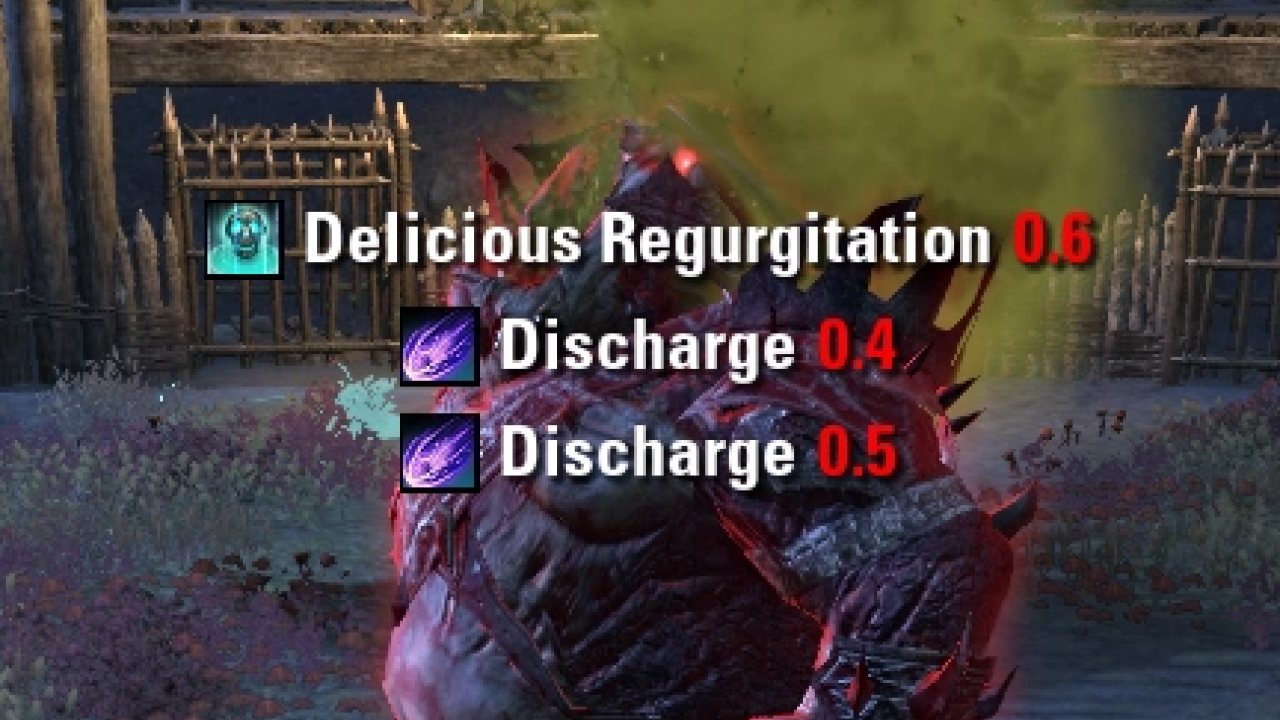
CrutchAlerts displays almost ALL incoming attacks that are cast on you. It also displays a curated list of casts on other players or the enemy itself that may affect you, as well as very large prominent alerts for especially dangerous or important casts. It's come to contain various other PvE features too.
However, this isn't meant to be a replacement for addons like Code's Combat Alerts or trial-specific addons which all display additional useful information. I think of CrutchAlerts as a gap-filler and also just an interesting tool to see the abilities cast on me out in the world, some of which have interesting names I would never have noticed otherwise.
Disclaimer: Certain features that rely on text detection may only work on English client. Other language support has been added for some parts.
General
General Alerts
- Shows timers for anything that someone (usually enemies) "BEGINs" casting on you, as well as effects that you "GAIN" from enemies. Basically, it contains most targeted attacks.
- Shows timers for certain "BEGIN" or "GAINED" attacks on other people or enemies. Typically these are AOEs that could be dangerous for you. This is a manually curated whitelist, you can adjust them in alerts/AbilityData.lua if you want to add/remove something.
- Shows an approximate countdown for when certain bosses will be damageable, such as Pinnacle Factotum and Nahviintaas. All official client languages are supported for most content, with some English only for now.
- Shows timers for certain casts/buffs that affect playstyle, mostly to have these timers right next to timers for incoming damage, allowing you to quickly decide what to do. This includes: Fatecarver, Magma Shell, Engulfing Dragonfire, Radiant Destruction, Fencer's Parry, and more.
Prominent Alerts
- Shows reaaaally big text and sometimes a ding sound for attacks where your action is requested, e.g. blocking the Assembly General Stomp, blocking Shield Charge, etc.
Vertical Boss Health Bar
- Instead of traditional health bars that go left and right, this features vertical health bars for the boss(es), allowing labels for percentage-based mechanics.
In-World Icons
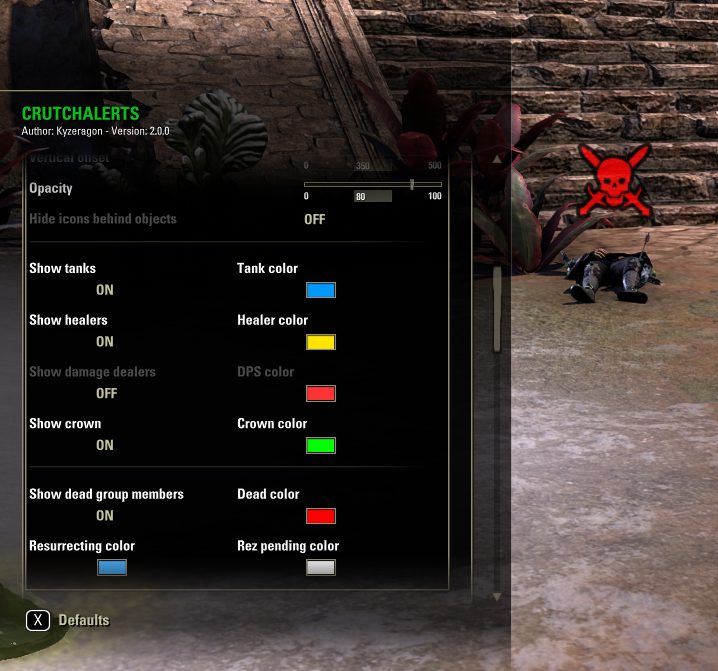
- Options to show icons for group members by role, crown, and if they are dead.
- Options to set "individual icons" for specific players, with options for custom texture, optionally LibCustomIcons, and text.
- The same framework is used to display mechanic icons attached to group members, e.g. Ossein Cage Enfeeblement.
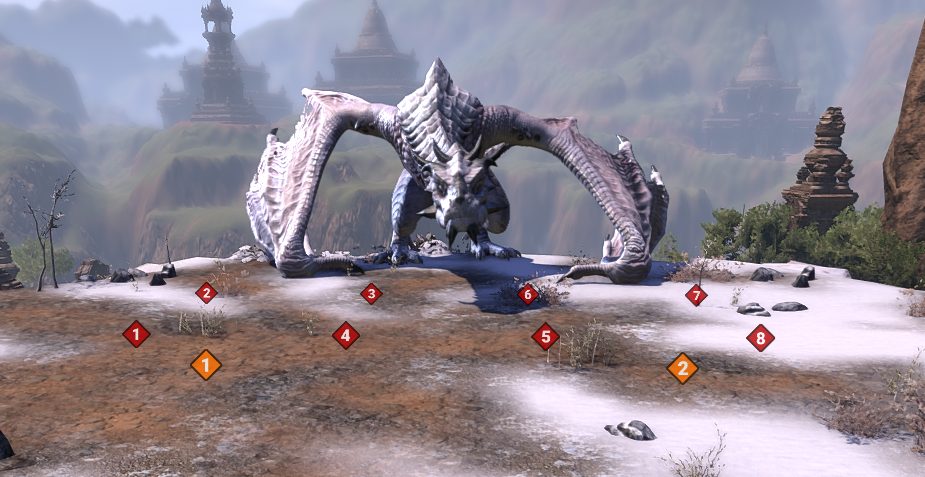
- Options to show icons for positioning on certain bosses, such as Lokkestiiz hardmode. See the feature lists below for details on specific trials and dungeons.
Info Panel
- Shows a panel on certain encounters, with timers or other info, for example the time until the next Bahsei HM portal
Crowd Control
- 2 radial UI trackers when you get hard cc'ed. Inspired by Miat's CC Tracker
- Play sound when cc'ed
- Show info about the cc in chat
Trials
Asylum Sanctorium Features
- Adds an option to show Felms' and Llothis' HP on the Olms encounter, as part of the vertical health bars. Requires the vertical boss health bars, of course. Enabled by default. CrutchAlerts > Asylum Sanctorium > Show minis' health bars
- In addition to the regular targeted timer for the Defiling Dye Blast, adds options to play a ding sound when the cone is on yourself and/or other people.
- Shows an info panel for mini timers: enrage and respawn for each, Llothis' bolts, cone, and teleport, and Felms' teleport. Each can be configured to enable or disable based on your set LFG role. CrutchAlerts > Asylum Sanctorium > Info Panel
Cloudrest Features
- Shows a timer for when you will receive Voltaic Overload, along with a sound effect to warn you.
- Shows a timer for when you can drop Hoarfrost, and the subsequent time until Overwhelming Hoarfrost, with the frost number.
- Shows a prominent alert for dropping Hoarfrost.
- Shows an icon above players who receive Hoarfrost. Disabled by default.
- Shows an icon above players who receive Roaring Flare.
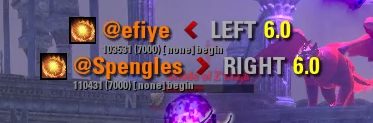
- In execute with Siroria, shows which side the two flares should go to. This matches the sides designated by RaidNotifier.
- Shows an indicator for Olorime's spears mechanic. Shows a colored icon for 1 revealed spear, grayed out icon for synergized spear, and checkmark for orb dunked.
- Shows an info panel timer for time until which portal or time until portal wipe.
- Shows an info panel timer and tracking for Malicious Spheres.
- Shows a prominent alert if you try to rez a player whose shade is still up.
- Colors OdySupportIcons death icons purple if a corpse's shade is still up.
Dreadsail Reef Features
- Shows Firebrand/Frostbrand stacking alerts and icon. Matches (and credit for the idea to) Qcell's Dreadsail Reef Helper.
- Shows prominent alerts for Scalding Swell, Biting Billow, Charred Constriction, and Frigidarium.
- Shows potion icons on the approximate locations that Dreadsail Brewmasters throw elixirs.
- Shows a prominent alert if you reach too many lightning stacks. The number is adjustable in Settings > Dreadsail Reef
- Shows a prominent alert if you reach too many poison stacks. The number is adjustable in Settings > Dreadsail Reef
- Shows info panel timers for Taleria: Maelstrom, Winter Storm, Summon Behemoth, and Summon Siren.
- Shows approximate guidelines for where Taleria's Arcing Cleave will hit. Disabled by default.
- Shows prominent alerts for Sea Behemoth light attacks if you are not a tank.
- Plays a sound when a siren is about to charm you.
Halls of Fabrication Features
- Shows an always-active circle in the world on triplets for where Shock Field would be.
- On Assembly General, shows icons for execute positions.
Hel Ra Citadel Features
- On the Warrior hardmode, shows faint circles around players who have Stone Form. The circle approximates the area of the oneshot if the player synergizes to break out of it. Enabled by default. CrutchAlerts > Hel Ra Citadel > Show circles on Stone Form
Kyne's Aegis Features
- On trash, shows telegraphs on the approximate locations where Exploding Spears (from Raiders) will land.
- On Yandir, shows prominent alerts for incoming Chaurus Bile and Gargoyle's Curse projectiles.
- On trash and Falgravn, shows icons above players targeted by Blood Prison.
- On Falgravn, shows icons for the tanks and 4 dps stack points for the 2nd floor.
Lucent Citadel Features
- Shows a prominent alert if you get Darkness Inflicted.
- On Orphic Shattered Shard, shows icons for the 8 mirrors.
- Shows a prominent alert when Fate Sealer spawns and you are a tank.
- Shows a timer for the currently held Arcane Knot.
- Shows icons and a line between the players with Arcane Conveyance.
- On veteran Xoryn, shows icons for suggested Tempest areas. They are also shown when the trial starts, to help with positioning practice. You can also use /crutch xoryn to temporarily toggle them
- Shows an "alert" timer for who has Weakening Charge, configurable for never, always, or only tanks.
Maw of Lorkhaj Features
- On Zhaj'hassa, shows indicator for cleanse pads, and timer for when pad will be available.
- On Twins, shows icons above players' heads corresponding to Lunar and Shadow Aspect.
Opulent Ordeal Features
- Shows icons above players' heads for the respective Affinities.
- Shows info panel timer for the Essence time limit, the full center-screen announcement text, and a "turn-off-brain mode" that shows the order and direction.
- Shows info panel timer for time until the next Bombs.
- Shows effect timer for Radiant Lamplight.
Ossein Cage Features
- Shows a progress bar for the highest Caustic Carrion stacks on a group member ("predicts" when the next tick will be).
- Shows the titans' health via the vertical boss health bars.
- Shows positioning icons for Jynorah + Skorkhif, optionally matching Asquart's Ossein Cage Helper. Disabled by default. CrutchAlerts > Ossein Cage > Show twins icons
- Shows an info panel with timers for Titanic Leap and Titanic Clash.
- Shows icons above players for Sparking Enfeeblement (blue) and Blazing Enfeeblement (orange), and purple for both. Enabled only on hardmode by default. CrutchAlerts > Ossein Cage > Show Enfeeblement debuffs
- On Jynorah + Skorkhif hardmode, prints to chat what you hit titans with, since it procs Reflective Scales.
- On Jynorah + Skorkhif hardmode, has an option to mark dangerous abilities. It can be configured to show warning icons on certain abilities, e.g. Solar Barrage, when it's almost time for portal (health percentage configurable). CrutchAlerts > Ossein Cage > Enable portal ability overlay
- On Jynorah + Skorkhif hardmode as a non-tank, shows text in the info panel indicating the side you should be on. For example, if you got Sparking Enfeeblement on the first curse phase, it will display to target Skorkhif / go to orange portal, persisting through death, so you don't forget where you're going. This is based on the very first Enfeeblement you receive, alternating afterwards. CrutchAlerts > Ossein Cage > Show target / portal on twins HM
- Shows an "alert" timer for who has Stricken, configurable for never, always, or only tanks.
- Shows icons above players' heads and a line between the people with Dominator's Chains, colored based on distance.
Rockgrove Features
- On Oaxiltso, shows which side to cleanse on, using the same logic as Qcell's Rockgrove Helper.
- Oaxiltso info panel: Shows time until Noxious Sludge, Blistering Smash, and Savage Blitz. Smash is disabled by default.
- Shows icons above players who receive Noxious Sludge. Disabled by default.
- Shows Death Touch as a countdown above group members' heads. Enabled by default. CrutchAlerts > Rockgrove > Show Death Touch icons
- Bahsei info panel: Shows time until next portal, how many players in portal, portal direction, and time until Sickle Strike and Cursed Ground
- Overlays a warning icon on your skills when it could be dangerous to cast them prior to your Bahsei HM portal. For example, if you configure it for Flames of Oblivion, there will be a warning icon on your bar about 11 seconds before your portal spawns. You must also configure your intended portal number in CrutchAlerts > Rockgrove > Portal number
- Shows approximate trajectories for Death Touch explosions. In order to see your group member's lines, you both need LibGroupBroadcast with this version of CrutchAlerts, though the group member does not need to have the lines turned on. Off by default: CrutchAlerts > Rockgrove > Curse Lines. Special thanks to M0R_Gaming and Ooki42 for the idea, groundwork, implementation, and testing help
Sanity's Edge Features
- On Twelvane + Chimera, shows number icons labelling the glyphics in the puzzle rooms.
- On Chimera, shows time until next Arctic Shred.
- On Ansuul, shows an icon for the center of the arena, and icons for players with Poisoned Mind.
- On Ansuul, shows the clones for Breakdown phase via the vertical health bars.
- Shows prominent alerts for Chain Pull and Execute.
- Shows info panel timers for Frost Bomb on Yaseyla.
- Shows info panel timers for Calamity and Wrathstorm on Ansuul.
Sunspire Features
- On Lokkestiiz hardmode, shows icons on the ground for beam phase positions, which will only show before pulling and during flight phase.
- On Lokkestiiz hardmode, shows approximate telegraphs for some of the Storm Breath + Trail AoEs, for now just the ones in the middle on 80% and 20% because that's what people keep dying in. Object permanence is a thing, guys. Disabled by default.
- On Yolnahkriin, shows time until Focus Fire, in the info panel.
- On Yolnahkriin, shows icons above players who are safe to stack on (do not have Focused Fire debuff) when Focus Fire is cast - mostly a feature for the OT.
- On Yolnahkriin, shows icons on the ground for where head and (right) wing stack will be when he lands.
- On Nahviintaas, in portal, shows the upcoming mechanics the Eternal Servant will cast. Note: if you enter portal much later than the first person, the first few mechanics shown may be incorrect as it catches up.
Arenas
Infinite Archive Features
- Automatically marks Fabled enemies with basegame target markers when your reticle passes over them. It may sometimes mark incorrectly if you move too quickly and particularly if an NPC or your group member walks in front, but is otherwise mostly accurate. Enabled by default.
- Automatically marks enemies that can cast Negate Magic, same as above. Disabled by default.
- Shows icons where Fabled Brewmaster throws Elixirs of Diminishing.
- Prints the Corridor Puzzle solution when you approach a switch.
- Shows prominent alerts for Venomous Arrow and Blood Craze when the enemy does not have Major Cowardice, on arcs 4+ and 10+, respectively.
Maelstrom Arena Features
- Shows which stage and round you are on, and extra text to remind about final boss round.
- Shows notifications and sounds if you start taking damage to certain abilities in NORMAL Maelstrom/Dragonstar, to facilitate AFK-ish farming, notifying you if manual intervention is needed.
Vateshran Hollows Features
- Option to display messages for missed adds on veteran difficulty, to aid in scorekeeping. It should be used only if going for score; skipped adds may be inaccurate if you skip entire pulls. The missed adds detection assumes that you do the secret blue side pull before the final blue side pull prior to Iozuzzunth. Disabled by default.
Dungeons
Dungeon Features
- In Shipwright's Regret, suggests a group member to stack on for Soul Bomb on Foreman Bradiggan HM. Also displays an icon above that group member. Enabled by default.
- In Black Gem Foundry, adds a line on the Quarrymaster Saldezaar encounter during the Rupture ping pong phase, to help preview where you would get ponged. Enabled by default.
Misc
Miscellaneous Features
- Overrides OdySupportIcon such that icons will not show for players in the opposite realm in Cloudrest, Sunspire, and Rockgrove portals.
- Display NPC subtitles in chat, which can be turned off entirely or in certain zones.
- "Diagnostics" for raid leaders: Prints to chat relevant information for some mechanics, such as who ate a curse on Bahsei.
Commands
/crutch printskills - Prints your slotted ability IDs.
/crutch printeffects - Prints ability IDs of effects on you.
/crutch lock - Locks UI elements after repositioning.
/crutch unlock - Unlocks UI elements for repositioning.
/crutch toggle general - Toggles showing general alerts. This applies to begin casts, gained casts, and casts on others. It does NOT apply to special alerts and timers that each have their own settings, such as Fatecarver. It is intended as a quick manual toggle for those who don't want to see incoming alerts outside of instanced PVE, while persisting the toggles for each type of cast. If you prefer to always have those alerts off, you can instead turn off the general alerts via the settings menu. A chat warning will show when you are in a dungeon, trial, or arena with the toggle off.
/crutch xoryn - Temporarily toggles Tempest icons for Xoryn, after the run has already started.
/crutch circle - Draws a circle with radius in meters, centered on your character, complete with RGB poops.
/crutch meme scorejets - If you want derpy jets year-round, I guess.
Depends on: LibAddonMenu-2.0
Also bundles LibForgottenAddons, which shows a chat message if you have certain addons that are out of date. This typically occurs because Minion 3 "forgets" that you have an addon installed, so it stops receiving updates until you reinstall it. See the settings menu for LibForgottenAddons to disable the check "forever," or if you change your mind, /libforgottenaddonsenable
Special thanks to:
- M0R_Gaming and Ooki42 for Bahsei curse lines
- camrenis, efiye, jetplane_18, pkstar12, Plonkerr, t.ea, and Tredeuce for testing, letting me drag them to random content, and allowing me to sandbag during runs
Known Issues / Planned Features
- Support more client languages with damageable timers
- BHB: DLC dungeon thresholds were compiled from online guides and sources, many of which disagree on the exact %s. I want to eventually verify all of them precisely, but this will be a very slow process
- BHB: Center-screen alert text for upcoming thresholds?
ABOUT THIS LISTING
This page describes CrutchAlerts by Kyzeragon. The description and screenshots are the author's own, imported from their listing on ESOUI on 24 October 2026: https://www.esoui.com/downloads/info3137-CrutchAlerts.html
Mythiq.net hosts no files for it. The download button goes straight to the release file on cdn.esoui.com, so you are downloading from the author's own host, not from a copy of ours.
The download count, rating and comments on this page start at zero and count Mythiq.net only. The source's own figures are not copied here — they measure a different site, and a number that cannot be checked against our own ledger is not worth printing.