Character Knowledge efficiently tracks recipe, furnishing plan, motif, grimoire, script, and trait research knowledge across multiple characters, accounts, and servers.
Character Knowledge efficiently tracks recipe, furnishing plan, motif, grimoire, script, and trait research knowledge across multiple characters, accounts, and servers.
New: Trait Research
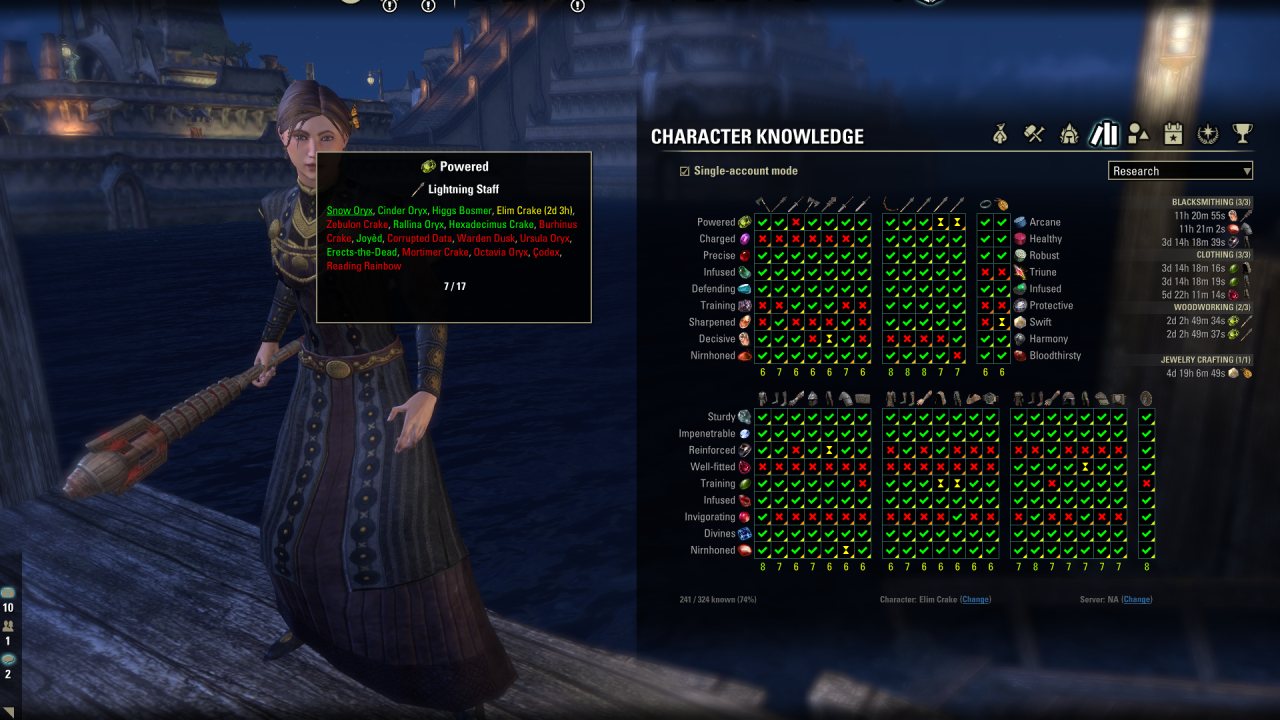
New in Character Knowledge 3 is the long-requested feature to track trait research across characters, accounts, and servers.
The new trait research grid in Character Knowledge 3:
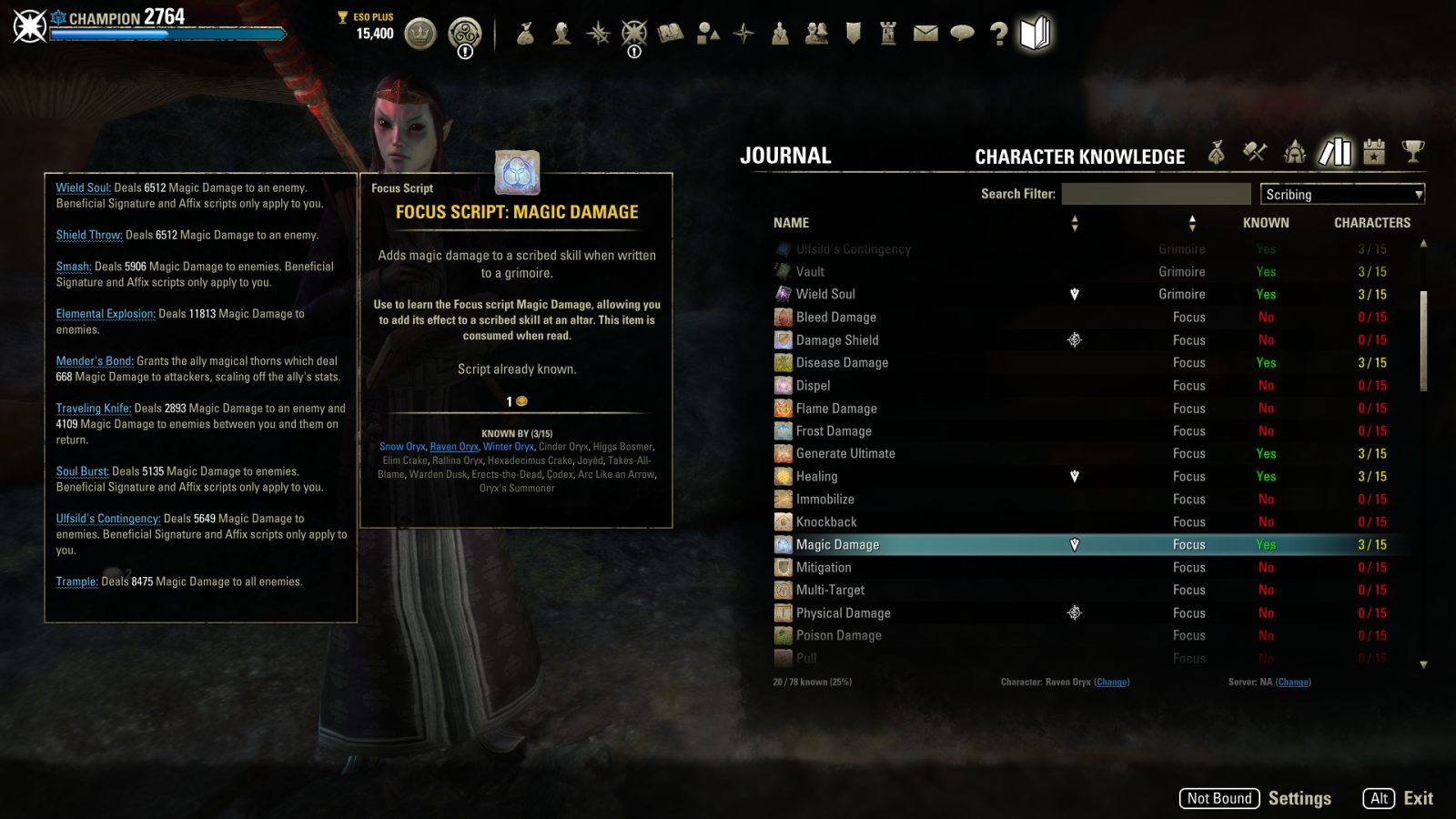
Scribing support, added in Character Knowledge 2:
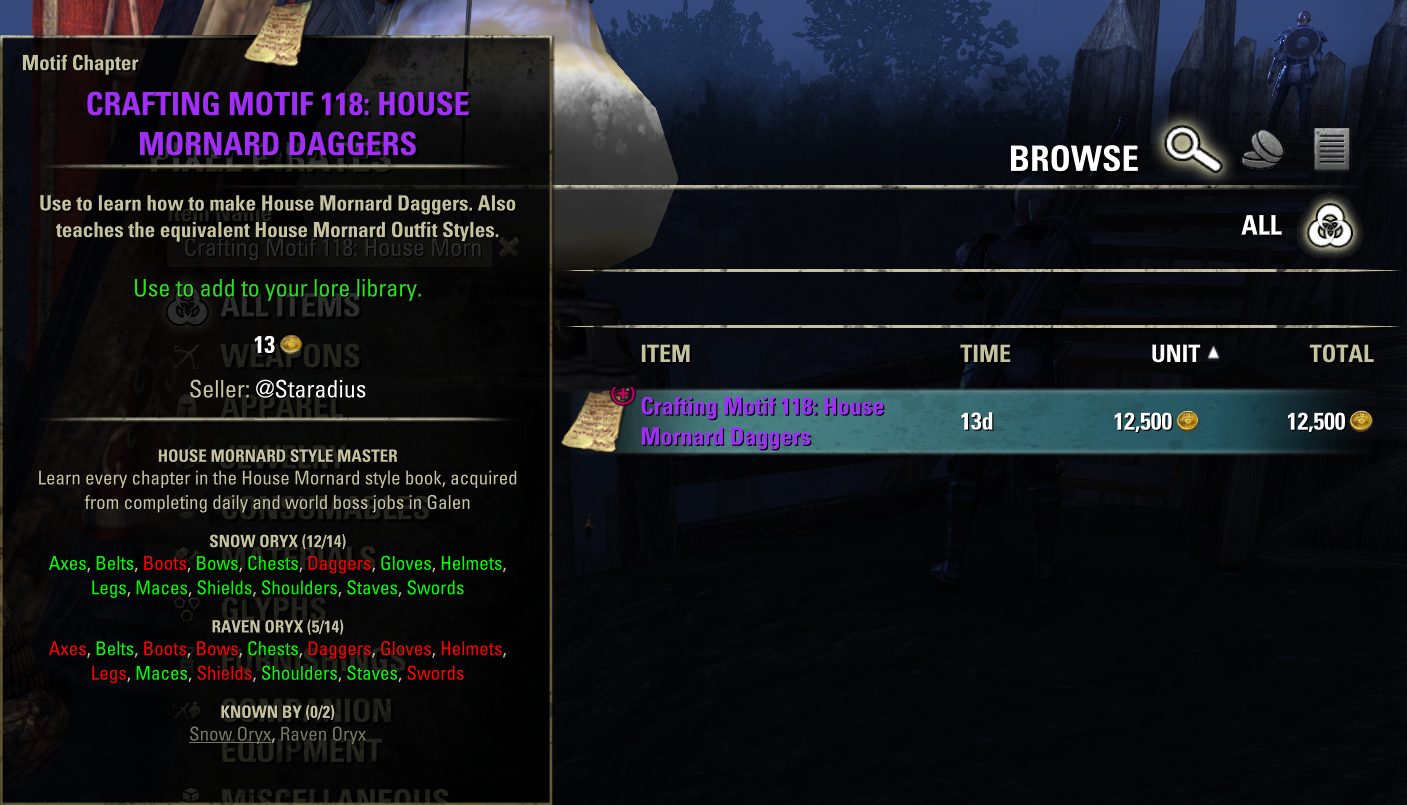
Motif tracking:
Extended Journal
This addon is a part of the Extended Journal, which is a collection of addons comprised of Loot Log, Item Set Browser, Character Knowledge, Collectibles Tracker, and Raidificator.
There are different ways that you can choose from to access the Extended Journal addons:
- Main Menu Bar: You can open any of the Extended Journal addons via the game's Main Menu Bar at the top of the screen, and once the Extended Journal is open, you can click on the tab that you want.
- Keybind: You can also set a keybind to open the Extended Journal, and once the Extended Journal is open, you can click on the tab that you want.
- Chat command: You can access Character Knowledge directly using the /characterknowledge (or /ck) chat command.
Yet another research/recipe/motif/script tracker? Why use Character Knowledge?
Character Knowledge was created in response to some of the frustrations that I have with existing addons. Specifically...
- Character Knowledge is very efficient. I was frustrated by the measurable performance impact that most other tracking addons have, and Character Knowledge is optimized to have essentially zero impact on character load times and performance in general.
- Character Knowledge is altaholic-friendly. It can track knowledge of characters across multiple accounts and even across servers.
- Character Knowledge has a concept of character priority. Most people have a "main" character that they prioritize for learning recipes and motifs, and Character Knowledge recognizes this and helps ensure that more important characters are given priority for distributing those extra copies of recipes and motifs that you found.
- Character Knowledge makes it easier to access information with a simple, straightforward UI.
- Character Knowledge gives players the option to share their information with friends via an export/import feature. No more need for manually compiling a list of missing motifs during the Anniversary Event.
What does this addon do, specifically?
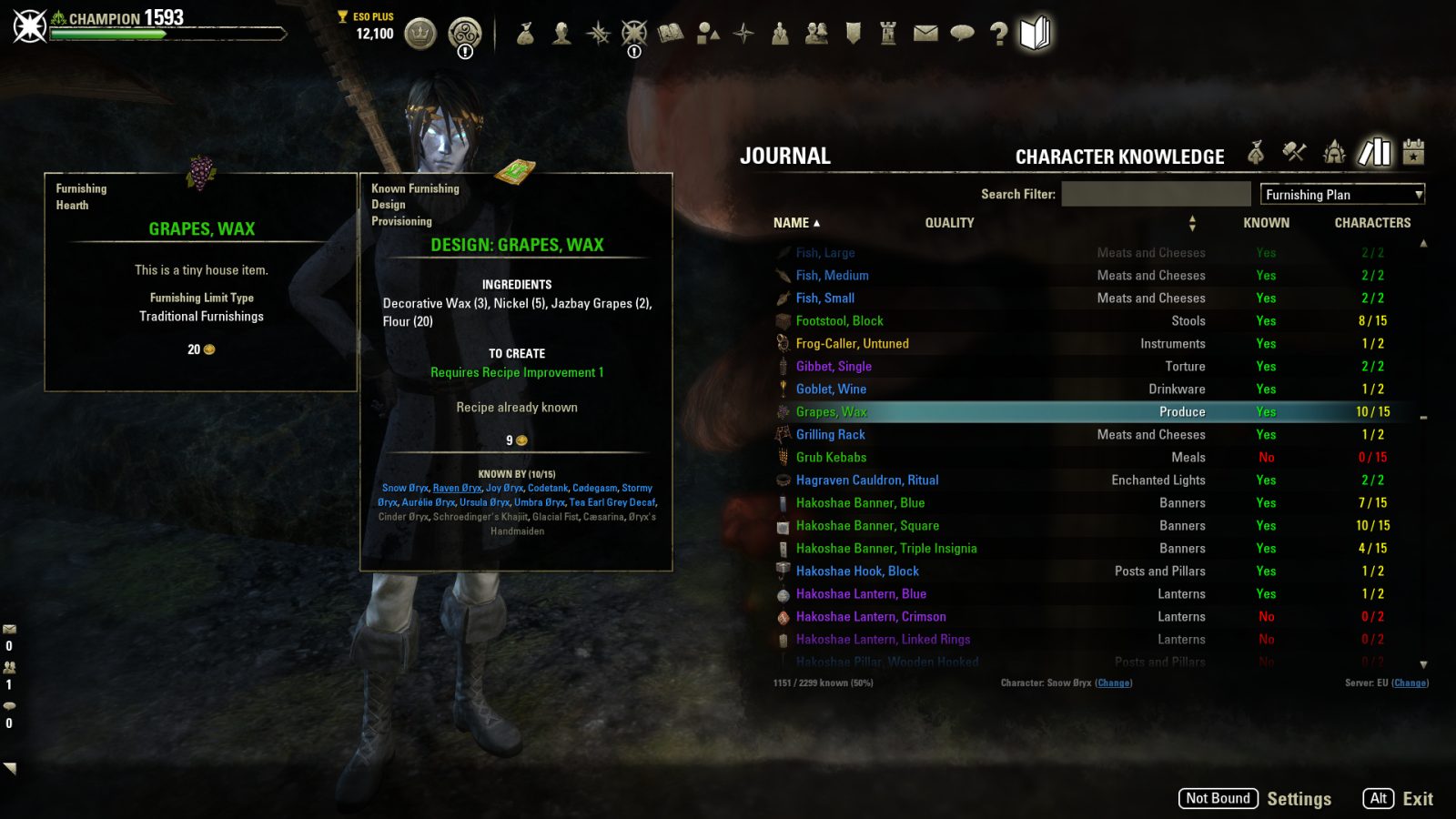
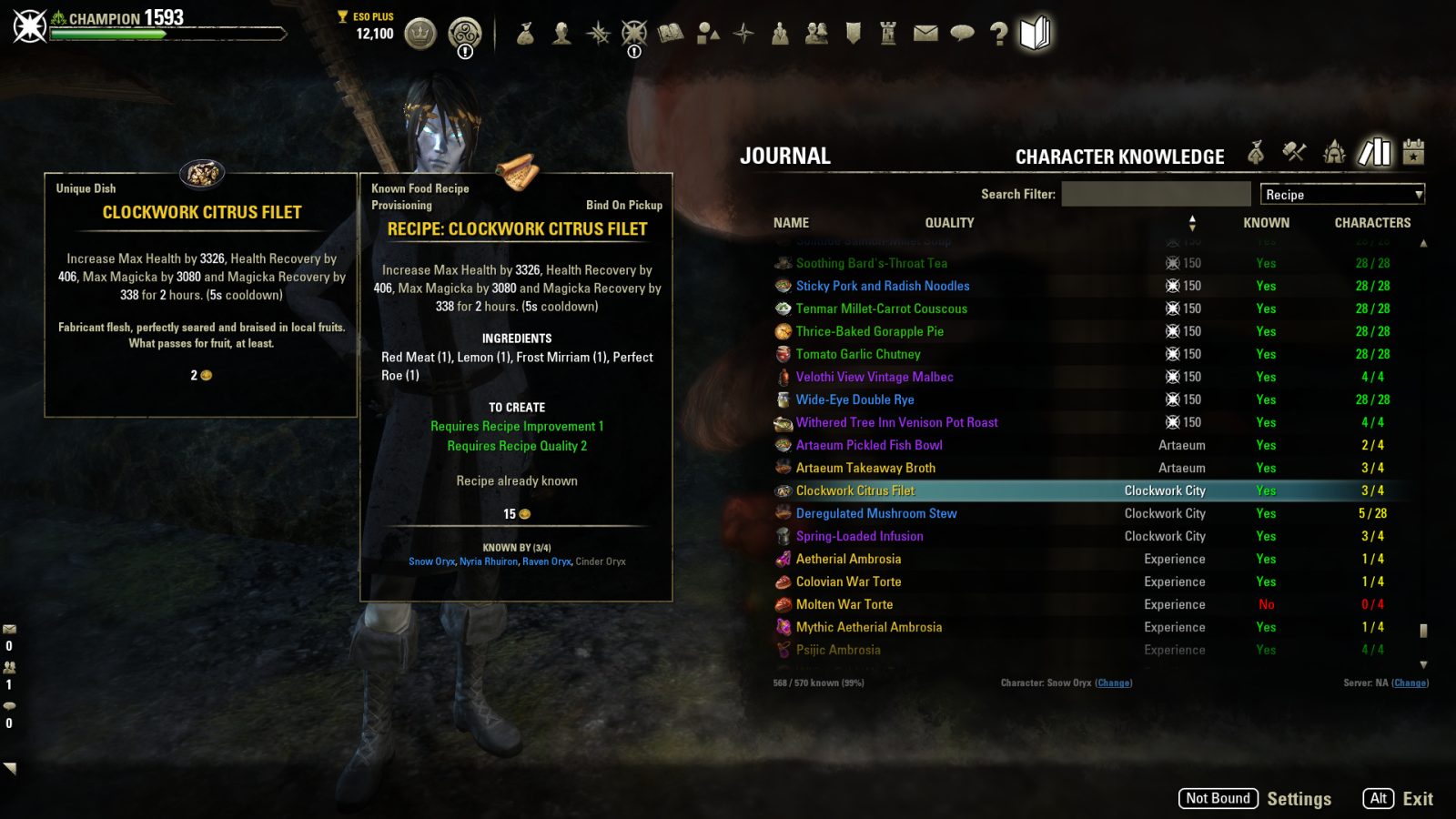
Character Knowledge browser:
The main UI lets users browse through a master list of recipes, furnishing plans, motifs, grimoires, and scripts, along with an overview of the extent of your characters' knowledge of these items.
The main UI also features a research grid that shows you an overview of the research progress of all 324 traits. Additionally, each grid cell can also contain a small flag in the corner. If this flag is present, then it means that there are other tracked characters that can research the trait, and the color of the flag signifies the percentage of your tracked characters who have learned the trait.
Information added to tooltips throughout the game:
Whenever you look at an item tooltip for a recipe, plan, motif, grimoire, or script, you'll see an overview of which characters know that particular item. In the case of motifs, you will also see information about where you can find the motif in-game and an overview of your knowledge of all the chapters of this style. In the case of scripts, you will also see a panel with detailed information about what the script can do.
Whenever you look at the item tooltip for an item with a researchable trait, you'll see a list of which characters can research that item. Additionally, characters that can research an item but are currently unable to due to other items in their research queue will appear in the list with a time, indicating when they will be able to research the item.
A command to mass-learn recipes, furnishing plans, motifs, and scripts in your inventory:
Instead of clicking on each motif and then closing the book page one at a time, the mass-learn command can learn dozens of motifs in just a second.
- This feature can be invoked via the /cklearn (or /ckl) chat command or by setting a keybind
- Character priority is used to determine eligibility, to prevent low-priority characters from learning items unknown by higher-priority characters; this can be overridden by specifying the "all" parameter (i.e., /cklearn all) to learn all unknown items
Advanced Filters custom filter plugin:
For users of the Advanced Filters addon, Character Knowledge will also install a few custom filter plugins for Advanced Filters.
Marking unknown items
Note: This feature requires Loot Log to be installed.
If Loot Log is installed, it will work with Character Knowledge to mark items in your inventory and bank, vendor screens, mail, etc. with the following indicators:
- Plus Sign: The current character does not know the item and there are no other characters with greater priority who do not know the item.
- 3 Pips: There is another character, specifically the character whose priority outranks all other characters (i.e., the "main"), who does not know the item.
- 2 Pips: There is another character with greater priority than the current character (but not the "main") who does not know the item.
- 1 Pip: The current character knows the item, but there is another character with lesser priority who does not.
Generally speaking, a plus sign means that you should learn the item on the current character, while pips mean that you should pass the item to another character, with the number of pips indicating whether your should pass it up or down the priority list.
Additional search filter syntax
- The "-" prefix can now be used in the search filter to exclude a search term. For example, searching for "chair -orcish" will find furnishing plans for all chairs that are not Orcish.
- "-" as a standalone search term (not as a prefix) will filter the results to show only unknown items. For example, "chair - -orcish" can be used to find furnishing plans for all chairs that are not Orcish and that the currently selected character does not know. (To demonstrate both the standalone and prefix uses of "-")
- "+" as a standalone search term will filter the result to show only known items. For example, "desk +" can be used to find all known desk plans, and "+" by itself will hide all unknown items.
LibCharacterKnowledge
Character Knowledge includes the LibCharacterKnowledge library. Addon authors who wish to use the library for their own addons can check out the the LibCharacterKnowledge Developer Reference. LibCharacterKnowledge is also available as a standalone download for users who want to use it without installing Character Knowledge.
ABOUT THIS LISTING
This page describes Character Knowledge (Research, Motif, Recipe, Furnishing Plan and Scribing Tracker) by code65536. The description and screenshots are the author's own, imported from their listing on ESOUI on 24 October 2026: https://www.esoui.com/downloads/info2938-CharacterKnowledgeResearchMotifRecipeFurnishingPlanandScribingTracker.html
Mythiq.net hosts no files for it. The download button goes straight to the release file on cdn.esoui.com, so you are downloading from the author's own host, not from a copy of ours.
The download count, rating and comments on this page start at zero and count Mythiq.net only. The source's own figures are not copied here — they measure a different site, and a number that cannot be checked against our own ledger is not worth printing.
Media
Requirements
Game versions
12.1.0
12.0.0
11.3.0
11.2.0
11.1.0
11.0.0
API VERSION
Built for ESO API version 12.1.0, 12.0.0, 11.3.0, 11.2.0, 11.1.0. After a patch the game marks add-ons built for the previous API as out of date; the "Allow out of date add-ons" checkbox in the add-on menu loads them anyway, and most work.
LIBRARIES
Many ESO add-ons depend on a shared library — LibAddonMenu-2.0 above all — which is installed separately, exactly like an add-on. A dependency that is missing shows as the add-on simply not appearing in the list.
CONSOLE
Add-ons are PC and Mac only. There is no way to load them on console.
Installation
1. Download the archive with the button on this page and unzip it.
2. Move the unzipped folder into your add-ons directory:
Windows — Documents\Elder Scrolls Online\live\AddOns
3. Start the game, and at the character select screen click Add-Ons.
4. Tick the add-on. If it is greyed out and marked out of date, tick "Allow out of date add-ons" at the top of the same panel.
5. Log in. Most add-ons need a /reloadui after they are first enabled.
UPDATING
Delete the old folder first. ESO loads everything it finds, and two copies of one add-on is the usual cause of "an add-on has produced an error" on login.
This release downloads from cdn.esoui.com, not from us, so
there is no checksum to compare against. Scan the archive before you unpack it.
Version history
v3.1.4Latest
15 Oct 2026 · 139 KB via cdn.esoui.com · 0 downloads Download
- Version 3.1.4 (2026/10/14)
- Fixed a minor problem with the calculation of the multi-character indicator in the research grid
- Version 3.1.3 (2026/09/23)
- The tooltip extension displaying the researchability list will no longer be disabled for tradable BoP items that have no tradability context (e.g., items that are linked in chat) and will instead be shown with the same single-account filter that is applied to non-tradable items
- Version 3.1.2 (2026/08/31)
- Improved support for Update 51
- Added option to change the styling of the multi-character indicator in the research grid
- Version 3.1.1 (2026/08/03)
- Added support for Update 51
- Version 3.1.0 (2026/07/28)
- Redesigned the LibCharacterKnowledge settings panel
- Added support for reading motif books via the context menu in the motif browser
- Due to API restrictions, only books learned by the current character can be read
- Version 3.0.7 (2026/07/02)
- Compatibility with Vengeance
- Version 3.0.6 (2026/06/08)
- Fixed an uncommon Lua error caused by faulty event ordering assumptions
- Version 3.0.5 (2026/04/30)
- Removed an item from the blacklist that, after 8 years, is finally dropping
- Version 3.0.4 (2026/04/16)
- Improved the handling of keybinds for UI interactions
- Version 3.0.3 (2026/04/16)
- Added support for Update 50
- Improved the formatting of the research time display
- The character that is currently logged in will now always be viewable in the browser, even if they have been disabled in LibCharacterKnowledge
- Added safeguard against errors from old embedded/non-manifested LibAddonMenu2
- Reverted the motif sourcing tooltip removal for Update 50 due to the new base-game motif sourcing information being limited to only Crown versions
- Version 3.0.2 (2026/04/08)
- Added the researchable character list to the crafting preview tooltip when crafting non-set items, to make that information easier to access while crafting research items
- Version 3.0.1 (2026/04/07)
- Fixed an error that can arise when accessing research information for a character that has no research data
- Version 3.0.0 (2026/04/07)
- Added support for Trait Research
- Selecting Research from the browser UI will display a research grid; in addition to displaying the research status for the currently-selected character, it will also indicate if and how many other tracked characters can research a particular trait
- Tooltips for researchable items will display a list of characters for which the item is researchable, and for characters who cannot immediately research the item due to existing items in their queue, the tooltip will also indicate when that character will be able to research the item
- Users of Advanced Filters will see a new Researchable filter option
- In response to ZOS adding motif sourcing information to base-game motif tooltips in Update 50, Character Knowledge will no longer add that information to motif tooltips after Update 50
- Version 2.2.12 (2026/03/03)
- Added support for the optional LibRadialMenu library, which provides an alternative to keyboard keybinds for gamepad users
- The "Learn Items" command can be invoked via LibRadialMenu
- Version 2.2.11 (2026/02/16)
- Improved support for Update 49
- Version 2.2.10 (2026/01/20)
- Added support for Update 49
- Version 2.2.9 (2025/09/18)
- Added support for Update 48
- Version 2.2.8 (2025/07/15)
- Added support for Update 47 (Feast of Shadows)
- Version 2.2.7 (2025/04/21)
- Added support for Update 46
- Version 2.2.6 (2025/01/30)
- Added Spanish localization by Cisneros
- Version 2.2.5 (2024/09/19)
- API version bump for Update 44
- Version 2.2.4 (2024/08/25)
- Fixed a minor issue that can sometimes occur when using keybinds to switch to some base-game interfaces
- Version 2.2.3 (2024/08/22)
- Standardized tooltip text colors across all Extended Journal addons
- Version 2.2.2 (2024/08/16)
- Updated LibExtendedJournal to facilitate potential Perfect Pixel support
Off-site on cdn.esoui.com —
no checksum, because we never held this file.
Link checked by our review team on 25 Oct 2026.
Tell us if something is wrong — a file that will not work, content taken from
someone else, or anything that looks unsafe. Reports go to our review team, not
to the author.
We use cookies to ensure that we give you the best experience on our website and improve your experience. By continuing to use this site you consent to such use of cookies.