Dynamic CP provides some quality of life and champion points management features. For a lightweight version that focuses on the QoL parts, see Dynamic CP Lite.
Dynamic CP provides some quality of life and champion points management features. For a lightweight version that focuses on the QoL parts, see Dynamic CP Lite.
WARNING: This should not be used at the same time as Dynamic CP Lite! However, you can switch between them as long as they aren't both enabled; the settings are separate from each other.
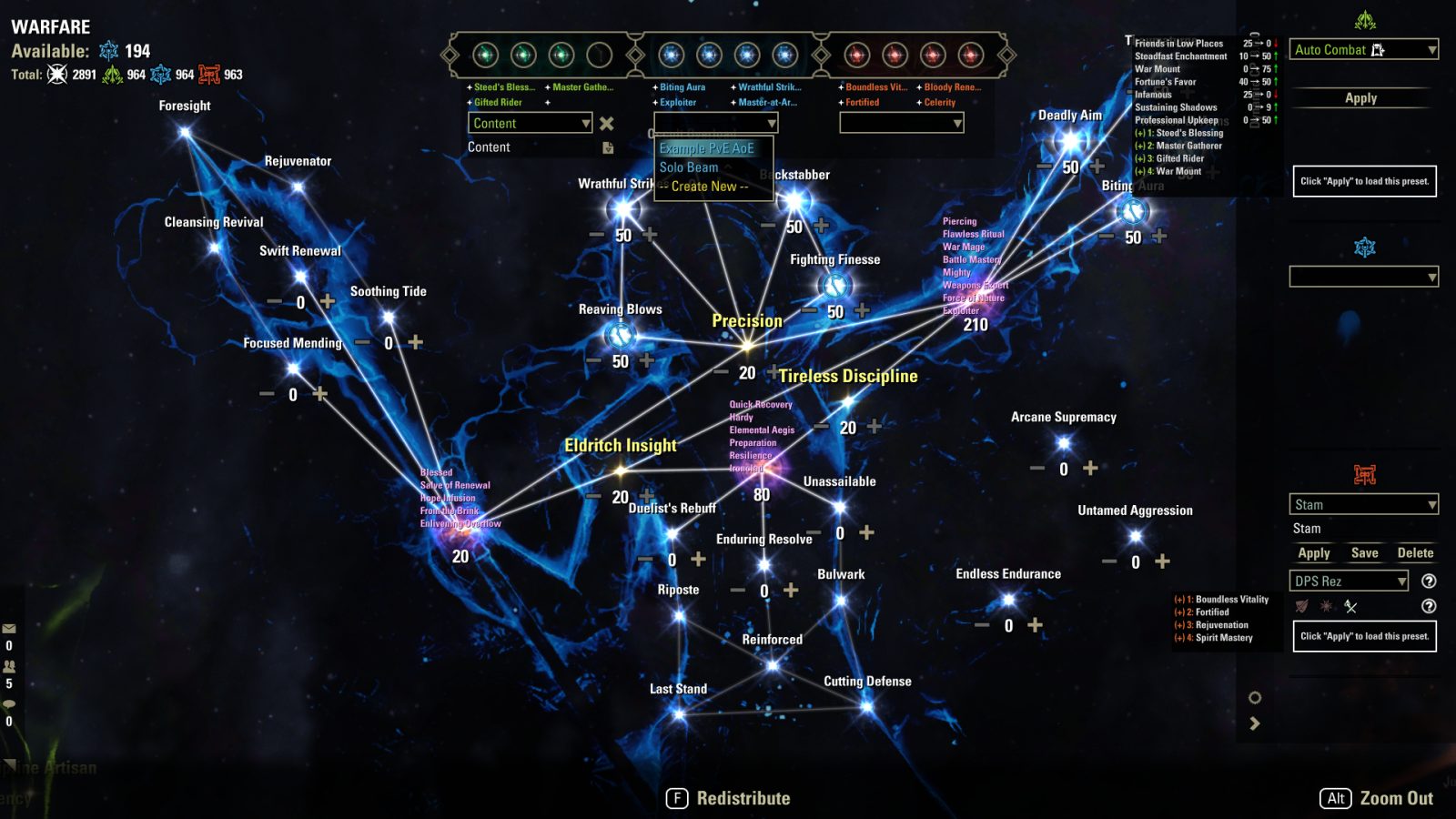
Presets Window
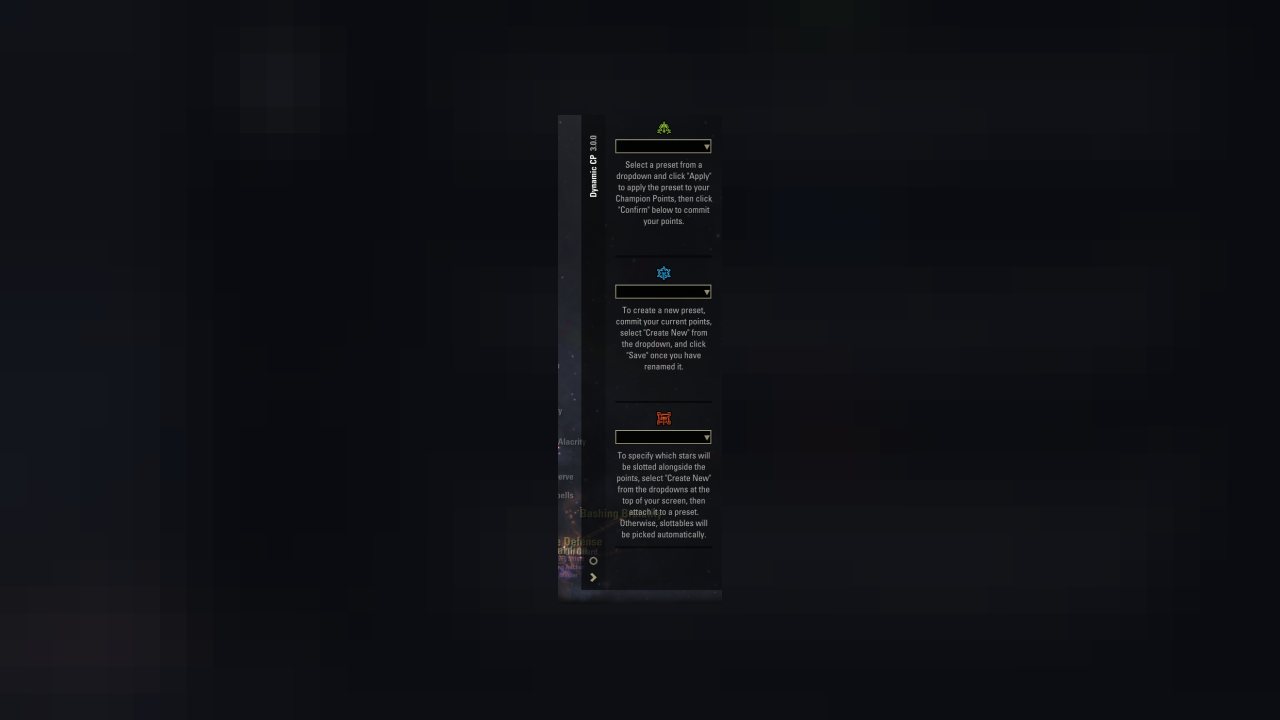
- Allows you to save, load, and delete champion point presets
- Presets are saved per tree instead of all together
- Slottable stars can be saved into "slottable sets" which can then be reused in different presets
- Comes with automatic "smart" presets that allocate points based on your build, e.g. selected LFG role, whether you have Fatecarver, etc.
- Toggle it with keybind or command: /dcp presets
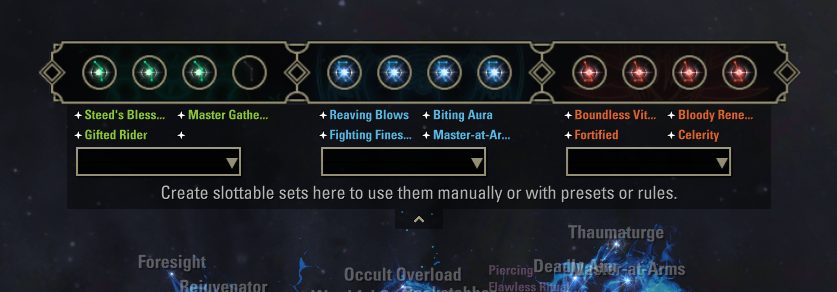
Pulldown Panel
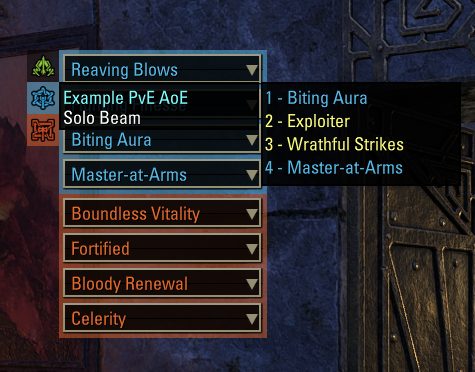
- Displays a pulldown list of your currently slotted stars
- Allows you to create, edit, and delete slottable sets, which are groups of up to 4 slottable stars in the same tree
- The slottable sets can be linked to presets in the presets window, used from the Quickstar panel, or used in custom rules
- If you change the stars in your slottable set, it's automatically updated in the places that you use them
- For developers: there is an API for other addons to get and apply slottable sets. See DynamicCP/src/API.lua
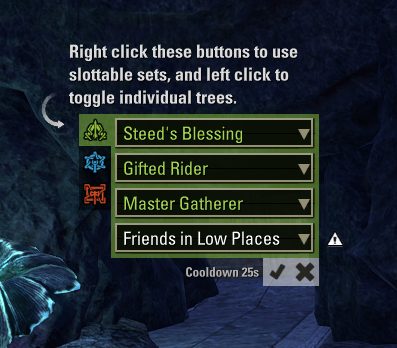
Quickstar Panel
- See your currently slotted stars outside of the CP screen, or inside, or both, or neither!
- Use the dropdowns to switch slotted stars, and confirm or cancel using the buttons
- Left click buttons to toggle open different tree tabs
- Right click buttons to use slottable sets, to apply all 4 slottables at once
- Toggle the entire window with keybind or command: /dcp quickstar or /dcp qs or /dcp q
- Additional keybind for cycling through tabs
- Multiple settings available like scale, button orientation, which side to display the menu on, etc. so you can fit it into your UI. Or if you don't like it, you can turn it off entirely :'D
Quality of Life Improvements
Each of these QoL changes can be adjusted in the addon settings.
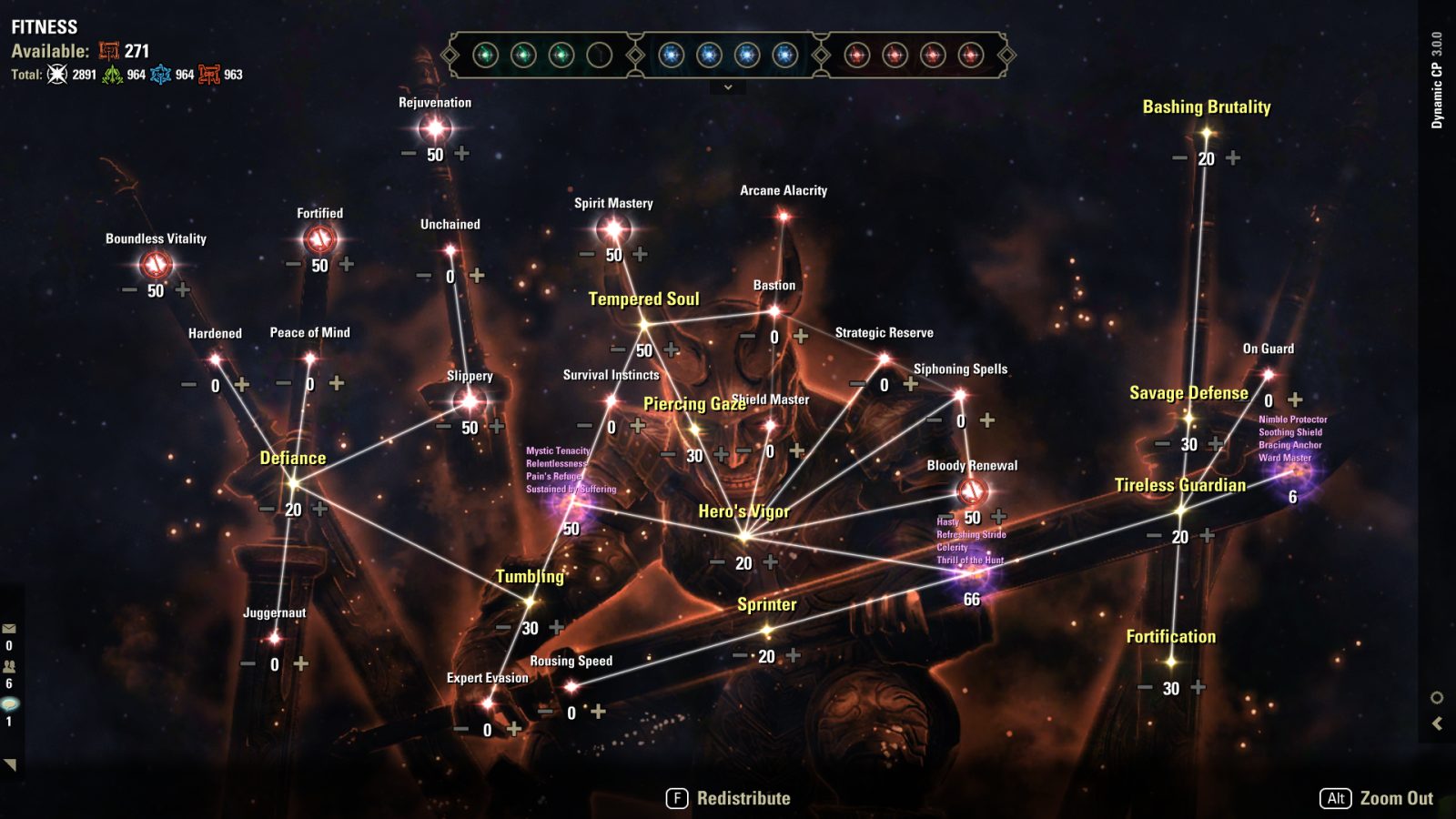
- Enables labels on each star to make them easier to find
- Enables double-click on slottable stars to slot or unslot them from the hotbar, instead of having to drag and drop each one
- Displays a chat message when you gain a champion point
- Displays your total CP and CP for each tree on the top left of the CP screen
- Displays a warning if you exit the CP screen without saving your changes
- Displays a warning if you hit the cooldown for changing slottables
- Can hide the constellation art entirely if you find the stars difficult to see against the bright background
Custom Rules
Version 1.0.0 added an entirely new system for (semi-)automatically slotting stars based on your own rules! Gone are the days of forgetting to change out Backstabber on the vSS dragons.
- When you log in with this new version of the addon, a dialog will take you to the Custom Rules menu, where you can add, remove, and edit rules. Or, if you don't want to do the work, you can just import a whole suite of rules that I've defined for my own usage. Shortcut command: /dcp rules
- These custom rules allow you to automatically slot different stars in different zones, for example Treasure Hunter in dungeons, Gifted Rider in overland zones, and so on. In addition, rules can trigger off of specific bosses too, so you can have a rule that changes out Backstabber when encountering a Sunspire dragon, and then slots Backstabber back on after the dragon dies
- There are a lot of options, take a look yourself! This system is meant to slot "longer-term" stars based on your location. If you're looking for something that changes your green stars when you perform applicable actions, such as slotting Reel Technique when you start fishing, I would definitely recommend the addon Jack of all Trades which can be used in conjunction with Dynamic CP's custom rules
Depends on: LibAddonMenu-2.0 LibDialog
Special thanks to @Raijindono for her help on UX, and @camrenis and @Plonkerr for extensive testing and feedback!
Known Issues / Planned Features:
- Labels look overwhelming in the main zoomed out screen. Maybe hide them until zoomed in
- Show pending changes on the labels
- Double clicking slottable to slot also triggers single click handler to add points into the star, if it's not already maxed
- Some way of knowing if the max points have been put into a star
- Show star in pulldown with a different format or icon if it's not committed?
- Add certain (user-specified?) "inactive" slottables to Quickstar menu even if no points are allocated into it, e.g. Backstabber, and ask user if they want to respec in order to slot that star
- No plans for gamepad support; there's too much custom UI that requires clicking
- Maybe localization eventually, but low priority
- etc...
Bug reports and feedback are appreciated :D
ABOUT THIS LISTING
This page describes Dynamic CP (Champion Points 2.0) by Kyzeragon. The description and screenshots are the author's own, imported from their listing on ESOUI on 26 October 2026: https://www.esoui.com/downloads/info2952-DynamicCPChampionPoints2.0.html
Mythiq.net hosts no files for it. The download button goes straight to the release file on cdn.esoui.com, so you are downloading from the author's own host, not from a copy of ours.
The download count, rating and comments on this page start at zero and count Mythiq.net only. The source's own figures are not copied here — they measure a different site, and a number that cannot be checked against our own ledger is not worth printing.
Media
Requirements
Game versions
12.1.0
12.0.0
API VERSION
Built for ESO API version 12.1.0, 12.0.0. After a patch the game marks add-ons built for the previous API as out of date; the "Allow out of date add-ons" checkbox in the add-on menu loads them anyway, and most work.
LIBRARIES
Many ESO add-ons depend on a shared library — LibAddonMenu-2.0 above all — which is installed separately, exactly like an add-on. A dependency that is missing shows as the add-on simply not appearing in the list.
CONSOLE
Add-ons are PC and Mac only. There is no way to load them on console.
Installation
1. Download the archive with the button on this page and unzip it.
2. Move the unzipped folder into your add-ons directory:
Windows — Documents\Elder Scrolls Online\live\AddOns
3. Start the game, and at the character select screen click Add-Ons.
4. Tick the add-on. If it is greyed out and marked out of date, tick "Allow out of date add-ons" at the top of the same panel.
5. Log in. Most add-ons need a /reloadui after they are first enabled.
UPDATING
Delete the old folder first. ESO loads everything it finds, and two copies of one add-on is the usual cause of "an add-on has produced an error" on login.
This release downloads from cdn.esoui.com, not from us, so
there is no checksum to compare against. Scan the archive before you unpack it.
v3.4.0
- Added an automatic preset for red tree "Speed / Solo," which prioritizes movement speed first, intended for crafting mules and such
- Added automatic presets for red and blue tree "General PvP." These are of course just generic CP allocations intended for non-specialized use, because there's such a wide range of PvP playstyles
- Bumped API for U50/U51
- For developers: adjusted the API for user-created slottable sets to have more granular options for printing messages
v3.3.0
- Bumped required LibAddonMenu-2.0 version to 43
- For developers: added an API for other addons to get and apply the user-created slottable sets. See DynamicCP/src/API.lua
v3.2.3
- Added the Night Market's dungeons and trials as such respectively, for custom rules
- Bumped API to U49/U50
v3.2.2
- Fixed an error when applying a preset that has an attached slottables set
v3.2.1
- Text now switches between keyboard and gamepad fonts based on your UI mode
- Added an option to hide the slottables set creation dropdowns. Dynamic CP > Other Settings > Show slottable sets on pulldown
- Fixed partially unlocked slottables not being slotted by the auto presets
- Did lots of refactoring in prep for a lite version / port to console. Behavior should be the same, please yell if I broke something ;D
v3.1.0
- Added the Blighted Blastbones morph to blue Auto PvE preset, so if you have Blighted Blastbones unlocked, it will prioritize Biting Aura
- Fixed attached slottables set not saving with color code. Now you can use color codes in slottables set names
- Removed the "Automatically slot stars" setting for presets, since presets now slot stars automatically or based on attached slottables sets. If you do NOT want stars to be slotted when applying a preset, you can still create a blank slottables set and attach it to the preset
v3.0.1
- Fixed an issue where some elements were hidden after using an auto preset, making it impossible to create a new preset until reload
- Changed the slottable set dropdown to only show after preset is created. So you must create the preset with just points first, and then are able to attach a slottable set and change the applicable roles. (I'll probably make both of these available at preset creation in the future, but it requires some more code changes)
v3.0.0
- Added "slottable sets": At the top of your CP menu, you can now create sets of slottable stars. These "slottable sets" can then be attached to CP presets, custom rules, or used in the quickstars panel (right click). If you change the stars in your slottable set, it's automatically updated in the places that you use them
- Added "automatic presets": These are the brighter green options at the top of the preset lists, with icons showing what CP they will prioritize. They will use as many points as you have available, until stars useful for your detected build are all allocated. For example, the blue Auto PvE preset allocates based on your selected LFG role, and if you are a DPS, also allocates based on your max resource and whether you are a heavy attack build (Sergeant's Mail), have Fatecarver or jabs unlocked (for AoE) or not (single target)
- Removed old hardcoded default presets for new installations; they will remain if you already had the addon installed pre-3.0. If you want to delete them all at once, there's a button in Dynamic CP > Preset Settings > Delete Default Presets
- Updated importable custom rules
- Removed standalone (docking) window
v2.2.6
- Added Naj-Caldeesh and Black Gem Foundry as group dungeons for custom rules
v2.2.5
- Added Ossein Cage as trial for custom rules
- API bump to U46. Slottable presets still not quite ready 🥔
v2.2.4
- Added Lep Seclusa and Exiled Redoubt as group dungeons for custom rules
Off-site on cdn.esoui.com —
no checksum, because we never held this file.
Link checked by our review team on 26 Oct 2026.
Tell us if something is wrong — a file that will not work, content taken from
someone else, or anything that looks unsafe. Reports go to our review team, not
to the author.
We use cookies to ensure that we give you the best experience on our website and improve your experience. By continuing to use this site you consent to such use of cookies.