This addon depends on the following libraries:
LibAddonMenu-2.0
ATTENTION: CHECK YOUR CURRENT ADDON'S SETTINGS BEFORE UPDATING TO THE NEW VERSION 0.22:
The SavedVariables were changed to save per server now and thus they will reset.
You need to redo the few settings again after login!
Have at least a look at your current threshold values and colors so that you are easily able to reset them.
Do you remember that moment as you find a nice chest somehwere but then you realize that you don't have any lockpicks left in your pocket?
And the next moment some other player appears and loots this chest right in front of you?
Picking a lock is sometimes frustrating and you want some help?
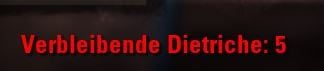
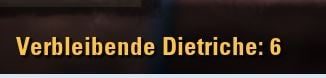
This simple addon gives you the possibility to colorize the "lockpicks left" information that you see at the bottom line, if you are lockpicking a chest.
The colors can be changed according to a number of lockpicks that you have left in your inventory (threshold values).
The next chest you will lockpick will give you the visual information now, if you need to get some new lockpicks to your pocket.
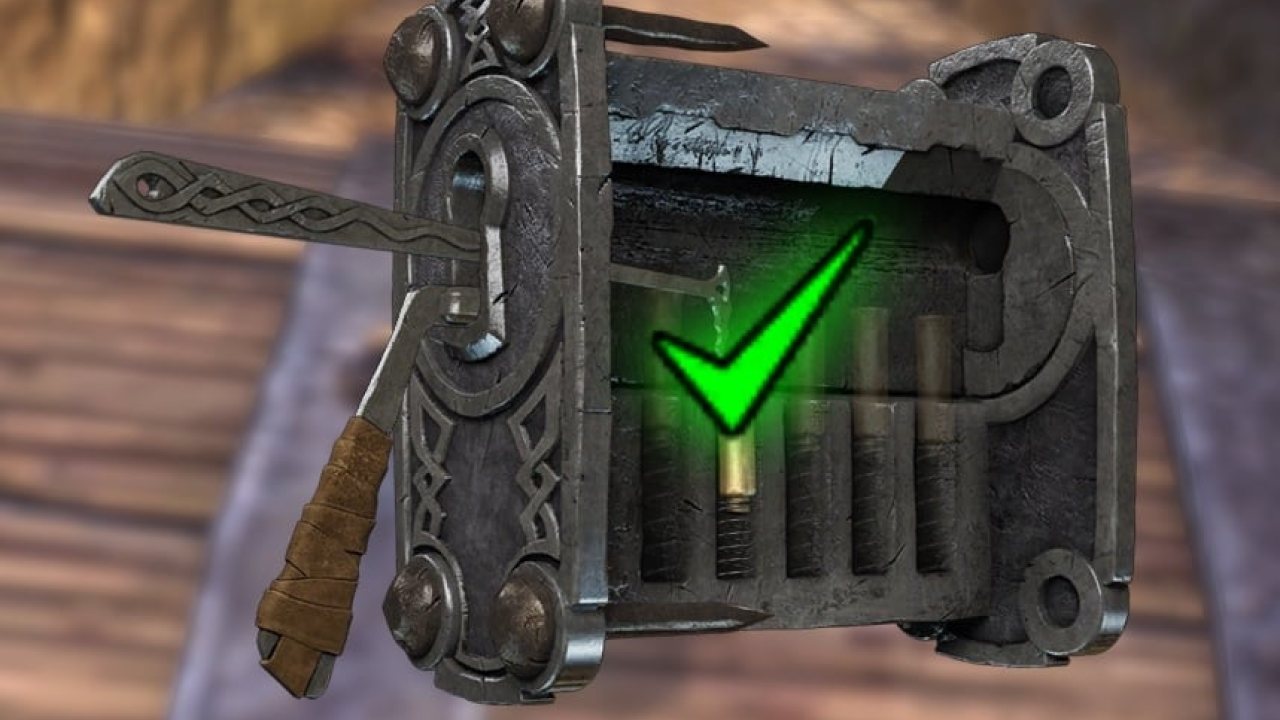
In addition the addon is able to show you visual helpers during your lockpicking:
- A green check icon will be shown each time a chamber of the current lockpick progress was picked and you need to release your mouse button!
- You are able to colorize the lock's springs green as they get resolved.
Supports keyboard and gamepad mode.
After installing the addon please visit the settings menu (ESC -> Settings -> AddOn settings) and configure it there to your needs!
This page describes FCO Lockpicker by Baertram. The description and screenshots are the author's own, imported from their listing on ESOUI on 26 October 2026: https://www.esoui.com/downloads/info909-FCOLockpicker.html
Mythiq.net hosts no files for it. The download button goes straight to the release file on cdn.esoui.com, so you are downloading from the author's own host, not from a copy of ours.
The download count, rating and comments on this page start at zero and count Mythiq.net only. The source's own figures are not copied here — they measure a different site, and a number that cannot be checked against our own ledger is not worth printing.
Media
Requirements
Game versions
12.0.0
11.3.0
11.2.0
11.1.0
11.0.0
10.3.5
API VERSION
Built for ESO API version 12.0.0, 11.3.0, 11.2.0, 11.1.0, 11.0.0. After a patch the game marks add-ons built for the previous API as out of date; the "Allow out of date add-ons" checkbox in the add-on menu loads them anyway, and most work.
LIBRARIES
Many ESO add-ons depend on a shared library — LibAddonMenu-2.0 above all — which is installed separately, exactly like an add-on. A dependency that is missing shows as the add-on simply not appearing in the list.
CONSOLE
Add-ons are PC and Mac only. There is no way to load them on console.
Installation
1. Download the archive with the button on this page and unzip it.
2. Move the unzipped folder into your add-ons directory:
Windows — Documents\Elder Scrolls Online\live\AddOns
3. Start the game, and at the character select screen click Add-Ons.
4. Tick the add-on. If it is greyed out and marked out of date, tick "Allow out of date add-ons" at the top of the same panel.
5. Log in. Most add-ons need a /reloadui after they are first enabled.
UPDATING
Delete the old folder first. ESO loads everything it finds, and two copies of one add-on is the usual cause of "an add-on has produced an error" on login.
This release downloads from cdn.esoui.com, not from us, so
there is no checksum to compare against. Scan the archive before you unpack it.
Version history
v0.31Latest
20 Jun 2026 · 23 KB via cdn.esoui.com · 1 download Download
0.31 2026-06-19
-Updated API version and dependencies
-Fixed CharacterSettings lua error
-Added support for consoles (thanks a lot to Dakjaniels)
0.29 2025-06-11
-Updated API versions
-Updated dependency versions
-Added chamber resolved icon color and texture settings
-Added chamber springs resolved color settings
0.28 2025-02-07
-Updated API versions
-Updated dependency versions
0.27 2024-04-21
-Updated API versions
-Added Chinese translations (Thanks to LoongKeiZ)
0.26 2023-02-26
Fixed "Chamber resolved" sound replacement not working without opening settings and re-applying it
0.25 2023-02-12
Added support for PerfectPixel: "Lockpicks left" label will be shown centered above the lock springs now
0.24 2022-01-14
-Added "chamber stressed" sound replace setting, to choose another sound instead of the default silent rattle of the chamber spring
0.23 2021-11-17
With version 0.22 (if you had updated to v0.22 and logged in already, you may ignore tis info):
ATTENTION: CHECK YOUR CURENT ADDON'S SETTINGS BEFORE UPDATING TO THE NEW VERSION:
The SavedVariables were changed to save per server now and thus they will reset. You need to redo the few settings again. Have at least a look at your current threshold valus and colors so that you are easily able to reset them.
-Fixed lock chamber resolved icon not re-appearing after 1st lock
-Fixed color or lockpick's left text
0.22 2021-11-16
-Updated APIversion to Deadlands
-Fixed gamepad mode not loading the hooks, if gamepad mode was set to "automatic". It now should once enable the hooks for keayboard/gamepad mode at login (using the active input mode) and again if an input mode switches.
-Updated the total code to be more faster
0.21
Fixed gamepad mode remembering the pre-lockpicking chat state properly, and restoring it properly
0.2
-Updated APIversion
-Removed LibStub checks
-Updated library versions
-Updated gamepad support for the correct chat minimized state detection before lockpicking begins
-Changed some code for a betetr speed
0.1
-Updated APIversion
-Updated library calls to support global variables instead of LibStub
0.0.94
Updated API and removed libraries.
You need to install them as standalone versions.
Check the description for infformation what a library is, what a standalone library is, what other addons are helping you to see the dependent libraries of an addon, and how you are able to install them properly as a standalone version.
0.0.93
Fixed bug: Chat will now restore properly to the state it got before the lockpicking started
0.0.92
Updated API and libraries
0.0.9l
Hopefully fixed: Working within gamepad mode now.
-> Thanks to Trent Apple for the fix!
0.0.9k
-Api raise to Morrowind
-Fixed 2 french translation strings that were missing (wrong capitalized variable names ...)
0.0.9j
-Api raise to Homestead
-Updated library LAM
0.0.9i
Added green colorized lock springs option (Thanks to AssemblerManiac for the idea and code!)
0.0.9h
Added Japanese translations.
Added option to use the game client's language.
0.0.9g
Fixed a copy&paste error from previous version
0.0.9f
Fixed settings variable error
0.0.9e
Fixed library path
0.0.9d
Updated library libAddonMenu 2.0 r23
0.0.9c
Fixed bug with languages
0.0.9b
Updated: Russian translation
0.0.9a
Fixed: Lockpick chamber resolved icon showing on top of chest again
0.0.9
Updated API
Updated libraries
0.0.8d
-Updated LAM to 2.0 r25
-Updated API to Shadows of the Hist
0.0.8c
API raised to Dark Brotherhood
0.0.8b
-Updated: Library libAddonMenu 2.0 to version 20
0.0.8a
-Updated: API version to support Thieves guild
-Added: Feature to show a "green check" icon if the current chamber of the lock is picked successfully
Enable this setting in the settings (Standard value: Disabled)
->This will show you a green check icon each time a chamber of the current lockpick progress was picked and you need to release your mouse button
Off-site on cdn.esoui.com —
no checksum, because we never held this file.
Link checked by our review team on 26 Oct 2026.
Tell us if something is wrong — a file that will not work, content taken from
someone else, or anything that looks unsafe. Reports go to our review team, not
to the author.
We use cookies to ensure that we give you the best experience on our website and improve your experience. By continuing to use this site you consent to such use of cookies.