Checked with Update 51 "Nowhere Vault" (API 101051)
Checked with Update 51 "Nowhere Vault" (API 101051)
...some beta update could be in the Comments section
...last version always on GitHub
An in-combat complement to the Quickslot Radial Menu
- Each Profile contains five custom Presets of up to eight equipped Slots.
- One Profile for each of your characters.
- And one for an Account-wide configuration you can access from any of your characters.
- All Settings are saved after each session and restored at login.
And I totally approve Miss Bizz YouTube video about GQSB .. (a bit outdated but cute enough)
1. LAYOUT OPTIONS
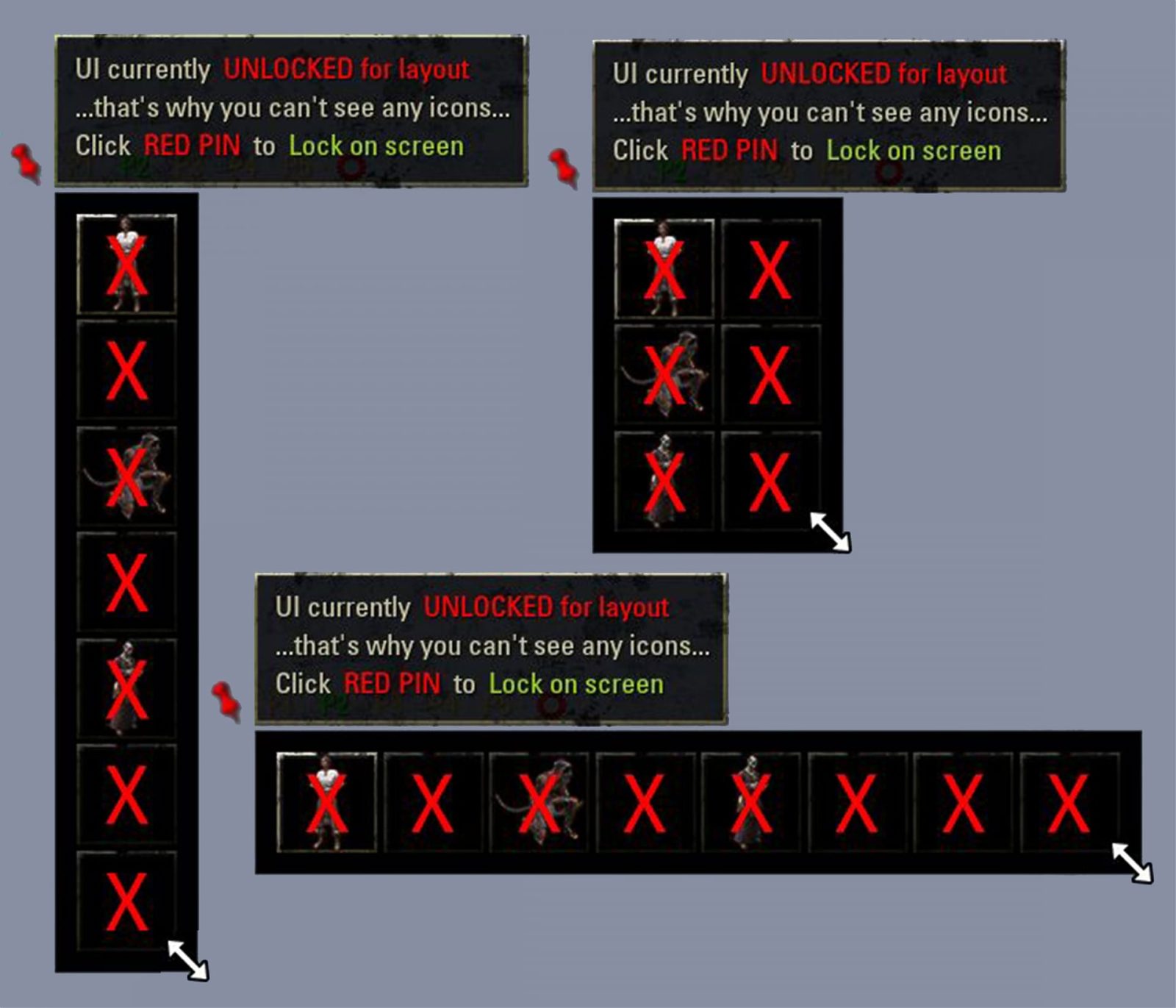
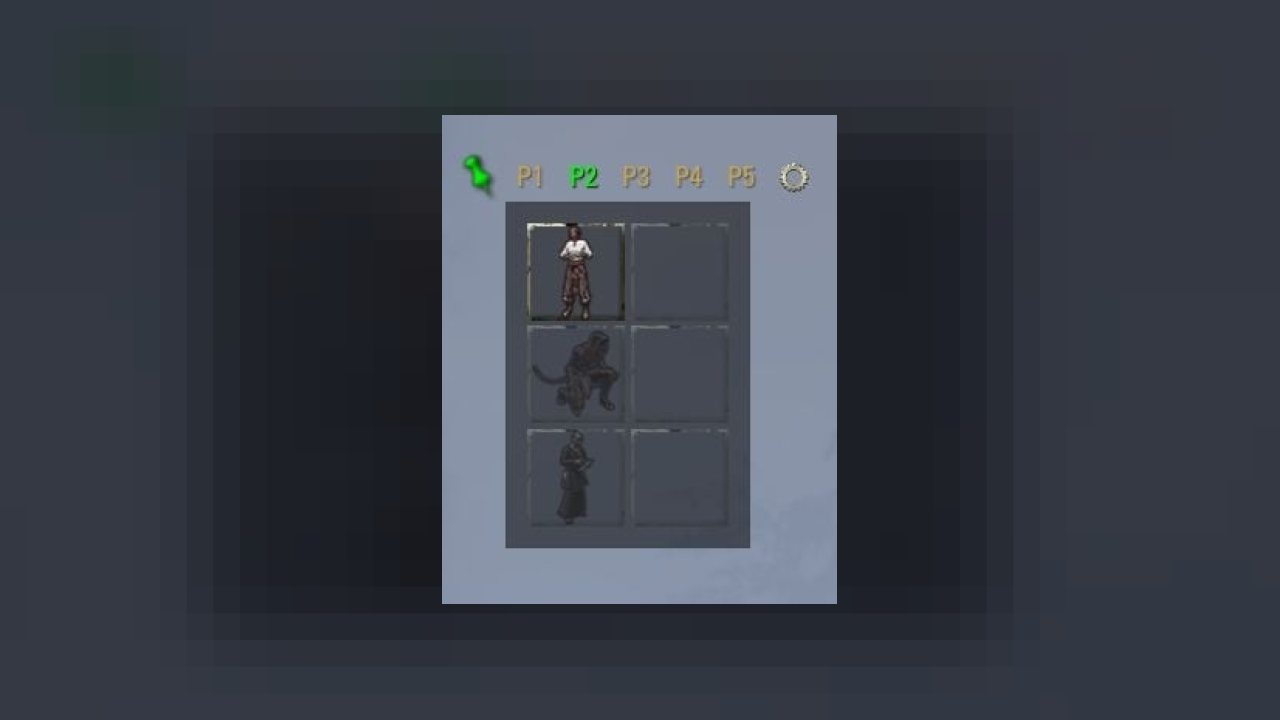
- You can drag an Unlocked-UI corner to visualize from one up to 8 Quick Bar Slot buttons
- 1x8, 8x1, 2x3, .. Row x Col .. (8 cells max)
- Buttons-size
- Labels font size
- Labels position (left center right .. above middle below)
5. UI VISIBLITY OPTIONS
- Visible when In-combat only
- Visible when Reticle is showing (i.e. no interface-menu on screen)
- Visible Always
- Visible Never
- Visible Blink changes
- Visible FORCED (sneak a peek)
- Visible BLOCKED (get out of the way)
7. ACTIVATION (i.e. Select, and display, the ITEM your next activation will use)
- From a clicked Button
and..or
- From each slot Hotkey (Controls config menu)
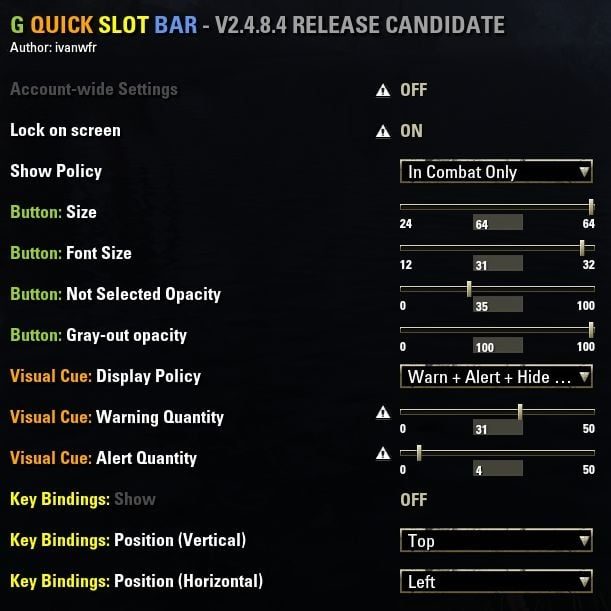
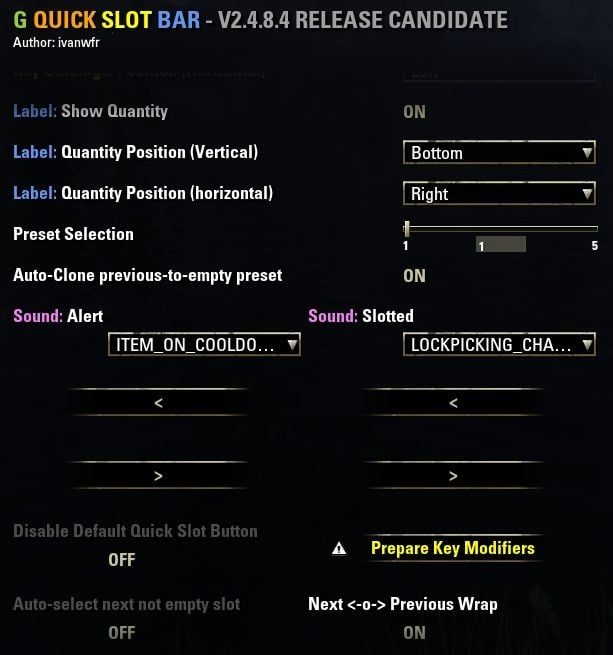
8. And the Settings menu has more (with tooltips and warnings)
- auto-select-next
- auto-wrap
- action-sounds
- translucency
- hide-game-action-bar-quick-slot (at the left of the action bar)
- Activate Account-wide or Character's profile
- In-combat delayed Preset swap (at the end of a fight)
- Static Preset (changes won't be saved - so you can make a mess and restore anytime , possibly just at the
end of a fight)
9. Pre-release on GitHub
Some corrections could be underway and, until next release, some In-Progress
version could be accessible on GitHub.
When you deploy a master zip from GitHub, the result should be a single folder
named after the Addon's name, under your live\Addons\ folder.
There should be no piled up folders such as GreymindQuickSlotBar\GreymindQuickSlotBar
you can try an copy-paste this line in File-Explorer
Screenshots
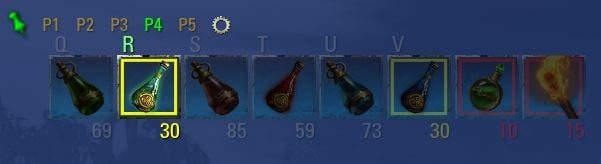
1. UI 3x2
2. UI 1x8
3. Unlocked UI resizing
4. Controls Hotkeys Binding
5. Settings menu 1/3 ⚙
6. Settings menu 2/3 ⚙
7. Settings menu 3/3 ⚙
8. Visibility logic - A piece of lua code (230117)
ABOUT THIS LISTING
This page describes Greymind Quick Slot Bar by bsrealm. The description and screenshots are the author's own, imported from their listing on ESOUI on 24 October 2026: https://www.esoui.com/downloads/info258-GreymindQuickSlotBar.html
Mythiq.net hosts no files for it. The download button goes straight to the release file on cdn.esoui.com, so you are downloading from the author's own host, not from a copy of ours.
The download count, rating and comments on this page start at zero and count Mythiq.net only. The source's own figures are not copied here — they measure a different site, and a number that cannot be checked against our own ledger is not worth printing.
Media
Requirements
Game versions
11.0.0
10.3.5
10.2.0
10.1.0
10.0.0
9.3.0
API VERSION
Built for ESO API version 11.0.0, 10.3.5, 10.2.0, 10.1.0, 10.0.0. After a patch the game marks add-ons built for the previous API as out of date; the "Allow out of date add-ons" checkbox in the add-on menu loads them anyway, and most work.
LIBRARIES
Many ESO add-ons depend on a shared library — LibAddonMenu-2.0 above all — which is installed separately, exactly like an add-on. A dependency that is missing shows as the add-on simply not appearing in the list.
CONSOLE
Add-ons are PC and Mac only. There is no way to load them on console.
Installation
1. Download the archive with the button on this page and unzip it.
2. Move the unzipped folder into your add-ons directory:
Windows — Documents\Elder Scrolls Online\live\AddOns
3. Start the game, and at the character select screen click Add-Ons.
4. Tick the add-on. If it is greyed out and marked out of date, tick "Allow out of date add-ons" at the top of the same panel.
5. Log in. Most add-ons need a /reloadui after they are first enabled.
UPDATING
Delete the old folder first. ESO loads everything it finds, and two copies of one add-on is the usual cause of "an add-on has produced an error" on login.
This release downloads from cdn.esoui.com, not from us, so
there is no checksum to compare against. Scan the archive before you unpack it.
Version history
v2.7.2.25Latest
7 Oct 2026 · 52 KB via cdn.esoui.com · 0 downloads Download
v2.7.2.25 (261006)
- Checked with Update 51 "Nowhere Vault"
v2.7.2.24 (260614)
- Checked with v9.0.0 "Necrom"
v2.7.2.23 (260315)
- Checked with Update 49 "The Night Market"
v2.7.2.22 (251101)
- Checked with Update 48 "Seasons of the Worm Cult"
v2.7.2.21 (250608)
- Checked with Update 47 "Feast of Shadows"
v2.7.2.20 (250608)
- Checked with Update 46 "Seasons of the Worm Cult Part 1"
- Dependency updated from LibAddonMenu-2.0>=32 to LibAddonMenu-2.0>=40
v2.7.2.19 (250608)
- Checked with Update 46 "Seasons of the Worm Cult Part 1" (API 101046)
v2.7.2.18 (250311)
- Checked with Update 45 "Fallen Banners" (API 101045)
- Buttons font outlined for better visibility
v2.7.2.16 (241102)
- Checked with Update 44 (API 101044)
v2.7.0 (220824)
- Checked with Update 35 High Isle (8.1.5) (API 101035)
v2.6.9 (220508)
- Checked with Update 34 High Isle (8.0): (API 101034)
1 [HOTBAR_CATEGORY_QUICKSLOT_WHEEL] extra argument for some functions
2 [standard QSB UI Shown / Hidden] [ZO_QuickSlot] replaced by [QUICKSLOT_KEYBOARD]
3 [QSB slot changed in radial menu] [EVENT_ACTION_SLOT_UPDATED] replaced by [EVENT_HOTBAR_SLOT_UPDATED]
4 [Disable Default Quick Slot Button] replaced by
5 New keybinding to toggle AccountWide Settings ON-OFF
6 Buttons tooltip showing current preset, button number and Current AccountWide or Character Settings
7 ChatMute and ChatMax saved as Per-Preset options (instead of OFF AT LOGGIN)
8 Button labels above texture (instead of hidden below)
v2.6.8 220223
- Checked with Update 33 Deadlands (7.2.10): (API 101033)
1 - Added ChatMute and ChatWarned flags to warn at most once with "You need a refill"
2 - LibDebugLogger (if installed) to save logs in SavedVariables\LibDebugLogger.lua
v2.6.7 211105
- Checked with Update 32 Deadlands (7.2.5): (API 101032)
1 - Preset adjustments were rejected on first Item consumed (unless saved by a Preset swap or reload)
2 - Character name-to-ID and Megaserver migration code removed
v2.6.6 - 211101
Checked with Update 32 Deadlands (7.2.5): (API 101032)
1 - Keeping depleted items equipped in slot (will show on refill)
2 - Default Warning and Alert sounds set to none
3 - Warning and and Alert sounds controled by ChatMute Settings option
4 - Red-Gear-Header: added a tooltip about Lock this Preset
5 - "Initialize function scope" set to local
v2.6.5 - 210823
Checked with v7.1.5 - Waking Flame & Update 31: (API 101031)
1 - Patch for First time install (/ reinstall from scratch) issue
2 - Cloning FROM PRESET AccountWide to Character (both ways)
3 - Cloning PREVIOUS PRESET LAYOUT to UNLOCKED PRESET (red pin)
4 - Cloning PREVIOUS PRESET CONTENT to EMPTY PRESET
5 - Using SERVER NAME to load SavedVariables
6 - Default Show Policy changed form Never to Always
7 - Default Auto-Clone previous-to-empty PRESET changed from false to true
8 - show-hide USER FORCED or BLOCKED have priority over SETTINGS VISIBILITY policy
Tell us if something is wrong — a file that will not work, content taken from
someone else, or anything that looks unsafe. Reports go to our review team, not
to the author.
We use cookies to ensure that we give you the best experience on our website and improve your experience. By continuing to use this site you consent to such use of cookies.