Kill Counter is an add-on that Tracks Kills in PVP and other PVP achievements.
Kill Counter is an add-on that Tracks Kills in PVP and other PVP achievements.
It also has Deathmatch/MOBA style Kill streak alerts (Like "Killing Spree" or "Dominating")
as well as death streaks, and capture streaks (Keeps and resources). Kill Counter
also alerts you when a Keep or resource has been captured (50% full). It features an
unobtrusive GUI element for quick view of your current session kills, deaths, Kill/Death ratio,
and Streaks. Individual kills also have their own alerts, with an added sound for that extra level
of satisfaction! All Alerts are fully customizable and can be toggled on/off via the Kill Counter
settings menu (/kc settings, see below).
Needed Dependencies - REQUIRED TO USE
LibAddonMenu 2
LibMainMenu-2.0
Happy Hunting!
- Kill Counter team
Note: Kill Counter Devs (Drummerx04 & Casterial) both rarely play Elder Scrolls Online for the time being, while we'll continue to maintain Kill Counter (Fixing compatibility issues, or adding classes) we do not plan any functionality changes or bug fixes. However, we do support Killz by Teebow Ganx which is similar to Kill Counter and actively being worked on.
Should you have any issues with Kill Counter, please comment.
FEATURES
The GUI element can be dragged to a different place by clicking and dragging the right half of the display bar.
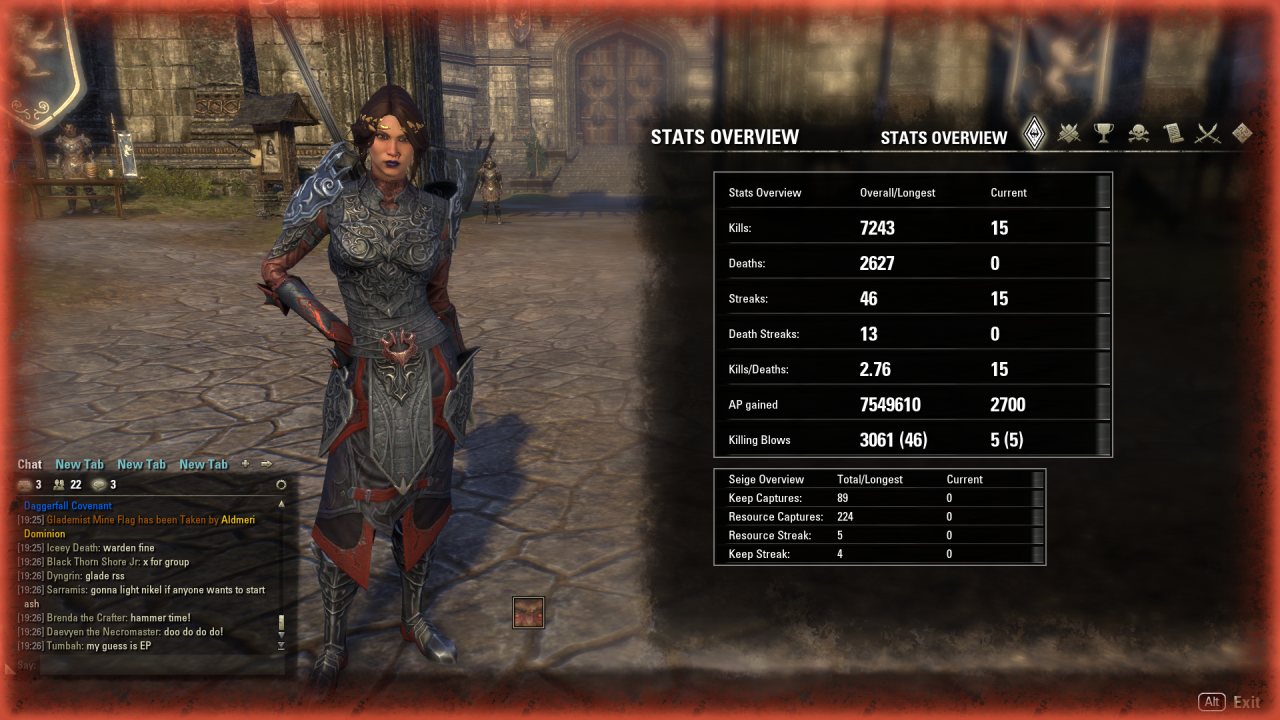
Kill Counter also has a Full stats menu which lists has multiple distinct sections
1) Overview :: Overview of all stats (totals, KDR, siege stats, etc).
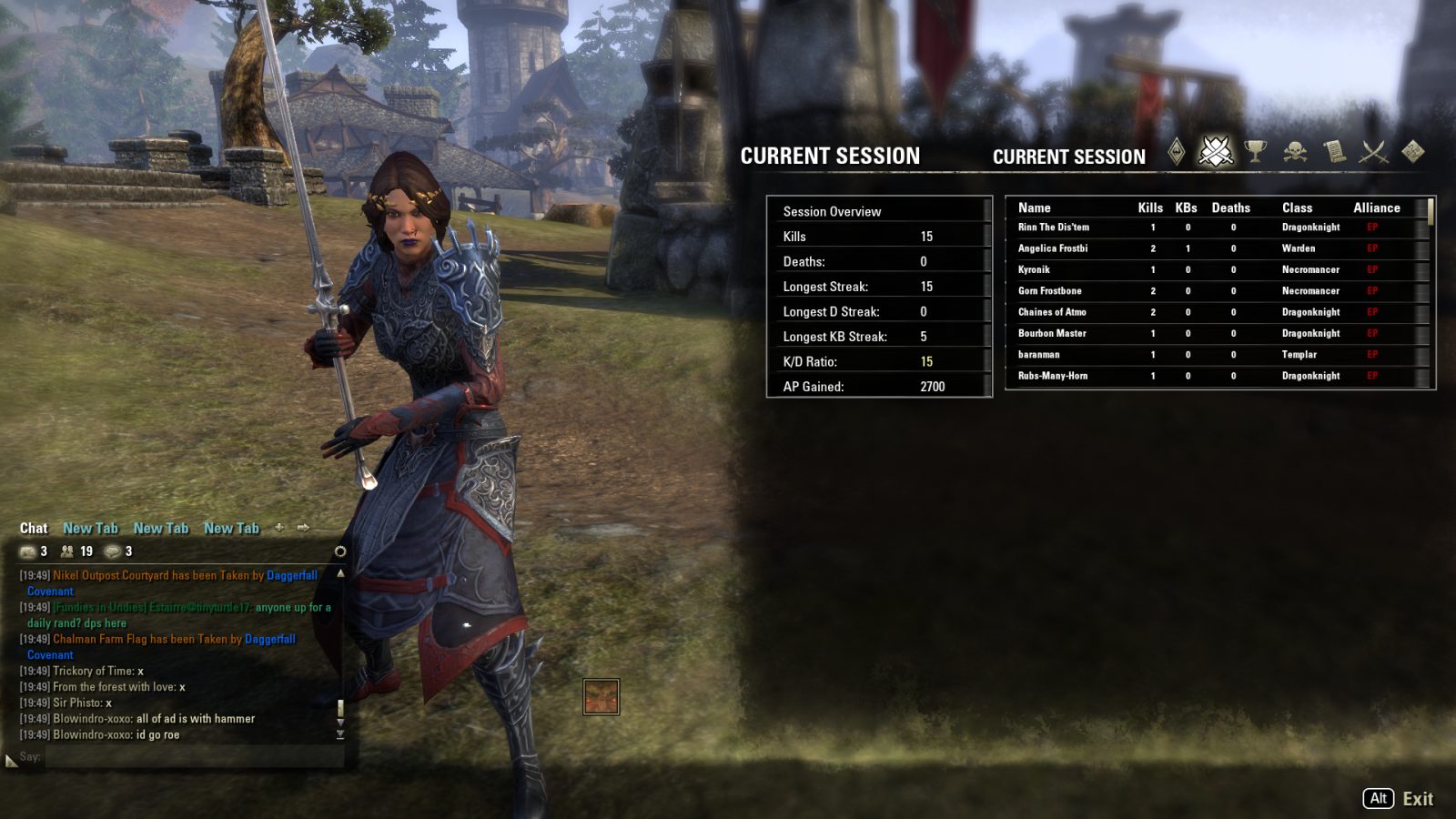
2) Current Session :: List of earnings, kills, killing blows etc, since the last time you logged out... or crashed.
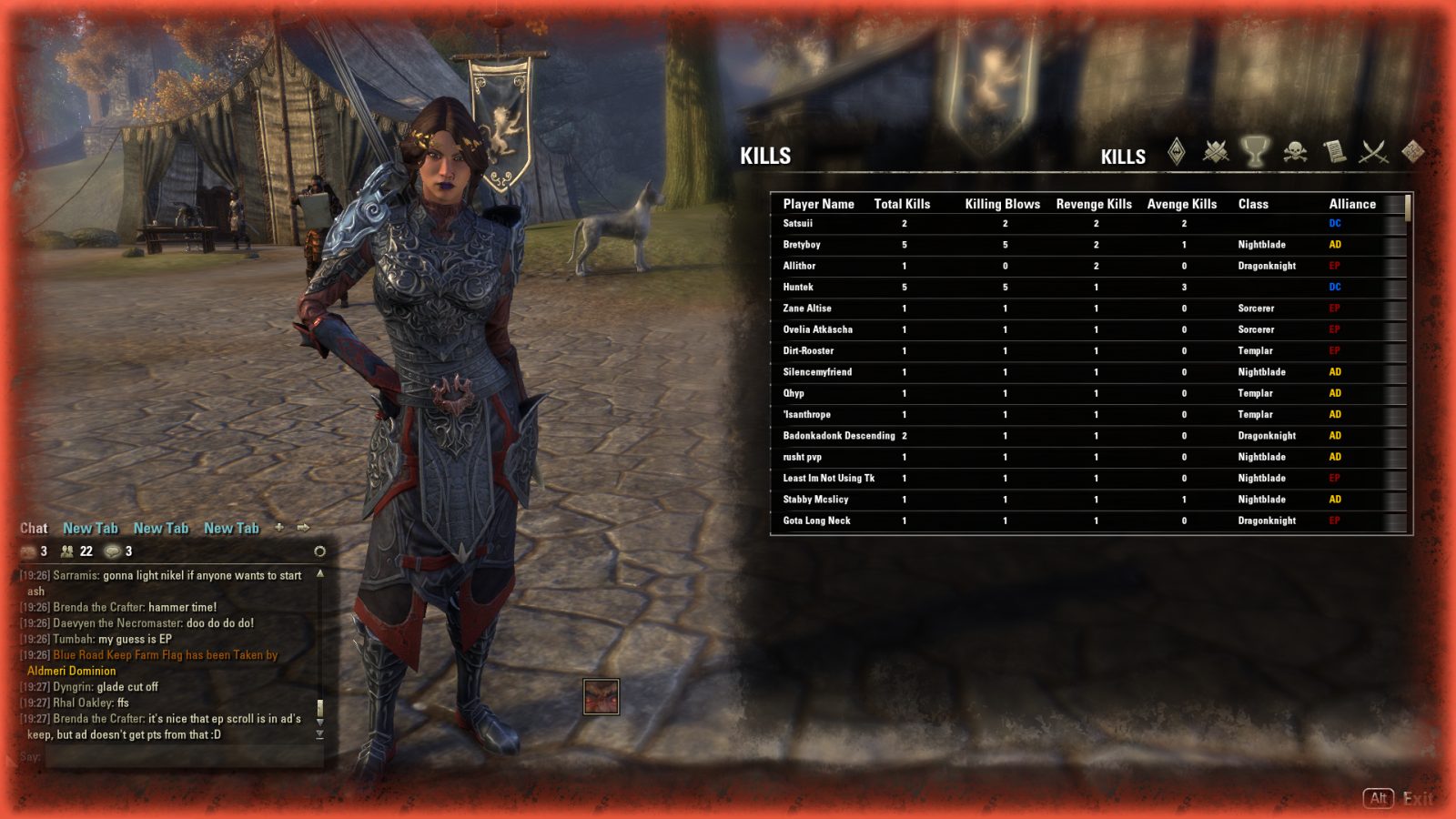
3) Kill History :: All data on kills and killing blows that wasn't lost to game crashes...
4) Killed By History :: Summary of players that have killed you.
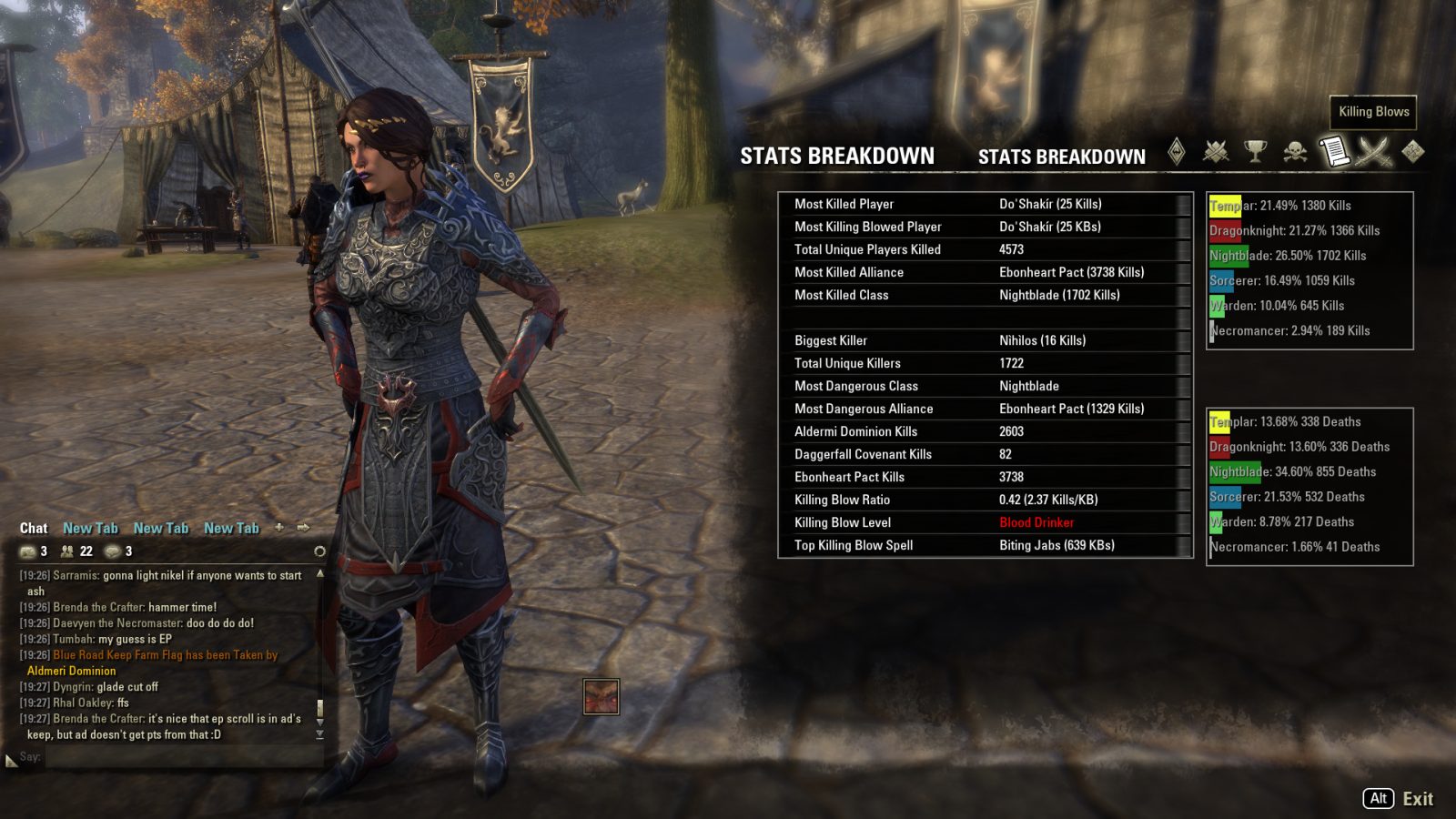
5) Breakdown :: Summations/Averages/Other break downs of your stats.
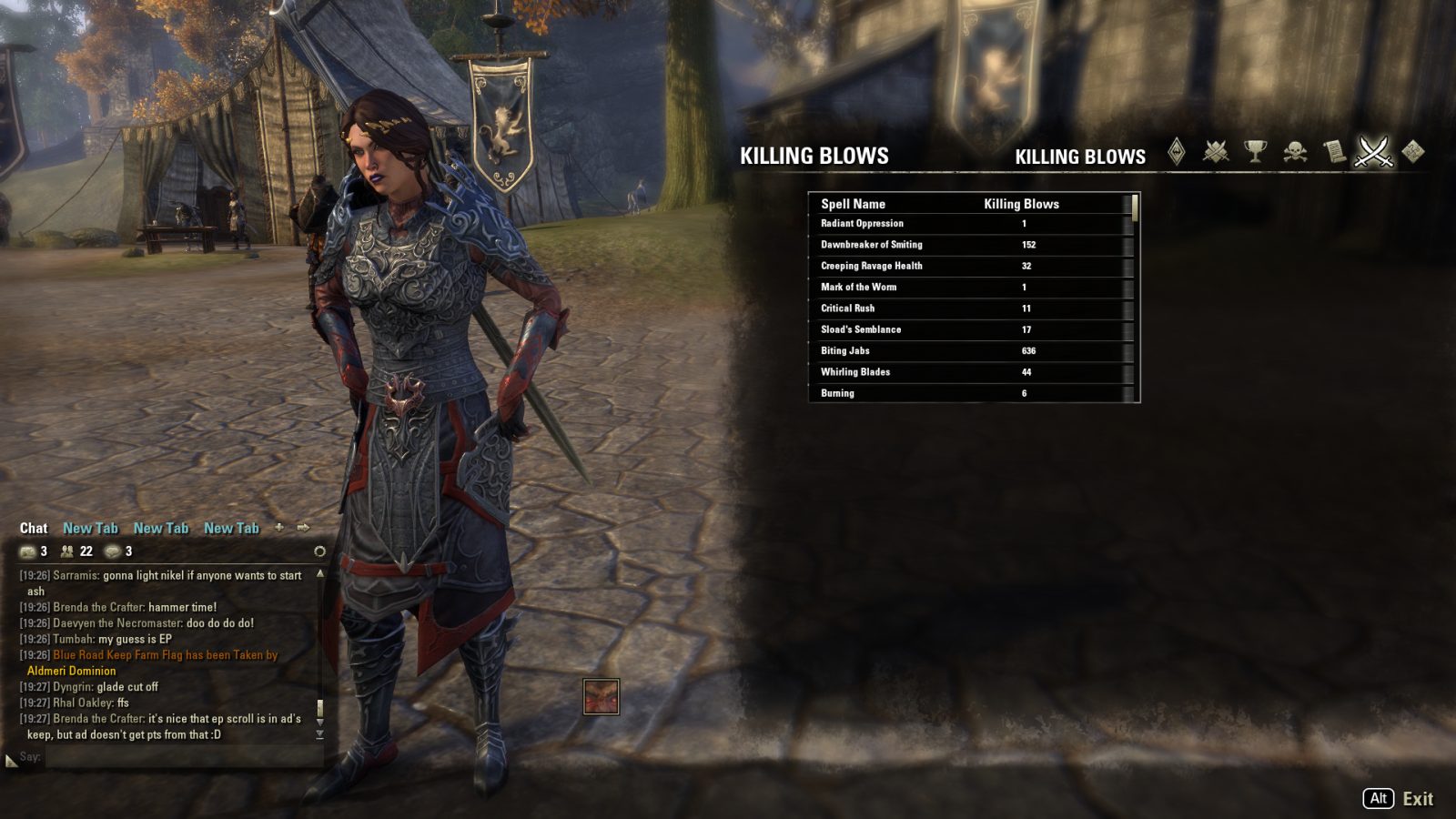
6) Killing Blow History :: The number of kills achieved with each skill you have used.
7) Settings :: Custom settings window. It was already here so I used it. Eventually, I'll try to move it to the standard location.
8) K/D color coding for your "Rank" (Red, Yellow, Blue, Gold, etc)
Kill Counter has always served as a way to track your overall
performance and your performance against other players, other add-ons
such as Miat's provide far more involved additions to the UI, while KC
tries to be unintrusive.
3.1.5 is the start of the settings panel and the ability to turn off kill counter bar while in PVP.
Kill Counter will continue to try to be modernized in the patches 3.0+
Update 3.0.0 includes several bug fixes, code clean up, and improvements It also has small improvements to the KC stat bar displayed. To read more of the changes please check the change log.
We've also given users the ability to turn AP off on the bar (This is for users who use AP meter)
/kc help:
- /kc on - turns on the kc stat bar
- /kc off - turns off the kc stat bar
- /kc settings - opens the settings menu
- /kcreport - creates a report of current stats
- /kcreset - reset current stats
- /kc stats - shows stats menu
- /kc ooc - toggles out of combat messages
- /kc sounds - toggles sounds
New star bar:
Update 2.7.0 includes a substantial transformation of your Kill Statistics. If you find your existing history to be of extreme importance to you, then I recommend backing it up just in case (By default the information is located at \Documents\Elder Scrolls Online\live\SavedVariables\Killcounter.lua). I've tested a few languages, and multiple sets of data, but there's always a chance something really screwy exists in your data. If something goes wrong, I'd be glad to help you in the comments.
New/Improved Features update 2.7.0:
- Added Necromancer class for tracking
- Disabled KC outside of Cyrodiil/BG (This allows duelers to not report only wins- was bugged)
- Increased bar width for the triple digit to quadruple digit AP numbers/kills.
--If you were using an old API version these might now be supported:--
- Statistics now properly support multiple languages.
- Kill and Killed by messages now include a player link. Now you can now more easily whisper your opponents, even ones with impossible to type names.
- KC no longer counts extra kills when multiple spells hit at the same time. Each killing blow spell is still recorded and reported, but only 1 KILL is counted.
You will probably notice a drop in kills reported per hour, but that's because the kills reported are much closer to being correct.
- Quite a few general code changes, efficiency improvements, code golf, etc
Slash Commands:
/kcreset - reset the counter. you can also do
/kcreset full to reset all of your stats (including list of killed enemies, total kills, etc)
/kc is a general purpose command with many different functions:
/kc on to show Kill Counter
/kc off to hide Kill Counter
/kc stats to view or hide stats panel
/kc settings to view and enable/disable various parts of Kill Counter
/kcreport - Use to report your Kill Counter stats to chat. See below for full list of options for this but an example would be:
/kcreport g1 --reports to guild one
/kcreport z -- reports to zone
/kcreport s full -- reports to say, and shows full stats
/kc report w @somefriendofyours --reports to someone in a whisper
KC Report slash command information: Please see the Author Portal for information on the /kcreport slash command, and more.
Special thanks to Ayantir Drummerx04, @g4rr3t Ghostbane(AP Meter), QuadroTony,Cinnamon_Spider, Hank1997, SheWhoLovesGold, Araxleon, the NA dueling/PVP guild Legend, Mikethecoder,
and many others for helping to create/update/test Kill Counter in the past years.
Kill Counter development/maintenance is now under the care of Casterial, please be gentle, but suggestions
for things to improve or features to add would be welcome.
ABOUT THIS LISTING
This page describes Kill Counter by mikethecoder4. The description and screenshots are the author's own, imported from their listing on ESOUI on 24 October 2026: https://www.esoui.com/downloads/info337-KillCounter.html
Mythiq.net hosts no files for it. The download button goes straight to the release file on cdn.esoui.com, so you are downloading from the author's own host, not from a copy of ours.
The download count, rating and comments on this page start at zero and count Mythiq.net only. The source's own figures are not copied here — they measure a different site, and a number that cannot be checked against our own ledger is not worth printing.
Media
Requirements
Game versions
9.2.5
9.1.5
API VERSION
Built for ESO API version 9.2.5, 9.1.5. After a patch the game marks add-ons built for the previous API as out of date; the "Allow out of date add-ons" checkbox in the add-on menu loads them anyway, and most work.
LIBRARIES
Many ESO add-ons depend on a shared library — LibAddonMenu-2.0 above all — which is installed separately, exactly like an add-on. A dependency that is missing shows as the add-on simply not appearing in the list.
CONSOLE
Add-ons are PC and Mac only. There is no way to load them on console.
Installation
1. Download the archive with the button on this page and unzip it.
2. Move the unzipped folder into your add-ons directory:
Windows — Documents\Elder Scrolls Online\live\AddOns
3. Start the game, and at the character select screen click Add-Ons.
4. Tick the add-on. If it is greyed out and marked out of date, tick "Allow out of date add-ons" at the top of the same panel.
5. Log in. Most add-ons need a /reloadui after they are first enabled.
UPDATING
Delete the old folder first. ESO loads everything it finds, and two copies of one add-on is the usual cause of "an add-on has produced an error" on login.
This release downloads from cdn.esoui.com, not from us, so
there is no checksum to compare against. Scan the archive before you unpack it.
Version history
v3.5.1Latest
7 Dec 2023 · 44 KB via cdn.esoui.com · 0 downloads Download
3.5.0
Fixed class code, Sparta 117!
3.4.6
Comma Fix
3.4.5
Fixed Displaying Killed Messages
Attributor & Bug Squasher: @g4rr3t
3.4.
(Note: This is mainly for PTS, but will work with the launch of the Chapter)
Arcanist Class Added
Arcanist Class Added
Fixes an issue where some of Necromancers abilities were not counted correctly
Code Cleaned & Fixed up for easier reading for future updates
3.3.4
API bump
Got KC to Work Again
3.3.3
LibMainMenu - Deprecated, updated to LibMainMenu 2
Fixed the deprecated files
API Bump
3.3.2
API Bump, fixed minor issues
"/kcreport", "/kcreport full" now initially report in /say
"/kcreport", "/kcreport full" both report killing blows, full is overall while /kcreport is current
Optimized the killing timer
3.3.1
API bump
3.3.0
Fixed minor issues with error calling before addon loaded.
(note, untested, if a bug occurs let me know)
3.2.8:
MAJOR ADD-ON OVERHAUL!
This is no longer a standalone and needs LibAddonMenu 2 and LibMainMenu.
Fixes an issue where current data was not stored in a timely matter so if you crashed, you'd lose the data. IOt now updates per kill/death to retain data
3.2.7:
[Minor bug fix
3.2.6
Minor Bug Fix, if you deposit AP to bank you'll no longer go negative
note: I'm aware of a few issues and will work on them slowly, but due to a new job I won't have as much time for a while.
3.2.5
API Bump
3.2.4
Added K/D ratio levels in Overview Stats
God Mode (Gold) - 10+K/D
Beast Mode (Orange ) - 5+K/D
Super Mode (Blue) - 2.5+K/D
.7-2.5 Green
between .5-.7 Yellow
below .5 Red
note: you should now see colored K/D for your overview stats. This is to encourage people to care more about their K/D!
Completely overhauled the code base to be standard formatting. This should help with adjust code going forward
3.2.3
Fixed a minor mathematical bug.
3.2.2
Added K/D ratio levels in Current Sessions Tab
God Mode (Gold) - 10+K/D
Beast Mode (Orange ) - 5+K/D
Super Mode (Blue) - 2.5+K/D
.7-2.5 Green
between .5-.7 Yellow
below .5 Red
Fixed Misspelling of Daggerfall
Fixed Text Overlap
3.2.1
Fixed a major bug where Sorcerer was reporting as Dragonknight and vice versa.
Updated the KC Stat Bar to update on event instead of after event
Removed VR levels
Fixed blank class by making it say "duel". This is back when KC counted kills outside, but not deaths.
Updated the GUI. Re-did all the icons to make them match their respective tab
Updated the draw line visuals between each line.
Updated the class colors on graphs
Updated the background for information
Updated the stat bar to not have cross colors
Possible Future Updates:
Searching Kills, this is far down the line but still being worked on
Background image changes for the menu
Dueling Mode, being looked into
3.2.0
* Fixed / changed a few kill counter elements
- Kill Counter /kc on stat bar is no longer transparent. This is to help visibility in Cyrodiil and modernize it.
* May add a settings option for this
- Changed the Killers tab so that it no longer displays levels. Levels would require a lot of data updating and not update all old player data so this is removed from the table and added Kills To Them so you can easily view Kills From / To the player in the Killers Table
3.1.5a
* Added another option in panel to view stats quickly
3.1.5
* Added the start of the Settings->Addon panel, for now this just has a button to open /kc settings
- Added another option in settings to disable kill counter stats bar entirely while in cyrodiil or battlegrounds
Known Issues:
- If you open KC settings through panel initially (without default ways of opening) data may show as T, this will fix itself.
Upcoming (Hopefully - 3.2.0-3.2.5)
- Working on un-embedding settings and moving to the panel. Kill Counter is old, so bare with me as I work through it
Off-site on cdn.esoui.com —
no checksum, because we never held this file.
Link checked by our review team on 26 Oct 2026.
Tell us if something is wrong — a file that will not work, content taken from
someone else, or anything that looks unsafe. Reports go to our review team, not
to the author.
We use cookies to ensure that we give you the best experience on our website and improve your experience. By continuing to use this site you consent to such use of cookies.