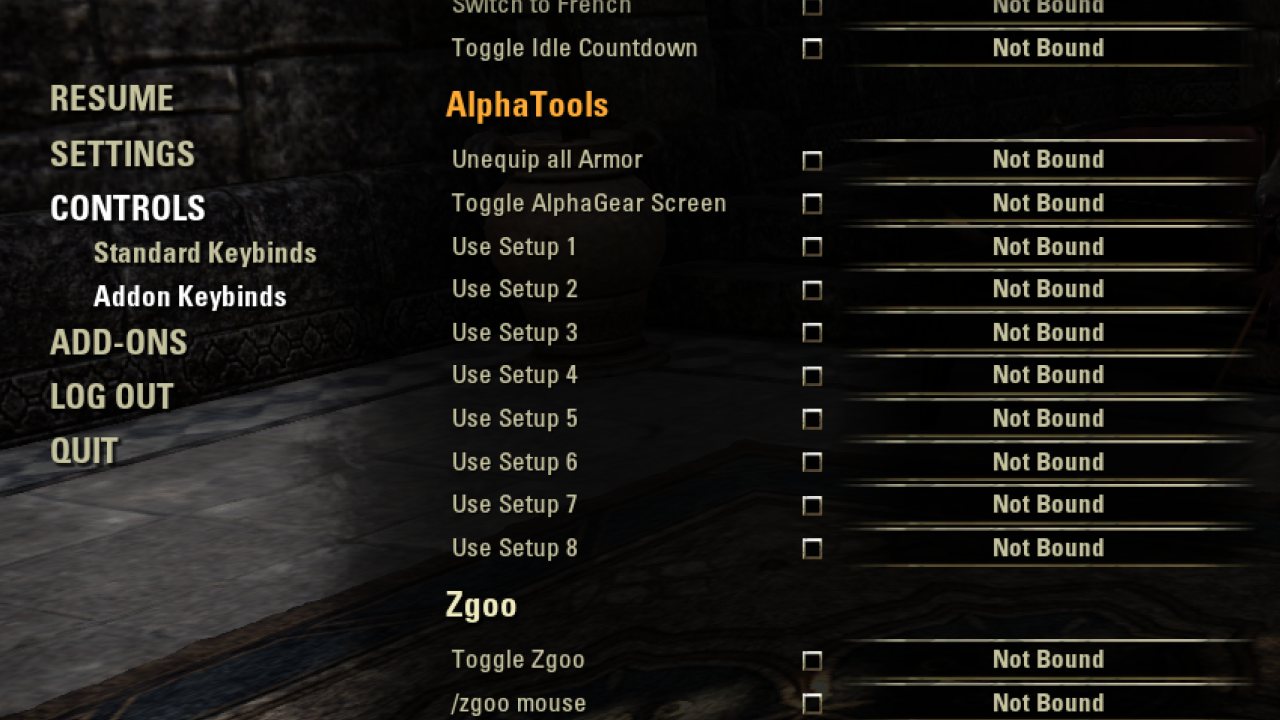
This addon (it's actually no library which needs to be added as a dependency) splits the list of keybindings under Controls menu into Standard Keybinds and Addon Keybinds. It does that regardless of whether it is installed stand-alone or embedded in another add-on.
Stand-alone
This addon (it's actually no library which needs to be added as a dependency) splits the list of keybindings under Controls menu into Standard Keybinds and Addon Keybinds. It does that regardless of whether it is installed stand-alone or embedded in another add-on.
What it does
The addon hooks ZO_KeybindingsList's row setup and hide callbacks, and in these hooks fires custom callbacks via CALLBACK_MANAGER. The new callbacks are:
Example - adding custom setup/hide stuff to keybind Category header rows:
ABOUT THIS LISTING
This page describes libAddonKeybinds by merlight. The description and screenshots are the author's own, imported from their listing on ESOUI on 24 October 2026: https://www.esoui.com/downloads/info1253-libAddonKeybinds.html
Mythiq.net hosts no files for it. The download button goes straight to the release file on cdn.esoui.com, so you are downloading from the author's own host, not from a copy of ours.
The download count, rating and comments on this page start at zero and count Mythiq.net only. The source's own figures are not copied here — they measure a different site, and a number that cannot be checked against our own ledger is not worth printing.
Requirements
Game versions
11.3.0
11.2.0
API VERSION
Built for ESO API version 11.3.0, 11.2.0. After a patch the game marks add-ons built for the previous API as out of date; the "Allow out of date add-ons" checkbox in the add-on menu loads them anyway, and most work.
LIBRARIES
Many ESO add-ons depend on a shared library — LibAddonMenu-2.0 above all — which is installed separately, exactly like an add-on. A dependency that is missing shows as the add-on simply not appearing in the list.
CONSOLE
Add-ons are PC and Mac only. There is no way to load them on console.
Installation
1. Download the archive with the button on this page and unzip it.
2. Move the unzipped folder into your add-ons directory:
Windows — Documents\Elder Scrolls Online\live\AddOns
3. Start the game, and at the character select screen click Add-Ons.
4. Tick the add-on. If it is greyed out and marked out of date, tick "Allow out of date add-ons" at the top of the same panel.
5. Log in. Most add-ons need a /reloadui after they are first enabled.
UPDATING
Delete the old folder first. ESO loads everything it finds, and two copies of one add-on is the usual cause of "an add-on has produced an error" on login.
This release downloads from cdn.esoui.com, not from us, so
there is no checksum to compare against. Scan the archive before you unpack it.
Version history
v6Latest
25 Jan 2026 · 3.4 KB via cdn.esoui.com · 0 downloads Download
version 6
- Fixed API change: KEYBINDING_MANAGER is renamed to KEYBOARD_KEYBINDING_MANAGER
version 5
- API bump.
- Get rid of LibStub.
version 4
internal
version 3
- include AddOnVersion, IsLibrary fields in manifest
- avoid hard dependency on LibStub (not bundled anymore)
version 2
- replace colons in callback names with periods
version 1
- first release
Off-site on cdn.esoui.com —
no checksum, because we never held this file.
Link checked by our review team on 25 Oct 2026.
Tell us if something is wrong — a file that will not work, content taken from
someone else, or anything that looks unsafe. Reports go to our review team, not
to the author.
We use cookies to ensure that we give you the best experience on our website and improve your experience. By continuing to use this site you consent to such use of cookies.