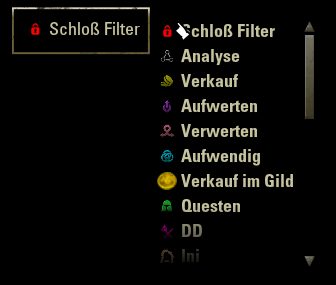
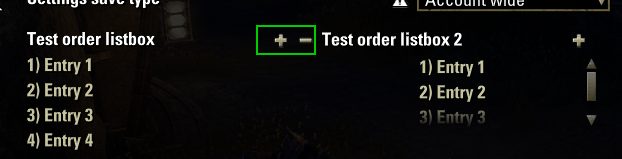
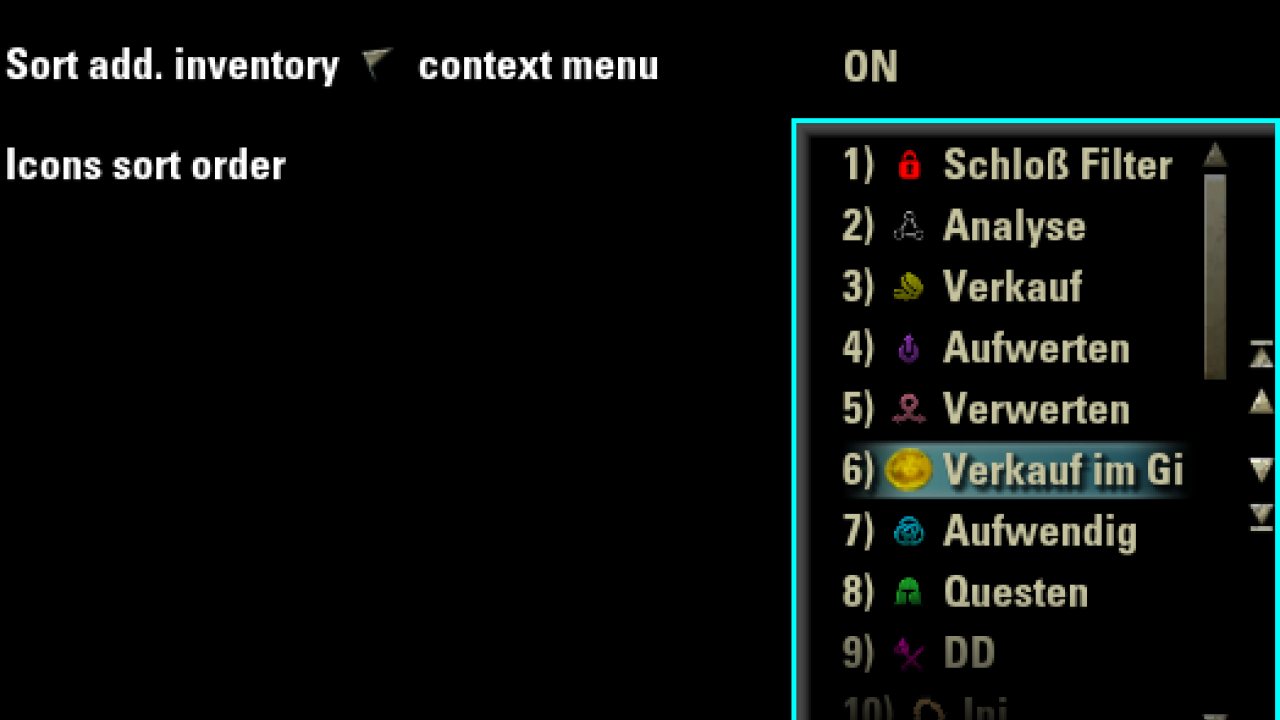
A listbox widget with manual order possiblities (via buttons or drag&drop) for the library LibAddonMenu.
LibAddonMenu - OrderListBox widget
A listbox widget with manual order possiblities (via buttons or drag&drop) for the library LibAddonMenu.
Just install it in addition to LibAddonMenu-2.0 (release 32 or newer is needed!) and use the new widget type "orderlistbox" in your addon'
settings panel.
Add to your manifest txt file:
This widget is based on a ZO_SortList.
Selecting an entry will highlight the row and show the move buttns (if not disabled in the orderListBoxData table).
Pressing the mouse left button long on an entry and moving the mouse up or down (within the listbox boundaries), called "Dragging", will make the entry move up or down to the position where you release your left mouse button.
If you want to move it more down to the bottom/more to the top than the current list is scrolled use your mousewheel to scroll, while still holding the left mouse button.
Functionalities:
- Button to move a selected entry 1 up
- Button to move a selected entry 1 down
- Button to move a selected entry to the top
- Button to move a selected entry to the bottom
- All buttons can be disabled via the orderListBoxData table
- Drag & drop of an entry (up and down)
- Show dragged list entry text as label near the cursor
- Auto scroll up/down if dragging entries to the upper/lower part of the list
- Drag & drop can be disabled via the orderListBoxData table
- Show number of position in front of the text of an entry
- Number of position is disabled by default via the orderListBoxData table
- Show value of entry after the entry text (surrounded by [])
- Show value of entry after the tooltip text of an entry (surrounded by [])
- Show an "Add entry" button and a customizable dialog for the add entry value (with value checks e.g. only numerically). A callback function can handle additional tasks as the entry got added.
The customizable dialog can use a customControl and customSetupFunction so you can e.g. add a dropdown and populate default entries via the setupFunction.
- Show remove selected entry(ies) button. A check function can check if the entry could be deleted and a callback function can handle additional taks after the entry got deleted.
Provides the following parameters:
Example usage in a LAM settings panel:
If you define your own XML virtual template for the "rowTemplate" tag:
Make sure to add the handlers OnDragStart and OnReceiveDrag to your virtual row template! Check XML file LAM2_orderlistbox_widget.xml, virtual control "LAM2_OrderListBox_Widget_Scrolllist_Row" as template!
If you want to define your own addCustomEntryDialog XML template, here are 2 examples: 1 with only 1 label with fixed text added and another with a dropdown adding your joined guilds:
GitHub
LibAddonMenu - OrderListBox widget
Documentation
ABOUT THIS LISTING
This page describes LibAddonMenu - OrderListBox widget by Baertram. The description and screenshots are the author's own, imported from their listing on ESOUI on 24 October 2026: https://www.esoui.com/downloads/info3080-LibAddonMenu-OrderListBoxwidget.html
Mythiq.net hosts no files for it. The download button goes straight to the release file on cdn.esoui.com, so you are downloading from the author's own host, not from a copy of ours.
The download count, rating and comments on this page start at zero and count Mythiq.net only. The source's own figures are not copied here — they measure a different site, and a number that cannot be checked against our own ledger is not worth printing.
Media
Requirements
Game versions
12.0.0
11.3.0
11.2.0
11.1.0
11.0.0
10.3.5
API VERSION
Built for ESO API version 12.0.0, 11.3.0, 11.2.0, 11.1.0, 11.0.0. After a patch the game marks add-ons built for the previous API as out of date; the "Allow out of date add-ons" checkbox in the add-on menu loads them anyway, and most work.
LIBRARIES
Many ESO add-ons depend on a shared library — LibAddonMenu-2.0 above all — which is installed separately, exactly like an add-on. A dependency that is missing shows as the add-on simply not appearing in the list.
CONSOLE
Add-ons are PC and Mac only. There is no way to load them on console.
Installation
1. Download the archive with the button on this page and unzip it.
2. Move the unzipped folder into your add-ons directory:
Windows — Documents\Elder Scrolls Online\live\AddOns
3. Start the game, and at the character select screen click Add-Ons.
4. Tick the add-on. If it is greyed out and marked out of date, tick "Allow out of date add-ons" at the top of the same panel.
5. Log in. Most add-ons need a /reloadui after they are first enabled.
UPDATING
Delete the old folder first. ESO loads everything it finds, and two copies of one add-on is the usual cause of "an add-on has produced an error" on login.
This release downloads from cdn.esoui.com, not from us, so
there is no checksum to compare against. Scan the archive before you unpack it.
Version 15 - 2025-07-26
-Fixed cursor dragged text offset to start right of the arrow, and not below it
-Fixed cursor dragged text to resize with long & short texts (prevent showing only the first character of text if long text was dragged after shot text)
-Fixed add new entry and remove entry buttons position for extraWide = true option
Version 13 - 2025-06-18
-Updated API and versions of dependencies
-Fixed add new entry dialog button texture not showing by default
-Fixed data description functions missing ()
Version 12 - 2024-10-11
Aded callback functions for the new entry added, and entry removed.
Also added a check function for the entry removed which will be executed if the entry should be removed. If the checkFunc fails (returns false) the entry won't be deleted.
-Added data:
-- addEntryCallbackFunction = function(orderListBox, newAddedEntry, orderListBoxData) return true end, -- (optional) function returning a boolean (true = added, false = not added) called as the entry get's added,
-- removeEntryCheckFunction = function(orderListBox, selectedIndex, orderListBoxData) return true end, -- (optional) function returning a boolean (true = remove, false = keep) if the entry can be removed or not
-- removeEntryCallbackFunction = function(orderListBox, selectedEntry, orderListBoxData) return true end, -- (optional) function returning a boolean (true = removed, false = not removed) called as the entry get's removed,
Version 11 - 2024-05-31
-Added new data:
--Show "Add new entry" button -> Shows a dialog
--Show "Remove selected entry" button -> Can ask before removal via a dialog
addEntryDialog = {
--title="Add new value",
--text="Enter new value here",
textType=TEXT_TYPE_ALL,
--buttonTexture="/esoui/art/buttons/minus_up.dds",
--maxInputCharacters=3,
--specialCharacters={"a", "b", "c"},
--defaultText = "Default text",
--instructions = ZO_ValidNameInstructions:New(GetControl(self, "NameInstructions"), nil, { NAME_RULE_TOO_SHORT, NAME_RULE_CANNOT_START_WITH_SPACE, NAME_RULE_MUST_END_WITH_LETTER })
validatesText = true,
validator = function(text) return text ~= nil and text ~= "" end
},
showRemoveEntryButton = true,
askBeforeRemoveEntry = function() return true end
Version 10 - 2023-12-10
-Fixed data.reference not used for widget's control name (Thanks to t4cmyk)
Version 9 - 2023-11-13
-Updated version and API versions of dependencies
-Fixed duplicate name bug if no reference was provided
-Fixed tooltip showing if no tooltip defined (Thanks to kawamonkey)
-Added possibility to use SI_ string constants (Thanks to kawamonkey)
Version 8 - 2023-03-14
-Updated API
-Updated dependency version
-Added Spanish translation
-Added Chinese translation
Version 7 - 2022-04-18
-Updated API
-Updated dependency version
Version 6 - 2021-05-24
-Added assertion error messages if the provided listEntries table, or its needed entry data/format, is missing
-Added showValue and showValueAtTooltip boolean parameters
-Added more spee dup local variables
-Removed some redundant code and put it into a function
-Changed XML templates to use upper case names
Version 5 - 2021-05-24
-Fixed error upon changing a LAM 2.0 addon settings panel
-Fixed scrolling of scroll list to bottom if item was moved to the last entry
-Fixed drag&drop: If any other mouse button than the left is clicked during the drag process the drag will be aborted
Version 4 - 2021-05-23
-Changed mouse label only update once at start of drag
-Changed auto scroll to be more smooth and only update every 200ms
-Fixed label at mouse to hide again if dragging is aborted via right mouse/ESC key (close of LAM panel), dragging somewhere else than the scroll list
Off-site on cdn.esoui.com —
no checksum, because we never held this file.
Link checked by our review team on 25 Oct 2026.
Tell us if something is wrong — a file that will not work, content taken from
someone else, or anything that looks unsafe. Reports go to our review team, not
to the author.
We use cookies to ensure that we give you the best experience on our website and improve your experience. By continuing to use this site you consent to such use of cookies.