Overview
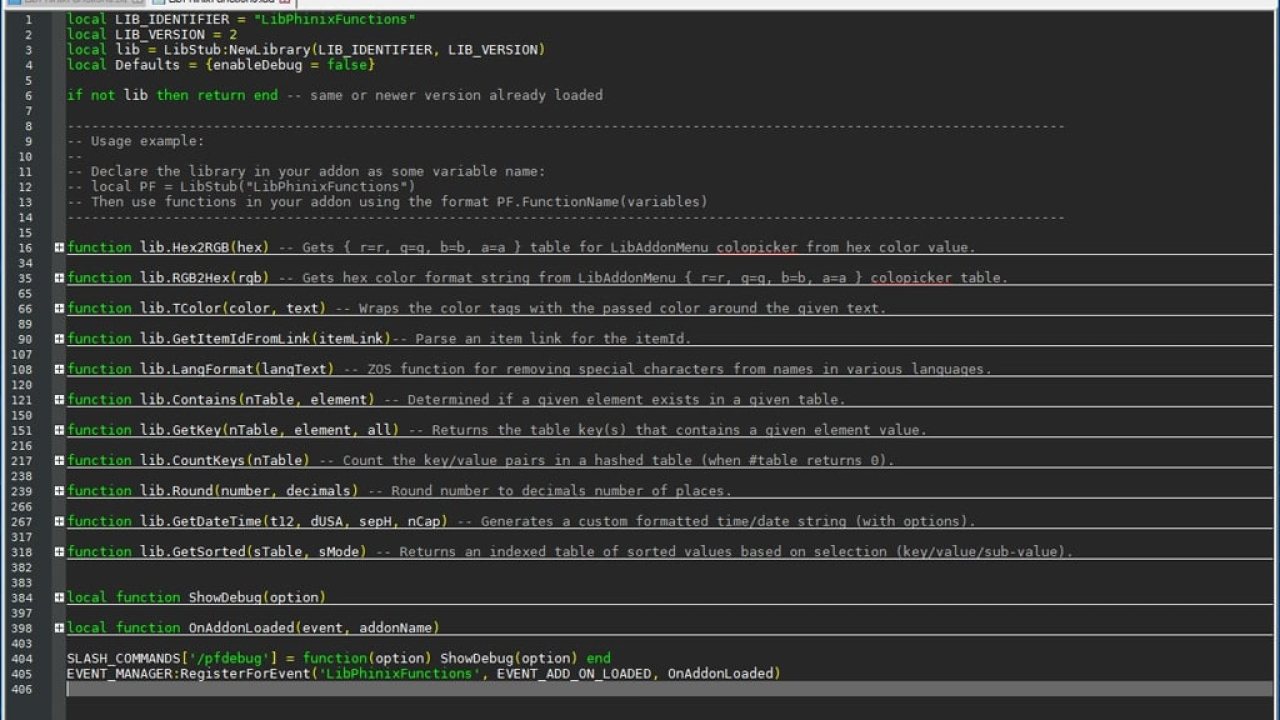
This simple library consolidates various useful tricks and techniques I have picked up over my years of LUA coding and used in various of my addon projects. New functions will be included as needed/requested.
LibPhinixFunctions
This simple library consolidates various useful tricks and techniques I have picked up over my years of LUA coding and used in various of my addon projects. New functions will be included as needed/requested.
To use the library first add it to your addon manifest:
## DependsOn: LibPhinixFunctions>=9
Then define it somewhere in your addon where you want to use it:
local PF = LibPhinixFunctions
Functions can them be called like so:
(Here 'color' and 'text' would be value you pass the function. See below for more info.)
PF.TColor(color, text)
Chat commands:
/pfdebug on -Enables debug text output.
/pfdebug off -Disables debug text output (default ).
CURRENT AVAILABLE FUNCTIONS:
PF.SubExtendedASCII(iString) --Convert accented letters to standard ASCII equivalent using extended ASCII lookup table.
PF.Hex2RGB(hex) --Gets { r=r, g=g, b=b, a=a } table for LibAddonMenu colopicker from hex color value.
Gets the RGB value needed for LibAddonMenu color picker settings from a hex format variable used in text string coloring.
For example, you have a saved variable such as Addon.ASV.textColor = "ffffff" you use to set text labels: Label:SetText("|c"..Addon.ASV.textColor..SomeText.."|r")
If you want to allow users to pick the color used through LibAddonMenu colorpicker you can make the GetFunc Hex2RGB(textColor):
PF.RGB2Hex(rgb) --Gets hex color format string from LibAddonMenu { r=r, g=g, b=b, a=a } colopicker or { =r, =g, =b, =a } saved variable table.
Works opposite to the above, used for the SetFunc in LibAddonMenu color picker to save the chosen color to a hex variable for use in addons.
PF.TColor(color, text) --Wraps the color tags with the passed color around the given text.
color: String, hex format color string, for example "ffffff".
text: The text to format with the given color.
Example: PF.TColor("ff0000", "This is red.")
Returns: "|cff0000This is red.|r"
PF.Contains(nTable, element) --Determined if a given element exists in a given table.
nTable: Table, source to search for element.
element: String or number to find in the table.
Example: Does the given table contain a key with the given value?
local SourceTable = {="alpha", ="beta", ="gamma"}
PF.GetKey(nTable, "alpha")
returns: true
PF.GetKey(nTable, element, all) --Returns the table key(s) that contains a given element value.
nTable: Table, source to search for element.
element: String or number to find in the table.
all: Int, 1 to return first match or 2 for table.
Example 1: Return the key that contains the string (only returns first match of multiple if all = 1 or nil.
local SourceTable = {="alpha", ="beta", ="gamma"}
PF.GetKey(nTable, "alpha")
returns: 1
Example 2: Return table of keys that contain the value.
local SourceTable = {=3, =2, =1, =3}
PF.GetKey(nTable, 3, 2)
returns: {=true, =true}
Possible use:
Prints:
Key 4 contains value 3
Key 1 contains value 3
PF.CountKeys(nTable) --Count the key/value pairs in a hashed table (when #table returns 0).
nTable: Table, source to search for element.
Example: Count the key/value pairs in a hashed table.
local SourceTable = {["name1"]="alpha", ["name2"]="beta", ["name3"]="gamma"}
PF.CountKeys(nTable)
returns: 3
PF.Round(number, decimals) --Round number to decimals number of places.
number: The number to round.
decimals: The number of decimals to round to. 0 = Nearest integer.
Example: PF.Round(42.185, 2) = 42.19
NOTE: Value of decimals must be a whole number >= 0.
PF.GetDateTime(t12, dUSA, sepH, nCap) --Generates a custom formatted time/date string (with options).
t12: Int, 1 or nil if you want 12 hour format time return, 2 for 24 hour 'military' time.
dUSA: Int, 1 or nil for USA format date MM-DD-YYYY, 2 for DD-MM-YYYY.
sepH: Int, 1 or nil for '/' date separator, 2 for '-'.
nCap: Int, 1 or nil for lower case 'am/pm' in time string, 2 to capitalize.
Example 1: local datestamp, timestamp = PF.GetDateTime():
Returns: datestamp = 3/12/2019 (string), timestamp = 2:46pm (string)
Example 2: local datestamp, timestamp = PF.GetDateTime(2, 2, 2):
Returns: datestamp = 12-03-2019 (string), timestamp = 14:46 (string)
OPTIONAL: Declare additional variables for day, month, year return.
Example: local datestamp, timestamp, day, month, year = PF.GetDateTime():
Returns: datestamp = 03/12/2019 (string), timestamp = 2:46pm (string), day = 12 (number), month = 3 (number), year = 2019 (number)
PF.GetSorted(sTable, sMode, sFunc) --Returns an indexed table of sorted values based on selection (key/value/sub-value).
sTable: Table, source table to sort.
sMode:
1: Return sorted table of values.
2: Return sorted table of keys.
string: Return sorted table of sub-values of the given name.
sFunc: Optional custom LUA table.sort function
Example 1: Return sorted table of values.
local SourceTable = {="gamma", ="alpha", ="beta"}
PF.GetSorted(SourceTable)
returns: {="alpha", ="beta", ="gamma"}
Example 2: Return sorted table of keys.
local SourceTable = {["gamma"]=1, ["alpha"]=2, ["beta"]=3}
PF.GetSorted(SourceTable, 2)
returns: {="alpha", ="beta", ="gamma"}
Example 3: Return sorted table of sub-values.
local SourceTable = {={v1="gamma",v2="beta"}, ={v1="alpha",v2="delta"}, ={v1="charlie",v2="epsilon"}}
PF.GetSorted(SourceTable, "v1")
returns: {="alpha", ="charlie", ="gamma"}
Example 4: Use custom LUA table.sort function on values.
local SourceTable = {="gamma", ="alpha", ="beta"}
PF.GetSorted(SourceTable, nil, function(a, b) return a < b end)
returns: {=2, =3, =1}
I hope you find some of these shortcuts helpful!
Gold donations are always welcome!
PC NA: @IllusoryID
Click here to view my other addons.
ABOUT THIS LISTING
This page describes LibPhinixFunctions by Phinix. The description and screenshots are the author's own, imported from their listing on ESOUI on 24 October 2026: https://www.esoui.com/downloads/info2298-LibPhinixFunctions.html
Mythiq.net hosts no files for it. The download button goes straight to the release file on cdn.esoui.com, so you are downloading from the author's own host, not from a copy of ours.
The download count, rating and comments on this page start at zero and count Mythiq.net only. The source's own figures are not copied here — they measure a different site, and a number that cannot be checked against our own ledger is not worth printing.