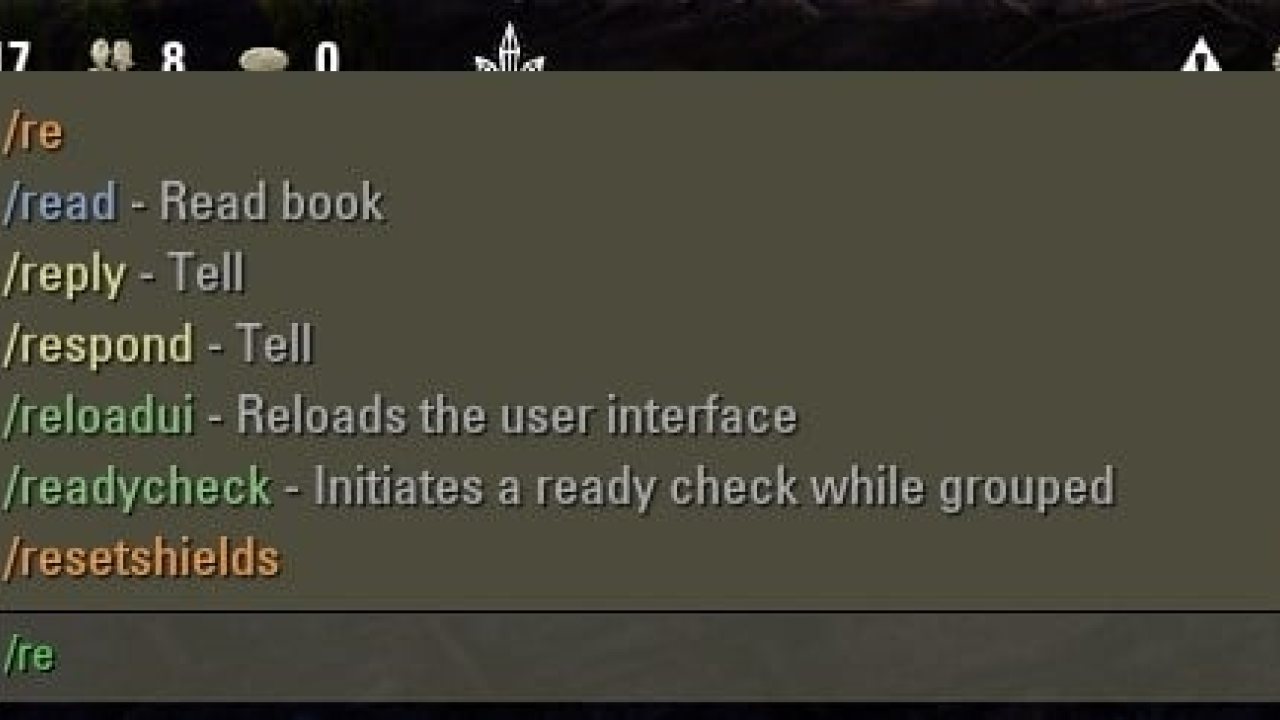
This library wraps around slash commands and adds many useful features.
This library wraps around slash commands and adds many useful features.
- Autocompletion for all slash commands
- Color coding and description for all built-in commands
- Functions for addon authors to register their own commands with a description
- Subcommands for structured menus
- Autocompletion for subcommands
- Custom autocompletion handlers for easy parameter selection
Quick Start
In order to use the library, the following line has to be included in the addon manifest:
A simple slash command is then registered with the following code:
You can also add multiple names for the same command
Alternatively you can also set the values on the Command object which is returned from Register.
In order to add a subcommand to the new command you can call RegisterSubCommand and set the properties like before.
If the base command has a callback, it will still get called if there is no matching subcommand alias. You can also register subcommands to a subcommand to create a tree of commands.
Autocompletion for your registered subcommands will automatically turn on as long as there is no custom autocompletion enabled. In order to disable the built in autocompletion for your subcommands you can either call command:SetAutoComplete(false) or set your own autocompletion.
There are two ways to make your own autocompletion.
Either you supply a numerically indexed table of strings to SetAutoComplete:
Or you create your own AutoCompleteProvider:
The key in the table returned from GetResultList will be used to determine which results should show up in the autocomplete box.
The values will be used as the label for the entries and also show up in the chat input box when you select an entry.
If you want to have a different label, you can use the GetResultFromLabel method to transform the displayed entry to something else on select.
The simplest way to handle it is to generate a lookup table in GetResultList and then just return lookup.
You can also generate the results on the fly, but keep in mind that GetResultList will be called on every change to the chat input, so it is usually better to cache the results.
API Reference
Will follow soon.
ABOUT THIS LISTING
This page describes LibSlashCommander by sirinsidiator. The description and screenshots are the author's own, imported from their listing on ESOUI on 24 October 2026: https://www.esoui.com/downloads/info1508-LibSlashCommander.html
Mythiq.net hosts no files for it. The download button goes straight to the release file on cdn.esoui.com, so you are downloading from the author's own host, not from a copy of ours.
The download count, rating and comments on this page start at zero and count Mythiq.net only. The source's own figures are not copied here — they measure a different site, and a number that cannot be checked against our own ledger is not worth printing.
Requirements
Game versions
11.0.0
10.3.5
API VERSION
Built for ESO API version 11.0.0, 10.3.5. After a patch the game marks add-ons built for the previous API as out of date; the "Allow out of date add-ons" checkbox in the add-on menu loads them anyway, and most work.
LIBRARIES
Many ESO add-ons depend on a shared library — LibAddonMenu-2.0 above all — which is installed separately, exactly like an add-on. A dependency that is missing shows as the add-on simply not appearing in the list.
CONSOLE
Add-ons are PC and Mac only. There is no way to load them on console.
Installation
1. Download the archive with the button on this page and unzip it.
2. Move the unzipped folder into your add-ons directory:
Windows — Documents\Elder Scrolls Online\live\AddOns
3. Start the game, and at the character select screen click Add-Ons.
4. Tick the add-on. If it is greyed out and marked out of date, tick "Allow out of date add-ons" at the top of the same panel.
5. Log in. Most add-ons need a /reloadui after they are first enabled.
UPDATING
Delete the old folder first. ESO loads everything it finds, and two copies of one add-on is the usual cause of "an add-on has produced an error" on login.
This release downloads from cdn.esoui.com, not from us, so
there is no checksum to compare against. Scan the archive before you unpack it.
Version history
v1.2.0Latest
8 May 2025 · 14 KB via cdn.esoui.com · 0 downloads Download
v1.2.0
- added console compatibility
- added Spanish, Japanese, Russian and Chinese translations
- removed remaining LibStub related code
- updated for Seasons of the Worm Cult Part 1
v1.1.0
- switched to semantic versioning
- changed internal structure
- updated for Harrowstorm
r6
- added new global for access without LibStub (LibStub is still used internally for now)
- updated for Elsweyr
r5
- fixed autocompletion showing up when browsing the command history
- removed min score requirement for autocomplete results (meaning it will always show 10 results, even when they are not a match)
Off-site on cdn.esoui.com —
no checksum, because we never held this file.
Link checked by our review team on 26 Oct 2026.
Tell us if something is wrong — a file that will not work, content taken from
someone else, or anything that looks unsafe. Reports go to our review team, not
to the author.
We use cookies to ensure that we give you the best experience on our website and improve your experience. By continuing to use this site you consent to such use of cookies.