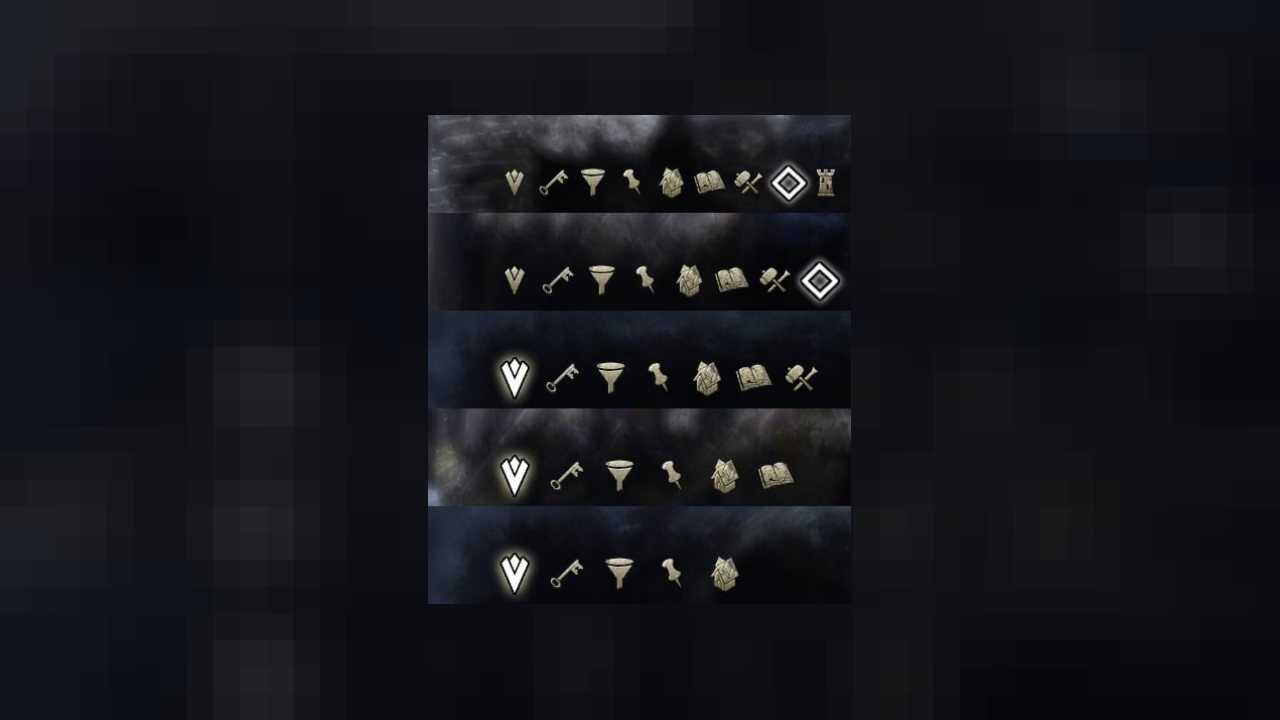
This library adjusts the size and padding of the World Map Info Tab on the right side of the screen.
Description
This library adjusts the size and padding of the World Map Info Tab on the right side of the screen.
With the "Homestead" update another built-in tab is added. Space is getting rare.
This library is working stand-alone, but every addon author adding a new tab to the World Map Info should include the library. Even if space is enough, if your addon is the only one; for you. You never know.
It works well up to 12 tabs (6 addons). Beyond that symbols getting a bit small, but should work up to 19 tabs. Once one ever have that much tabs I start thinking about a more complex modification.
Here you can see from default to Atlas, HarvestMap, WaypointIt, sidWarTools:
ABOUT THIS LISTING
This page describes LibWorldMapInfoTab by votan. The description and screenshots are the author's own, imported from their listing on ESOUI on 26 October 2026: https://www.esoui.com/downloads/info1568-LibWorldMapInfoTab.html
Mythiq.net hosts no files for it. The download button goes straight to the release file on cdn.esoui.com, so you are downloading from the author's own host, not from a copy of ours.
The download count, rating and comments on this page start at zero and count Mythiq.net only. The source's own figures are not copied here — they measure a different site, and a number that cannot be checked against our own ledger is not worth printing.
Requirements
Game versions
6.3.5
6.2.5
API VERSION
Built for ESO API version 6.3.5, 6.2.5. After a patch the game marks add-ons built for the previous API as out of date; the "Allow out of date add-ons" checkbox in the add-on menu loads them anyway, and most work.
LIBRARIES
Many ESO add-ons depend on a shared library — LibAddonMenu-2.0 above all — which is installed separately, exactly like an add-on. A dependency that is missing shows as the add-on simply not appearing in the list.
CONSOLE
Add-ons are PC and Mac only. There is no way to load them on console.
Installation
1. Download the archive with the button on this page and unzip it.
2. Move the unzipped folder into your add-ons directory:
Windows — Documents\Elder Scrolls Online\live\AddOns
3. Start the game, and at the character select screen click Add-Ons.
4. Tick the add-on. If it is greyed out and marked out of date, tick "Allow out of date add-ons" at the top of the same panel.
5. Log in. Most add-ons need a /reloadui after they are first enabled.
UPDATING
Delete the old folder first. ESO loads everything it finds, and two copies of one add-on is the usual cause of "an add-on has produced an error" on login.
This release downloads from cdn.esoui.com, not from us, so
there is no checksum to compare against. Scan the archive before you unpack it.
Version history
v1.2.7Latest
21 Feb 2021 · 2.5 KB via cdn.esoui.com · 1 download Download
version 1.2.7:
- Update to API 100034 "Flames of Ambition".
version 1.2.6:
- Update to API 100033 "Markarth".
version 1.2.5:
- Update to API 100032 "Stonethorn".
version 1.2.4:
- Update to API 100031 "Greymoor".
version 1.2.3:
- Update to API 100030 "Harrowstorm".
version 1.2.2:
- Update to API 100029 "Dragonhold".
version 1.2.1:
- Update to API 100028 "Scalebreaker".
version 1.2.0:
- API bump 100027 "Elsweyr".
- Accessible via LibWorldMapInfoTab.
- Use of LibStub is optional.
version 1.1.1:
- Update to API 100026 "Wrathstone".
version 1.0.7:
- API bump 100025 "Murkmire".
- Work without LibStub as well.
version 1.0.6:
- Update to API 100024 "Wolfhunter".
- New library load structure.
version 1.0.5:
- API bump 100023 "Summerset".
version 1.0.4:
- API bump for "Dragon Bones".
version 1.0.3:
- API bump for Clockwork City.
version 1.0.2:
- API bump for Horns of the Reach.
version 1.0.1:
- API bump for Morrowind.
version 1.0.0: initial
Off-site on cdn.esoui.com —
no checksum, because we never held this file.
Link checked by our review team on 26 Oct 2026.
Tell us if something is wrong — a file that will not work, content taken from
someone else, or anything that looks unsafe. Reports go to our review team, not
to the author.
We use cookies to ensure that we give you the best experience on our website and improve your experience. By continuing to use this site you consent to such use of cookies.