With Version 1.10 an Workaround for old instances of LibAddonMenu-2.0 (LAM) was removed from OSI, as it conflicted with future development of LAM.
Important Info for Addon Devs:
With Version 1.10 an Workaround for old instances of LibAddonMenu-2.0 (LAM) was removed from OSI, as it conflicted with future development of LAM.
If you experience problems since the last update, e.g. screen gets blurry or lua errors mentioning ZO_Screen manager, it means that one or more of your addons have old versions of LAM embedded.
You can find information on how to fix it in the esoui forum or in the comment section here.
Originally developed as private addon back when hiding group members with the Crown Crate trick became a thing and having some visual indicators for support players in the group helped me a lot to identify their position - hence the name SupportIcons. Since then I've added options to assign custom icons to individual players and unique icons for friends and members of my raidgroups.
Use the /osi command to open the addon settings, settings are saved account-wide. Don't forget to assign a keybinding in your controls settings to quickly toggle icon visibility.
DEPENDENCIES
LibAddonMenu-2.0
Odylon is currently not actively playing ESO. I, ExoY, will continue to maintain and develop the addon.
LATEST CHANGES
Version 1.7.0 (2022/06/16)
- API bump to High Isle Chapter
- added new companions ember and isolde (thanks @Anceane and @Kyzeragon )
- added armory and deconstructor (thanks @Kyzeragon )
GENERAL SETTINGS
- Update Interval: milliseconds, lower numbers lead to higher accuracy but require more performance
- Icon Size: width/height in pixels, if scaling is turned on, chosen size will apply around 10m in front of the camera
- Scaling: turn off if you want icons to have a fixed size
- Vertical Offset: distance from ground to icon bottom in meters
- Opacity: regulate the transparency of the icons
- Fade out close to Camera: use this setting to avoid icons close to the camera blocking your view
- Distance to start fading: distance from camera to icon in meters at which fading out starts
GROUP ICONS
Choose the default icons applied to group leader, tanks, healers, damage dealers, battleground team members and dead players.
- Show 3D Icon: toggle if 3d icons for a certain support role should be visible
- Prioritize over custom Icons: toggle if icons for a certain support role should always be visible
- Icon Color: adjust the color of the icon
- Texture: choose from a variety of icons provided by the game
ALLY ICONS
Choose the default icons applied to your companion, banker, merchant and fence. Options for allies of group members will be implemented in a future update.
- Show 3D Icon: toggle if 3d icons for a certain ally should be visible
- Icon Color: adjust the color of the icon
- Texture: choose from a variety of icons provided by the game
CUSTOM ICONS
To assign custom icons to individual players, right-click on that person in your group window, friends list or guild roster and select Assign Custom Icon. Right-click again to Change Custom Icon or Remove Custom Icon.
- Show custom 3D Icons: toggle if custom 3d icons should be visible
- Remember assigned Icons: toggle if assigned icons for indiviual players should be saved
- Clear Group: removes all assigned icons for your current group members
- Empty Cache: removes all previously cached icons for individual players
UNIQUE ICONS
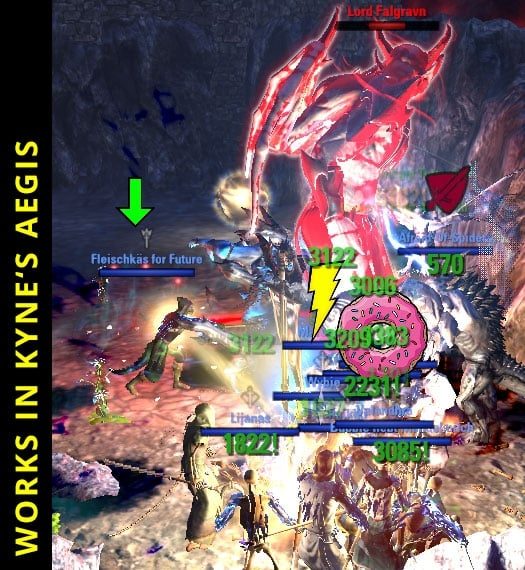
Unique icons are automatically assigned to the respective player and can not be removed. If you don't want to see them, simply turn off the option to show them.
Requires Hodor Reflexes to be active if you want to show the icons and animations provided by this addon.
- Show unique 3D Icons: toggle if unique 3d icons should be visible
- Use Hodor Reflexes Icons: allows the use of icons provided by Hodor Reflexes
- Use Hodor Reflexes Animations: allows the use of animations provided by Hodor Reflexes
- Prioritize Hodor Reflexes over unique Icons: toggle if icons and animations provided by Hodor Reflexes should be used instead of unique icons
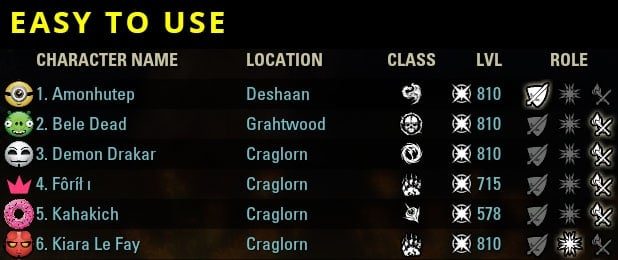
Screenshot by @RHOEncador showing off the unique icons he created for his raidgroup based on their discord avatars.
He reduced the icon size and vertical offset and added some transparency in the addon settings.
RAID ICONS BETA
Experimental feature allowing group leaders to force raid specific icons on group members. Hodor Reflexes is required to share the icon information amongst the group.
Make sure that your group is ready and everbody is online since icon information is only shared when an icon gets assigned. Once a group member disconnects or reloads the UI, raid icons are lost for this person. Group leaders can share already assigned icons again by clicking on Change Raid Icon and pressing the Save button.
- Show Raid Icons assigned by Group Lead: toggle if icons assigned by group leader should be accepted or ignored
- Activate Context Menu for Group Lead: activate this option to show the respective context menu for group leaders
WORLD MAP
Shows your group members icons on the World Map as well as on Votan's Minimap and Minimap by Fyrakin.
- Show custom Icons: toggle if custom icons for group members should be visible
- Show unique Icons: toggle if unique icons for group members should be visible
- Show Icons for dead Players: activate this option to show icons for dead players
- Show Role Icons: activate this option to show group role icons
- Icon Size: icons size in pixels
GROUP WINDOW
- Show custom Icons: toggle if custom icons for group members should be visible
- Show unique Icons: toggle if unique icons for group members should be visible
- Show Icons for dead Players: activate this option to show icons for dead players
- Show Role Icons: activate this option to show group role icons
- Show Crown Overlay: show a crown overlay for the group leader
CHAT WINDOW
Modifies incoming Chat Messages and adds icons to Display Names. Also shows icons for Character Names but the respective player needs to be on your Friends List, in your Group or one of your Guilds. Any changes to settings will only apply to upcoming Chat Messages.
- Show custom Icons: toggle if custom icons should be visible
- Show unique Icons: toggle if unique icons should be visible
- Icon Size: icons size in pixels, prints test message after changing the value
FRIENDS LIST & GUILD ROSTER
- Show custom Icons: toggle if custom icons should be visible
- Show unique Icons: toggle if unique icons should be visible
- Show Player Status Overlay: show player online status as overlay
MECHANIC ICONS DEVELOPER INFO
The addon provides a couple of exposed functions to allow other addon developers to assign their own specific icons on players to alert about certain raid mechanics. These icons are only visible while the player is in combat and will reset automatically once combat ends. You can check out Qcell's Rockgrove Helper, ExoYs Support Icon Extension or CrutchAlerts which make use of this feature.
Simple addon example:
WORLD POSITION ICONS DEVELOPER INFO
The addon provides a couple of exposed functions to allow other addon developers to place icons in the world. You can check out CrutchAlerts which makes use of this feature.
You can use this chat command to print your current world position:
Simple addon example:
CUSTOM ICON PACKS DEVELOPER INFO
The addon provides an exposed function to allow other addon developers to provide custom icon packs.
Simple addon example:
UNIQUE ICON PACKS DEVELOPER INFO
The addon provides an exposed function to allow other addon developers to provide unique icon packs.
Simple addon example:
CREDITS
Code for adding context menus is based on Drummerx04's and code65536's LGM - Lilith's Group Manager.
Halloween and superhero themed custom icons were created by hopstarter and are free for personal and non-commercial use.
Special thanks to DmExtra for creating the raid icons and to RaZor78 for donating gold.
Thanks to all my friends and raidbuddies who helped with testing this addon.
ABOUT THIS LISTING
This page describes OdySupportIcons - Group Role Icons & More by Odylon. The description and screenshots are the author's own, imported from their listing on ESOUI on 26 October 2026: https://www.esoui.com/downloads/info2834-OdySupportIcons-GroupRoleIconsMore.html
Mythiq.net hosts no files for it. The download button goes straight to the release file on cdn.esoui.com, so you are downloading from the author's own host, not from a copy of ours.
The download count, rating and comments on this page start at zero and count Mythiq.net only. The source's own figures are not copied here — they measure a different site, and a number that cannot be checked against our own ledger is not worth printing.
Media
Requirements
Game version
11.3.0
API VERSION
Built for ESO API version 11.3.0. After a patch the game marks add-ons built for the previous API as out of date; the "Allow out of date add-ons" checkbox in the add-on menu loads them anyway, and most work.
LIBRARIES
Many ESO add-ons depend on a shared library — LibAddonMenu-2.0 above all — which is installed separately, exactly like an add-on. A dependency that is missing shows as the add-on simply not appearing in the list.
CONSOLE
Add-ons are PC and Mac only. There is no way to load them on console.
Installation
1. Download the archive with the button on this page and unzip it.
2. Move the unzipped folder into your add-ons directory:
Windows — Documents\Elder Scrolls Online\live\AddOns
3. Start the game, and at the character select screen click Add-Ons.
4. Tick the add-on. If it is greyed out and marked out of date, tick "Allow out of date add-ons" at the top of the same panel.
5. Log in. Most add-ons need a /reloadui after they are first enabled.
UPDATING
Delete the old folder first. ESO loads everything it finds, and two copies of one add-on is the usual cause of "an add-on has produced an error" on login.
This release downloads from cdn.esoui.com, not from us, so
there is no checksum to compare against. Scan the archive before you unpack it.
Version history
v1.13.3Latest
23 Mar 2026 · 247 KB via cdn.esoui.com · 0 downloads Download
Version 1.13.3 (2026/03/22)
- API bumb to U49
- variable name fix
Version 1.13.2 (2025/07/22)
- API bumb to U46
- compatibility adjustments to avoid crashes due to new lib "LibCustomIcons"
Version 1.13.1 (2025/03/15)
- Hotfix for custom menu entries for guild members and friend list were displayed in group list
Version 1.13.0 (2025/03/15)
- API bump to U45
- Added "terilorne, dibellan freetrader", Thanks to Bonstrigmo
- Added LibCustomMenu as dependency
- fixed the "vote to kick groupmember" in dungeon was prevented by OSI
- API bump to U44
- Added U44 Companions (Tanlorin/ Zerith-var)
- Added Assistance (tzozabrar, eri, xyn) - Thanks to Bonstrigmo
Version 1.10.0 (2023/06/24)
- API bump to U38 (Necrom)
- Added Necrom Companions
- Removed SevenSin's Icon (his own request)
- Removed LAM workaround
- Changing handling of Gilandil to support more languages (at least german and english)
Version 1.9.0 (2023/04/07)
- API bump to U37
- added Zuqoth, Armory Advisor and Aderene, Fargrave Dregs Dealer
Version 1.8.0 (2023/02/05)
- API bump to Firesong DLC
- added option to display your own unique icon above your head (you need to be grouped and unique icons need to be activated for it to work)
- rearranged ally's in addon menu (helper first, then companion in order of release)
- fixed name mix up of companion names in addon menu
Version 1.7.0 (2022/06/16)
- API bump to High Isle Chapter
- added new companions ember and isolde (thanks @Anceane and @Kyzeragon )
- added armory and deconstructor (thanks @Kyzeragon )
Version 1.6.5 (2021/07/13)
- Fixed custom assigned icons not beeing saved
Version 1.6.4 (2021/07/05)
- Fixed rare bug with companion id's
- Added support for new crow assitents
- Added color to icon preview in options menu
- Added callbacks for world position icons
- Added callbacks for mechanic icons
Version 1.6.3 (2021/06/29)
- Added options to use different icons for Bastian and Mirri
- Added options to use different colors for players beeing resurrected
- Added exposed function to retrieve icon size defined by player
- Added exposed function to create unique icon packs
- Added exposed function to place icons in the world
Version 1.6.2 (2021/06/05)
- Added options to show icons for your allies
- Added exposed function to create custom icon packs
Version 1.6.1 (2021/05/22)
- Fixed a problem with iconpicker component
- Adjusted API version for the upcoming Blackwood DLC
- Added options to allow disabling 3d and 2d icons separately
- Added exposed functions to adjust/reset mechanic icon size
Version 1.6.0 (2021/05/13)
- Fixed icons in battlegrounds not showing sometimes
- Adjusted icon positioning to use bottom anchor
- Added option to show Hodor Reflexes icons and animations
- Added option to show icons for dead players, damage dealers and battleground team mates
- Added option to fade out icons close to the camera
- Added option to prioritize role icons over custom icons
- Added option to customize size for leader icon
- Added option to show icons in chat window
- Added option to show icons on world map
- Added options for icons in group window, friends list and guild roster
- Added more custom icons
- Added more unique icons
- Removed color option for custom icons
- Removed custom icons from role options
Version 1.5.6 (2021/04/10)
- Fixed icon-window staying visible after closing friends-list or guild-roster
- Possibly fixed LUA errors when using addons which include old versions of LibAddonMenu
- Added more unique icons
Version 1.5.5 (2021/03/18)
- Adjusted API version for Flames of Ambition DLC
- Changed priorization and layering of different icon types
- Unique and custom icons are now also shown in friends list and guild roster
- Added experimental feature allowing raidlead to force icons on groupmembers
- Added more unique icons
Off-site on cdn.esoui.com —
no checksum, because we never held this file.
Link checked by our review team on 26 Oct 2026.
Tell us if something is wrong — a file that will not work, content taken from
someone else, or anything that looks unsafe. Reports go to our review team, not
to the author.
We use cookies to ensure that we give you the best experience on our website and improve your experience. By continuing to use this site you consent to such use of cookies.