PSA: silvereyes is no longer playing ESO, so this addon is being maintained by the Postmaster team.
PSA: silvereyes is no longer playing ESO, so this addon is being maintained by the Postmaster team.
Mail addon to simplify receiving and sending mail. Full gamepad support for inbox features.
Fork of Zierk's Postmaster.
Description
Postmaster Mail provides several features to simplify mail handling.
- Suppressing confirmation dialogs for deleting mail
- Suppressing confirmation dialogs for returning mail to sender
- Auto-return / bounce mail messages beginning with any of the following prefixes:
- RTS
- BOUNCE
- RETURN
Note: prefix matching is not case-sensitive, so "rts" and "Bounce" work as well.
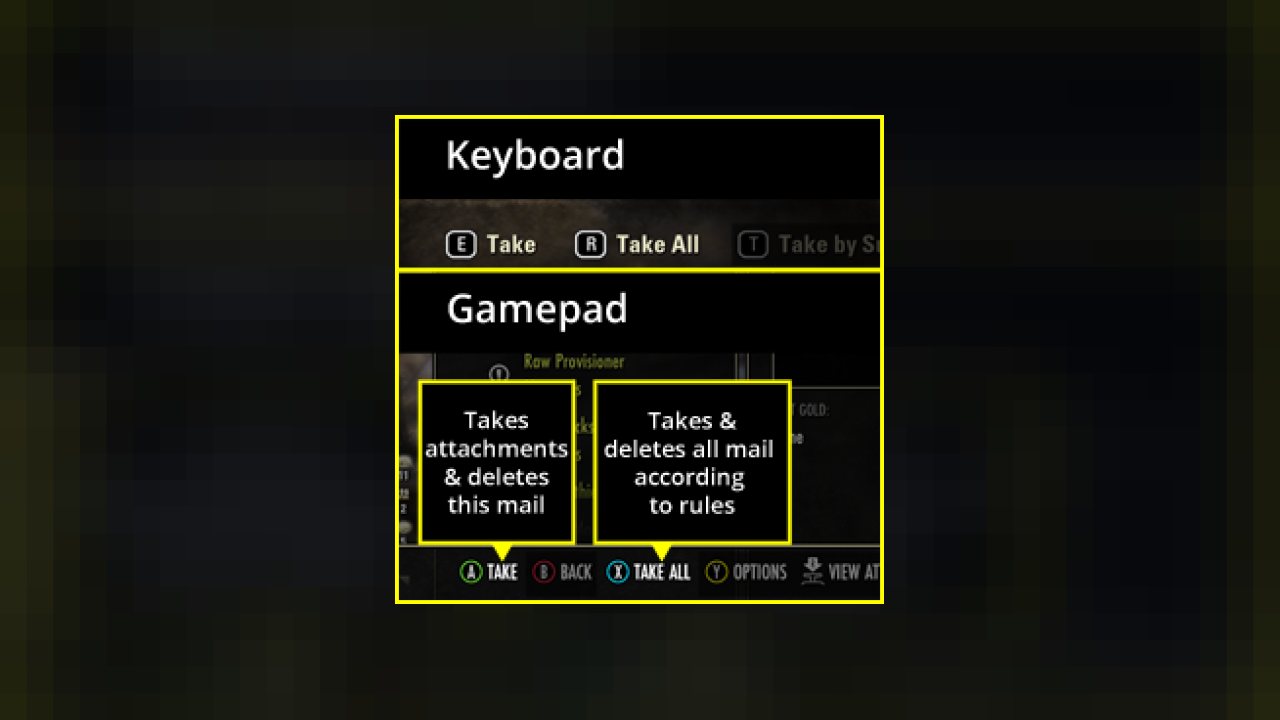
- New keybind "Take" that takes attachments and deletes mail with a single keypress
- New keybind "Take All" that takes and optionally deletes multiple messages based on configuration rules (see below)
- For mail without attachments, remaps the Delete keybind to use the primary action key/button
- Keyboard UI only: adds a right click menu to recall recent text values for the following Send Mail text boxes:
- To / Recipient
- Subject
- Message body text
Note for Dolgubon's Lazy Writ Crafter users
Dolgobon's Lazy Writ Crafter has a feature to automatically take hireling mail attachments without any keypress. It is not Postmaster that does this. If you want to disable that feature, go to Settings > Addons > Lazy Writ Crafter > Time Savers > Hireling Mail Actions and set it to "nothing".
Dependencies
You must install the following libraries separately from this addon in order for it to work. I highly recommend using the Minion addon manager to simplify this process.
- For Send Mail features on keyboard: LibCustomMenu
Settings
General Options
- Automatic mail return
- Suppress delete confirmation prompts
- Suppress return to sender confirmation prompts
Keyboard Keybind Changes
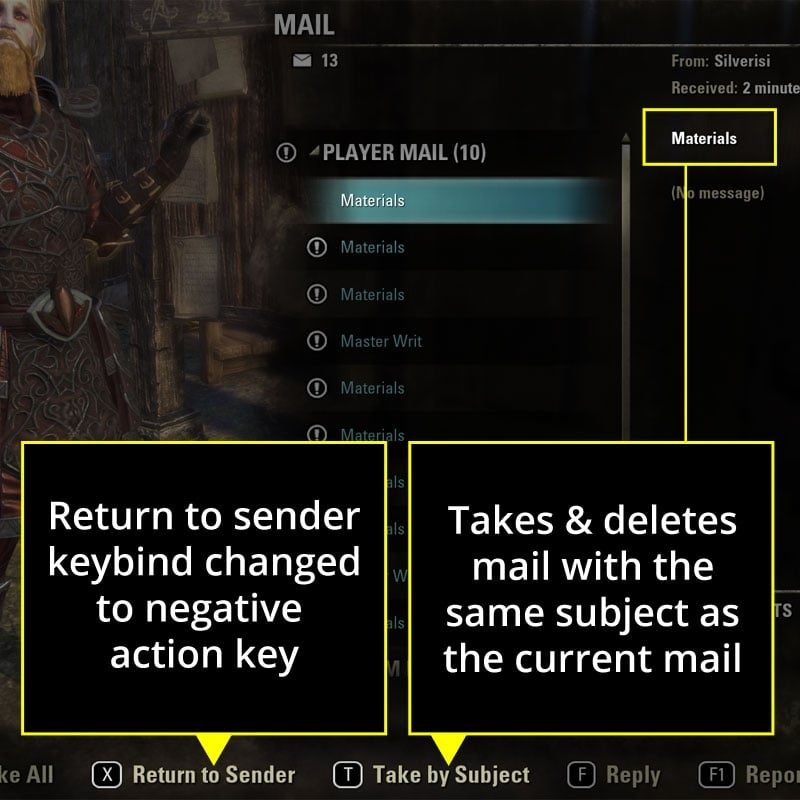
- Primary (E): Take - Takes attachments and deletes the mail after looting.
- Primary (E): Delete (empty messages) - alternating Take and Delete uses the same key, for ease of use.
- Secondary (R): Take All takes and/or deletes all mail according to configured options
- Tertiary (F): Reply - opens the send mail screen and fills in the To: and Subject: fields. This is the same as the base-game default.
- Negative (X): Return to Sender or Cancel a Take All operation.
- Quaternery (T): Take by Subject or Take by Sender, if configured.
Gamepad Keybind Changes
- Primary (A): Take - Takes attachments and deletes the mail after looting.
- Primary (A): Delete (empty messages) - alternating Take and Delete doesn't require finger gymnastics
- Secondary (X): Take All takes and/or deletes all mail according to configured options
- Cancel Take All (B)
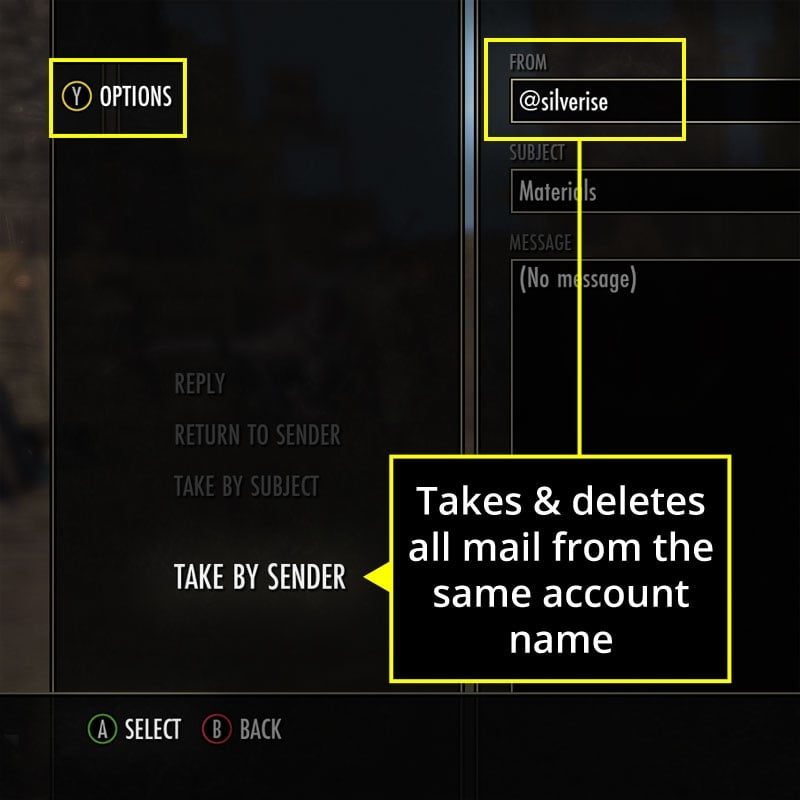
- Options (Y):
- Take by Subject
- Take by Sender
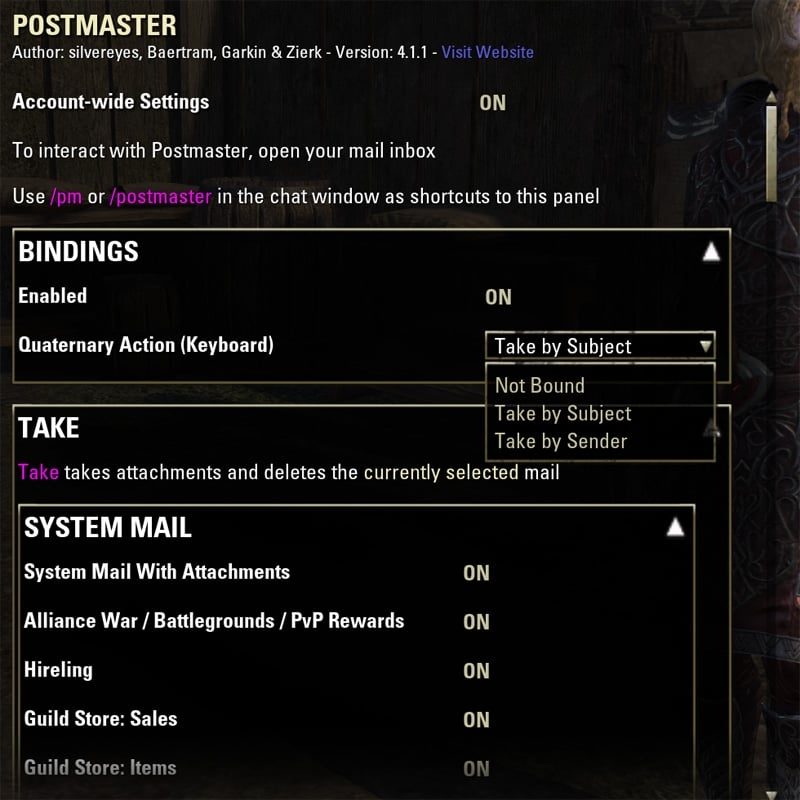
Bindings Options
- Enable / Disable custom keybind mappings. Disabling will revert the Primary, Secondary and Negative keybinds to their base-game actions.
- Quaternery Action (Keyboard): Choose what action the T key performs.
Take All Options
- Reserved Slots - will leave the given number of backpack slots open
- System Mail
- Alliance War / PvP Rewards
- Hirelings
- Guild Store
- Undaunted
- All other system attachments
- System mail without attachments
- Player Mail
- With attachments
- Returned mail
- Player mail without attachments
- C.O.D.
- C.O.D. Mail - Pays and takes C.O.D. attachments that you have enough gold for.
- C.O.D. Limit - Only mail with a C.O.D. amount less than this value will be paid. Set to zero (0) for no limit.
Take By Subject Options
- Delete (if you disable this option, Take by Subject will only take attachments, not delete)
Take By Sender Options
- Delete (if you disable this option, Take by Subject will only take attachments, not delete)
Chat Messages Options
The following options customize the way the summary messages sent to the chat box appear.
- Use Default System Message Color: no special coloring. Just the default yellow.
- Chat Message Color: custom color messages
- Prefix
- Use Short Prefix: PM instead of Postmaster will prefix chat messages
- Use Postmaster 3.8 Colored Prefix: In version 3.8, before color was customizable, the prefix looked like this: PM
- Loot History
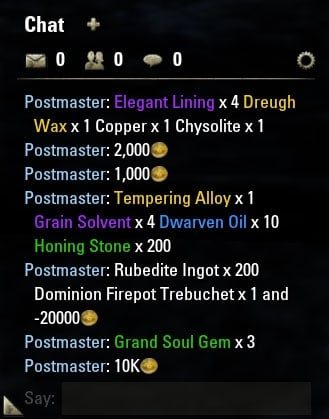
- Loot History Summary: Enable/disable printing a summary of attachments taken by Postmaster in the chat box.
- Minimum Loot Quality: Only items with quality equal to or greater than this will be shown in the summary
- Show Loot Icons: Enable/disable showing icons of the items in the summary next to their item links
- Show Uncollected Sets Icons: If enabled, an icon will appear next to any item in the summary if it is not yet in your item sets sticker book.
- Icon Size: Increase or decrease the dimensions of icons in the summary
- Show Loot Trait Names: If enabled, gear with special traits (e.g. Divines, Training, etc.) will have the name of the trait displayed next to the item link in the summary.
- Hide Quantity for Single Items: excludes the quantity multiplier text (i.e. x1) for items that only had a single item of that type collected from attachments.
- Combine Repeated Items: If the same kind of item was picked up by Postmaster from multiple mail messages, the total number of items from all messages will be reported once. Otherwise, it will be reported separately for each message.
- Sort Order: determines how items in the summary are sorted.
- List Delimiter: determines what text separates item links in the list.
- Link Style: Either with or without square brackets around the link.
- Messages Count: When enabled, display how many messages were taken by Postmaster.
Send Mail Options
- Save Recipient: whether or not to enable the recent recipients right-click context menu.
- Clear Saved Recipients: clears recent history of saved recipients.
- Save Subject: whether or not to enable the recent subjects right-click context menu.
- Clear Saved Subjects: clears recent history of saved subjects.
- Save Messages: whether or not to enable the recent saved messages right-click context menu.
- Clear Saved Messages: clears recent history of saved messages.
- Recent Messages Menu Character Width: sets the maximum number of characters to display in the right-click context menu for saved messages, since they can be quite long.
- Number of Recent Entries to Save: sets how many recent recipients, subjects or messages will be retained for display in the right-click context menus.
Compatibility
- Mostly translated to German, French, Japanese and Russian. Very special thanks to Scootworks, Llwydd and k0ta0uchi!
- Wykkyd Mailbox
- MailR - Revised
- MailBuddy
Known Issues
- A few of the warning messages still need translations, and some of the other translations are a bit rough. Any improvements to the translations would be welcome, if you want to send them on.
Future Feature Ideas
- Master Merchant integration for C.O.D. mail - don't pay C.O.D. missing MM data or that's a bad deal
Feedback
- If you like this addon, please click Favorite on the right, share with friends, and maybe leave a nice comment in the Comments tab above. I'm much more likely to continue development if I see the community appreciates it.
- If you have new feature ideas, please submit them at the Features button on the right
- If you find bugs, please submit reports using the Bugs button on the right
- When submitting bug reports, please do your best ahead of time to determine that the problem actually is with this addon. Disable other addons and make a list of steps to reproduce the issue.
ABOUT THIS LISTING
This page describes Postmaster Mail by silvereyes. The description and screenshots are the author's own, imported from their listing on ESOUI on 26 October 2026: https://www.esoui.com/downloads/info850-PostmasterMail.html
Mythiq.net hosts no files for it. The download button goes straight to the release file on cdn.esoui.com, so you are downloading from the author's own host, not from a copy of ours.
The download count, rating and comments on this page start at zero and count Mythiq.net only. The source's own figures are not copied here — they measure a different site, and a number that cannot be checked against our own ledger is not worth printing.
Media
Requirements
Game versions
10.0.0
9.3.0
9.2.5
9.1.5
9.0.0
8.3.5
API VERSION
Built for ESO API version 10.0.0, 9.3.0, 9.2.5, 9.1.5, 9.0.0. After a patch the game marks add-ons built for the previous API as out of date; the "Allow out of date add-ons" checkbox in the add-on menu loads them anyway, and most work.
LIBRARIES
Many ESO add-ons depend on a shared library — LibAddonMenu-2.0 above all — which is installed separately, exactly like an add-on. A dependency that is missing shows as the add-on simply not appearing in the list.
CONSOLE
Add-ons are PC and Mac only. There is no way to load them on console.
Installation
1. Download the archive with the button on this page and unzip it.
2. Move the unzipped folder into your add-ons directory:
Windows — Documents\Elder Scrolls Online\live\AddOns
3. Start the game, and at the character select screen click Add-Ons.
4. Tick the add-on. If it is greyed out and marked out of date, tick "Allow out of date add-ons" at the top of the same panel.
5. Log in. Most add-ons need a /reloadui after they are first enabled.
UPDATING
Delete the old folder first. ESO loads everything it finds, and two copies of one add-on is the usual cause of "an add-on has produced an error" on login.
This release downloads from cdn.esoui.com, not from us, so
there is no checksum to compare against. Scan the archive before you unpack it.
Version history
v4.1.8Latest
20 Jun 2024 · 73 KB via cdn.esoui.com · 0 downloads Download
PSA: silvereyes is no longer playing ESO, so this addon is being maintained by the Postmaster team.
Version 4.1.8 @PacificOshie 2024-06-19
- Bugfix: Fixed the delete exception for keyboard. Now using DeleteMail because ConfirmDelete is obsolete.
- Updated api version to 101042.
Version 4.1.7 @PacificOshie 2024-02-24
- Bugfix: Fixed the "unread mail" count when automatically returning mail (RTS). Thanks tralce and DakJaniels.
- Bugfix: Fixed a nil reference exception when logging out of the game. Thanks Baertram and DakJaniels.
- Updated version to 101040.
Version 4.1.6 @PacificOshie 2023-08-21
- No code changes. Updated version to 101039.
Version 4.1.5 @PacificOshie
- No code changes. Updated version to include Scribes of Fate 101037 and Necrom 101038.
Version 4.1.4 @PacificOshie
BUGFIXES
- Bugfix: Fixed an error with showing the context menu, such as right-click in the SendMail To field.
Version 4.1.3 @PacificOshie
BUGFIXES
- Bugfix: Fixed an error with TakeAndDelete and TakeAll keybinds when there is no mail open yet.
Version 4.1.2 @PacificOshie
- This version is compatible with both PTS (Scribes of Fate) and live (Firesong)
- No code changes. Verified compatibility and updated the version so it's no longer out of date.
Version 4.1.1
- This version is compatible with both PTS (Deadlands) and live (Waking Flame)
- Reverted Dolgubon's Lazy Writ Crafter integration changes from version 4.0.0
- Lazy Writ Crafter > TimeSavers > Hireling Mail Actions will no longer be set automatically to "nothing" whenever the Postmaster > Take All > System Mail > Hireling setting is enabled.
- Dolbugon fixed the issue with not being able to disable that feature. Please upgrade to the latest version of Lazy Writ Crafter, if you have it installed.
Version 4.1.0
NEW FEATURES
- This version is compatible with both PTS (Deadlands) and live (Waking Flame)
- Added missing Baertram author credit in settings panel
- Special handling for mail containing only unique item attachments that conflict with items in your bag
+ Will now display a grey attachments header "ATTACHMENTS (UNIQUE)"
+ Will disable take and take all keybinds for those messages once opened the first time in your play session.
BUGFIXES
- Bugfix: fixed tracking code for unique items like treasure maps in your bag
Version 4.0.0
NEW FEATURES
- Update 32 Deadlands compatibility. This version is compatible with both PTS (Deadlands) and live (Waking Flame)
- Gamepad compatibility, at long last!
- New Bindings settings
+ Postmaster keybinds (Take / Take All) can now be disabled
+ New customizable quaternary action keybind. Options include:
* Take by Subject: takes all messages matching the subject of the current message.
* Take by Sender: takes all messages matching the sender of the current message.
- Send Mail saving features (keyboard only, require LibCustomMenu to be installed)
+ Right clicking send mail fields allows you to select from recent values to quickly fill in that field.
+ Restore recent recipients in the To field
+ Restore recent subjects
+ Restore recent mail message text
+ History can be cleared in the Postmaster > Send Mail Settings
+ Individual saved values can be removed directly from the right-click menu.
- Russian language support. Just Google Translate for now, but please feel free to send improved translations to me, and I will incorporate them and give you credit.
- Improved Dolgubon's Writ Crafter compatibility.
+ Automatically sets the new Lazy Writ Crafter > TimeSavers > Hireling Mail Actions option to "Nothing" whenever the Postmaster > Take All > System Mail > Hireling setting is enabled.
IMPROVEMENTS
- Removed code for "reply" keybind now that the base game includes it.
- Removed custom PostHook method. Now uses SecurePostHook from the API.
- Refactored code to use object-oriented programming to improve legibility.
- Removed unnecessary prehook to KEYBIND_STRIP:SetUpButton()
BUGFIXES
Off-site on cdn.esoui.com —
no checksum, because we never held this file.
Link checked by our review team on 26 Oct 2026.
Tell us if something is wrong — a file that will not work, content taken from
someone else, or anything that looks unsafe. Reports go to our review team, not
to the author.
We use cookies to ensure that we give you the best experience on our website and improve your experience. By continuing to use this site you consent to such use of cookies.