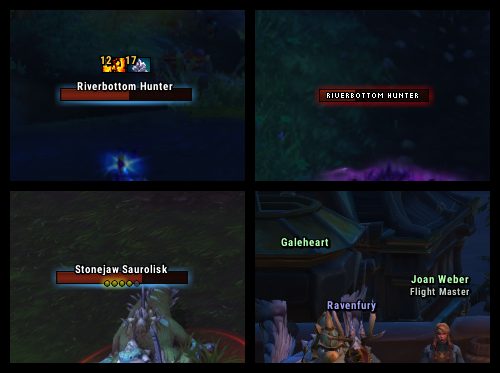
Prettier nameplates,
Configurable through interface options (/knp).
Frequently Asked Questions
0. Why do friendly nameplates look different in instances?
Blizzard has blocked addons from modifying friendly nameplates in instances as of 7.2 (read their statement here). We can't do anything about this.
1. Only the nameplate of my target shows up!
That's because of the default interface option under Esc > Interface > Names > "Always show nameplates".
When that option is NOT checked (the default), only the nameplate of your current target will be shown while out of combat. When it IS checked, nameplates will always be shown, depending on other CVars (FAQ 1a, for instance) and settings in /knp.
1a. Friendly NPCs don't have any nameplates!
This is due to a CVar Blizzard added in 7.1. There's a checkbox for it under /knp > CVars > "Always show friendly NPCs' nameplates"
2. Some nameplates still aren't showing up!
They're probably disabled. The game's default options for nameplate visibility are under Esc > Interface > Names. The default keybinds for them are V, Ctrl+V, and Shift+V.
Alternatively, if you're in a large raid or another situation where many nameplates are visible then, as of Legion, the maximum number of visible nameplates is limited to 40. Addons can't change this.
See also: FAQ 7.
3. Why are nameplates fading and changing size as they move?
This is vanilla nameplate behaviour inherited by KNP as of 2.19. Check the "allow Kui Nameplates to modify CVars" option under /knp > CVars, then check "disable scaling" and "disable fading."
KNP also now inherits the game's line-of-sight alpha modifier by default. To disable that, set "line-of-sight alpha" under /knp > CVars to 1.
4. Why is there a nameplate under my character?
That's the personal nameplate which was added to the game in Legion. Here's how to disable it. By default, it only shows while you're in combat, or when you otherwise receive damage or healing. There are some options for this behaviour under /knp > CVars.
6. Nameplates keep appearing/disappearing after I enter/leave combat!
If nameplates are being shown upon engaging a boss, this is done by boss mods like BigWigs or DBM so that they can show you extra information on them. You can disable this by unchecking /knp > boss mods > "allow boss mods to control visibility..."
Otherwise, make sure the "combat action" drop-downs at the top of /knp > General are set to "do nothing". If that doesn't fix it, make sure "always show nameplates" is checked (see FAQ 1). If it still happens, then another addon is doing it.
7. Why don't unattackable enemy players (e.g. in sanctuaries) have nameplates?
The game doesn't render nameplates for unattackable enemy players. Addons can't change this. The in-world floating names aren't nameplates and can't be modified by add-ons (except the font).
8. Why doesn't [ability] show in the aura frame?
Note that only buffs on friendlies and debuffs on enemies will be shown by the auras module at the moment - you can't currently configure it to show debuffs on friends or buffs on enemies (not counting those shown by the boss mods module).
With that out of the way, the ability might not be included in the default filter. You can use KuiSpellListConfig to change which spells are shown.
ABOUT THIS LISTING
This page describes KuiNameplates by Kesavaa. The description and screenshots are the author's own, imported from their listing on CurseForge on 3 October 2026: https://www.curseforge.com/wow/addons/kuinameplates
Mythiq.net hosts no files for it. The download button goes straight to the release file on edge.forgecdn.net, so you are downloading from the author's own host, not from a copy of ours.
The download count, rating and comments on this page start at zero and count Mythiq.net only. The source's own figures are not copied here — they measure a different site, and a number that cannot be checked against our own ledger is not worth printing.
Media
BFA 2.16.2
Requirements
Game version
1.15.1
GAME FLAVOUR
This is a Classic build. Retail and Classic run different interface APIs, and an addon built for one throws Lua errors on the other — check you are installing into the right client folder.
INTERFACE VERSION
Built against game version 1.15.1. After a patch, an addon that has not been updated is flagged out of date; most keep working, and the "Load out of date AddOns" checkbox on the character screen lets you try.
DEPENDENCIES
Some addons need a separate library addon (Ace3, LibStub and friends) that is not bundled. If the addon does not appear in the list in game, a missing dependency is the usual reason.
Installation
1. Quit World of Warcraft completely. The game reads the AddOns folder at launch and will overwrite settings for an addon added while it is running.
2. Download the archive with the button on this page and unzip it.
3. Move the folder — the one with the .toc file in it, not the zip's wrapper folder — into:
World of Warcraft\_classic_era_\Interface\AddOns (or _classic_ for the current Classic expansion)
4. Start the game. On the character selection screen, click AddOns and check that it is listed and enabled.
IF IT DOES NOT APPEAR
Nine times out of ten the folder is nested one level too deep. Interface/AddOns/Thing/Thing/Thing.toc will not load; Interface/AddOns/Thing/Thing.toc will.
UPDATING
Delete the old folder before unzipping the new one. Unzipping over the top leaves files behind that the new version no longer expects.
This release downloads from edge.forgecdn.net, not from us, so
there is no checksum to compare against. Scan the archive before you unpack it.
Tell us if something is wrong — a file that will not work, content taken from
someone else, or anything that looks unsafe. Reports go to our review team, not
to the author.
We use cookies to ensure that we give you the best experience on our website and improve your experience. By continuing to use this site you consent to such use of cookies.