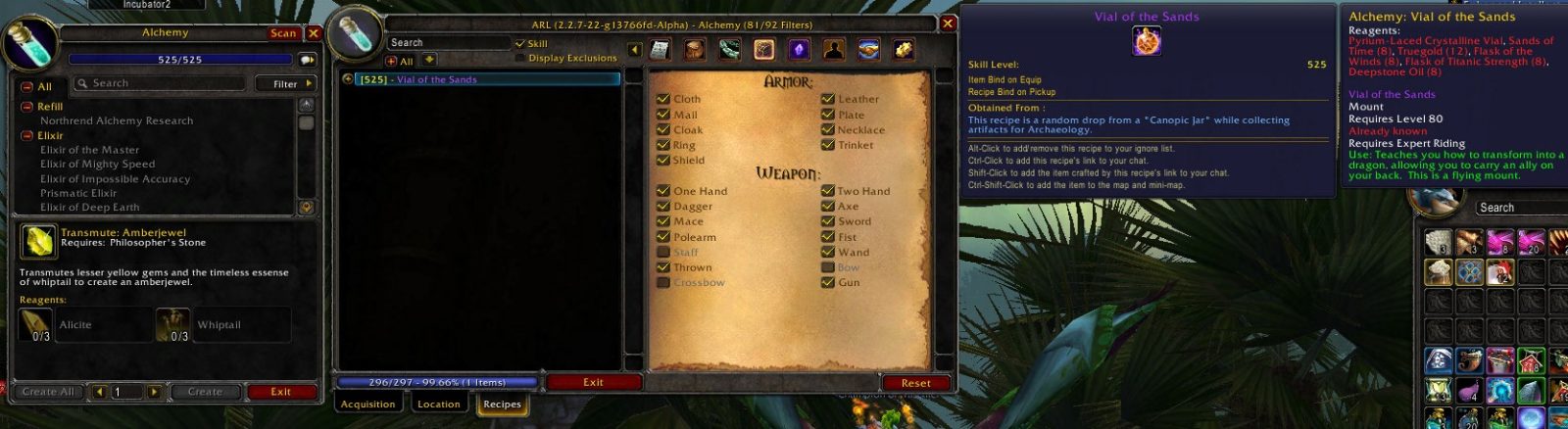
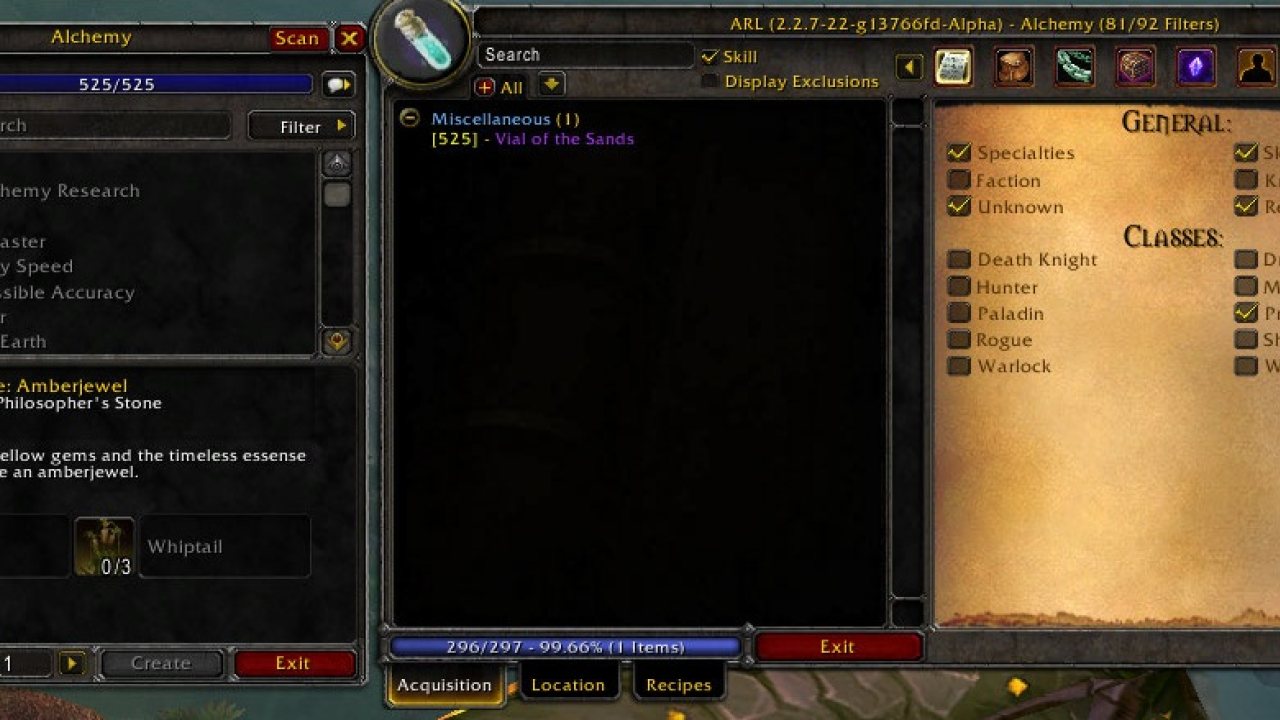
Ackis Recipe List is an addon which will scan your trade skills and provide information on how to obtain recipes. It works fo...
What it does
Ackis Recipe List is an AddOn which will scan your trade skills and provide information on how to obtain recipes.
French (frFR) - Ackis Recipe List est un addon qui analyse vos métiers et fournit des informations sur la façon d'obtenir les recettes manquantes.
German (deDE) - Ackis Recipelist ist ein AddOn, das deine Berufe durchsucht und dir mitteilt, wo du fehlende Rezepte bekommst.
Korean (koKR) - Ackis Recipe List|1은;는; 당신의 전문 기술들을 훑어서 제조법들을 얻는 방법에 대한 정보를 제공할 애드온입니다. 룬 벼리기를 포함하여 모든 전문 기술들에 작용합니다.
Spanish (esES) - Ackis Recipe List es un addon que escanea tus habilidades comerciales y provee información de cómo obtener las recetas.
Simplified Chinese (zhCN) - 扫描并告知如何获取缺失配方的详细商业技能信息插件。
Traditional Chinese (zhTW) - 掃描並告知如何獲取缺失配方的詳細商業技能訊息插件。
Brazilian Portuguese (ptBR) - Ackis Recipe List é um addon que irá escanear suas profissões e lhe provirá informações de como obter receitas.
Latin America Spanish (esMX) - Ackis Recipe List es un addon que escanea tus habilidades comerciales y provee información de cómo obtener las recetas.
Italian (itIT) - Ackis Recipe List è un addon che scansiona le tue competenze nelle professioni e fornisce informazioni su come ottenere ricette.
Russian (ruRU) - Сканирует ваши профессии и составляет список отсутствующих рецептов. Также отображает информацию о способах их приобретения.
Profession AddOns
Due to the increasing data size and memory usage with each WoW expansion, the professions have been split into their own AddOns; you need only download the ones you'll be using. Each installed and enabled profession AddOn will load whenever it's first accessed by the ARL core.
The individual profession AddOns can be found here:
- Alchemy
- Blacksmithing
- Cooking
- Enchanting
- Engineering
- Inscription
- Jewelcrafting
- Leatherworking
- Mining
- Tailoring
Note that Ackis Recipe List will not work without the AddOn for the profession you are trying to scan. If you attempt to scan a profession that is not installed, you will be informed.
Where to get it
- WoW Ace - Alpha Quality
- Curse - Stable release
- WoWInterface - Stable release - Quite out of date
Do this first
Read the documentation located at these locations:
- Bug Reporting and Feature Requesting
- In-game Documentation
How to get it to work
You open up a trade skill window (ie: Enchanting) and click on the Scan button which is attached to the trade skill window. Results will be printed out to the chat frame, or into a separate window depending on preference.
Command Line
Ackis Recipe List has a GUI to change parameters. Type /arl to open up the GUI. Acceptable commands include:
- Opens up the about panel, listing information about the mod:
/arl about
- Opens up the sorting options:
/arl sort
or
/arl sorting
- Scan a profession:
/arl scan profession
- Opens up in-game documentation regarding ARL:
/arl documentation
- Opens up display options:
/arl display
- Opens up profile options:
/arl profile
- Prints out a list of all the profession tradeskill links:
/arl tradelinks
Clicking
Ackis Recipe List will behave differently depending on which modifying keys you use to click.
Scan Button
This is the functionality that occurs when you are clicking the scan button.
- Normal Click
- Performs a scan of the current tradeskill displaying recipes in a new window.
- Shift Click
- Generates a text dumping of the current tradeskill in a format (CSV, XML, BBC) specified by the user.
- Alt Click
- Removes all waypoints on the World Map and Mini-map generated by ARL.
- Ctrl Click
- Provides development code for use when updating trainers, vendors, etc in the recipe database.
Recipe
This is the functionality that occurs when you click on a recipe.
- Normal Click
- Expands or contracts the recipe acquire information.
- Shift Click
- Generates an item link of the item that the recipe will make into your default chat box.
- Ctrl Click
- Generates a spell link for the recipe you clicked.
- Alt Click
- Adds or removes a recipe from the exclusion list.
- Ctrl-Shift Click
- Adds the specific recipe acquire methods to the World Map and Mini-map.
Contacting the Authors
Please use the bug reporting feature to submit bug reports. Do not contact us via Curse PM. Do not submit bug reports in comments.
IRC
Feel free to join us on irc at [[irc://irc.freenode.net:6667|Freenode]] in the channel #arl
Freenode Webchat
Freenode has come up with their alternative to Mibbit. Webchat
Known Issues
- When gaining a reputation level recipes for that faction will still appear in red when doing a scan.
- Recipe acquire information is slightly inaccurate. We are updating recipes daily as information is identified. If you find something inaccurate or wrong, submit a ticket here and we will get it updated.
Feature Requests/Bug Reporting
Read the Bug Reporting and Feature Requesting information before submitted a bug report or feature request. Posting reports in the comments is not the place to do so. Ackis had to turn off the comments at Curse.com because of constant bug reports and feature requests. Comments are for questions on how to use the mod, or you can see the thread on WoW Ace. Please follow these small little instructions to make our lives easier. The easier you make development for Ackis Recipe List, the more time we will have to develop other addons.
Bug Reports
Please use the WoW Ace tracker to file bug reports. Posting bugs in the comments is not the place to do it.
Feature Request
Please use the WoW Ace tracker to add suggestions and feature requests. Not all suggestions will be accepted: there are many people who use this addon, each with separate views. We will, however, try to make it as user friendly as possible...but when a decision is made please accept it.
Integration
Ackis Recipe List strives to integrate with existing trade skill mods out there. If you have a request for integration, please submit a feature request at WoW Ace. We make no promises to implement the feature at all. There is a limited API documented to interface with the ARL database. If you are a developer and would like more functions, please contact us on IRC. Currently, the mod works with:
- Advanced Trade Skill Window - Screenshot 1
- Skillet
- Mr Trader
- Gnome Works
- Professions Vault
If your mod should be on this list, please submit a ticket.
Detailed Documentation
- API
- Bug Reporting and Feature Requestiing
- In-game Documentation
- Localization
- YouTube Videos and External Reviews
Acknowledgments
- Ideas for the mod came from FGTradeLacker (original mod no longer updated, however someone has taken over updating the recipes for it).
- Ace community for listening to my questions on the IRC channel and helping me out, and fellow mod authors for developing such great add-ons.
- Please see the X-Credits field for more Acknowledgments. Any code snippets borrowed or inspired from are credited in the code files. The main display also lists all people who are in X-Credits.
- Everyone who has helped me with localizations.
Wiki
WoWPedia
ABOUT THIS LISTING
This page describes Ackis Recipe List by Torhal. The description and screenshots are the author's own, imported from their listing on CurseForge on 26 October 2026: https://www.curseforge.com/wow/addons/arl
Mythiq.net hosts no files for it. The download button goes straight to the release file on edge.forgecdn.net, so you are downloading from the author's own host, not from a copy of ours.
The download count, rating and comments on this page start at zero and count Mythiq.net only. The source's own figures are not copied here — they measure a different site, and a number that cannot be checked against our own ledger is not worth printing.
Media
ARL-ItemTypes.jpg
ARL-MainScan.jpg
Requirements
Game version
9.2.0
GAME FLAVOUR
This is a retail (modern World of Warcraft) build. It will not work in the Classic clients, which run a different interface API.
INTERFACE VERSION
Built against game version 9.2.0. After a patch, an addon that has not been updated is flagged out of date; most keep working, and the "Load out of date AddOns" checkbox on the character screen lets you try.
DEPENDENCIES
Some addons need a separate library addon (Ace3, LibStub and friends) that is not bundled. If the addon does not appear in the list in game, a missing dependency is the usual reason.
Installation
1. Quit World of Warcraft completely. The game reads the AddOns folder at launch and will overwrite settings for an addon added while it is running.
2. Download the archive with the button on this page and unzip it.
3. Move the folder — the one with the .toc file in it, not the zip's wrapper folder — into:
World of Warcraft\_retail_\Interface\AddOns
4. Start the game. On the character selection screen, click AddOns and check that it is listed and enabled.
IF IT DOES NOT APPEAR
Nine times out of ten the folder is nested one level too deep. Interface/AddOns/Thing/Thing/Thing.toc will not load; Interface/AddOns/Thing/Thing.toc will.
UPDATING
Delete the old folder before unzipping the new one. Unzipping over the top leaves files behind that the new version no longer expects.
This release downloads from edge.forgecdn.net, not from us, so
there is no checksum to compare against. Scan the archive before you unpack it.
Version history
v9.2.0-nolibLatest
23 Oct 2022 · 429 KB via edge.forgecdn.net · 0 downloads Download
Off-site on edge.forgecdn.net —
no checksum, because we never held this file.
Link checked by our review team on 26 Oct 2026.
Tell us if something is wrong — a file that will not work, content taken from
someone else, or anything that looks unsafe. Reports go to our review team, not
to the author.
We use cookies to ensure that we give you the best experience on our website and improve your experience. By continuing to use this site you consent to such use of cookies.