Adds an addon manager in game via the 'Addons' menu. Special support for multi-part addons. Based on rMCP by Rophy.
In Memoriam
A special thank you to Sylvanaar for all he gave to this community. Please reach out to me directly if you are interested in becoming a contributor to this project. I don't play WoW but I know the impact Sylvanaar had on this community, his contributions deserve to go on for as long as this game exists.
Stop logging out of the game just to change your addons!
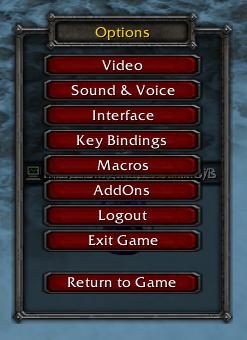
ACP adds the "Addons" button to the game's main menu (The one you get when you hit ESC). It allows you to manage your addons in game, with an interface which looks similar to the blizzard addon manager. ACP will help you deal with the "Clutter" that multi-part addons and libraries introduce by displaying your addons in logical arrangements. ACP has many features to make your addon list easy to manage, help you with missing libraries, and provide you with detailed information about each addon.
Slash Commands:
/acp - show and hide the ACP window
/acp addset - enable an addon set
/acp removeset - disable an addon set
/acp disableall - disable all addons (except protected and ACP)
/acp default - restore the enabled addons to what was enabled last time the UI was loaded
Icon meaning:
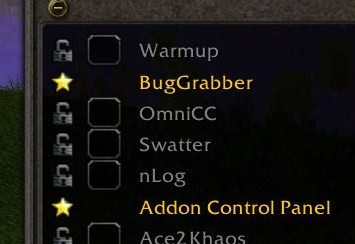
Star: Protected addon - this addon will not be disabled when you choose disable all, also if it is not enabled when you log into the game, it will be re-enabled and you will be prompted to reload the ui.
Dk Grey Open Lock: Addon does not supply compatibility information
Lt Grey Closed Lock: Addon has provided compatibility information
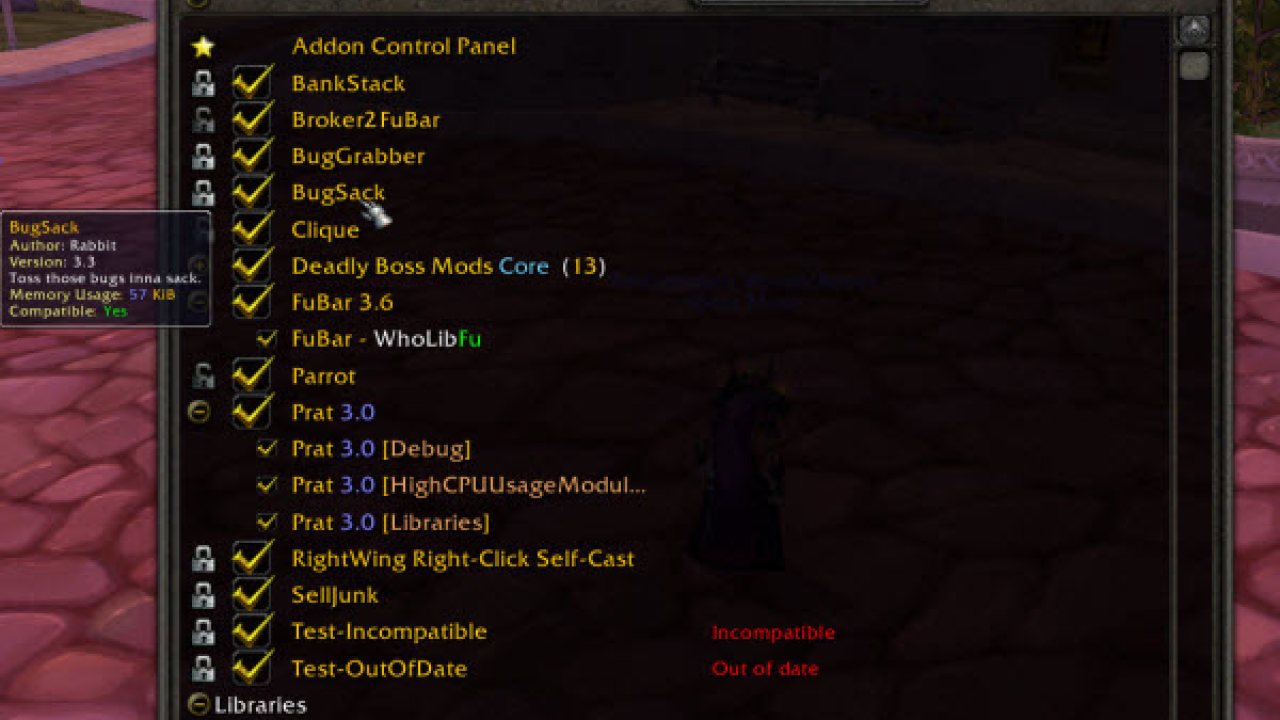
Addon compatibility helps you determine if the addon supports the current version of the game that you are running. You will see further information in the tooltip for the addon, and incompatible/out of date addons will be labeled in the main addon list.
Credits:
ACP is based on the work of 2 other projects rMCP, which is a version of MCP modified by Rophy, and MCP originally by Saien.
ABOUT THIS LISTING
This page describes Addon Control Panel by lucifercatnip. The description and screenshots are the author's own, imported from their listing on CurseForge on 3 October 2026: https://www.curseforge.com/wow/addons/acp
Mythiq.net hosts no files for it. The download button goes straight to the release file on edge.forgecdn.net, so you are downloading from the author's own host, not from a copy of ours.
The download count, rating and comments on this page start at zero and count Mythiq.net only. The source's own figures are not copied here — they measure a different site, and a number that cannot be checked against our own ledger is not worth printing.
Media
ACPMenu.jpg
ACPProtect.jpg
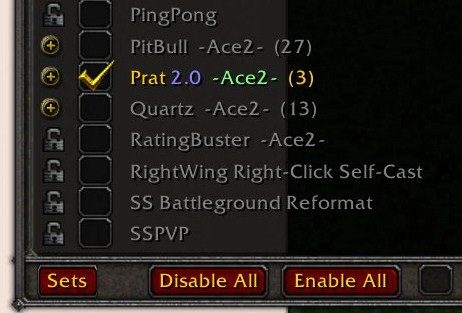
ACPExpand.jpg
ACPCollapse.jpg
Requirements
Game versions
3.4.5
12.0.0
11.2.7
1.15.8
5.5.3
2.5.5
12.0.1
GAME FLAVOUR
This is a retail (modern World of Warcraft) build. It will not work in the Classic clients, which run a different interface API.
INTERFACE VERSION
Built against game version 3.4.5, 12.0.0, 11.2.7, 1.15.8, 5.5.3, 2.5.5. After a patch, an addon that has not been updated is flagged out of date; most keep working, and the "Load out of date AddOns" checkbox on the character screen lets you try.
DEPENDENCIES
Some addons need a separate library addon (Ace3, LibStub and friends) that is not bundled. If the addon does not appear in the list in game, a missing dependency is the usual reason.
Installation
1. Quit World of Warcraft completely. The game reads the AddOns folder at launch and will overwrite settings for an addon added while it is running.
2. Download the archive with the button on this page and unzip it.
3. Move the folder — the one with the .toc file in it, not the zip's wrapper folder — into:
World of Warcraft\_retail_\Interface\AddOns
4. Start the game. On the character selection screen, click AddOns and check that it is listed and enabled.
IF IT DOES NOT APPEAR
Nine times out of ten the folder is nested one level too deep. Interface/AddOns/Thing/Thing/Thing.toc will not load; Interface/AddOns/Thing/Thing.toc will.
UPDATING
Delete the old folder before unzipping the new one. Unzipping over the top leaves files behind that the new version no longer expects.
This release downloads from edge.forgecdn.net, not from us, so
there is no checksum to compare against. Scan the archive before you unpack it.
Version history
v3.5.16Latest
20 Feb 2026 · 43 KB via edge.forgecdn.net · 0 downloads Download
Off-site on edge.forgecdn.net —
no checksum, because we never held this file.
Link checked by our review team on 3 Oct 2026.
Tell us if something is wrong — a file that will not work, content taken from
someone else, or anything that looks unsafe. Reports go to our review team, not
to the author.
We use cookies to ensure that we give you the best experience on our website and improve your experience. By continuing to use this site you consent to such use of cookies.