Overview
Enables you to see what quests you have completed, and what ones you have left to do.
Quest Completist
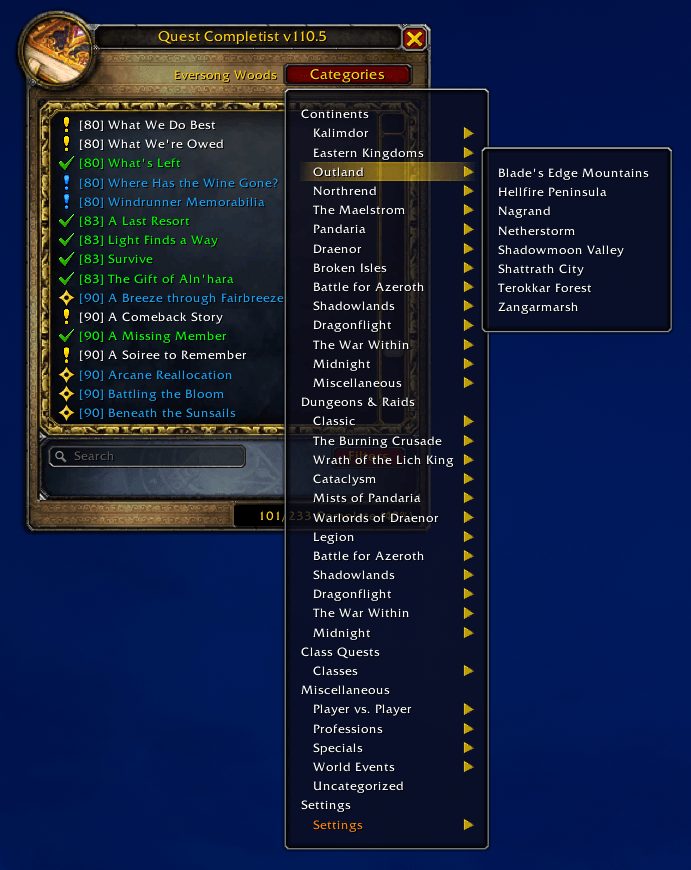
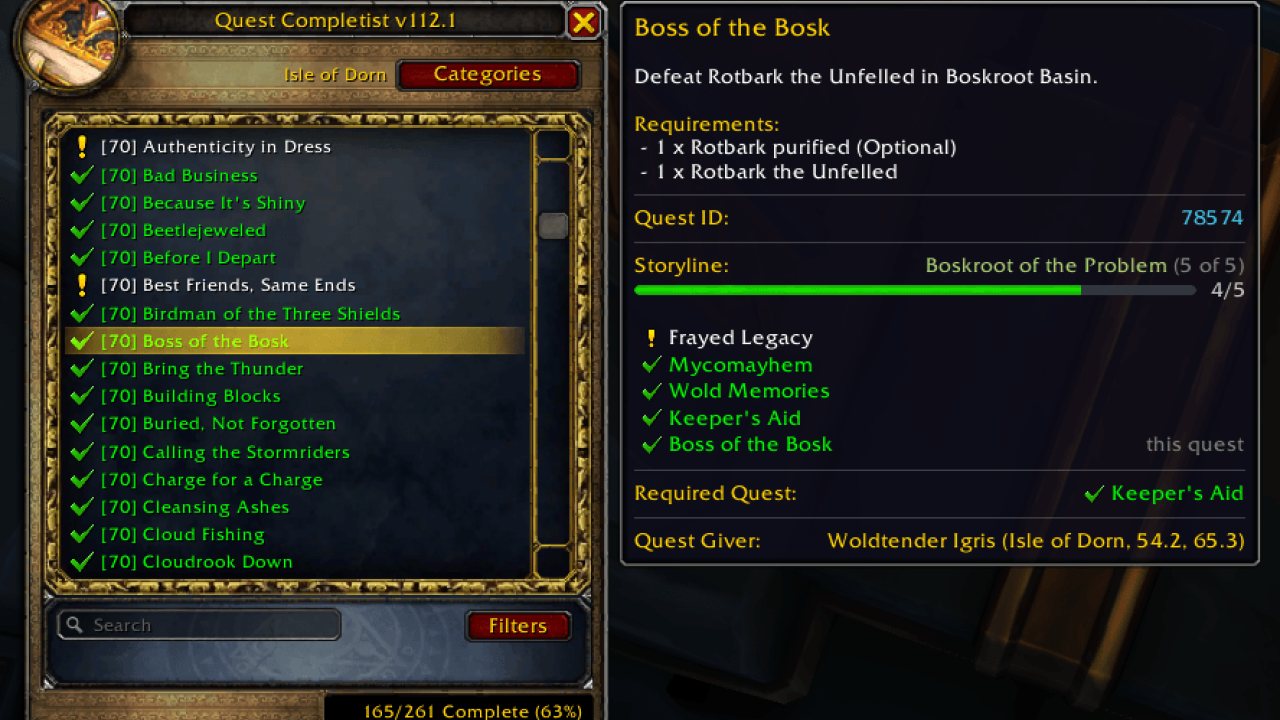
See which quests you've completed and which you still have left, for every zone, dungeon, class, profession and holiday in the game. On Retail, Quest Completist knows over 35,000 quests and places over 13,000 quest-giver pins on your world map.
Type /qc (or /questc) to open it, click its minimap button, or set a key binding.
Game versions
Quest Completist's main releases are made for Retail and, since 111.1, WoW: Forever. One download covers both: each game loads its own quest list, menus and map pins.
On WoW: Forever, it knows around 5,100 quests and places around 2,000 quest-giver pins. Its list is still growing: Forever's new quests above level 40, and the quest givers in its new zones, will follow in updates. Retail-only features, like covenants, renown, campaigns, the Warband and world quests, don't apply there.
The Files tab also has versions for other editions of the game, such as Classic, created and maintained by Thalid83 (Thanks!). If you play one of those, pick the file for your game version there. They're built separately, so some features on this page may work differently or not be available.
Help map WoW: Forever
Forever's new zones bring quest givers the addon doesn't know yet, and you can help just by playing. Quest Completist notes the quest givers you meet, and your notes can put them on everyone's map.
To share them: log out, then email QuestCompletist.lua to questcompletist@gmail.com. It holds no character or realm names. Notes from Retail help too.
Where to find it:
- In the Battle.net app, choose the game, click the cog next to Play and pick Show in Explorer (on a Mac, the Finder option). That opens your World of Warcraft folder.
- Open _retail_ (for WoW: Forever, Forever's own folder beside it), then WTF, then Account.
- Open the folder named after your account, a name in capitals or a number like 12345678#1, then its SavedVariables folder. It's not the SavedVariables folder straight inside Account.
- Send QuestCompletist.lua (Windows may show it as just QuestCompletist), not the QuestCompletist.lua.bak beside it.
On a usual install, that's C:\Program Files (x86)\World of Warcraft\_retail_\WTF\Account\SavedVariables on Windows, or /Applications/World of Warcraft/_retail_/WTF/Account//SavedVariables on a Mac.
Features
A checklist for every zone
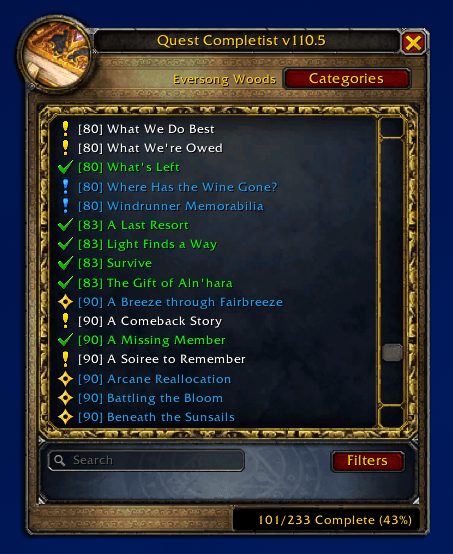
- Every quest in a zone, dungeon, raid, class, profession or holiday category, marked done or still to do.
- A running total for each category, like 142/180 Complete (78%).
- The list follows you as you travel, switching to the zone you're in, without losing your search or a category you're browsing.
- Category and quest names, and the addon's own tooltips, options and messages, show in your game's language. Search finds a quest by its name in your language or in English.
- Sort by level or alphabetically. A quest that scales with you shows the level it scales to for you.
Clear icons at a glance
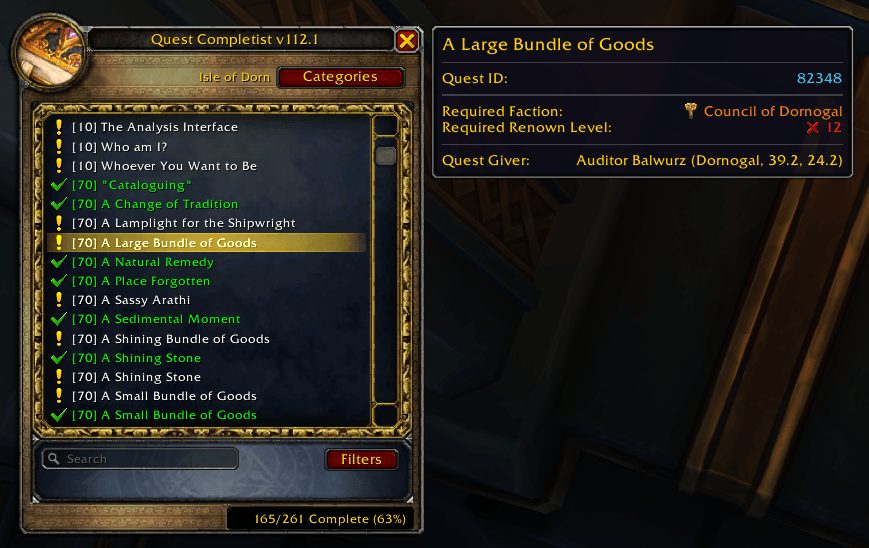
- Different icons for normal, daily, weekly, repeatable, holiday, class and profession quests.
- Quests in your log show a grey ? (in progress) or a yellow ? (ready to hand in), in the list and in its tooltips.
- PvP quests, like the Alterac Valley and Wintergrasp ones, have the game's crossed swords before their name in the list and in the map pins' tooltips, and a pin whose quests are all PvP shows the crossed swords as its icon.
- Dungeon, heroic and raid quests have the game's dungeon, heroic or raid icon before their name, in the list and in the map pins' tooltips.
- Dailies and repeatables are never marked "done", so you can see at a glance which dailies each zone has.
Quest givers on your world map
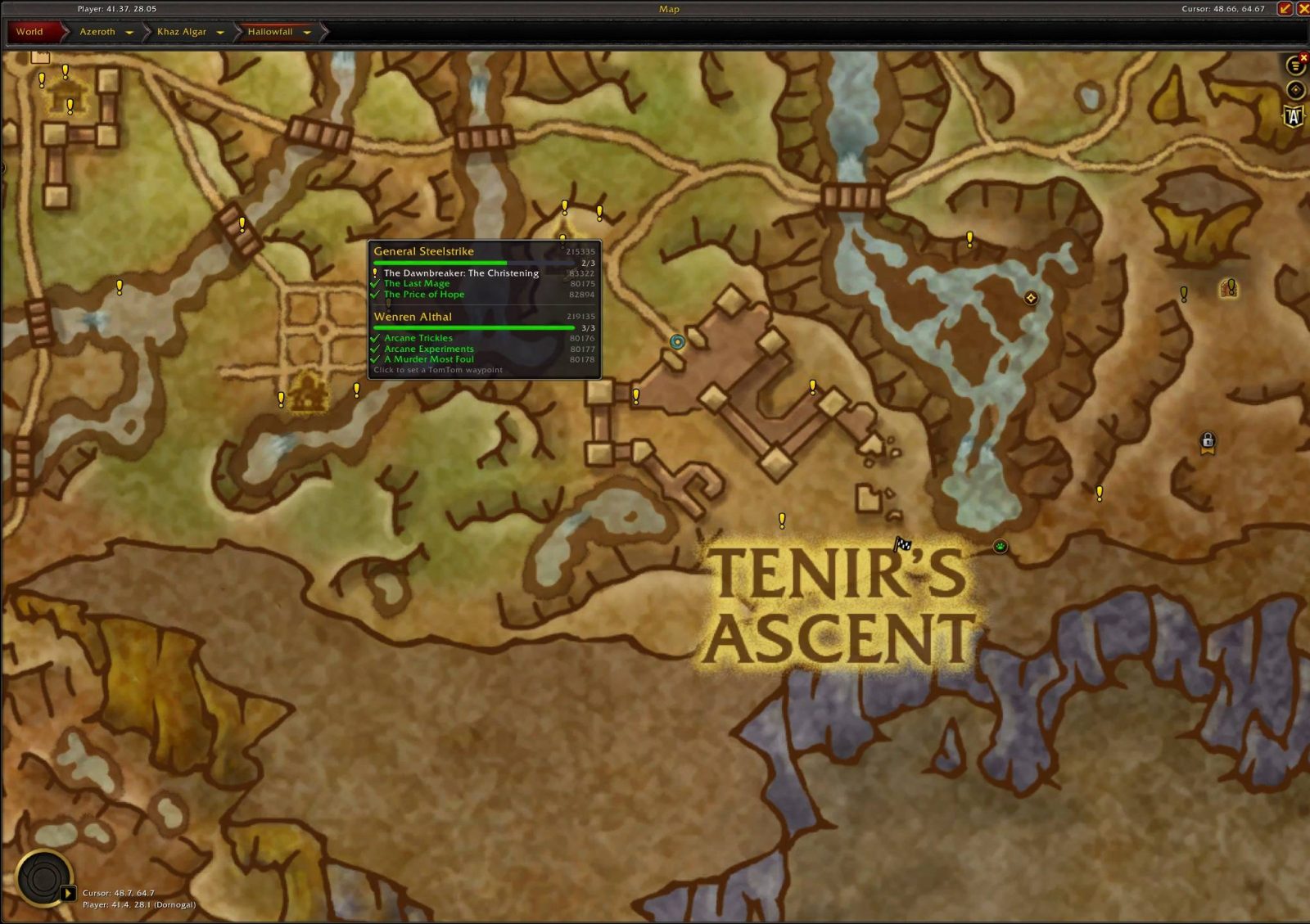
- Pins show where to pick up the quests you haven't done yet.
- A quest whose giver is inside a dungeon or raid shows at its entrance, with the game's dungeon or raid icon. Hover it for the instance's name and its quests.
- Hover a pin to see who gives which quests, with the quest givers' names and titles (like Innkeeper) in your game's language.
- A progress bar shows how many of each quest giver's quests you've done. The ones still to do come first, and done quests fold into one line: hold Shift to list them.
- With the map's filters for them turned off, quests you can't take yet are greyed, with what stands in the way, like Requires Level 50 or the quest to do first.
- Holiday quest pins follow the in-game calendar. Brewfest, Hallow's End, Winter Veil, the Darkmoon Faire and the rest appear only while they're running. Type /qc holidays to see what's on now and what's coming up.
- On the continent maps, each zone shows an icon for what you have left to do there, with the number: a yellow ! for quests you can take, a ? for quests ready to hand in. Hover one for the counts and what's done. On Retail, hubs like Oribos, Dalaran and Undermine have their own. Untick Hide Completed Quests in the map's filters and a zone you've finished gets a green check. Untick Show Zone Icons on Continent Maps in the options to hide the icons.
Detailed quest tooltips
- Where the quest giver is, or the entrance of the dungeon or raid the quest is in, the quest's type, if it has one (like Dungeon, Raid or PvP), its campaign and chapter, its storyline with your progress through it and your place in it, and the quests you need to do first.
- For a quest that isn't part of a storyline, its quest chain: the quests before and after it, each with its level and whether you've done it.
- The item a quest starts from, like Magtheridon's Head for "The Fall of Magtheridon", with anything the item itself needs, such as a level or a profession.
- On Retail, the game's own reason when it holds a quest back, like Requires further advancement in the Argus Campaign., until you've done the quest.
- Renown and friendship rank requirements, with a ✓ or ✗, and the reputation it rewards that your character can earn.
- On WoW: Forever, the profession and skill level a quest needs, like Fishing (30), with a ✓ or ✗.
- Warnings for breadcrumb quests, and for quests that lock out others ("you can only complete one of these").
- Quest IDs show at the top of the quest dialog and in the list and map pin tooltips, and quest giver IDs in the map pin tooltips. Untick Show Quest and NPC IDs in the options to hide them.
Filters to show only what matters to you
- Hide quests for the other faction, other races and classes, professions you don't have, or other covenants.
- Hide completed, in-progress, low-level, daily, weekly, repeatable or world quests, or ones you can't take yet.
- Hide quests you've already done on another character in your Warband.
- Hide quests you can no longer get, like Battle for Azeroth's old PvP rewards, the Remix events' Timerunning quests and hidden tracking quests, and any you've marked unattainable (on by default).
- Every filter can be set separately for the map and the quest list. When your filters hide every quest in a zone or category, the list says how many.
Keeps itself up to date
- Asks the game which quests you've completed every time you log in, including ones done before you installed the addon.
- The list and map update as soon as you accept, hand in or abandon a quest.
- Dailies and weeklies clear themselves at the real daily and weekly reset.
Notes the quest givers you meet
- Quest Completist can note the quest givers you meet and where you met them. It's on by default, kept on your computer only, and nothing is sent anywhere.
- To share your notes and help fill in the map, see Help map WoW: Forever above.
- Untick Note the Quest Givers I Meet in the options, or type /qc record off, to stop it. /qc report shows how much it holds.
Handy clicks
- Left-click a quest to set a waypoint to its quest giver, or to its dungeon's or raid's entrance.
- Left-click a quest giver's pin on the map to set a waypoint to it.
- A waypoint is TomTom's if you have TomTom, otherwise the game's own map waypoint, which replaces yours. The game allows none on some maps.
- Alt-click a quest giver's pin on the map to show its quests in the quest list, through the list's own filters. The list opens above the map.
- Left-click a zone's icon on a continent map to open that zone.
- Shift-click a quest to mark it as done, or not done.
- Alt-click a quest to mark it as unattainable (for quests you can no longer get). Hide quests that are no longer available hides these too.
- Left-click the minimap button to show or hide the quest list, right-click it for the options, and drag it to move it around the minimap. Untick Show Minimap Button in the options, or type /qc minimap, to hide it. Quest Completist is also in the AddOns menu beside the minimap, with the same clicks, whether the button shows or not.
Feedback
Found a quest in the wrong place, or one the addon says you can't do when you can? A small alert appears when Quest Completist spots something it didn't know. If you pick up a quest the addon thought was no longer available, it tells you in chat. Please report these in the comments or on the Issues page.
Viduus, Frostmane EU
Quest Completist 114.1
New
- Alt-click a quest giver's pin to list its quests. The quest list opens above the world map on that quest giver's quests, through the list's own filters, not the map's. A pin that stands for several quest givers lists all their quests, headed by the first one's name and how many more there are. A plain click still sets a waypoint, and the pin's tooltip now says Alt-click to list these quests. Thanks for the idea!
- Dungeon, heroic and raid quests are marked. They have the game's dungeon, heroic or raid icon before their name, in the quest list and in the map pins' tooltips, as PvP quests have the crossed swords. Thanks for the idea!
- The quest list's tooltip shows a quest's chain. For a quest that isn't part of a storyline, a Quest chain section lists the quests before and after it, each with its level and whether you've done it. It leaves out quests your character can't take and, on Retail with Hide Other Covenant Quests ticked, other covenants' quests. Thanks for the idea!
- The Arcantina has its own category. Its visitors' quests, like "Where the Fire Once Burned" and "Hellscream's Heritage", list there instead of under Mount Hyjal, Nagrand, other old zones or Uncategorized, and the list switches to it when you walk in. Thanks for the report! Retail only.
- Allied races, three Battle for Azeroth chapters and Lorewalking have their own headings. Allied Races sits under Miscellaneous, with Heritage now beside it. The Shadow Hunter, The Fate of Saurfang and Tyrande's Vengeance sit under Battle for Azeroth, and Lorewalking under The War Within. Their quests no longer sit in zones like Twilight Highlands, Redridge Mountains and Netherstorm. Retail only.
- "The Historians" for the Alliance. It lists under Seasonal beside the Horde's and shows while WoW's anniversary runs. Retail only.
Improved
- Midnight's elves storyline lists under Silvermoon City. It starts and ends there, so quests like "The Kaldorei" and "The Shal'dorei" no longer sit under Amirdrassil and Suramar. Retail only.
- Four Midnight quests leave Azuremyst Isle. "Adventuring in Midnight" and "The Last Push" now list under Silvermoon City, and "Prey: A Crimson Summons" under Prey. Retail only.
- Entering Acherus: The Ebon Hold switches the list to the Death Knight hall, as the other class halls already do. Retail only.
- More quests show the reputation they reward. Most of them are Legion and Battle for Azeroth world quests. Retail only.
- More quests show the level they scale to for you. Retail only.
- Eight quests that come back every week are now weeklies. Among them are "Hallowfall Fishing Derby", "Creche Cache" in The Forbidden Reach and "Ray-ket Ball, Redux". The weekly reset clears them, so they show again each week, and Hide World and Weekly Quests hides them. "Ray-ket Ball, Redux" and the first "Hallowfall Fishing Derby" no longer wait for another weekly, so they don't grey out after each reset. Retail only.
- Voidstorm's storyline quests name only the quest before them. Quests of storylines like To Be Changed and Breaking the Triad no longer also name the campaign quest that unlocks their storyline, like "Friend or Fiend" or "Daylight is Breaking", in the map pins' Requires text and the list's Required Quest lines. Retail only.
Fixed
- Five chains no longer stay greyed out. In each, a quest waited for a later quest of its own chain, so the map greyed it for good and Hide quests with unfinished requirements hid it until you'd done it. They're the Necrolord covenant's start in Maldraxxus, Striking Steel in Hallowfall, To Be Changed in Voidstorm, The Crimson Rogue in Eversong Woods and the item upgrade quests in Silvermoon City. Retail only.
- Quests follow their story's order. Many quests no longer wait for a later step or show before you can take them. Among them are the Shadowlands covenants' stories, Bastion's "Your Personal Assistant", the Emerald Dream's "Amirdrassil", The War Within's Rambleshire, Fearbreaker and Melody of Madness quests, and quests in Exile's Reach, the Dragon Isles, Zereth Mortis and K'aresh. "Report to Mevix", "Report to Draven" and "Report to Moonberry" start their covenant's story with nothing to do first, and The Maw's "Setting the Ground Rules" now opens for every covenant, not only the Kyrian. Retail only.
- Quests with two versions no longer wait for the one you don't get. Where you're given one of two versions of a step, like "Collective Soul", "For Queen and Grove!", "Dangerous to Go Alone", "The Harbinger" or Legion class quests like "Focusing the Energies", the next step now accepts either. The Kyrian version of "The Highlord Calls" no longer shows to every level 60 character, and the Night Fae's "Keeper of Great Renown" no longer shows from the start of their story. Retail only.
- Class quests show to the right classes. The later quests of class chains, like the one to "Val'anyr, Hammer of Ancient Kings" and the Dragonwrath staff's, no longer show to other classes. "Assessing Your Spirit" in Bastion, "Hooking Over" in Korthia and the middle of Knights of Blood, the Blood Elf heritage chain, are now open to every class, and "Assessing Your Spirit" to every race too, so the quests after them no longer show early to other classes. In Exile's Reach and on the Stormwind and Orgrimmar tours, each class's version of a step, like the tours' "What's Your Specialty?", now waits for the right quest, and the step after it accepts any class's version. Four class quests are now for their class only, like the paladins' "Seeking the Kor Gem" and the rogues' "Junkboxes Needed". Retail only.
- Three covenant quests show only to their covenant. "A Stalwart Ally" and "Shared Souls" are the Venthyr's and "Good for the Soul" the Necrolord's. Retail only.
- The list keeps your choice after logging in inside an instance. If you log in somewhere the list has no zone for, like an instance or a garrison, a category you pick or a search you type is no longer replaced by the first zone you reach.
- Smaller quest fixes. "Slime Time Live" waits for one of "Six Hundred Feet Under", "Future Aspects" or "Tougher Down Under". The Horde's Hallow's End "Shopping Around" waits for "Fencing the Goods". "Mission to Mudsprocket" and "My Husband…" no longer warn that you can only complete one of these. "Valiant Of The Exodar", "Valiant Of Thunder Bluff" and "Valiant Of Undercity" no longer show to their own city's race. "Farewell, For Now", "Into the Woods", "Ripe for the Picking", "Blurred Vision" and "From the Ashes…" show their real level, so Hide Low Level Quests hides them at the right point. "Arathi Donations: Grilled Catfish" and "Arathi Donations: War-Scroll of Intellect" no longer read "Wartime Donations". Retail only.
Quest Completist 114.0
Improved
- Placeholder quests no longer show in The Maw. The 16 "Professions - Reuse" quests now count as no longer available, and "REUSE ME - SCS" is gone from The Maw's quest list and its map. They're unused leftovers that no player can get. Retail only.
- The "REUSE ME" placeholder quest no longer shows under Uncategorized. It's an unused leftover that no player can get. WoW: Forever only.
Fixed
- Both sides now see the whole Paladin Rescue storyline in Eversong Woods. Alliance and Horde characters can both do all of it. Quest Completist had some of its quests down for one side only, so Hide Other Faction Quests, which is on by default, hid them from the other: "Twilight Missive" and "A Somber Sun" from the Alliance, and "Signs of the Struggle" from the Horde. "Twilight Missive" and "Signs of the Struggle" now wait for your side's "Missing Paladins", and later steps such as "Cutting off the Head" wait for every step before them. Retail only.
Quest Completist 113.9
New
- Five "A Sealed Crate" quests. They show on the map at Dokimi in The Barrens and Marcy Baker in Redridge Mountains, and they list under Uncategorized. They're repeatable, so untick Hide Repeatable Quests to see them in the list. WoW: Forever only.
Improved
- Four Westfall quests need their profession. "My First Alchemy Set" and "My First Real Potion" need Alchemy, and two of the three "Harvesting the Harvesters" quests need Engineering. They show the profession they need in the tooltip and its icon in the list, and hide with the profession filter. Odd Child's pin now shows the Alchemy icon. WoW: Forever only.
- Three more quests wait for what unlocks them. Darkshore's "Holy Diver" waits for all nine "Beached Sea Turtle" and "Beached Sea Creature" quests, Ozwin Ironsprocket's Engineering "Harvesting the Harvesters" for the one that starts from an item, and Stormwind City's "Gatehouse Goods" for "Philmor's Favor". They name the quests to do first, and stay greyed on the map, or hidden with Hide quests with unfinished requirements ticked, until you've done what they wait for. WoW: Forever only.
Fixed
- "Kodo Hide Bag" no longer waits for "Gathering Leather". Quest Completist no longer expects Veren Tallstrider's Skinning quest first, so in Thunder Bluff a leatherworker with Leatherworking 10 and no Skinning sees his leatherworking quest ready to take. WoW: Forever only.
Quest Completist 113.8
New
- 18 more quests. Among them are the shamans' "The Darkreaver Menace" and "Again Into the Great Ossuary", the paladins' "Lord Grayson Shadowbreaker", Elwynn Forest's "Applejack Still", Zephras Isle's "More Al'Aketh Ears" and the "Tip the Scales" fishing quests. WoW: Forever only.
ABOUT THIS LISTING
This page describes Quest Completist by AlistairJM. The description and screenshots are the author's own, imported from their listing on CurseForge on 26 October 2026: https://www.curseforge.com/wow/addons/quest-completist
Mythiq.net hosts no files for it. The download button goes straight to the release file on edge.forgecdn.net, so you are downloading from the author's own host, not from a copy of ours.
The download count, rating and comments on this page start at zero and count Mythiq.net only. The source's own figures are not copied here — they measure a different site, and a number that cannot be checked against our own ledger is not worth printing.