Allows you to play Minecraft in a borderless fullscreen window.
Cubes Without Borders
A mod that allows you to play Minecraft in a borderless fullscreen window. This means you can keep the game open while interacting with other applications on a different monitor, or even directly on top of Minecraft itself, without the game being minimized.
Unlike other "borderless fullscreen" mods, Cubes Without Borders is highly configurable, does not hinder your input latency, and explicitly supports all major platforms - Linux, macOS, and even Windows - instead of providing a passable experience for only one group of players while making it seem as though others do not exist.
Usage
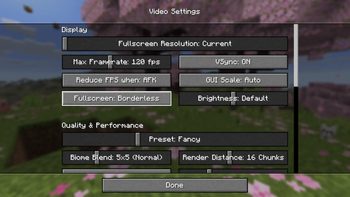
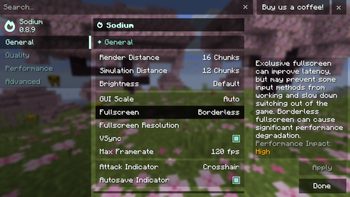
To enable borderless fullscreen, go to the Video Settings tab, where you would typically find the Fullscreen setting, and switch it to the newly added third option: Borderless.
Depending on whether you have Sodium installed, you may find this option in one of the following locations:
Additionally, the mod introduces a --borderless startup flag that forces the game to launch in the borderless fullscreen mode, regardless of your current settings.
FAQ
I'm a Windows user and...
That is a problem indeed, my friend! In all seriousness, though, if you are having issues with the default borderless fullscreen mode used by CWB, you can switch to a different one in the mod's settings.
Check whether minecraft:windowed (the default, low-latency borderless fullscreen mode) or windows:windowed (the true windowed fullscreen mode) works better for you.
Additionally, it's generally recommended to use CWB alongside Sodium, as it fixes many hardware- and driver-specific issues that might otherwise hinder your experience.
On Windows, my cursor becomes invisible in inventories when fullscreen is enabled.
Once again, you can switch to windows:windowed in the mod's settings to force the game to run in windowed mode, as proper fullscreen mode does not seem to work correctly on your system.
It's worth noting, however, that what you are experiencing is not a problem with the mod, but rather an issue with your system that you might be able to fix. People commonly report their cursor becoming invisible in games on Windows in the following scenarios:
- When using Medal
- When using OBS on Windows 11 with the "Windows 10+ Capturing Method" enabled for the source
- When the "Display pointer trails" option is enabled in the Control Panel
- Due to your usual causes, such as broken and/or outdated drivers
When I open Video Settings, the Fullscreen setting doesn't include a Borderless option - it's just a toggle!
You are probably using a rebranded fork of Sodium, or a version of Sodium that CWB doesn't support yet/already. Don't worry, though! You can access vanilla Video Settings from Sodium's custom screen by pressing Ctrl + Shift + P - there you'll be able to find the modified Fullscreen setting.
In fact, if you simply toggle fullscreen by pressing F11, for example, you should immediately jump straight into the borderless mode, as it's set as your preferred fullscreen mode by default.
When I set Fullscreen Mode to Borderless in Video Settings, nothing really changes compared to when it is set to Exclusive - the game window continues to be automatically minimized whenever it loses focus.
This mod does not label its setting as "Fullscreen Mode", it is simply called "Fullscreen". It also does not require you to restart the game when switching from one fullscreen mode to another. What you are seeing is a very misleadingly named option provided by Sodium. To enable real borderless fullscreen provided by CWB, please see the workaround for unsupported versions of Sodium and its forks described above.
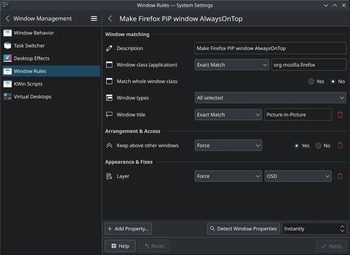
On Linux, I want to keep a Picture-in-Picture window opened by my browser on top of the game. However, it always goes behind the game window when I switch my focus back to Minecraft.
Due to the stacking order defined by the FreeDesktop specification, conforming desktop environments like KDE Plasma (rare GNOME W) place PiP windows behind focused fullscreen applications. Thankfully, you can always change the layer assigned to the window you want to keep above your game by using window rules. Here's an example of how to do this for Firefox:
Config
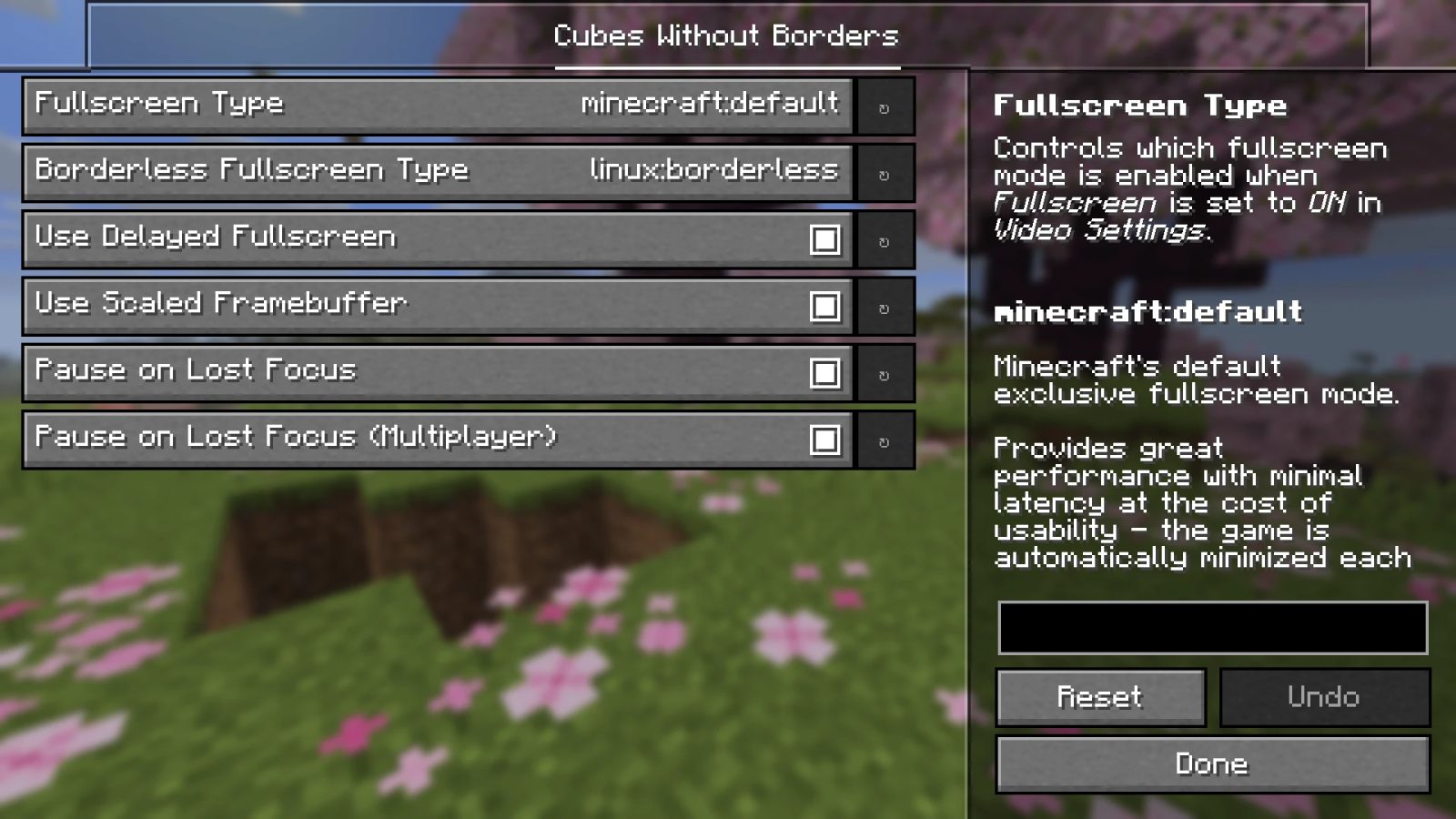
The mod provides a simple configuration screen that can be accessed if you have YACL or Cloth Config installed:
Otherwise, you can configure it by directly editing the cwb.json file, stored in your mod loader's default configuration directory:
Fullscreen Types
License
Licensed under the terms of the MIT License.
ABOUT THIS LISTING
This page describes Cubes Without Borders by Kira-NT. The description and screenshots are the author's own, imported from their listing on Modrinth on 3 October 2026: https://modrinth.com/mod/cubes-without-borders
Mythiq.net hosts no files for it. The download button goes straight to the release file on cdn.modrinth.com, so you are downloading from the author's own host, not from a copy of ours.
The download count, rating and comments on this page start at zero and count Mythiq.net only. The source's own figures are not copied here — they measure a different site, and a number that cannot be checked against our own ledger is not worth printing.
Media
Video Settings
Video Settings (Sodium)
Mod Settings
KDE Plasma Window Rules
Requirements
Game version
26.2
MOD LOADER
This release is built for Fabric, Forge, Neoforge and Quilt. A mod built for one loader will not load under another — Fabric mods do not run on Forge, and vice versa.
GAME VERSION
Built for Minecraft 26.2. Minecraft mods are tied to an exact version: a 1.21.4 build will refuse to load on 1.21.5.
DEPENDENCIES
Check the author's listing for required libraries before you start the game — a missing dependency shows up as a crash on launch, not as a warning.
Installation
1. Install Fabric for the Minecraft version you play, if you have not already.
2. Download the .jar with the button on this page. Do not unzip it — a mod jar is installed as it is.
4. Launch the game with the Fabric profile selected.
ON A SERVER
Anything that changes world generation or gameplay has to be installed on the server as well as on every client. Client-side visual and interface mods do not.
UPDATING
Replace the old .jar rather than adding the new one beside it. Two versions of the same mod in the folder is a crash on launch.
This release downloads from cdn.modrinth.com, not from us, so
there is no checksum to compare against. Scan the archive before you unpack it.
Version history
v4.1.0+26.2Latest
22 Jun 2026 · 89 KB via cdn.modrinth.com · 0 downloads Download
Features
- The initial fullscreen activation is now delayed by default
- This results in a smoother startup sequence and has the added benefit of helping some Windows users with faulty graphics drivers avoid the "Recovering from unsupported resolution" popup that can appear when the game window attempts to enter fullscreen mode immediately after its creation.
- This behavior is controlled by the new useDelayedFullscreen config option.
Full Changelog: v4.0.6...v4.1.0
Off-site on cdn.modrinth.com —
no checksum, because we never held this file.
Link checked by our review team on 3 Oct 2026.
Tell us if something is wrong — a file that will not work, content taken from
someone else, or anything that looks unsafe. Reports go to our review team, not
to the author.
We use cookies to ensure that we give you the best experience on our website and improve your experience. By continuing to use this site you consent to such use of cookies.