Item Set Browser is an addon view all the item sets in the game (including crafted sets) and track their collection status, in a way that's much easier to use and navigate than the base-game interface.
Item Set Browser is an addon view all the item sets in the game (including crafted sets) and track their collection status, in a way that's much easier to use and navigate than the base-game interface.
Item Set Browser was first created back in 2016 during the One Tamriel item set overhaul, years before the base-game item set collection interface existed. After the introduction of item set collections, Item Set Browser still offers a number of advantages over the base-game interface, including better ease of use, support for crafted sets, and a much more robust search function that allows you to search item set bonuses.
Extended Journal
This addon is a part of the Extended Journal, which is a collection of addons comprised of Loot Log, Item Set Browser, Character Knowledge, Collectibles Tracker, and Raidificator.
There are different ways that you can choose from to access the Extended Journal addons:
- Main Menu Bar: You can open any of the Extended Journal addons via the game's Main Menu Bar at the top of the screen, and once the Extended Journal is open, you can click on the tab that you want.
- Keybind: You can also set a keybind to open the Extended Journal, and once the Extended Journal is open, you can click on the tab that you want.
- Chat command: You can access Item Set Browser directly using the /itembrowser (or /ib) chat command.
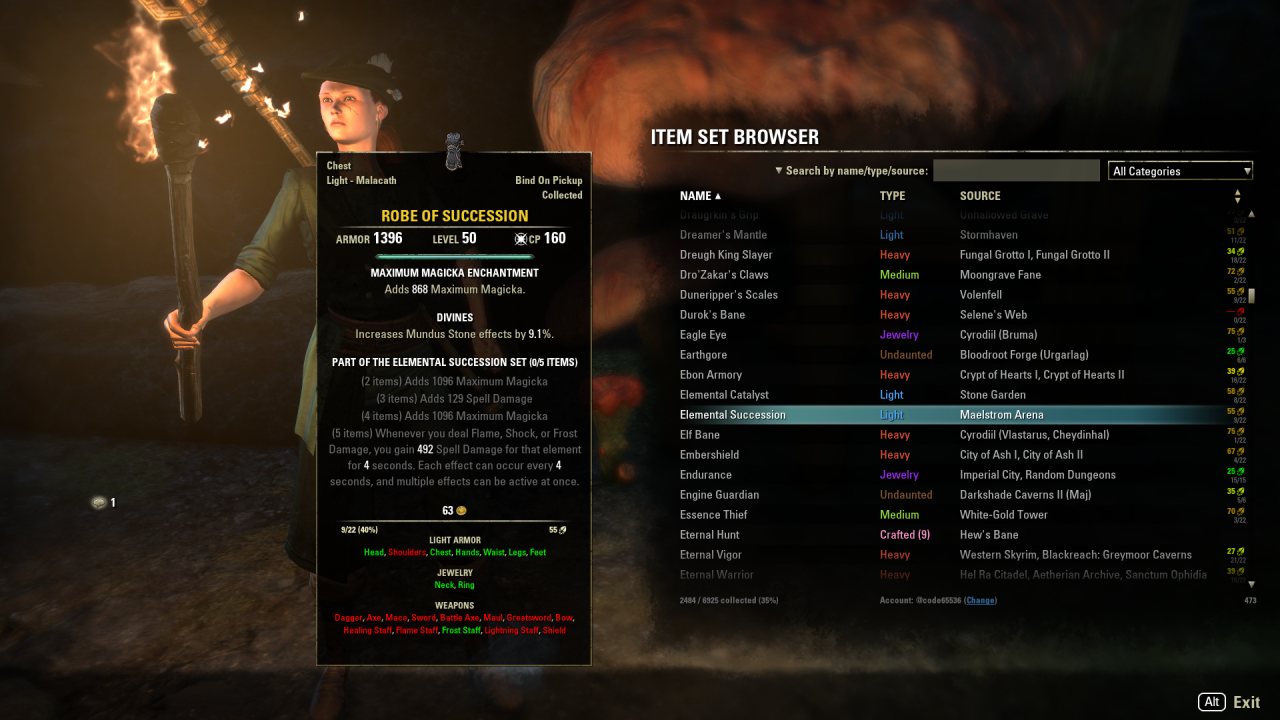
New in Item Set Browser 3 is support for the new Item Set Collections system. First, a column has been added to display the current reconstruction cost of each collectible item set. Second, the item tooltip that is displayed when hovering over an item set will now detail which specific pieces of the set have been collected.
The goal is for Item Set Browser to offer a more useful alternative to the base game's UI, which is clumsy to navigate and lacking in information density and clarity. All this is combined with Item Set Browser's existing features, such as a more robust search feature that lets players search by set bonuses.
Item Set Browser vs. the in-game Item Set Collections
- Item Set Browser is easier, faster, and far more efficient to navigate, without the need to click through categories and zone selections.
- Item Set Browser makes it easier to see your overall collection progress with the new completion rate column in the main display. You can even sort by this column, to see which sets are "almost done", for example.
- For each individual set, Item Set Browser offers a clearer view of what you have and what you're missing.
- The default UI uses ambiguous icons. Is that staff a fire staff or a frost staff? Is that sword-like object a 1H sword or a 2H sword? You can't tell with the default UI unless you hover over the item and examine them individually. Item Set Browser, in contrast, uses text. It might not be sexy, but it conveys the necessary information quickly, precisely, and efficiently.
- The default UI grays out uncollected items. The contrast is poor and it's harder to tell at a quick glance what is and isn't collected. Instead of improving the contrast (e.g., by using a colored background for collected items, as many people suggested during PTS), ZOS instead just sorts collected items to the front, which just results in inconsistent ordering. In contrast (pun intended), Item Set Browser uses clearly contrasting colors of red and green to produce a visual distinction that users can parse quicker and more efficiently.
- Item Set Browser still offers the same advanced search features that it has always had for the past four years, such as the ability to find sets by searching set bonuses.
This useful information extends beyond Item Set Browser's UI, however, and will appear in item tooltips throughout the game. Too much information overload? Don't worry! This feature can be disabled via Item Set Browser's addon settings panel.
What is Item Set Browser and what does it do?
Item Set Browser lets you browse and view all of the game's available item sets in-game. With One Tamriel's massive overhaul of itemization, it's difficult to keep track of what each item set does and where it can be acquired. This addon is designed to help you with that.
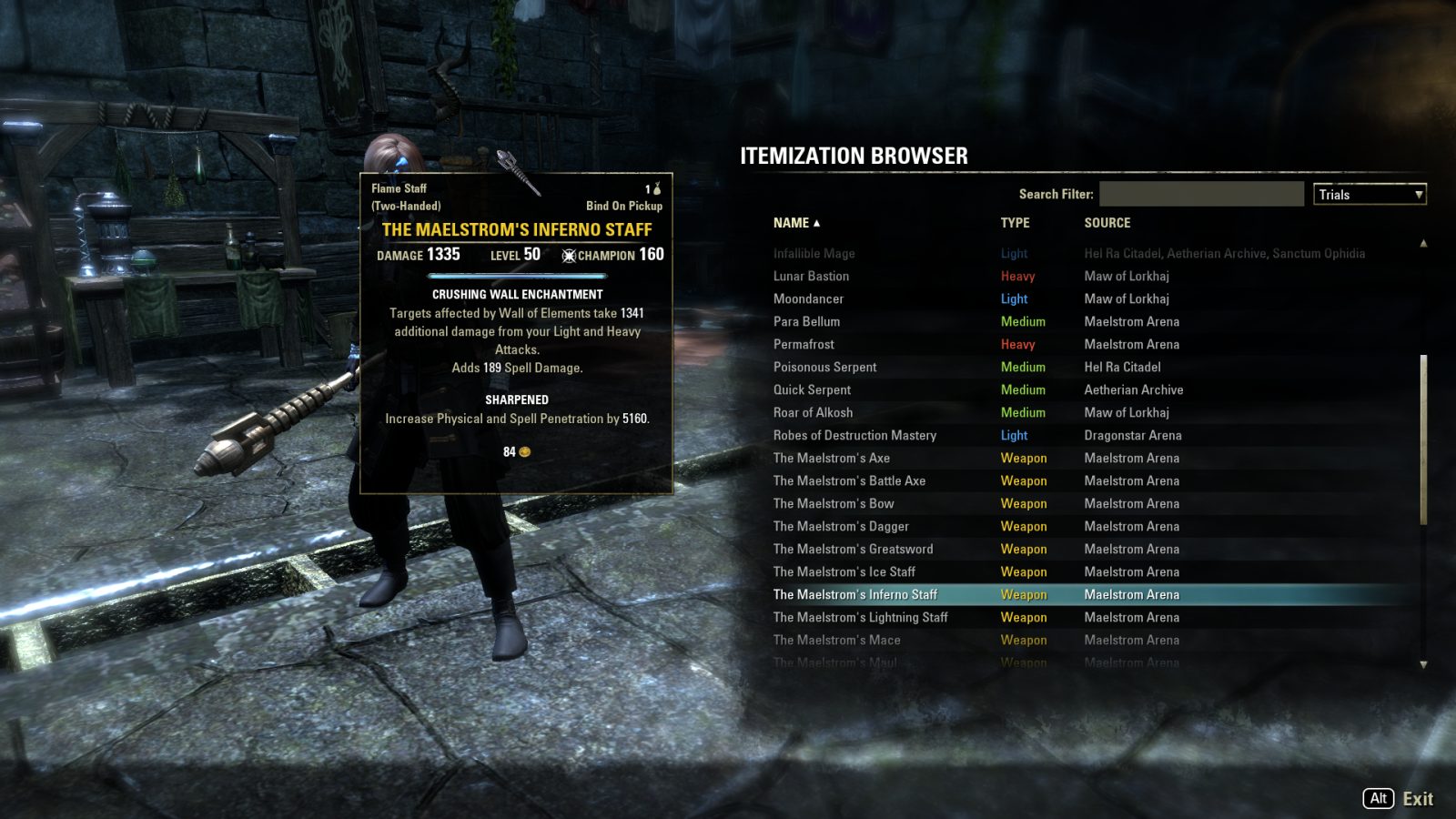
- All of item sets obtainable in the game, including the arena weapons, are listed and browsable.
- Hover over a set with your mouse to see the in-game tooltip for a sample item of that set.
- Click on a set to link into chat a sample item of that set.
- You can sort by name, type, and source of the item.
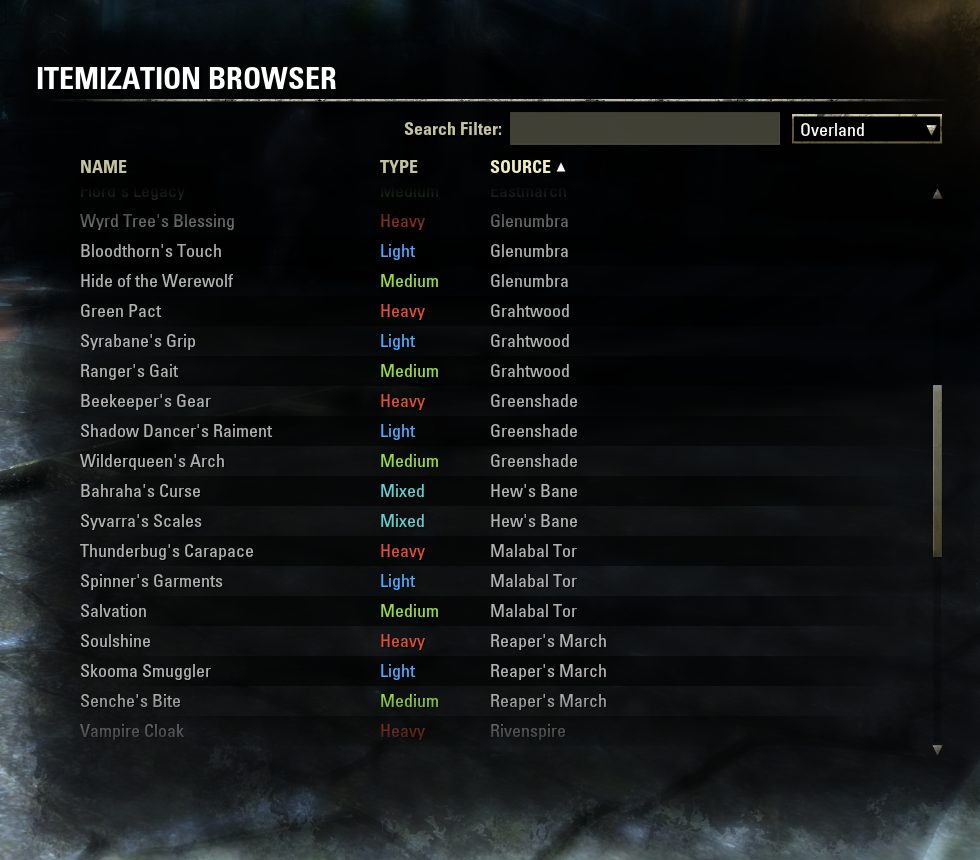
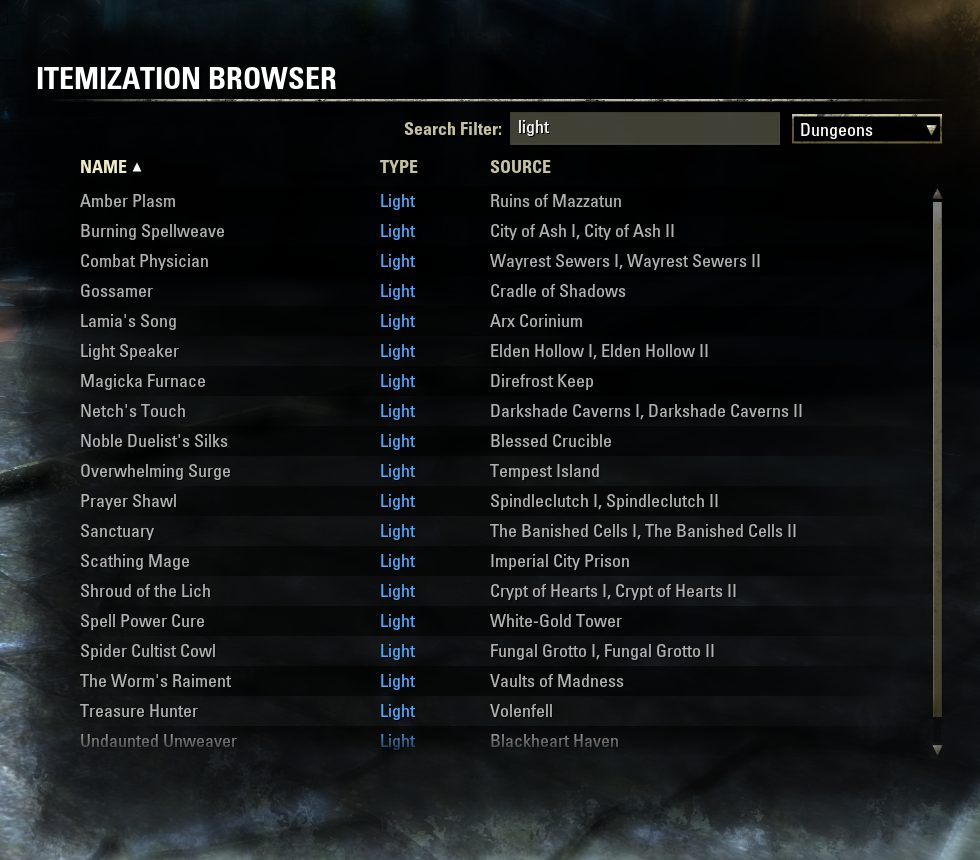
- You can filter by the general source type—e.g., overland, PvP, dungeons, etc. (Example)
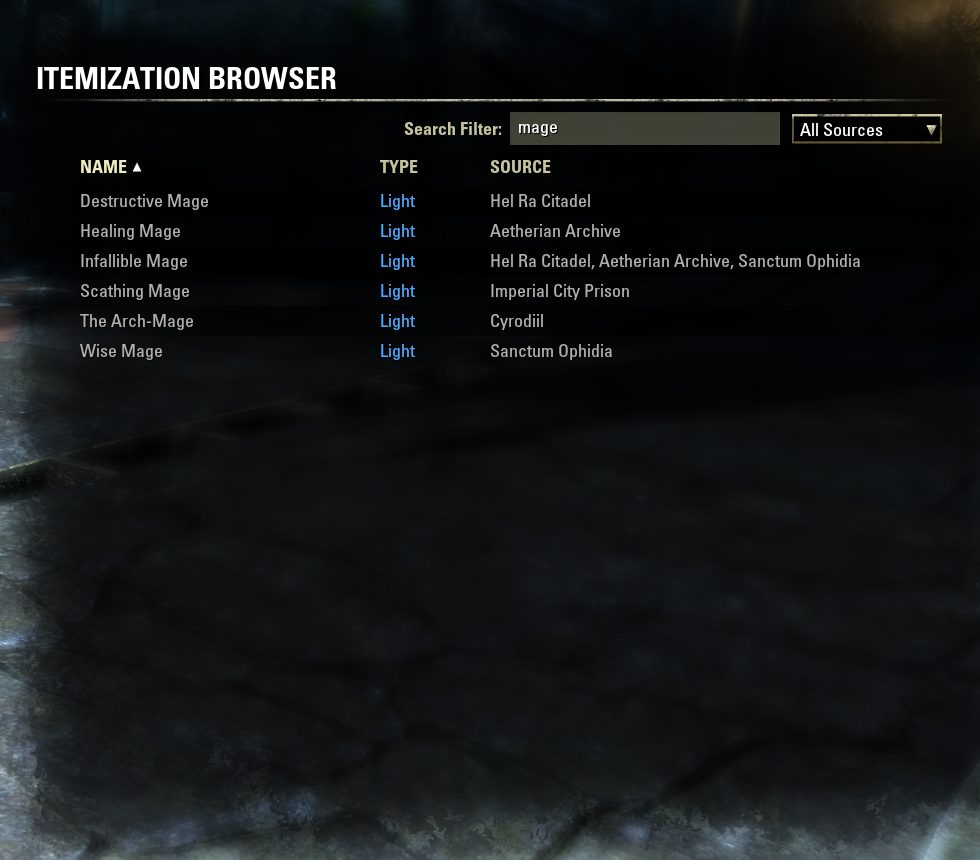
- There is also a text search to filter by the name, type, and/or source. This can be used in conjunction with the sort and source filters help you find what you want. (Example 1, 2)
How do I use this addon?
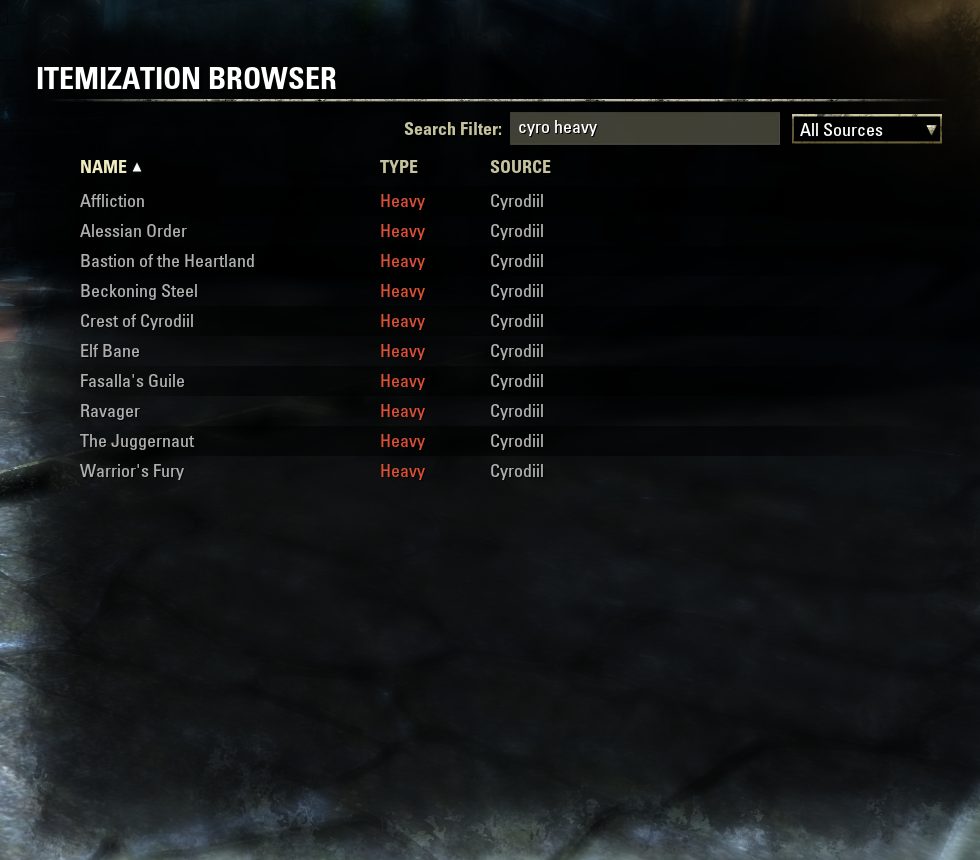
Once opened, you can view a set simply by hovering your mouse over it. Clicking on a set will post a link to chat. You can sort by name, type, or source by clicking on the appropriate header. You can use the drop-down box to filter by the general source type. And finally, you can also use the text search filter to narrow things down. For example, if you type "cyro heavy" into the search filter, it will display the heavy armor sets that can be acquired from Cyrodiil.
Searching by set bonuses
To search for sets by their set bonuses, click the dropdown arrow to change the search mode to "Search by set bonuses".
- You do not need to fully spell things out. You can search for "Weapon Critical" by simply typing "weap crit". (However, spelling out more of the term can help with disambiguation; for example, "mag" will match "magicka", but it will also match "damage", whereas "magi" will only match "magicka".)
- You can search for multiple bonuses, if they are separated by either a comma (",") or a plus sign ("+"). For example, a search for "mag rec, spell dam, max mag" will match all sets that have magicka recovery, spell damage, and max magicka. As another example, a search for "weap crit + max health" will show all the sets that have both weapon critical and maximum health bonuses.
- Alternatively, you can exclude a set bonus by using the minus sign ("-"). So if you change "weap crit + max health" into "weapon crit - max health", then you will be shown a list of all the sets that grant weapon critical without any maximum health bonuses.
- The search will match even if there are intervening terms, and it also follows the ordering. For example, a search for "spell damage" will match bonuses that say "Spell and Weapon Damage" (the "and Weapon" does not disqualify the match), but it will not match "damage from enemy spells" (since "damage" in this case comes before "spell" instead of after).
ABOUT THIS LISTING
This page describes Item Set Browser by code65536. The description and screenshots are the author's own, imported from their listing on ESOUI on 3 October 2026: https://www.esoui.com/downloads/info1480-ItemSetBrowser.html
Mythiq.net hosts no files for it. The download button goes straight to the release file on cdn.esoui.com, so you are downloading from the author's own host, not from a copy of ours.
The download count, rating and comments on this page start at zero and count Mythiq.net only. The source's own figures are not copied here — they measure a different site, and a number that cannot be checked against our own ledger is not worth printing.
Media
Requirements
Game versions
12.1.0
12.0.0
11.3.0
11.2.0
11.1.0
11.0.0
API VERSION
Built for ESO API version 12.1.0, 12.0.0, 11.3.0, 11.2.0, 11.1.0. After a patch the game marks add-ons built for the previous API as out of date; the "Allow out of date add-ons" checkbox in the add-on menu loads them anyway, and most work.
LIBRARIES
Many ESO add-ons depend on a shared library — LibAddonMenu-2.0 above all — which is installed separately, exactly like an add-on. A dependency that is missing shows as the add-on simply not appearing in the list.
CONSOLE
Add-ons are PC and Mac only. There is no way to load them on console.
Installation
1. Download the archive with the button on this page and unzip it.
2. Move the unzipped folder into your add-ons directory:
Windows — Documents\Elder Scrolls Online\live\AddOns
3. Start the game, and at the character select screen click Add-Ons.
4. Tick the add-on. If it is greyed out and marked out of date, tick "Allow out of date add-ons" at the top of the same panel.
5. Log in. Most add-ons need a /reloadui after they are first enabled.
UPDATING
Delete the old folder first. ESO loads everything it finds, and two copies of one add-on is the usual cause of "an add-on has produced an error" on login.
This release downloads from cdn.esoui.com, not from us, so
there is no checksum to compare against. Scan the archive before you unpack it.
- Worked around an issue reported by some players with weapon slot names in the set collection tooltip
- Version 4.7.0 (2026/08/04)
- Moved the item set data into a new bundled library (LibItemSets) so that other addons can make use of this data
- Added support for Update 51
- Version 4.6.11 (2026/06/08)
- Fixed an uncommon Lua error caused by faulty event ordering assumptions
- Version 4.6.10 (2026/05/14)
- Performance optimization
- Version 4.6.9 (2026/04/16)
- Improved the handling of keybinds for UI interactions
- Version 4.6.8 (2026/04/16)
- Added support for Update 50
- Added safeguard against errors from old embedded/non-manifested LibAddonMenu2
- Version 4.6.7 (2026/01/20)
- Added support for Update 49
- Version 4.6.6 (2025/09/18)
- Added support for Update 48
- Version 4.6.5 (2025/07/10)
- Added support for Update 47 (Feast of Shadows)
- Version 4.6.4 (2025/04/21)
- Added support for Update 46
- Version 4.6.3 (2025/01/30)
- Added support for Update 45 (Fallen Banners)
- Added Spanish localization by Cisneros
- Version 4.6.2 (2024/09/19)
- Added support for Update 44
- Version 4.6.1 (2024/08/25)
- Fixed a minor issue that can sometimes occur when using keybinds to switch to some base-game interfaces
- Version 4.6.0 (2024/08/22)
- Added a new category filter: "Today's Pledges"
- This feature requires the optional LibUndauntedPledges library
- Standardized tooltip text colors across all Extended Journal addons
- Version 4.5.10 (2024/08/16)
- Updated LibExtendedJournal to facilitate potential Perfect Pixel support
- Version 4.5.9 (2024/08/13)
- Improved the layout of the Extended Journal title bar
- Version 4.5.8 (2024/07/24)
- Corrected the sourcing information for Langour of Peryite, Nocturnal's Ploy, and Mara's Balm
- Version 4.5.7 (2024/07/19)
- Adjusted the source display for Shattered Fate and Seeker Synthesis to match the format used for the crafted sets from other multi-zone DLCs
- Maj, Glirion, Urgarlag, Vlastarus, Bruma, and Cropsford are now properly localized in the source column rather than appearing only in English
- Version 4.5.6 (2024/07/08)
- Added support for Update 43
- Right-clicking on an entry in the browser will now display its itemSetId
- Version 4.5.5 (2024/06/15)
- The reconstruction cost column now uses a smoother color gradient
- Version 4.5.4 (2024/06/02)
- Added Chinese localization by LoongKeiZ
- Version 4.5.3 (2024/04/17)
- Added support for Update 42 (Gold Road)
- Version 4.5.2 (2024/03/17)
- Fixed an issue where the dropdown button for the search mode was broken by the combobox changes in Update 41
- Version 4.5.1 (2024/02/22)
- Added support for Update 41 (Scions of Ithelia)
- Version 4.5.0 (2023/09/20)
- Arena sets are now categorized separately from trial sets
- Added support for Update 40
- Version 4.4.10 (2023/08/21)
- Added support for Update 39
- Version 4.4.9 (2023/07/03)
- Adjusted the sourcing of Cyrodiil town sets from Chorrol and Cheydinhal
- Version 4.4.8 (2023/05/01)
- Added support for Update 38 (Necrom)
- Version 4.4.7 (2023/02/13)
- Added support for Update 37 (Scribes of Fate)
- Version 4.4.6 (2022/09/23)
- Added support for Update 36 (Firesong)
- Version 4.4.5 (2022/07/28)
- Added support for Update 35 (Lost Depths)
- Version 4.4.4 (2022/06/06)
- Fixed an issue where antiquity fragment information could be incorrectly shown when browsing data in the context of a different server
- Updated French localization by @XXXspartiateXXX
- Version 4.4.3 (2022/05/05)
- Fixed a Lua error encountered when toggling the option for the display of completion percentages
- Version 4.4.2 (2022/04/20)
- Added support for Update 34 (High Isle)
- Version 4.4.1 (2022/03/09)
- Increased the minimum version requirement of LibMultiAccountSets (optional dependency for multi-account features) to 3.0.2 or newer
- Version 4.4.0 (2022/02/23)
Off-site on cdn.esoui.com —
no checksum, because we never held this file.
Link checked by our review team on 3 Oct 2026.
Tell us if something is wrong — a file that will not work, content taken from
someone else, or anything that looks unsafe. Reports go to our review team, not
to the author.
We use cookies to ensure that we give you the best experience on our website and improve your experience. By continuing to use this site you consent to such use of cookies.