pChat will update and support server dependent settings + histories!
pChat
Please logout and backup your SavedVariables regularly!
pChat will update and support server dependent settings + histories!
The SavedVariables backup reminder will remind you once a week and after APIversion changes, and can be disabled in the Backup settings submenu.
pChat is an addon to overhaul the way text is displayed in the chatbox, make your chat customizable as it should be :)
pChat was not created to work properly with the gamepad input mode! It may work if you play in gamepad input mode but using the keyboard chat mode (ingame settings), but please do not report any bugs if you use the gamepad input mode! Switch to keyboard input mode instead if you want to use pChat.
The original author of this addon were: Puddy & Ayantir
Modified by: DesertDwellers (maintainer before Baertram) and many other addon devs.
Current maintainer: Baertram (since 1st December 2019)
-> Please do not ask for new features. I'm only maintaining this addon to keep it functional and alive.
Needed libraries/dependencies
-LibAddonMenu 2
-LibAddonMenu - Sound slider Widget <--- ATTENTION: NEW DEPENDENCY! 2022-04-10
-LibMainMenu-2.0 (do not confuse with LibMainMenu)
-LibMediaProvider
-LibCustomMenu
-LibDebugLogger
Optionally using these libraries (which must be installed seperately):
-LibChatMessage in version 93 or higher!
-LibAnnyoingUpdateNotificationInGame (Launig)
-Custom Titles
-LibSlashCommander
Addons description
Features
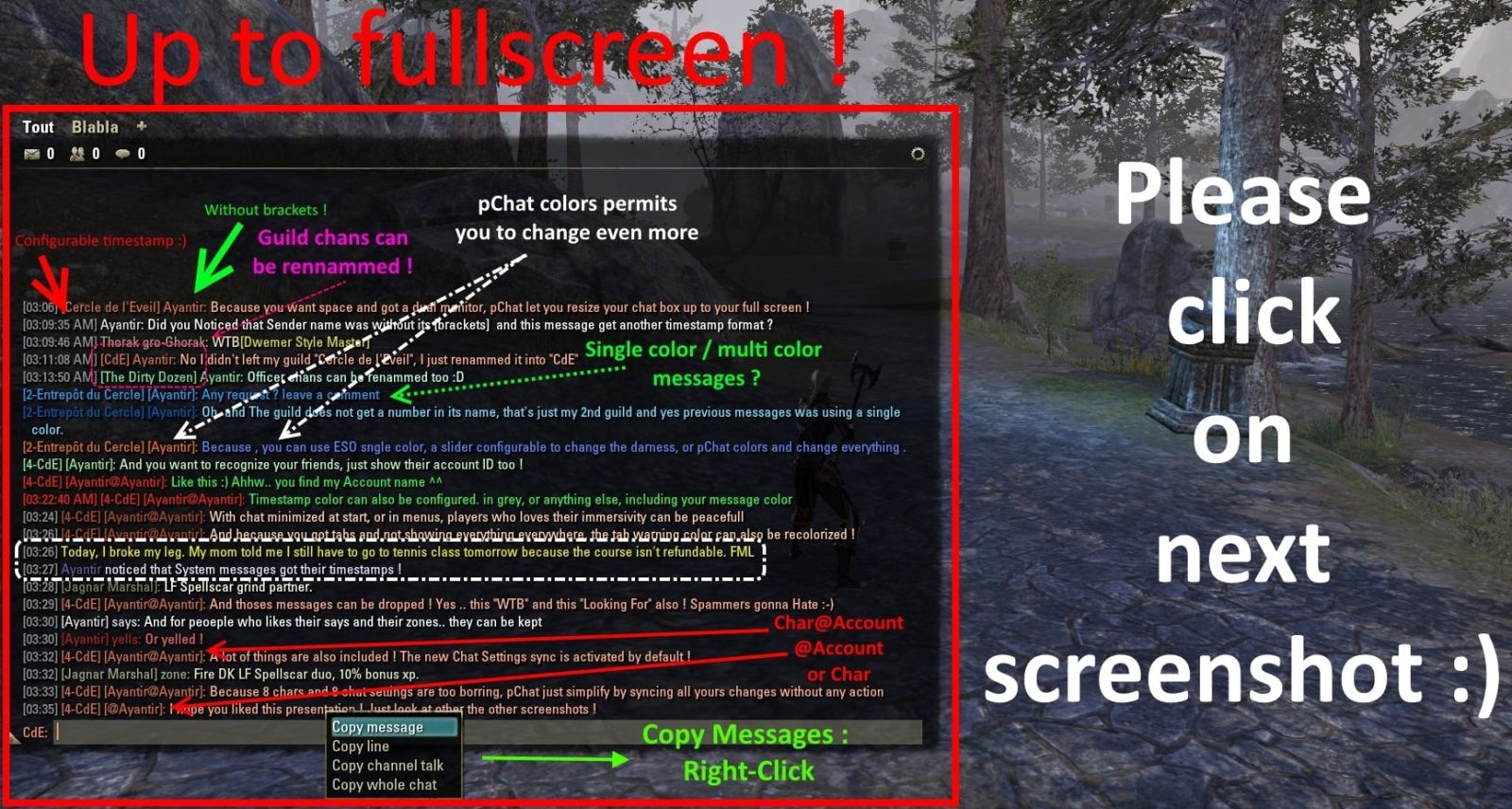
- Character/Account names : Because in your guild chat you won't see @JohnTheRipper but Bugnark gro-Moshul, pChat replace account names with Character Names. Customizable by guild, groupe, normal chat. PlayerName@AcountName and @AccountName/Playername available too.
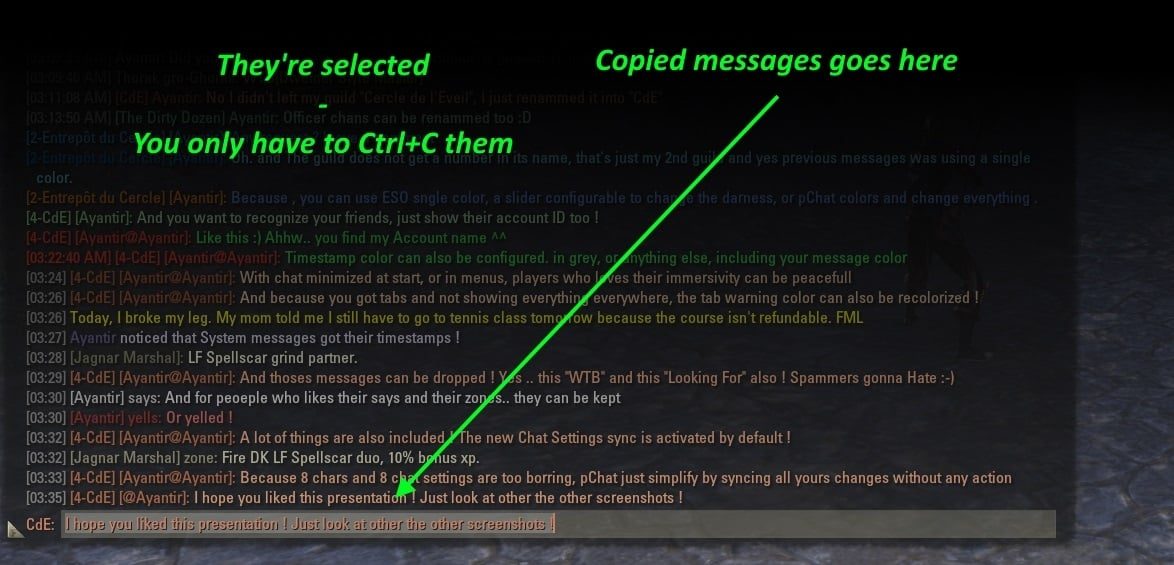
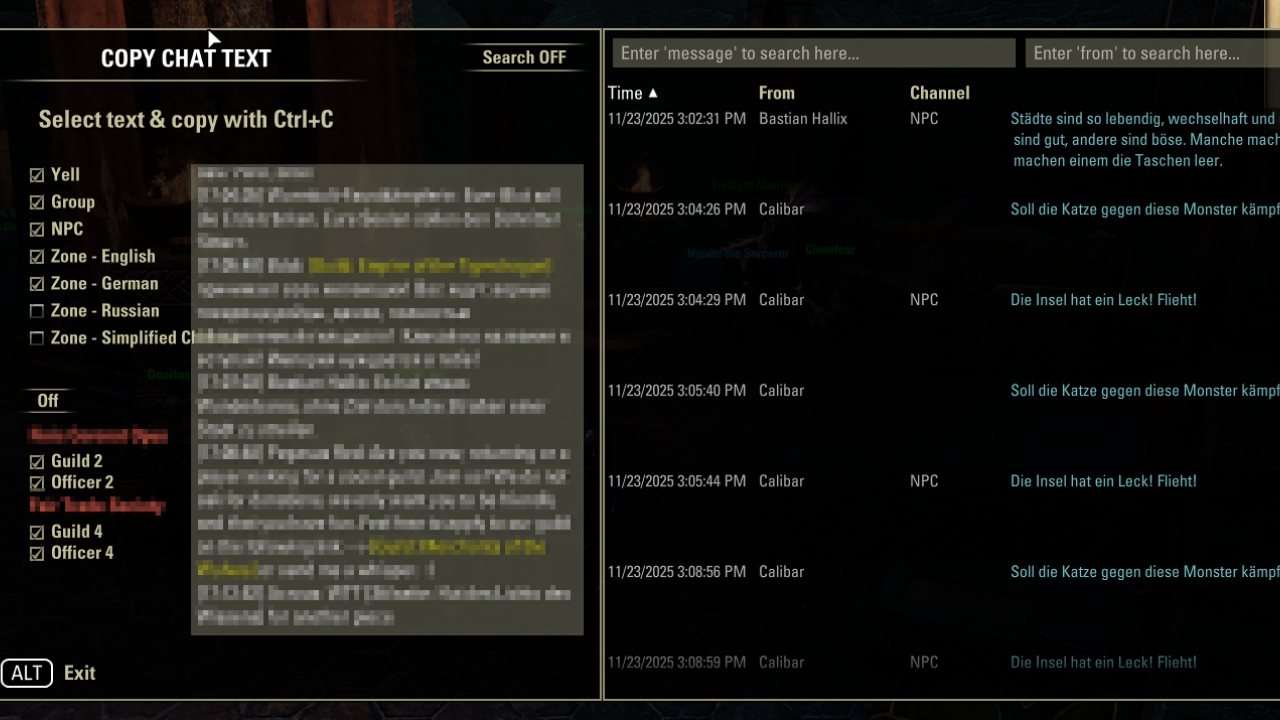
- Copy Text : You want to copy your chat ? Right click a chat message to put it to the chat editbox, and Ctrl+C to copy it to your clipboard then. Or open the copy dialog where you ca filter by chat channel and categories.
- Search copy Text : You want to search your chat history and current chat? Open the copy dialog and click on the search button to show the search UI. Right clicking found chat entries can be copied to the chat editbox again (CTRL+C to copy it to your clipboard then). The chat channel and categories filters will change the chat search UI once you applied the filters.
-Added slash command for the chat search:
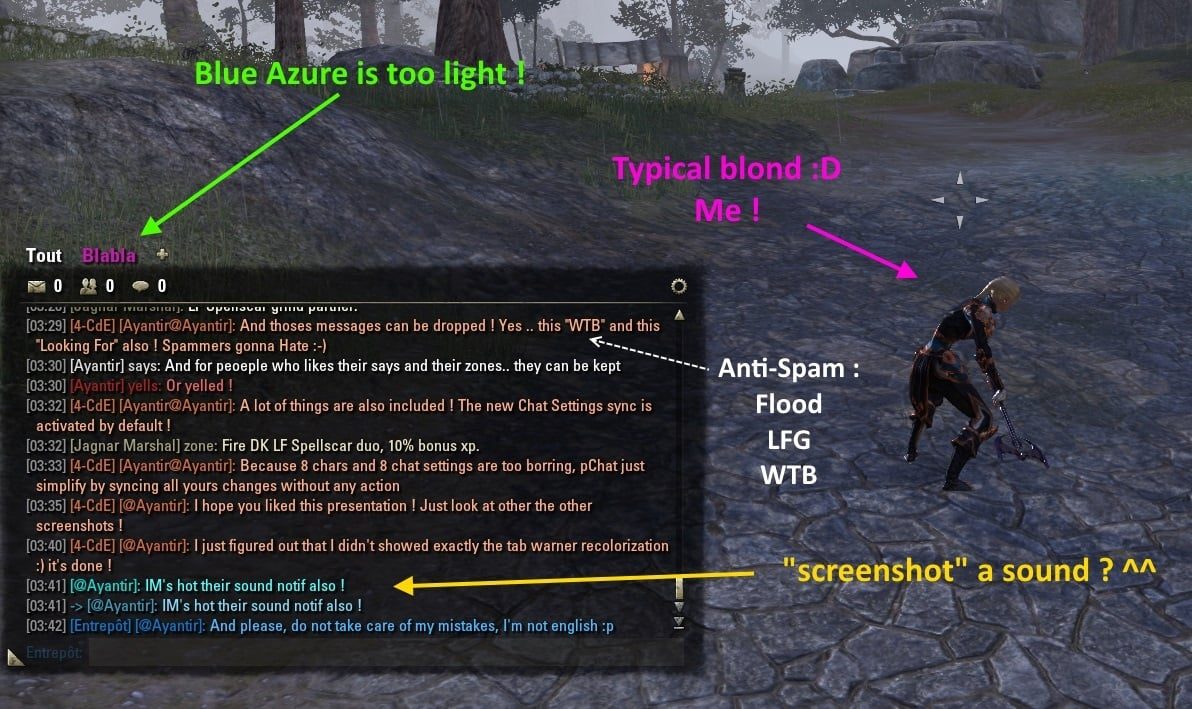
- Anti-Spam : Bored of LFG, WTB and other flooding players ? AntiSpam without any configuration
- Resizing Chatbox : Got a Full HD screen or more ? So let's resize your chatbox up to fullscreen
- Timestamps : For the ones who like precision, now all messages got their timestamps. Hightly customizable to show your desired format. 11:43 PM or 23:43:12, choose the one you like.
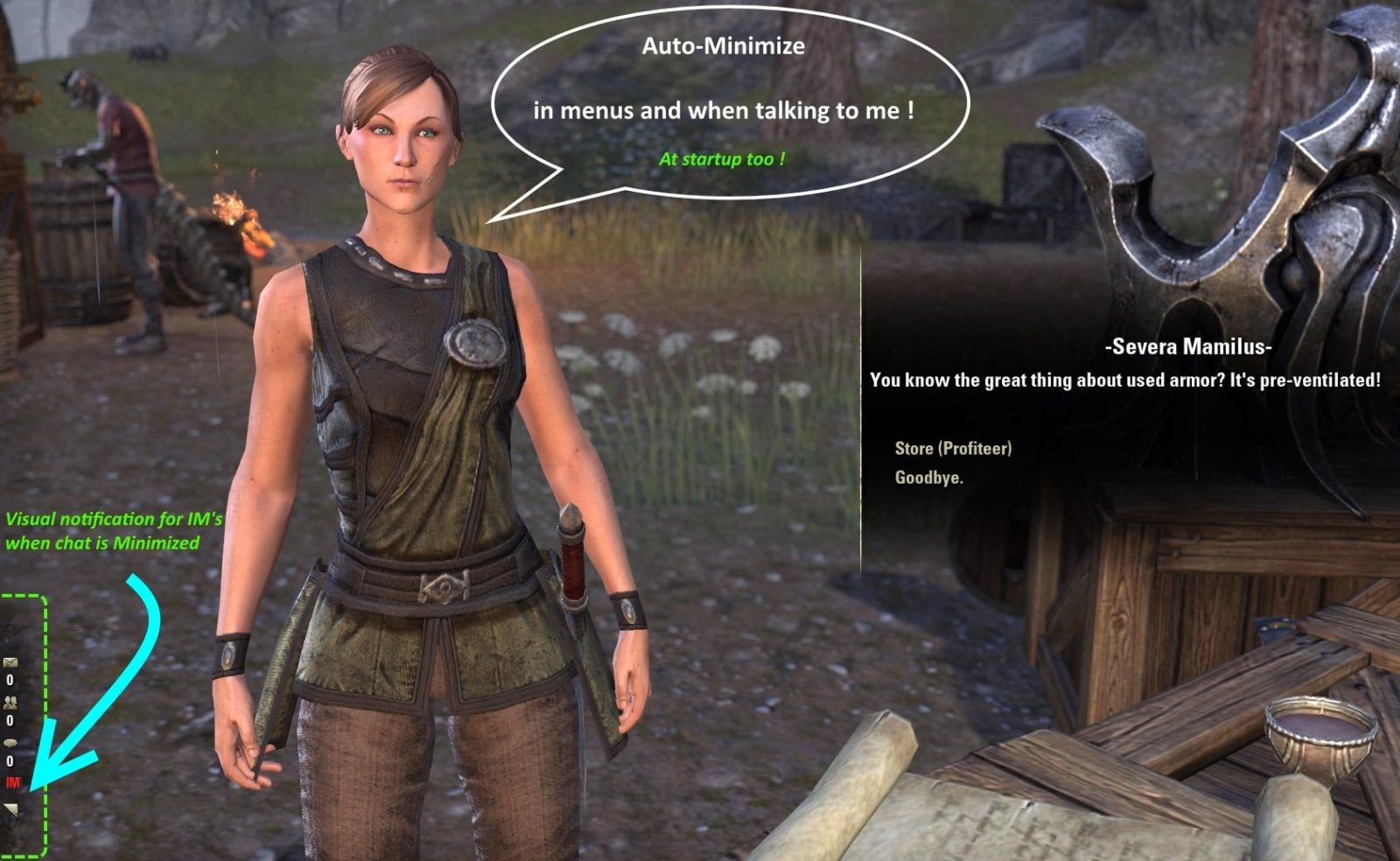
- No more whisper missed : A whisper : A sound. Visual
notification if you want it too.
- [21:08] : Because chat should be easy to read : Timestamps, From Info and messages can be colorized as you like
- Rename your Guilds Chans : Guild Tag or Officer one, each channel can be renamed
- French / German translations : Russian & Spanish Translations too
- Exit /g1, /say, /o1 : Click on chat, timestamp, channel name, and pChat will set your channel to the one you clicked on
- Chat history : No more chat wiped when you'll reloadUI. Also include a restore history when you logout, get kicked or disconnect.
- New Fonts embedded : 15 new fonts if you don't like the default one. And you can add the one you want too.
- Darker chat window : If your eyes need a little help to improve your chat reading, and if you don't like background it can also be always transparent.
- Define your own messages via /msg slash command : Define messages (long text) which you are able to quick post using a !, e.g. !ts + return key in the chat editbox: Will post the TeamSpeak server host/IP and login data information to chat. Often used with !ga to post guild advertisement texts.
- Chat context menu (at names and/or messages) :
-Setting: Show @AccountName/CharacterName (based on the chat channel and your pChat configuration for that chat channel! if you have not enabled @AccountName but only characterName it can be that @AccountName is missing!) in the context menu headline
-Setting: Teleport to player (if in guild, group or on friends list)
-Setting: Send mail to player
-Setting:Ignore will ask before ignoring, with a Yes/No dialog (works in "Friends list" and "Report player" too as you try to ignore a player).
- Added teleport slash commands :
/pchattpgl Port to group leader
/tpgl Port to group leader
/pchattppl Port to group leader
/pchattpgm Port to group member <1st found partial or full @displayName or character name>
/tpgm Port to group member <1st found partial or full @displayName or character name>
/tpp Port to group member <1st found partial or full @displayName or character name>
/pchattpp Port to group member <1st found partial or full @displayName or character name>
/pchattpfr Port to friend <1st found partial or full @displayName or character name>
/tpfr Port to friend <1st found partial or full @displayName or character name>
/pchattpg Port to guild's member <1st found partial or full @displayName or character name>
/tpg Port to guild's member <1st found partial or full @displayName or character name>
- Integrated addon "Chat Mentions" and other features : Enable sounds and visual mentioning of your character/account.
Show the currently typed character count at the chat window header bar.
Show the last time you have posted something to the zone chat at the chat window header bar.
Addon and features provided by: Coorbin
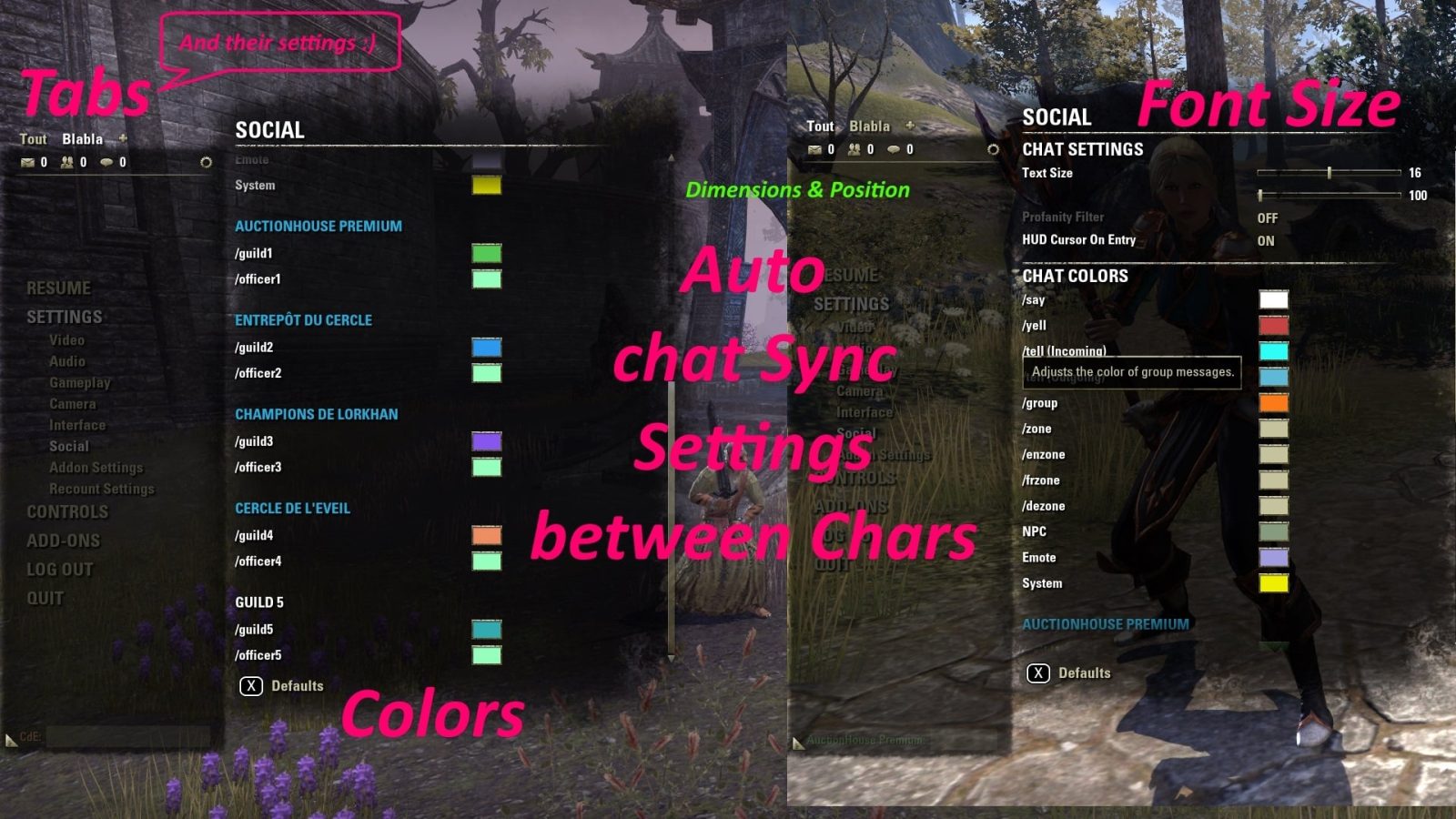
- And many other features : Redundant information like "says" are optionally removed, Prevent chat text from fading, Set default channel & tab at login, Strip Colors to avoid Raimbow Messages, Automatic Party Switching, Remove Brackets on Player Names, Change Tab color, Automatic chat configuration between chars, No Guild reorganization when you leave a guild, System Messages in the tab you have chozen, Keybinds to switch between tabs and toggle chat window, Automated messages system, Party Leader own color, Clear current tab, Auto switch channel when using arrow keys, Configurable switches for channels
Missing a feature? Have a look at the "Other chat addons" section below
Options menu to setup the addon : In Settings > Addon Settings > pChat ("Extensions" in French and "Erweiterungen" in German)
Known Issues :
-Do not use a keybind that uses Alt. For example, Alt+Shift+x, Alt+Ctrl+x, all keybinds without Alt are good.
-If you get an error message first read and apply the information from above, written below the headline
After updating pChat please be sure to check the subfolder "lib" is not there anymore. If it is still there: Delete it!
Any problems : Please let me know with a comment or a PM.
Please read the sticky comment (first comment) before posting a bug!
Important information:
Chat addons cannot work properly if the CrownStore is open! This is due to ZOs restrictions to protect the crown store against changes via addons and affects the chat as well.
Other chat addons
FCOChatTabBrain: Auto switch multiple chat tabs upon incoming messges, remember last chat channel at each tab, automatically change chat channels to last incoming one upon pressing (RETURN) key, redirect whisper messages, play sound notifications on messages (keywords, friends, group, leaders, guilds), auto switch to group, and many more features.
If your chat addon needs to be compatible with pChat
The CHAT_ROUTER:RegisterMessageFormatter only allows 1 function for each EVENT_CHAT_* callback function!
If you assign it new you'll overwrite exisitng ones!
So ALWAYS please check if any other chat addon is enabled, add these other known chat addons to your manifest txt ## OptionalDependsOn: list so the other addons load before your addon, and afterwards "post hook", or manually post hook, the other message formatter callback function -> See example for pChat below.
ATENTION: pChat uses the EVENT_PLAYER_ACTIVATED callback to register the message formatters! If you want to post hook it you MUST do that after your own EVENT_PLAYER_ACTIVATED callback! Using EVENT_ADD_ON_LOADED will make pChat overwrite your callback function again (and it's no good to use EVENT_ADD_ON_LOADED here as the chat is ready first after first called EVENT_PLAYER_ACTIVATED)!
Example code for your EVENT_PLAYER_ACTIVATED callback function, for the chat message formatter of EVENT_CHAT_MESSAGE_CHANNEL
Special Thanks to:
Seerah for LibAddonMenu & Garkin for his Help
Phidias, Kirix & Toperharrier, Baertram for their translations
and Puddy for his original work
FAQ
I see mention of "Automated Messages"
Not sure where you have read that, could you point me where that is written at pChat description/changelog?
pChat is not abe to send any automated messages to chat, that's nothing any addon could do. ZOs prevents this by design.
What addons can do is put a text to your chat editbox and you manually need to press enter/return key then to send the message.
But afaik pChat does not provide such messages.
I also read about, "flag messages" (where you type something like "!GA" and a Guild Advertisement message you pre-defined will display to the chat channel.)
Yes, you need to type /msg in chat and press return/enter key to open the UI for that.
Define a short identifier like "ab" then and your longtext, save it, And as you write the next time !ab into chat and press return/enter it will replace the !ab with your longtext defined.
and saw mention of being able to search the chat in a "SearchUI" by typing /pchats . Does it even exis?
The search UI exist, yes ;)
But that /pchats slash command does not exist afaik. Where did you read that?
Like the description tells you, you need to start it from the copy dialog UI.
What you need to enable though for the search to work properly is:
-Timestamps at the chat messages and/or the Right click context menu at chat messages need to be enabled
-Chat History, so the messages are restored after reloadui/login/logout etc. (saved to your SavedVariables and loaded again as you login so you can see old chat text, and obviously search it too).
-> If the context menu at message is enabled then (usualyl by enabling the timestamps or any other setting that adds charcter/accountnames at the beginning of the messages where you can right click then):
Right click any chat message then and choose "This message", "This conversation", "Total chat" to open the chat copy UI.
In that copy box UI you will find the search top right. Filter the chat messages at the usual copy UI first (e.g. by chat channels) and then search the results by string with the search button top right.
Contribute / Help / Fix:
If you want to contribute, help or fix feel free to send Github pull requests:
pChat at GitHub
ABOUT THIS LISTING
This page describes pChat (Chat customization & help: look/notification/sound/automation/history) by Puddy. The description and screenshots are the author's own, imported from their listing on ESOUI on 3 October 2026: https://www.esoui.com/downloads/info93-pChatChatcustomizationhelplooknotificationsoundautomationhistory.html
Mythiq.net hosts no files for it. The download button goes straight to the release file on cdn.esoui.com, so you are downloading from the author's own host, not from a copy of ours.
The download count, rating and comments on this page start at zero and count Mythiq.net only. The source's own figures are not copied here — they measure a different site, and a number that cannot be checked against our own ledger is not worth printing.
Media
Requirements
Game versions
12.1.0
12.0.0
11.3.0
11.2.0
11.1.0
11.0.0
API VERSION
Built for ESO API version 12.1.0, 12.0.0, 11.3.0, 11.2.0, 11.1.0. After a patch the game marks add-ons built for the previous API as out of date; the "Allow out of date add-ons" checkbox in the add-on menu loads them anyway, and most work.
LIBRARIES
Many ESO add-ons depend on a shared library — LibAddonMenu-2.0 above all — which is installed separately, exactly like an add-on. A dependency that is missing shows as the add-on simply not appearing in the list.
CONSOLE
Add-ons are PC and Mac only. There is no way to load them on console.
Installation
1. Download the archive with the button on this page and unzip it.
2. Move the unzipped folder into your add-ons directory:
Windows — Documents\Elder Scrolls Online\live\AddOns
3. Start the game, and at the character select screen click Add-Ons.
4. Tick the add-on. If it is greyed out and marked out of date, tick "Allow out of date add-ons" at the top of the same panel.
5. Log in. Most add-ons need a /reloadui after they are first enabled.
UPDATING
Delete the old folder first. ESO loads everything it finds, and two copies of one add-on is the usual cause of "an add-on has produced an error" on login.
This release downloads from cdn.esoui.com, not from us, so
there is no checksum to compare against. Scan the archive before you unpack it.
- Maintained by Baertram. Please do not ask for new features. I'll just keep the addon running. Thanks for your support -
Changelog:
## v10.0.7.5 ## 2026-09-29
Udated API version and dependencies
Fixed nil error at settings reset, for chat alpha value
## v10.0.7.4 ## 2026-06-08
Udated API version and dependencies
Fixed usage of old chat variable (in history restore)
## v10.0.7.3 ## 2026-04-14
Added Chinese translation, thanks to lolo77777
## v10.0.7.2 ## 2026-01-21
Fixed
#37 Chat Mentions are not checking guild advertisements now
#38 PTS Season Zero fix to support keybindings chording (SHIFT, CTRL, ALT key in addition)
## v10.0.7.1 ## 2025-11-28
Fixed:
-#36 Errors at /pchats chat search slash command (thanks to Dakjaniels)
-Fixed some translation errors
-Added more description to the Chat mentions' settings, and changed some texts to be more clear where they belong to (in case you do not read the tooltips at the controls, which always is the best solution ;-))
-Updated the LAM sound slider widget for chat mentions (please update the library to version 6!)
## v10.0.7.0 ## 2025-11-23
-Fixed version
-Fixed some fonts not rendering fine in Chat
-Added font preview to font selection dropdown (above it, at the settings menu)
If you change the font dropdown now the UI won't reload directly! You can preview the fonts above the dropdown and apply the reload UI manually as you did change the settings you want to change (uses LAM "Settings were changed at panel, do you want to reload the UI now?" dialog)
## v10.0.6.9 ## 2025-11-23
-Updated dependencies and API version.
-Fixed some smaller issues and an issue with fonts loading (thanks Dakjaniels!).
-Added a "Chat is scrolled up" warning setting to "Chat settings" -> "Chat window settings". Once enabled (default: OFF) your chat "Scroll to bottom" button will ping-pong with the size if you scrolled the chat up (and thus might miss any new incoming messages due to that).
-Added a dropdown for the accounts to the chat copy dialog (top left) where you can select the @account to search the chat for (if you play with multiple accounts).
The dropdown's @accountName can be preset in the settings "Restore chat" -> "Default account (Chat search)".
The dropdown is only selectable if you are searching the whole chat (not for single messages).
The chose @accountName from that dropdown will filter the chat messages at the chat copy dialog and the search UI!
## v10.0.6.8 ## 2025-08-17
-Updated APIversion for 101047
-Added slash command for the chat search:
/pchats
The chat search is based on the "copy chat" dialog, which is opend from the context menu as you click the name/timestamp at the chat. Make sure to enable the chat history if you want to search old chat too (up to 24h only! Everything more would explode the SavedVariables and make all loading screens slooooooow).
## v10.0.6.7 ## 2025-07-03
-Fixed slash commands for teleport to group, guild friends: Do not port to yourself
-Fixed slash command for teleport to guild member /tpg to accept either the guildIndex first and then the @displayname or charactername or parts of it only (1st partially matching member who is online will be teleported to)
## v10.0.6.5 ## 2025-06-08
-Updated ES translation, thanks to MasterZiggy
-Fixed system chat channel not showing at chat tab configuration
-Updated APIversion and dependencies
## v10.0.6.4 ## 2025-02-07
-Fixed French translations and version
-Fixed a bug with collectable items in itemlinks
## v10.0.6.2 + 3 ## 2025-01-26
-Fixed /msg add/remove updating the LibSlashCommander auto completion for the chat mesages started by !
## v10.0.6.1 ## 2025-01-25
-Fix ChatTabChannelSwitch
-Added pChat.lastCheckDisplayNameData for other addons to get the currently right clicked @displayName e.g. from the chat player context menu (if pChat setting to teleport to players via context menu is enabled)
Off-site on cdn.esoui.com —
no checksum, because we never held this file.
Link checked by our review team on 3 Oct 2026.
Tell us if something is wrong — a file that will not work, content taken from
someone else, or anything that looks unsafe. Reports go to our review team, not
to the author.
We use cookies to ensure that we give you the best experience on our website and improve your experience. By continuing to use this site you consent to such use of cookies.