Overview
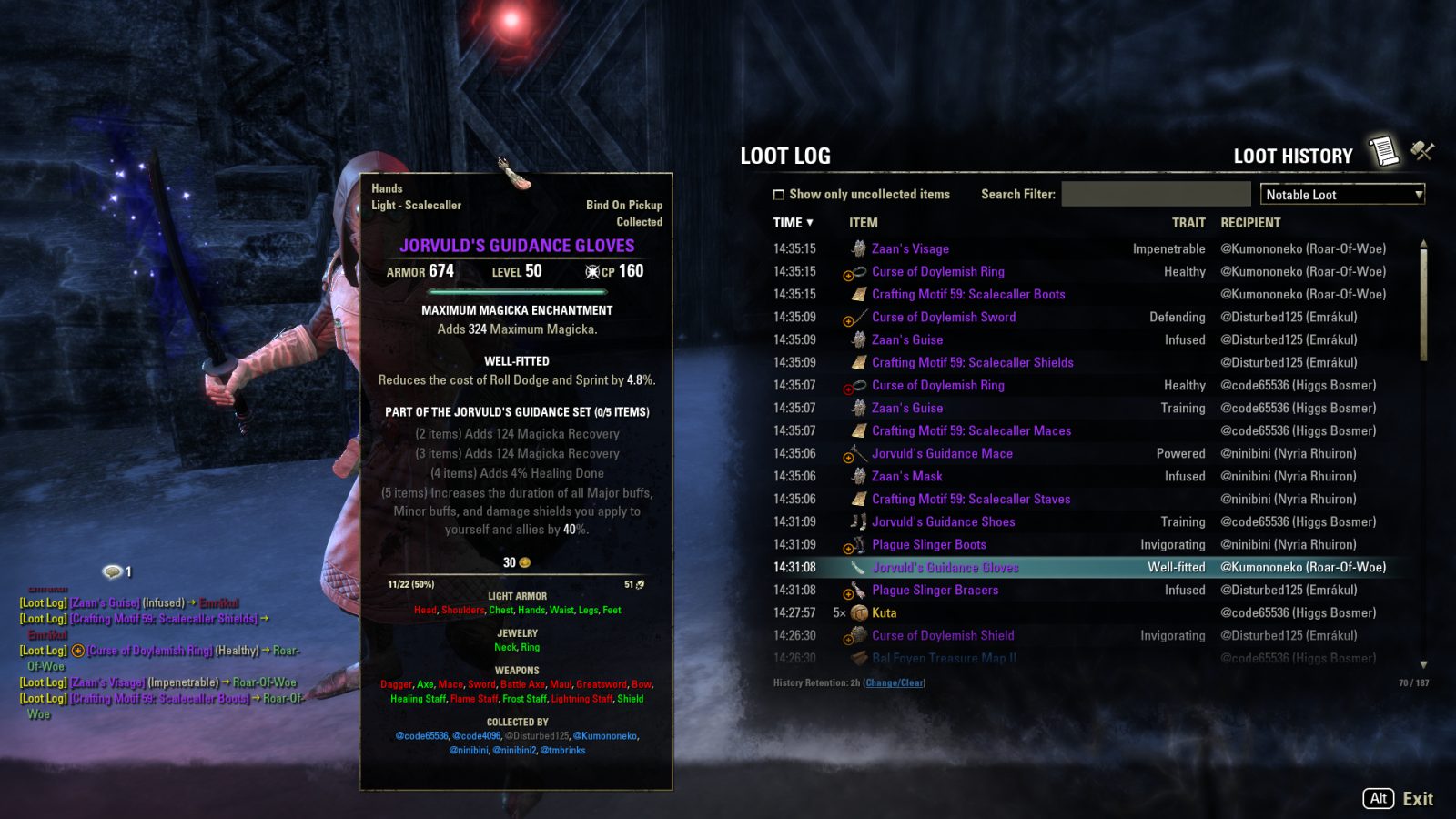
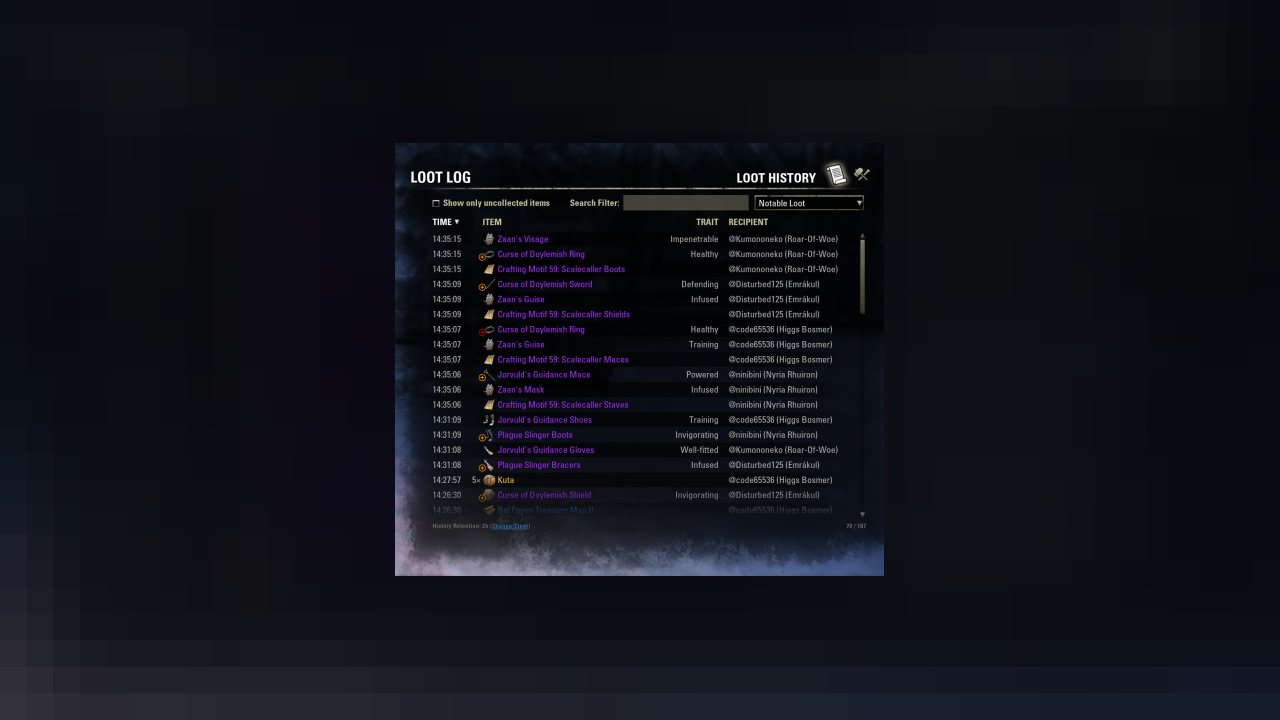
Loot Log helps players track their loot drops and those of group members and provides tools for loot management, such as the binding of uncollected set items.
Loot Log helps players track their loot drops and those of group members and provides tools for loot management, such as the binding of uncollected set items.
Additionally, in conjunction with other addons from the Extended Journal family, Loot Log offers additional inventory-related features such as marking unknown items.
Extended Journal
This addon is a part of the Extended Journal, which is a collection of addons comprised of Loot Log, Item Set Browser, Character Knowledge, Collectibles Tracker, and Raidificator.
There are different ways that you can choose from to access the Extended Journal addons:
- Main Menu Bar: You can open any of the Extended Journal addons via the game's Main Menu Bar at the top of the screen, and once the Extended Journal is open, you can click on the tab that you want.
- Keybind: You can also set a keybind to open the Extended Journal, and once the Extended Journal is open, you can click on the tab that you want.
- Chat command: You can access Loot Log's history browser directly using the /lootlog (or /ll) chat command.
- Chat notifications:When you see a loot notification in chat, you can click on the "[Loot Log]" tag at the beginning of the message to open the Loot History browser.
External Dependencies
Required:
- None
Recommended/Optional:
- Character Knowledge
- LibMultiAccountSets
- LibMultiAccountCollectibles
- LibAddonMenu-2.0
- LibServerResetTime (enables the special daily-reset search filter)
- LibRadialMenu (for gamepad users who want an alternative to keyboard keybinds)
Making Gear Trading Easier
New in Loot Log 3 are a few features to help players trade set items and other collectibles more efficiently.
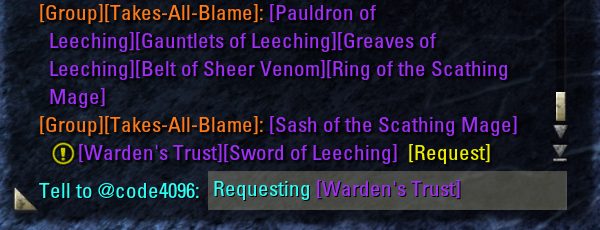
Flagging uncollected items that other players have linked in chat
First, Loot Log will now flag uncollected items that other players have linked in chat. This includes set items, style pages, and runeboxes.
- The goal is to facilitate trade with other players, not clutter a player's chatbox with bling.
- Only incoming messages from other players are processed. Outgoing messages and system messages (from addons) are ignored.
- Items that are bound and not tradeable will not be flagged.
- If the player already has an "unused" copy of an item in their inventory or bank, that item will not be flagged.
- If a message contains uncollected items, Loot Log will append a "Request" link to the message. Clicking this link will initiate a whisper with the message sender, requesting the uncollected items in that message.
- NOTE: This Request feature works only for items that other players have linked in chat. I.e., items that other players are actively offering for trade. I am mindful of how some people feel about addons that monitor loot and the unsolicited requests for gear that such addons enable, which is why the Request feature is not—and will never be—added to loot notifications; this is a deliberate decision to draw a line at how much I'm willing to facilitate behaviors that some people feel uncomfortable with.
/linktrade: The easy way to offer unneeded set items for trade
Next is the new /linktrade (or /lt) chat command, to link your tradeable set items in chat.
- /linktrade is designed to offer up for trade only the items that you don't need, so if you have an uncollected item in your inventory, it won't be linked.
- If you have multiple copies of an item, /linktrade will consolidate them.
- For example, it will output "[Arkasis's Sabatons]x3" instead of linking it three separate times if you have three unbound copies of those sabatons.
- This consolidation ignores trait, quality, level, and even name (for uniquely-named items), since it assumes that these details are irrelevant to players seeking items for their set collection.
- If you have multiple copies of an item that you have not yet collected, it will reserve one copy for yourself. So, in the example above, if you have not yet collected those sabatons, /linktrade will output "[Arkasis's Sabatons]x2", offering for trade two of the three copies that you have and reserving one copy for your own collection.
- Items that have been linked will not be linked again for 1 hour. This is to prevent unnecessary chat clutter caused by relinking items that you had already linked earlier. If you do want to relink items, you can use the /linktrade reset (or /lt reset) chat command to clear away the cooldown on relinking. (Relogging or reloading the UI will also clear the cooldown.)
- Because the chatbox is limited in size, it's not uncommon for the number of items that you can offer up for trade to exceed the size of the chatbox. In this case, /linktrade will link as many items as possible into your chatbox and let you know that there are still items remaining. Simply run the command again to link the remaining items.
- By default, /linktrade will only link tradeable bind-on-pickup items, such as those found in dungeons and trials. Users who want to use /linktrade to link bind-on-equip items can do so via the Loot Log addon settings panel.
With /linktrade, there is no more need to manually dig through your bag, linking items one by one.
/binduncollected: Bind uncollected items in a character's inventory
The new /binduncollected (or /bu) chat command will bind every uncollected set item in your character's inventory.
- If you have multiple copies of an item, only one copy (the first copy that it happens to find) will be bound.
Flagging uncollected items in item lists
Finally, Loot Log can flag uncollected collectible items in various in-game item lists, which include player inventory, banks, vendor inventory, and loot windows.
- For inbound contexts, Loot Log will use a "smart" determination of collection status, where an uncollected item will not be flagged as uncollected if the player already has an "unused" copy of that item in their inventory or bank.
- The reasoning for this is that in these contexts, similar to the flagging of uncollected items linked in incoming chat, the uncollected indicator is supposed to help a player determine if they should acquire an item that they do not already have.
- These are the inbound contexts in which this "smart" flagging is active:
- Loot windows
- Guild store listings
- NPC vendor inventories
- Inbound trade slots from the other player in the trade window (outbound trade slots from the player are not affected)
Support for Item Set Collections
New in Loot Log 2.4 are a number of features to support the new Item Set Collections. First, set items that are not yet collected by your account will be flagged in the Loot History browser with an indicator near the item's icon.
Second, there is a new filtering option in the Loot History browser to only show uncollected items.
Finally, uncollected set items can now be optionally flagged in chat notifications.
Searchable Loot History
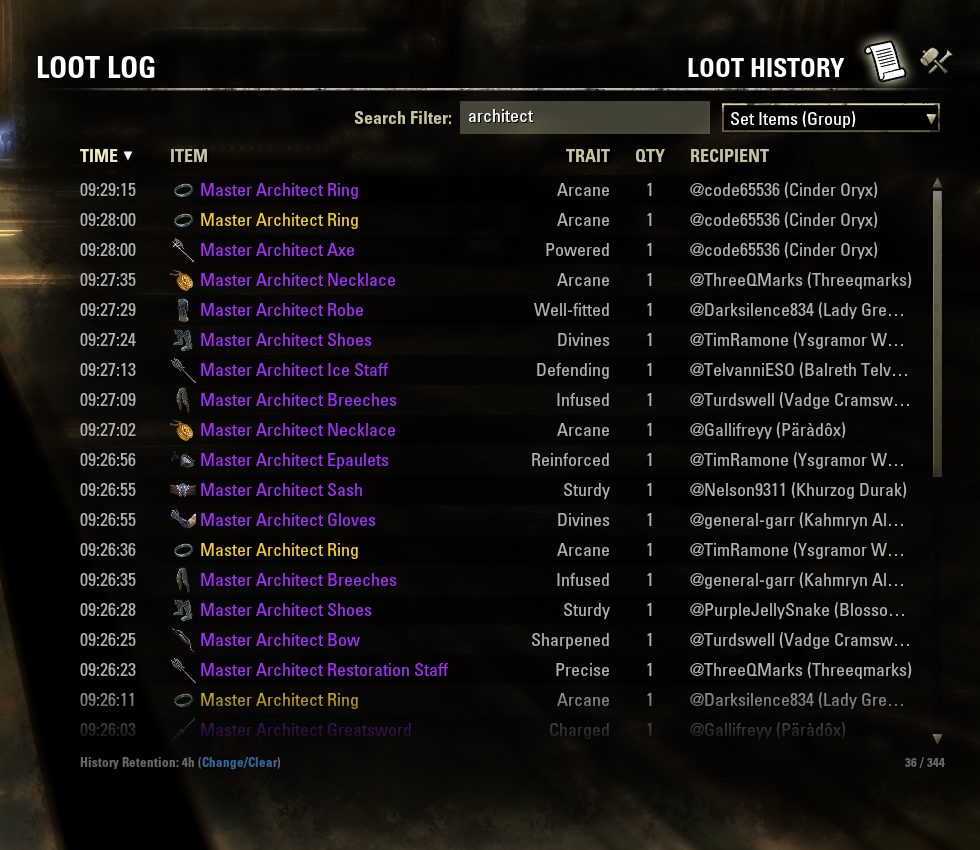
New in Loot Log 2 is a searchable, sortable Loot History.
How far back does the Loot History go?
By default, Loot Log will keep a minimum of 2 hours of loot history. The length of this retention period can be changed through the addon settings for Loot Log.
(Note: Depending on when Loot Log goes through to expire old entries, old entries may remain visible in the history for up to an hour after they become eligible for expiration.)
Searching and filtering the Loot History
To help players find what they need, the Loot History browser includes a text search filter as well as drop-down general view filter.
Filtering for daily items in the Loot History
If the optional LibServerResetTime library is installed, a standalone tilde character ("~") can be used as a special search term in the Loot History browser to filter out items looted prior to the most recent daily quest reset time; when combined with a long history retention, this can be used to, for example, track things such as the number of event rewards collected during the current event day or whether or not you've looted certain items that have daily cooldowns.
Multi-Account Support
Note: This features requires LibMultiAccountSets
Users with multiple accounts and LibMultiAccountSets installed can optionally enable Loot Log's Multi-Account Support.
At the center of multi-account support is the notion of account priorities. If your alt account gets a piece of gear, you generally want to make sure that your main account has collected that piece of gear before collecting it on your alt. Account priorities allow the player to designate which account is important and which accounts are not. The first thing a user must do after enabling multi-account support is configure the priorities for their account.
Enabling multi-account support will affect the following components of Loot Log:
- Loot History browser and loot notifications in chat:
- The collection status of bind-on-equip set items will now be flagged according to account priorities.
- The collection status of bind-on-pickup set items will continue to be flagged as before.
- Developer note: The main reason BoP items are not given the multi-account treatment in the Loot History browser and chat notifications is because it is impossible to reliably determine trade eligibility of BoP items from the game's loot events. The second reason is that accounts that can be eligible for a BoP item will be there with you in the run, and they can monitor the incoming loot stream themselves. There isn't a get-an-item-for-someone-who-wasn't-there use case for BoP like there is for BoE.
- The collection status of other collectibles (e.g., style pages) will continue to be flagged as before.
- Developer note: Cross-account collection information only covers item set knowledge and not general collectibles knowledge.
- Flagging/requesting items linked by others in chat:
- Bind-on-equip set items will now be flagged if the current account (if its priority is not set to Off), or an account with the same or higher priority, has not collected it.
- Developer note: Usually, players use alt accounts collect gear for the main account, and flagging all the gear that an alt account doesn't know, while on the main account, proved to be too "noisy" in play testing.
- Bind-on-pickup set items will continue to be flagged as before.
- Developer note: In a dungeon or trial, any account eligible for trade is likely to belong to a friend who has shared their data; it makes no sense for a player to watch for and request an item on a friend's behalf when their friend is in that instance with and capable of doing it for themselves.
- /binduncollected chat command:
- If an item that is uncollected by the current account is also uncollected by an account with a higher priority than the current account, /binduncollected will reserve a copy for that higher-priority account and not bind the item.
- Developer note: This should avoid the problem of alt accounts binding items that are needed by the main account.
- Flagging items in item lists (inventory, loot windows, etc.)
- All set items in inventory, banks, and deconstruction will be flagged according to account priorities; this includes both bind-on-equip and bind-on-pickup items.
- Bind-on-pickup items that are uncollected by another account will be flagged only if the item is eligible for trade with that account.
- Bind-on-equip set items in store inventories will be flagged according to account priorities.
- Bind-on-pickup set items in store inventories will continue to be flagged as before.
- If a bind-on-pickup set item is uncollected by the current account and is not flagged for any account with priority (i.e., if the current account's priority is set to Off), then the item will continue to be flagged as before.
- Developer note: Since bind-on-pickup items have limited tradeability, you might as well collect an unwanted item on an alt account that would otherwise not collect items.
Finally, users who have multiple accounts are highly encouraged to also install Item Set Browser, which will add information about which accounts have collected a particular item to an item's tooltip. Item Set Browser and Loot Log are designed to complement each other.
Loot Notifications in Chat
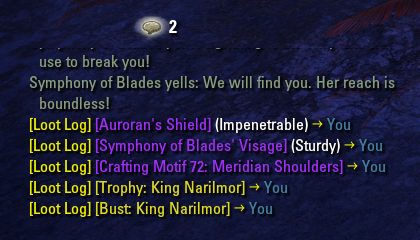
Additionally, players have the option to see loot notifications in their chatbox. Through the addon settings for Loot Log, players can configure which type of loot should appear in their chatbox, if any at all (this feature can be disabled, for players who prefer their chat to be free of the clutter of loot notification messages).
Disabling loot notifications in chat will not affect the Loot History. For example, if you turn off chatbox loot notifications for items that group members loot, you can still see this information when you consult the Loot History browser.
Clicking on the "[Loot Log]" tag that appears at the start of every chatbox loot notification will open the Loot History.
Tooltip Enhancements for Antiquity Leads
When hovering over an antiquity lead in the Loot History browser, Loot Log will display additional information in the tooltip for the lead. This information is also visible when looking at antiquity lead tooltips in the in-game loot and vendor interfaces.
ABOUT THIS LISTING
This page describes Loot Log by code65536. The description and screenshots are the author's own, imported from their listing on ESOUI on 3 October 2026: https://www.esoui.com/downloads/info1455-LootLog.html
Mythiq.net hosts no files for it. The download button goes straight to the release file on cdn.esoui.com, so you are downloading from the author's own host, not from a copy of ours.
The download count, rating and comments on this page start at zero and count Mythiq.net only. The source's own figures are not copied here — they measure a different site, and a number that cannot be checked against our own ledger is not worth printing.