When you check the auto-loot option in Teso menu, drops go directly into your bag. But you do not know what you looted.
Purpose
When you check the auto-loot option in Teso menu, drops go directly into your bag. But you do not know what you looted.
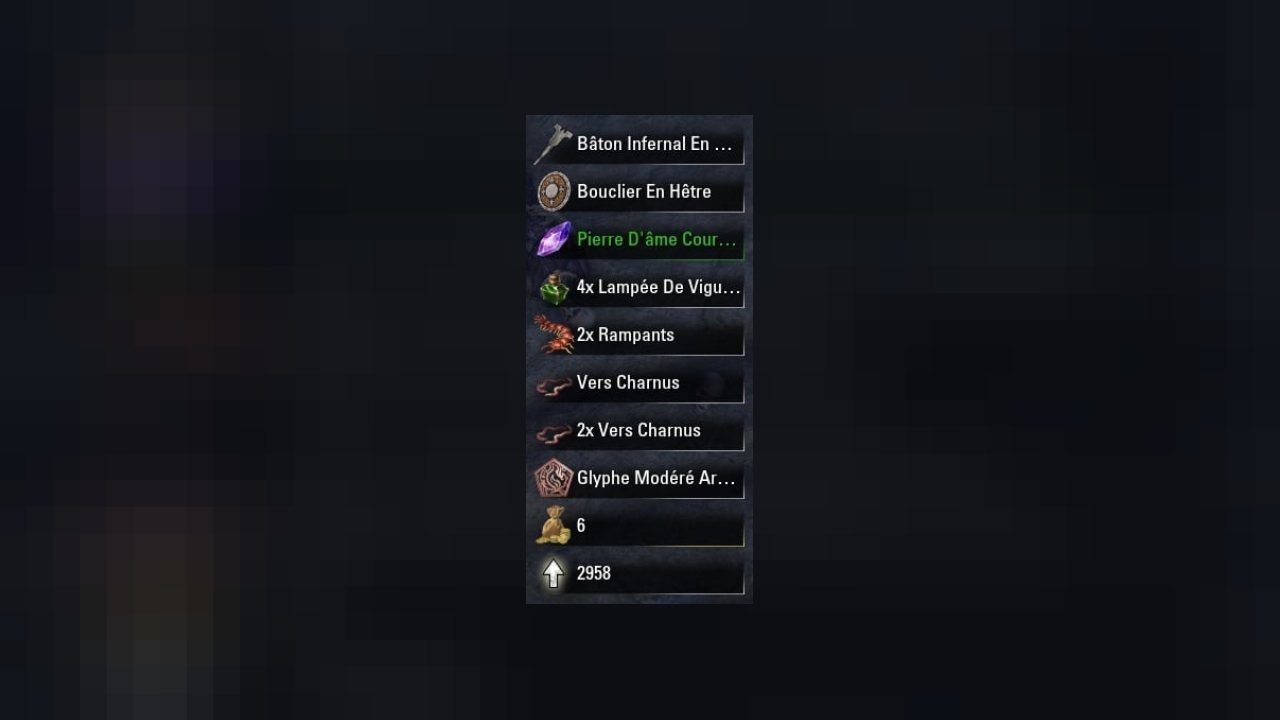
Lootdrop graphically displays this informations (icon, quantity, rarity and text) on the screen by stacking it in a specific and transparent window.
Features
- Displays your loots
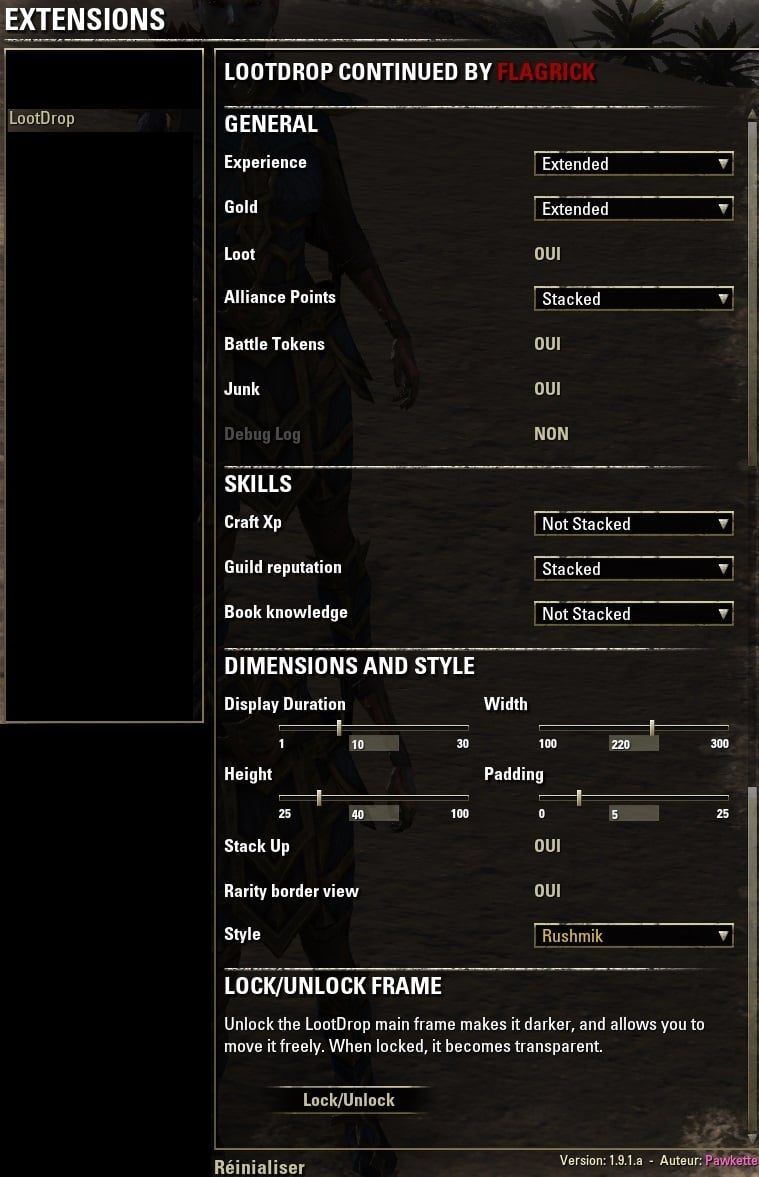
- Displays XP, Veteran XP, AP, TelVar, Guild XP, Inspiration (Craft XP), all configurable
- LootDrop frame is movable (menu -> lock/unlock). Move it at the desired place, and lock it
- Diiferent icon style from menu (older one by default, Pawkette style or Rushmik style)
- The quantity appears before the name, not after
- Rarity color on border of the LootDrop frame configurable in menu (on/off)
- Loots could be stack up (default) or stack down
- Key binding for Autoloot on/off and lootdrop frame lock/unlock
- Show detailed loot in chat if debug log is checked
- Show items looted from mail
Many Thanks to Pawkette who created this addon and Flagrick who added a lot of awesome things into LootDrop
ABOUT THIS LISTING
This page describes Lootdrop, Continued (All in One) by Ayantir. The description and screenshots are the author's own, imported from their listing on ESOUI on 3 October 2026: https://www.esoui.com/downloads/info35-LootdropContinuedAllinOne.html
Mythiq.net hosts no files for it. The download button goes straight to the release file on cdn.esoui.com, so you are downloading from the author's own host, not from a copy of ours.
The download count, rating and comments on this page start at zero and count Mythiq.net only. The source's own figures are not copied here — they measure a different site, and a number that cannot be checked against our own ledger is not worth printing.
Media
Requirements
Game version
2.5
API VERSION
Built for ESO API version 2.5. After a patch the game marks add-ons built for the previous API as out of date; the "Allow out of date add-ons" checkbox in the add-on menu loads them anyway, and most work.
LIBRARIES
Many ESO add-ons depend on a shared library — LibAddonMenu-2.0 above all — which is installed separately, exactly like an add-on. A dependency that is missing shows as the add-on simply not appearing in the list.
CONSOLE
Add-ons are PC and Mac only. There is no way to load them on console.
Installation
1. Download the archive with the button on this page and unzip it.
2. Move the unzipped folder into your add-ons directory:
Windows — Documents\Elder Scrolls Online\live\AddOns
3. Start the game, and at the character select screen click Add-Ons.
4. Tick the add-on. If it is greyed out and marked out of date, tick "Allow out of date add-ons" at the top of the same panel.
5. Log in. Most add-ons need a /reloadui after they are first enabled.
UPDATING
Delete the old folder first. ESO loads everything it finds, and two copies of one add-on is the usual cause of "an add-on has produced an error" on login.
This release downloads from cdn.esoui.com, not from us, so
there is no checksum to compare against. Scan the archive before you unpack it.
Version history
v3.5Latest
14 Aug 2016 · 104 KB via cdn.esoui.com · 0 downloads Download
- 3.5:
- Party members loots can now be enabled without having to enable chat output for yourself
- Party members loots can now be filtered by quality
- 3.4:
- Party members loots can now be displayed in chat (only)
- Another Lib update
- 3.3:
- API & Lib Update
- 3.2:
- Fix bad quantities for loots sent to crafting bag
- 3.1:
- Fix for V16 characters having randomly incorrect XP values
- 3:
- API Update (This version is both compatible Live & PTS)
- Updated LibAddonMenu library
- Code changed due to suppression of Veteran Ranks
- Added Dark Brotherhood Skillline display
- Since this version, LootDrop embeds Custom Titles, to provide Custom Titles to some users. For more info please see the concerned addon description.
- API bump
- Fixed money calculation when selling & buying at a same NPC
- Updated LibAddonMenu library
- 2.3:
- API bump
- 2.2.2:
- Fixed Keybindings
- LootDrop now disable the new "Default UI Loot Notification" inspired by this addon to avoid redundancy
- 2.2.1:
- Fixed a tiny bug with new racial type introduced by last ESO update
- 2.2:
- Added Tel Var Stones to loot displayed and its options
- Quest items now got their icon
- Veteran Experience is now displayed for v14/v15 characters. Chmpion Points are now only displayed to v16 characters.
- "H" bug for French and German users has been fixed
- Few memory improvements and code clean
- Updated API to Imperial City
- Updated LibStub and LibAddonMenu
- 2.1:
- Added Legerdemain Experience. Display can be changed in options as guilds ones.
- Players who reach Veteran 14 will now have their percentage of xp shown based on their Champion level instead of old Veteran level which is no longer accurate. This is visible if you set XP notification to Extended or activated chat debug.
- Dropped previous workaround for French language because problem has been (partially) fixed
- Updated to LibAddonMenu-2.0 r17
- 2.0.3:
- Fixed Thousand separator workaround for French language.
- Teso addon API version compliance (100010 --> 100011)
- 2.0.2:
- Thousand separator workaround for French language (no more x in place of space). I hope that Zenimax will fix ZO_CommaDelimitNumber function quickly.
- Bug Fix : Autoloot keybiding Correction .
- 2.0.1:
- more options for Loot frames (Text, inventory stack, style, mail)
- Font size settings added in Dimension and style settings
- Bug Fix : attempt to correct Xp gain when you have reached max veteran rank with more than max Xp (ie 1 000 000).
- 1.10.1:
- more options for Debug log
- Style info in Debug Log for all items that have one (if option is enabled)
- 1.9.10a:
- Debug info from mail Loot removed
- 1.9.10:
- Loot from Mail is optional (could be enabled only if Loot option is enabled)
- Loot from Mail : workaround to avoid crash (not sure it works : never reproduce it)
- 1.9.9:
- Debug log Fix: no more 'rh' between icon and skill xp value
- Quest item loot Fix : the '?' icon was back, Now, I hope he is returned home
- Added loot from mail
- Debug Log section has been created and moved at the end of settings menu
- debug log time info is now optional
- 1.9.8:
- Teso addon API version compliance (100009 --> 100010)
- Updated to LibAddonMenu-2.0 r16
- 1.9.7:
- Debug log : added item number you have in inventory after loot
- Teso addon API version compliance (100008 --> 100009)
- 1.9.6:
- Bug : Sometimes, instead of quest item tools, the addon showing the last item Drop in inventory
- 1.9.5:
- Fixed Guild reputation Xp (Fighter, Mage and Undaunted/other). In english and German, all Xp was for Undaunted (since teso 1.3.3 ? no report before ;-) )
- 1.9.4:
- Teso addon API version compliance (100007 --> 100008)
- Updated to LibAddonMenu-2.0 r14
- 1.9.3:
- Updated to LibAddonMenu-2.0 r13
- 1.9.2:
Off-site on cdn.esoui.com —
no checksum, because we never held this file.
Link checked by our review team on 3 Oct 2026.
Tell us if something is wrong — a file that will not work, content taken from
someone else, or anything that looks unsafe. Reports go to our review team, not
to the author.
We use cookies to ensure that we give you the best experience on our website and improve your experience. By continuing to use this site you consent to such use of cookies.