Roomba was created by Wobin, CrazyDutchGuy, and Ayantir and maintained by silvereyes, all of which are retired from ESO addon development.
Roomba
Your Guild Bank restacker
Roomba was created by Wobin, CrazyDutchGuy, and Ayantir and maintained by silvereyes, all of which are retired from ESO addon development.
Basic operation:
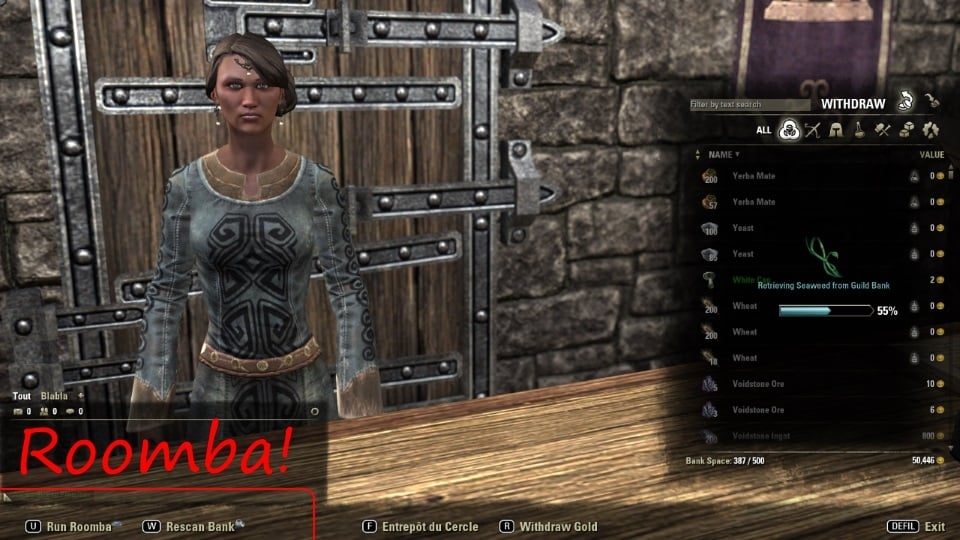
Open your Guild Bank. When things are all loaded up, you'll get a button on the bottom left.
Rescan or Roomba
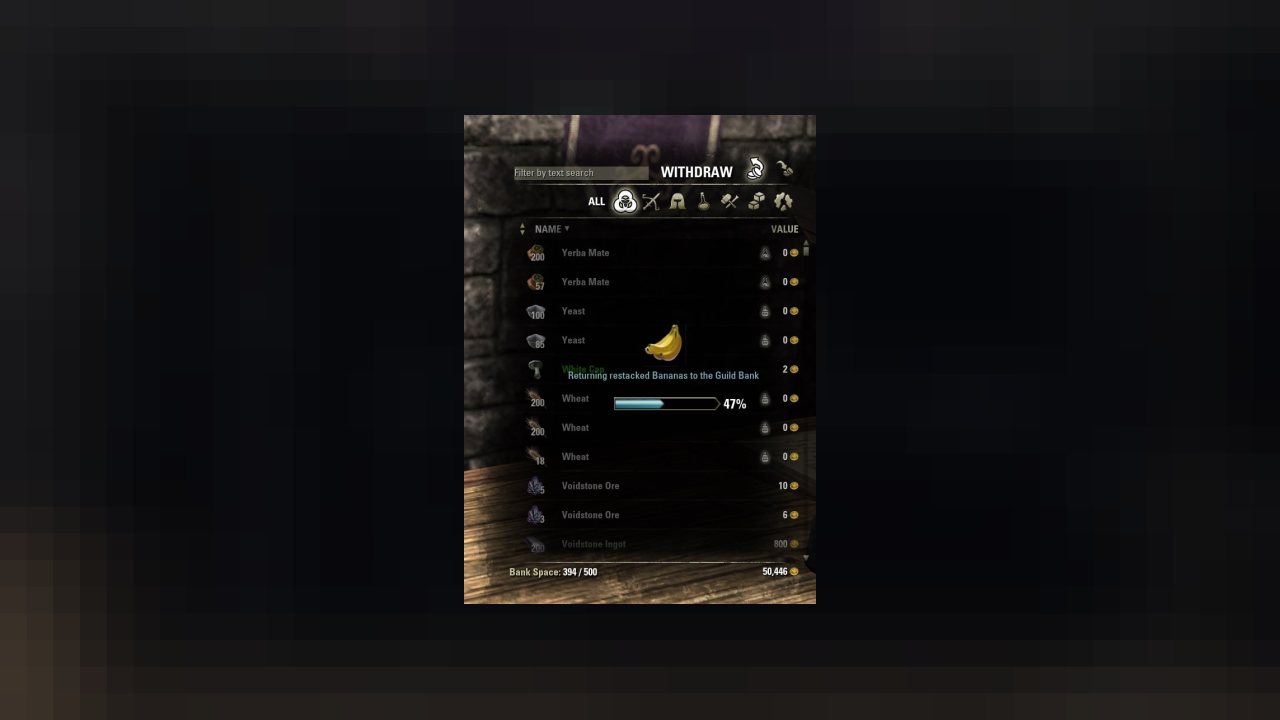
If there's nothing to stack, you'll only get Rescan (which you can use to recheck the bank for new things to stack). If you get Roomba, just click on it and Restack will start.
Roomba ignores existing items in your inventory, and only restacks guild bank items.
If you exit out of the guild bank before the stacking is complete you will retain the current stack of item you were in the process of stacking.
Action can also be keybound and more options are available in Addons Settings.
- Lite Mode: (off by default)
This new option in the settings will put roomba in lite mode and only restacks the item you put in Guild Bank automatically, just after you do it. (it takes 2 to 3 seconds each time)
Lite mode disables the regular mode, so in light mode Roomba doesn't scan your guild bank when you open it and the Roomba button will not appear.
Dependencies
You must install the following libraries separately from this addon in order for it to work. I highly recommend using the Minion addon manager to simplify this process.
- LibAddonMenu
- LibSavedVars
Developers
Developers, few things for you :
How to detect if Roomba is running - this function is useful if you listen to EVENT_SINGLE_SLOT_UPDATE (item junkers, looters, etc) :
How to start a Restack - this function is useful if you do some Guild Bank Management :
ABOUT THIS LISTING
This page describes Roomba - Guildbank Stacker by Masteroshi430. The description and screenshots are the author's own, imported from their listing on ESOUI on 24 October 2026: https://www.esoui.com/downloads/info402-Roomba-GuildbankStacker.html
Mythiq.net hosts no files for it. The download button goes straight to the release file on cdn.esoui.com, so you are downloading from the author's own host, not from a copy of ours.
The download count, rating and comments on this page start at zero and count Mythiq.net only. The source's own figures are not copied here — they measure a different site, and a number that cannot be checked against our own ledger is not worth printing.
Media
Requirements
Game version
12.1.0
API VERSION
Built for ESO API version 12.1.0. After a patch the game marks add-ons built for the previous API as out of date; the "Allow out of date add-ons" checkbox in the add-on menu loads them anyway, and most work.
LIBRARIES
Many ESO add-ons depend on a shared library — LibAddonMenu-2.0 above all — which is installed separately, exactly like an add-on. A dependency that is missing shows as the add-on simply not appearing in the list.
CONSOLE
Add-ons are PC and Mac only. There is no way to load them on console.
Installation
1. Download the archive with the button on this page and unzip it.
2. Move the unzipped folder into your add-ons directory:
Windows — Documents\Elder Scrolls Online\live\AddOns
3. Start the game, and at the character select screen click Add-Ons.
4. Tick the add-on. If it is greyed out and marked out of date, tick "Allow out of date add-ons" at the top of the same panel.
5. Log in. Most add-ons need a /reloadui after they are first enabled.
UPDATING
Delete the old folder first. ESO loads everything it finds, and two copies of one add-on is the usual cause of "an add-on has produced an error" on login.
This release downloads from cdn.esoui.com, not from us, so
there is no checksum to compare against. Scan the archive before you unpack it.
Version history
v2026.08.15Latest
15 Aug 2026 · 22 KB via cdn.esoui.com · 0 downloads Download
2026.08.15
- Fixes & improvements for gamepad/console users (thanks to gamer_sa22!)
2026.08.12
- Bigger font for gamepad/console users
2026.08.11
- Last changes to make it compatible with consoles (thanks to gamer_sa22!)
2026.07.06
- Added Translations for all officialy supported langages
- Performance optimizations & micro bug fixes
2026.06.13
- Bumped api to 101050
- Minor fixes
2025.04.06
- Bumped api to 101045
- Removed a LibStub reference which wasn't used anyway
- Small step to prepare the addon to be compatible with consoles in the future
2024.10.27
- Bumped api to 101044
2024.07.09
- Applied code65536's suggestion for siege weapon stacking
- Bumped api to 101043
2024.05.04
- Used kawamonkey's idea & code of muting all item sounds during tranfers to replace all item sounds by a softer subtle one (thanks kawamonkey)
- Used notnear's code to further implement a Stop button for Roomba (thanks notnear) WARNING: It stops Roomba in the middle of the tranfers so Guild Bank items not yet retransfered after being stacked can stay in your BackPack after that.
2024.04.20
- Bumped api to 101042
2024.03.18
- shijian452 的中文简译,谢谢!
2024.03.11-2
- 2nd attempt to differentiate between stackable and non stackable siege weapons (reported by kawamonkey, TESTED, PLEASE REPORT)
2024.03.11
- Attempt to differentiate between stackable and non stackable siege weapons (reported by kawamonkey, UNTESTED, PLEASE REPORT)
2024.02.01
- Bumped api to 101041
2023.09.23
- Bumped api to 101040
2023.08.04-5
- Working gamepad keybind, tested with a gamepad.
2023.08.04-4
- Cleaned working version.
2023.08.04-3
- Repair the keybinds, 4th attempt, this time I created one keybind for gamepad and one for keyboard. SHOULD WORK.
2023.08.04-2
- Repair the keybinds, 3rd attempt.
2023.08.04
- Repair the broken gamepad keybind (2nd attempt) (you will need to set it again)
2023.08.02
- That version should repair the broken gamepad keybind from previous version
2023.07.28-2
- As requested by (ZOS) DanBatson: Removed "allowFallthrough" from the XML as it was causing the game to crash internally.
2023.07.28
- Bumped api to 101039
2023.04.20
- Bumped api to 101038
2023.02.13
- Bumped api to 101037
2022.11.10
- Updated the required LibAddonMenu version number in the txt file
2022.09.20
- Bumped api to 101036 (tested on PTS week 1)
2022.07.12
- Bumped API Version to 101035
- New ownership (Masteroshi430) so I apply my july patch on the main addon :)
- version number becomes release date
NEW FEATURE:
- Lite Mode: (off by default)
This new option in the settings will put roomba in lite mode and only restacks the item you put in Guild Bank automatically, just after you do it. (it takes 2 to 3 seconds each time)
Lite mode disables the regular mode, so in light mode Roomba doesn't scan your guild bank when you open it and the Roomba button will not appear.
So to resume the 2 philosophies:
regular mode: " I will clean all this mess in the guild bank at once" (IMO for guild masters to run once a week)
lite mode: "I will avoid doing mess when putting things in the guild bank" or " I will do my part by restacking only the item I just put in the guild bank" (IMO for guild members)
Version 17.0.9
- Update 32 Deadlands compatibility
- This version is compatible with both PTS (Deadlands) and live (Waking Flame)
Version 17.0.8
- Update 31 Waking Flame compatibility
- Bugfix: Fix for rare edge case where Roomba could get stuck
Version 17.0.7
- Update 30 Blackwood compatibility
- This version is compatible with both live (Flames of Ambition) and PTS (Blackwood)
Version 17.0.6
- Update 29 Flames of Ambition compatibility
- This version is compatible with both live (Markarth) and PTS (Flames of Ambition)
Version 17.0.5
- Update 28 Markarth compatibility
Version 17.0.4
- Update 27 Stonethorn compatibility
- This version is compatible with both live (Greymoor) and PTS (Stonethorn)
Off-site on cdn.esoui.com —
no checksum, because we never held this file.
Link checked by our review team on 25 Oct 2026.
Tell us if something is wrong — a file that will not work, content taken from
someone else, or anything that looks unsafe. Reports go to our review team, not
to the author.
We use cookies to ensure that we give you the best experience on our website and improve your experience. By continuing to use this site you consent to such use of cookies.