Team: Calia1120 Demiknight Lakashi
Prior/inactive team members: Ravalox Wykkyd
Follow on Twitter for updates or Catch up on Discord
Tutorial video courtesy of @JGoss (outdated)
This update fixes Ability Bar save/load issues. In addition, the Gear Change window has been shifted to the right a bit to prep for the Orsinium DLC release on Nov. 2nd.
Anyone installing the addon fresh will have no issues, however if you have been using Outfitter previous to ESO 2.2.4, your Gear UI will be under the Character Stats ZOS added to the inventory screen. The easiest way to fix this is to click on your paperdoll, this will bring the Outfitter UI to the front, and you can move it to where you like to have it (and it will save that location going forward.)
If anyone has difficulty with doing this, or would rather edit the savedvariables file cause they like to be geeky/nerdy: in the WykkydsOutfitter.lua file in your savedvariables folder; change the line gc_shiftx to read: ["gc_shiftx"] = 600 ... This will force the UI to shift.
Note: This addon is in queue to be re-written. The interface will be improved as well as the functionality.
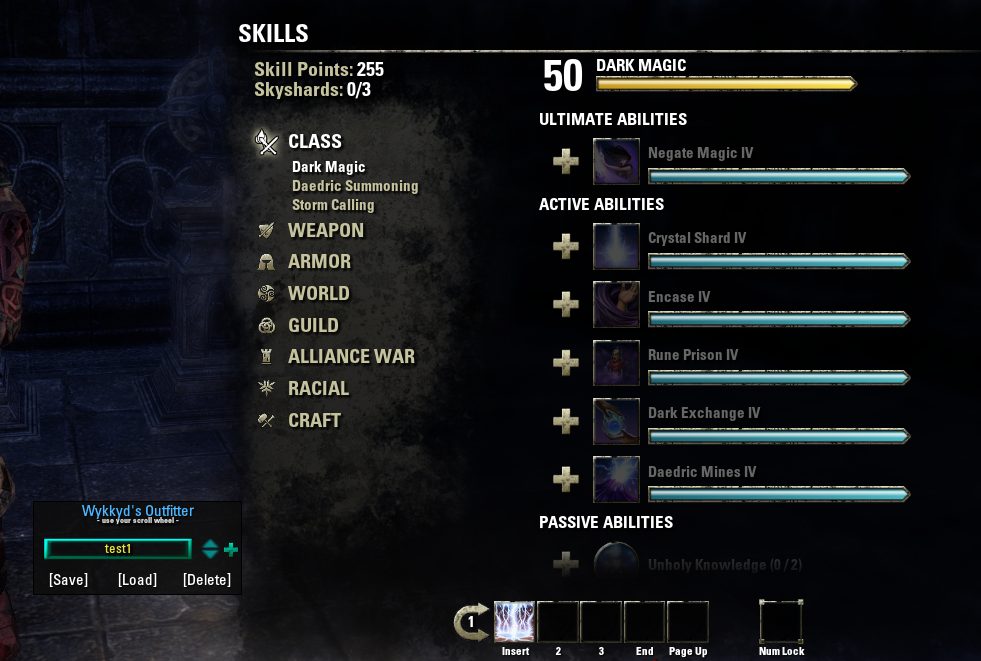
Wykkyd's Outfitter allows you to create GEAR SETS and ACTION BAR SETS from within the Inventory & Skills windows and load them at will. The sets you build in Outfitter can also be macro'd via Wykkyd's Macros and can, thus, be paired together and keybindable, if you so choose.
Swap your gear with a click!
Swap your action bar abilities with a click!
AS OF OUTFITTER 1.8.24.1 you will have to re-build all armor sets that you've built in the past. None of them will cross over and work properly. This is because I converted the addon over to use Zenimax's new item API for identifying your gear. This changed the ID codes associated with each piece of gear and that results in your old sets no longer being viable. I highly recommend you use the Outfitter popup window inside of the Inventory/Bags game window and re-build your sets before trying to equip them, or you might flood yourself offline.
- All new item Identifier system = more accurate and faster gear moves
- Cleaner item handling = fewer issues with duplicate or dual wielded items and shields
- Faster item moves = slightly greater chance you could move too quickly and cause small item hangs. So try not to swap sets too quickly after each other (I recommend waiting at least 3 to 5 seconds, and I also recommend reloading your user interface occasionally between multiple swaps to keep things running smooth).
- DO NOT open or close your bags or manually click any gear while an item move is taking place
- WARNING swapping gear-sets while mounted will dismount you if your swap includes any weapons
- WARNING swapping skill sets CAN result in a graphical bug with your ability icons. Toggling between weapon 1 & 2 a few times really quick usually resolves this bug (it is a game bug and I cannot directly fix it, sorry).
NEW WITH WYKKYDS MACROS (separate addon) you can now take advantage of a VERY ADVANCED user interface, via the new features of the MACRO WINDOW.
- Firstly: You can swap both action bars AND a gear set in a SINGLE macro with 1 press. The inactive weapon's skills will load when you swap to it. It will even prompt you in chat to toggle your weapons to finish loading your skills.
- ADVANCED FEATURE: Macro Key Intercept (ESC > Settings > Wykkyd Settings > Macro Key Intercept)
- MAKE SURE TO KEYBIND THE MACRO WINDOW (ESC > Controls > Keybindings > Wykkyd's Framework Macro Window)
- Opening the macro window with this setting enabled WILL INTERCEPT ALL KEYSTROKES
- This doesn't log what you're typing. That would be silly since it would only be able to write them to your saved variables file, which nobody but you has access to.
- This DOES interrupt gameplay temporarily, but that is by design.
- This is SPECIFICALLY so that you can re-map your keys WHEN INSIDE THIS WINDOW to whatever you wish, WITHOUT interrupting your normal game keybinds
- When the macro window is open, you can HOLD CONTROL to enable key mapping (which lets you set which key triggers which macro)
- Hovering your mouse cursor over a TAB button, a MACRO button or the CLOSE button while holding CONTROL lets you set that button to be triggered by the keyboard key that you press.
- EXAMPLE: Setting a keybind inside the macro window
- Open the macro window
- Hold CONTROL on your keyboard
- MOUSEOVER the first macro button
- Press 1 (while still mousing over, and still holding control)
- Macro 1 will now be set to the number key 1 whenever the macro window is open, but not at any other time
- EXAMPLE USAGE: Swapping gear with a macro, using these new keybinds
- Press HOME (my keybind for opening the macro window, in Controls>Keybinds)
- Press 1 (my keybind, set inside the macro window, for Macro Button 1)
- Press ` (my keybind, set inside Controls>Keybinds, for swapping weapons)
ABOUT THIS LISTING
This page describes Wykkyd Outfitter by calia1120. The description and screenshots are the author's own, imported from their listing on ESOUI on 24 October 2026: https://www.esoui.com/downloads/info52-WykkydOutfitter.html
Mythiq.net hosts no files for it. The download button goes straight to the release file on cdn.esoui.com, so you are downloading from the author's own host, not from a copy of ours.
The download count, rating and comments on this page start at zero and count Mythiq.net only. The source's own figures are not copied here — they measure a different site, and a number that cannot be checked against our own ledger is not worth printing.
Media
Requirements
Game versions
4.1
4.0
3.3
3.2
3.1
3.0
API VERSION
Built for ESO API version 4.1, 4.0, 3.3, 3.2, 3.1. After a patch the game marks add-ons built for the previous API as out of date; the "Allow out of date add-ons" checkbox in the add-on menu loads them anyway, and most work.
LIBRARIES
Many ESO add-ons depend on a shared library — LibAddonMenu-2.0 above all — which is installed separately, exactly like an add-on. A dependency that is missing shows as the add-on simply not appearing in the list.
CONSOLE
Add-ons are PC and Mac only. There is no way to load them on console.
Installation
1. Download the archive with the button on this page and unzip it.
2. Move the unzipped folder into your add-ons directory:
Windows — Documents\Elder Scrolls Online\live\AddOns
3. Start the game, and at the character select screen click Add-Ons.
4. Tick the add-on. If it is greyed out and marked out of date, tick "Allow out of date add-ons" at the top of the same panel.
5. Log in. Most add-ons need a /reloadui after they are first enabled.
UPDATING
Delete the old folder first. ESO loads everything it finds, and two copies of one add-on is the usual cause of "an add-on has produced an error" on login.
This release downloads from cdn.esoui.com, not from us, so
there is no checksum to compare against. Scan the archive before you unpack it.
Version history
v2.3.6.4Latest
9 Feb 2017 · 103 KB via cdn.esoui.com · 0 downloads Download
Change Log:
2.3.6.4
Updated to API 18
2.3.6.3
Updated to API 17
2.3.6.2 08/01/16
Updated for API 16
2.3.6.1
Updated for API 15
2.3.6.0 03/13/16
Updated Destro staff Item IDs. (ZOS changed two of the staff line IDs)
2.3.5.4 03/07/16
Updated to API version 14 (1.9)
2.3.5.3 11/02/15
Updated for ESO v2.2.4
2.2.5.2 10/22/15
Removed errant debug code left behind by the coding gnomes.
Thanks to Synozeer for noticing this!
2.3.5.1 10/20/15
Adjusted Gear Change UI placement for API 1.9 (100013) for ESO 2.2
2.3.5.0 10/11/15
Fixed an issue with the remaining Destro skills that change based
on the weapon in hand.
2.3.4.0 10/04/15
Fixed an issue with Destro Impulse line not saving.
Fixed a double for do loop that doubled the messages being sent to
the API. The API is sending even more duplicates causing the
excessive message notice.
2.3.3.2.b 05/01/15 Ravalox
Reviewed addon package and changed all references
to Wykkydgaming contact info to ExodusCode addon group.
Released into wild as GA v2.3.3.2
2.3.3.2.a 04/30/15 Ravalox
Located issue with compass adjustment code.
(Code changed from previous version, when no change was required)
Off-site on cdn.esoui.com —
no checksum, because we never held this file.
Link checked by our review team on 25 Oct 2026.
Tell us if something is wrong — a file that will not work, content taken from
someone else, or anything that looks unsafe. Reports go to our review team, not
to the author.
We use cookies to ensure that we give you the best experience on our website and improve your experience. By continuing to use this site you consent to such use of cookies.