Team: Calia1120 Demiknight Lakashi
Prior/inactive team members: Ravalox Wykkyd
Follow on Twitter for updates or Catch up on Discord
As of version 3.2.6 you will need to download and install the following libaries to use this addon:
LibAddonMenu
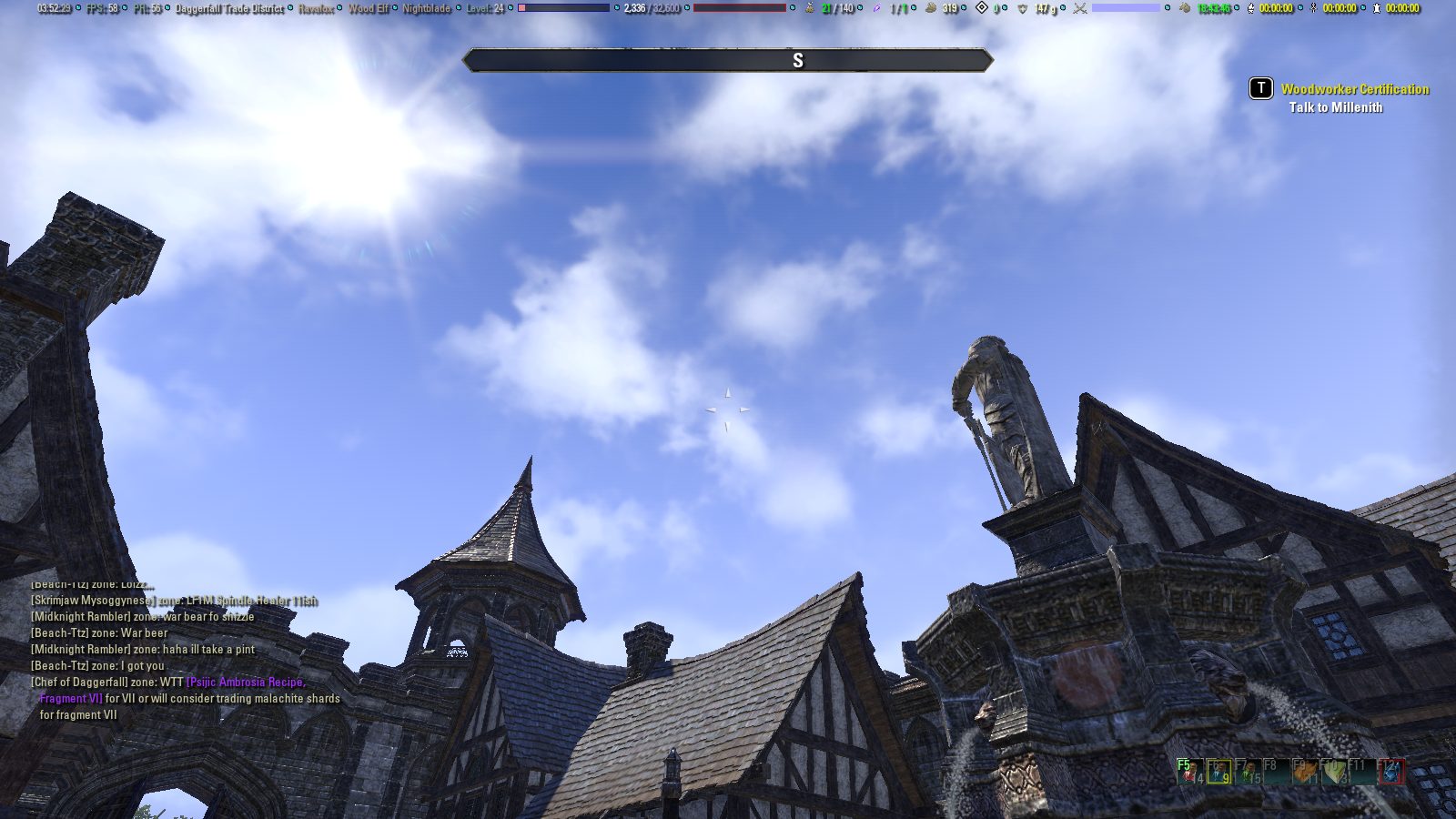
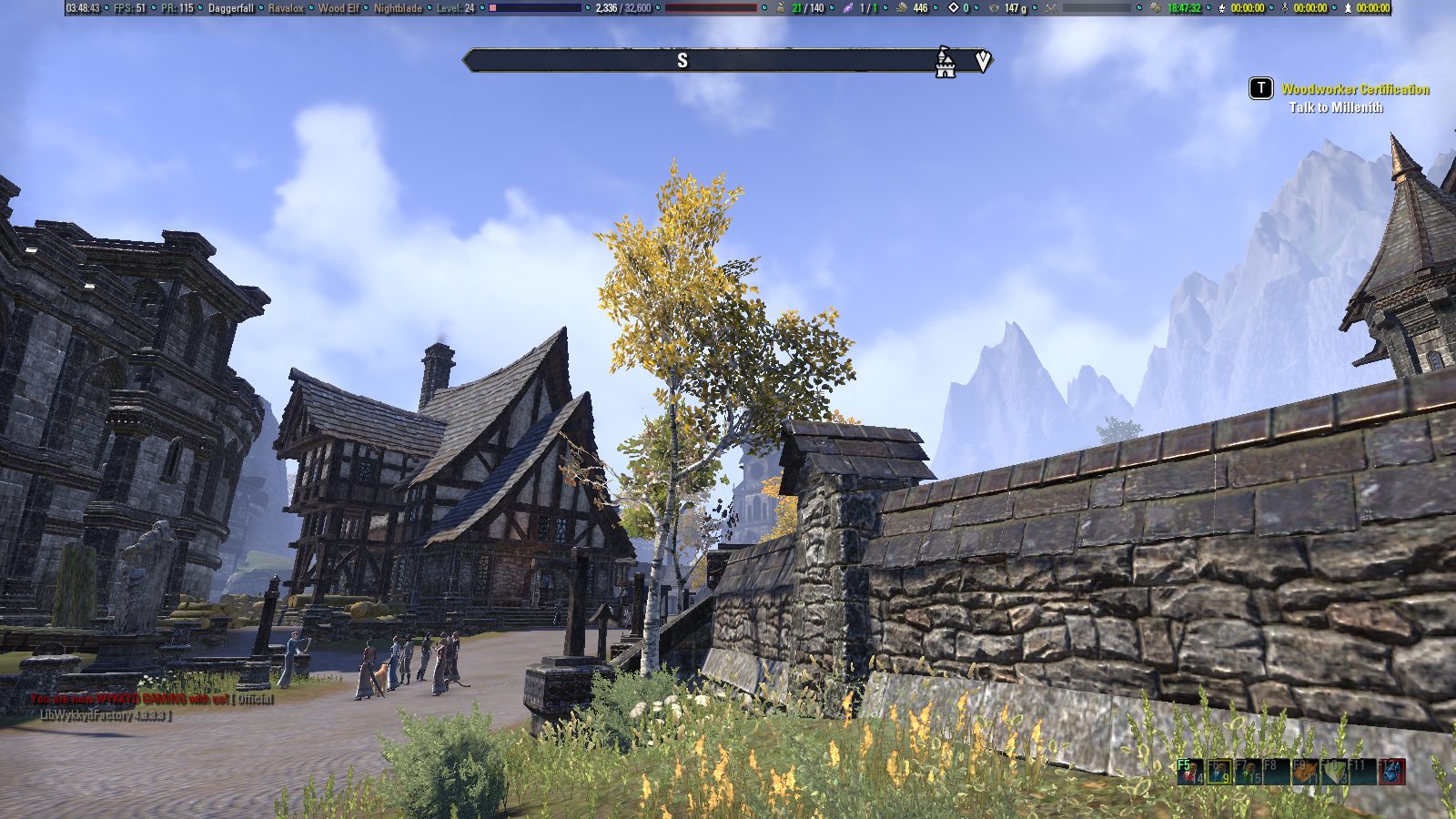
Wykkyd Toolbar is an addon originally programmed as a piece of Wykkyd's Framework. It provides an informational bar with on-screen display of useful, configurable, "tools".
Currently included tools:
- Alliance Points
- Gold
- Bag Space
- Soul Gems
- Horse Feed Timer
- Research Timers
- Time (real world)
- Level
- Experience (xp/cp)
- Experience Bar
- Werewolf / Vampire experience bar
- Character Name, Class, Race (if you want that kind of thing)
- ...and more
- ...much more coming soon
Advanced Setting Controls (available in all Wykkyd Addons)
- Save To Default - This feature saves a snapshot of your logged in character's CURRENT settings as a save set named SYSTEM DEFAULT.
- Load System Default - This loads the current SYSTEM DEFAULT as your character's settings and effectively sets your character to MIMIC the SYSTEM DEFAULT. This behaves exactly like Mimic below, with the exception that the SYSTEM DEFAULT only ever changes when you manually save to it from any character, by clicking Save To Default.
- Mimic... - This sets the current logged in character to adopt the settings of another character until this value is changed. This causes the logged in character's saved settings to reset every time you log in or Reload UI to be like the mimic'ed character. If you set George to mimic Bob, as you save settings on Bob while playing those settings will become George's settings too whenever you log into George. As you play George and change his settings manually, those changes become temporary unless you clear the Mimic box. This affords some fairly awesome opportunities for your play sessions.
- Wykkyd's Preferences (where available) - This will Reload UI and set your active character to the basic settings that Wykkyd uses for that addon for his characters as his STARTING point, he customizes each character from there and you are encouraged to also do so.
- Reset All - Resets all settings inside the Advanced Setting Controls section for that addon, for that character
Use of SYSTEM DEFAULT allows you to basically create system-wide default settings. I say "system" because these settings are not filtered by account name. So if three people share your computer, they all adopt the system defaults (if they selectively choose to do so). This is a "neat trick" for people with multiple accounts as it lets you share settings across all of them.
For example, if you log into your first character and set every Wykkyd addon up the way you want. Then in each you click "Save To Default", one by one. You've now established your "baseline", if you will. You can then log into each character you have (regardless of number of accounts), including that same first character, and inside each, in each addon, click "Load System Default". Now every single character will use the same settings. In fact, because you saved defaults from character 1 and then set character 1 to use those same defaults, even that character is inheriting the SYSTEM DEFAULT every single time it loads. This means if you're on character 7 and decide to change your default for all, all you have to do is tweak your settings and click "Save To Default" and every single character you set up this way gets those settings automatically.
WARNING: System Default, and Mimic, can be dangerous. As of this time this ALSO includes saved item sets, gear sets, quest header settings, tracked achievements... IE: it includes data saved by the addons too. THIS WILL BE CHANGING IN THE FUTURE to be more intuitive and robust. But I didn't want to delay this feature until that was 100% polished. After all, this is fairly useful as is.
ABOUT THIS LISTING
This page describes Wykkyd Toolbar by calia1120. The description and screenshots are the author's own, imported from their listing on ESOUI on 24 October 2026: https://www.esoui.com/downloads/info737-WykkydToolbar.html
Mythiq.net hosts no files for it. The download button goes straight to the release file on cdn.esoui.com, so you are downloading from the author's own host, not from a copy of ours.
The download count, rating and comments on this page start at zero and count Mythiq.net only. The source's own figures are not copied here — they measure a different site, and a number that cannot be checked against our own ledger is not worth printing.
Media
Requirements
Game version
6.0.5
API VERSION
Built for ESO API version 6.0.5. After a patch the game marks add-ons built for the previous API as out of date; the "Allow out of date add-ons" checkbox in the add-on menu loads them anyway, and most work.
LIBRARIES
Many ESO add-ons depend on a shared library — LibAddonMenu-2.0 above all — which is installed separately, exactly like an add-on. A dependency that is missing shows as the add-on simply not appearing in the list.
CONSOLE
Add-ons are PC and Mac only. There is no way to load them on console.
Installation
1. Download the archive with the button on this page and unzip it.
2. Move the unzipped folder into your add-ons directory:
Windows — Documents\Elder Scrolls Online\live\AddOns
3. Start the game, and at the character select screen click Add-Ons.
4. Tick the add-on. If it is greyed out and marked out of date, tick "Allow out of date add-ons" at the top of the same panel.
5. Log in. Most add-ons need a /reloadui after they are first enabled.
UPDATING
Delete the old folder first. ESO loads everything it finds, and two copies of one add-on is the usual cause of "an add-on has produced an error" on login.
This release downloads from cdn.esoui.com, not from us, so
there is no checksum to compare against. Scan the archive before you unpack it.
Version history
v3.2.7.0Latest
27 May 2020 · 87 KB via cdn.esoui.com · 0 downloads Download
V3.2.7
• API updated for Greymoor (100031)
V3.2.6.0
• API updated for Harrowstorm (100030)
• Removed LibStub as it has been discontinued.
• Removed LibAddonMenu, changed to required dependency.
V3.2.5.0
• API updated for Elsweyr (100027)
V3.2.4.0
• Fixed: Setting to mode to display soul stones was not being read correctly. Was always displaying empty/full or off. Should now should all options.
• Fixed: The font color for alliance points pre addon 3.2 was not implemented. Font color has returned for AP.
V3.2.3.0
• Fixed: Several addon settings were being missed when saving or loading addon settings to default.
V3.2.2.0
• Fixed: Tel Var Stone currency was always reporting zero. Call to retrieve currency was missing correct reference for where to look. (Character/Bank).
V3.2.1.0
• Fixed: Setting to turn on/off soul stones was not being picked up.
V3.2.0.1
• Fixed: Setting to turn on/off transmute stone currency was not being picked up.
V3.2.0.0
• Added Crowns, Crown Gems and Tel Var Stones to currencies.
• Reworked setting for showing icon, title or none. Previously there was a setting for icon and title, which suggests you could have both. That was not actually the case. Changed to be a drop-down list of Icon, Title or None.
• Setting icon or title was being controlled on an individual currency level. Changed to be a currency wide setting.
• Reworked setting for “use commas”. Now set as an overall setting for all currency items.
• Alliance Points, Gold, Tel Var Stones and Writs can now be configured to display value on character or stored in bank.
• The settings to enable/disable all currency items has been standardized to use a drop-down menu. Previously some used checkbox, others a list.
• Updated the currency addon settings to use headers and display currencies in alphabetical order.
• Due to several changes in the currency addon settings saved variable version has been incremented.
• All the currency items, except soul stones (which isn’t really a currency) are now using a new single LUA. Previously each currency had an independent file with 90% the same code.
• Fixed the soul stone icon when the character has no soul stones.
• The method to provide a warning color for currencies has been standardized. Prior to the warning limit the value will be normal. From the limit to below maximum is yellow. Maximum is red.
V3.1.3.0
• Fixed bank space metrics when not an ESO plus member.
V3.1.2.0
• Fixed bank space metrics when an ESO plus member.
• Fixed toolbar error when icon for bag/bank space set turned off.
V3.1.1.0
• Added bank space as a new toolbar widget.
• New icon used for bag space. (To be consistent with icon used with bank.)
• Added setting to automatically hide toolbar when in a dialog.
• Added setting to automatically hide world xp when character is not a vampire or werewolf.
• Fix for showing seconds that was applied to "adaptive research timers with days" implemented on the standard adaptive research timers.
• Updated code to hide horse training timer. No longer toggles main horse timer addon setting.
• LibAddonMenu updated to r26
• Fixed reference in addon to LibAddonMenu for divider items.
V3.1.0.0
• Updated to API Version 100026.
V3.0.3.0
• Fixed adaptive research timers to show seconds when time remaining is less than one minute.
V3.0.2.1
• I'd left a debug statement in the code.
V3.0.2.0
• Fixed zone and subzone name showing string control characters on initial load
• Added control character stripping to race and class strings
V3.0.1.0
⦁ Added keybind to toggle the bar on and off
⦁ Added a new Adaptive setting to show days when it is over 24hr remaining
V3.0.0.0
⦁ Added Spacer options
⦁ Reorganized the options into Categories to clean it up a bit
⦁ Fixed Reloading after changing research display options
⦁ Added Event Tickets
⦁ Trying to make non-standard scale settings space a bit better, post in forum or PM Lakashi on esoui.com with a screenshot of your bar and settings if there is an issue!
Off-site on cdn.esoui.com —
no checksum, because we never held this file.
Link checked by our review team on 25 Oct 2026.
Tell us if something is wrong — a file that will not work, content taken from
someone else, or anything that looks unsafe. Reports go to our review team, not
to the author.
We use cookies to ensure that we give you the best experience on our website and improve your experience. By continuing to use this site you consent to such use of cookies.