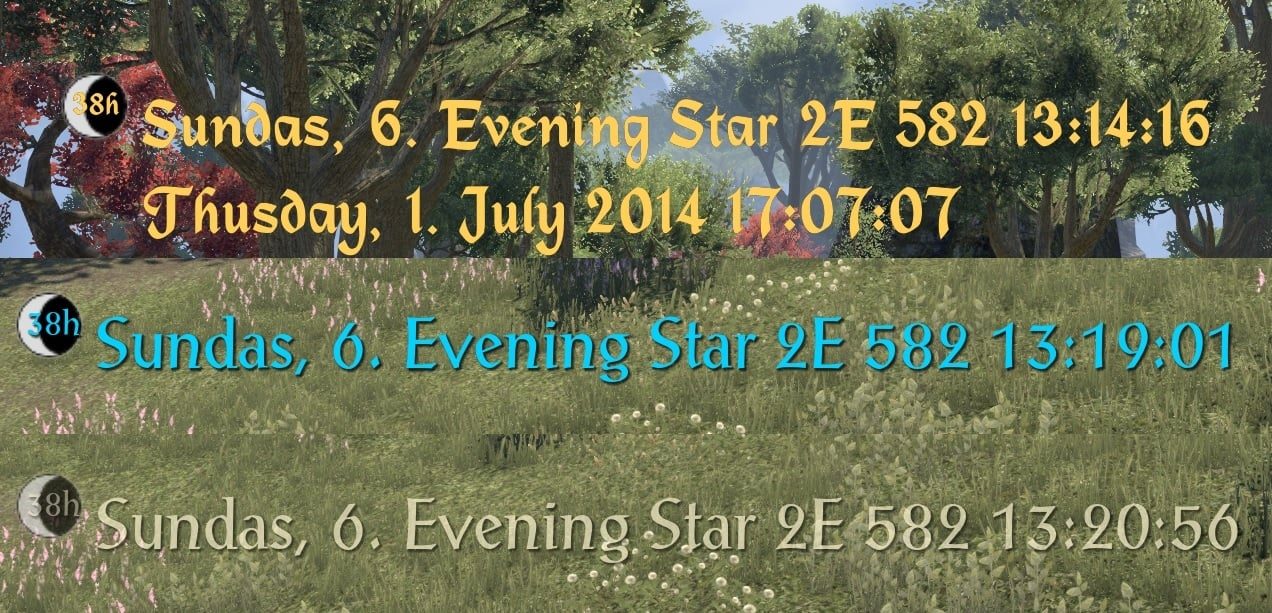
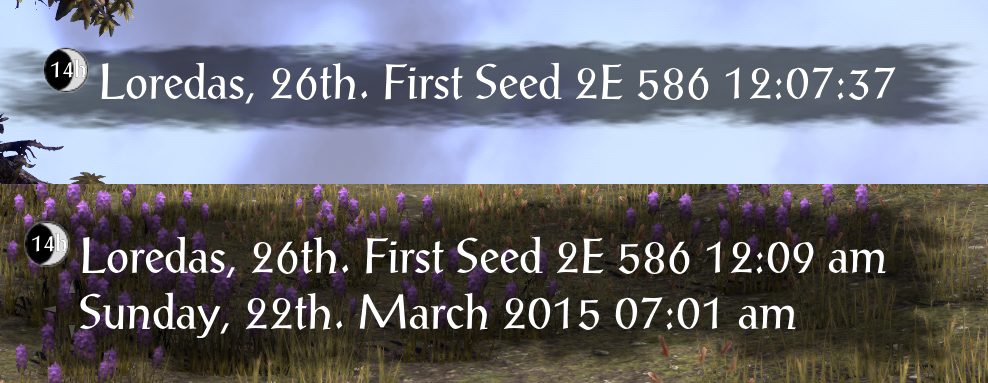
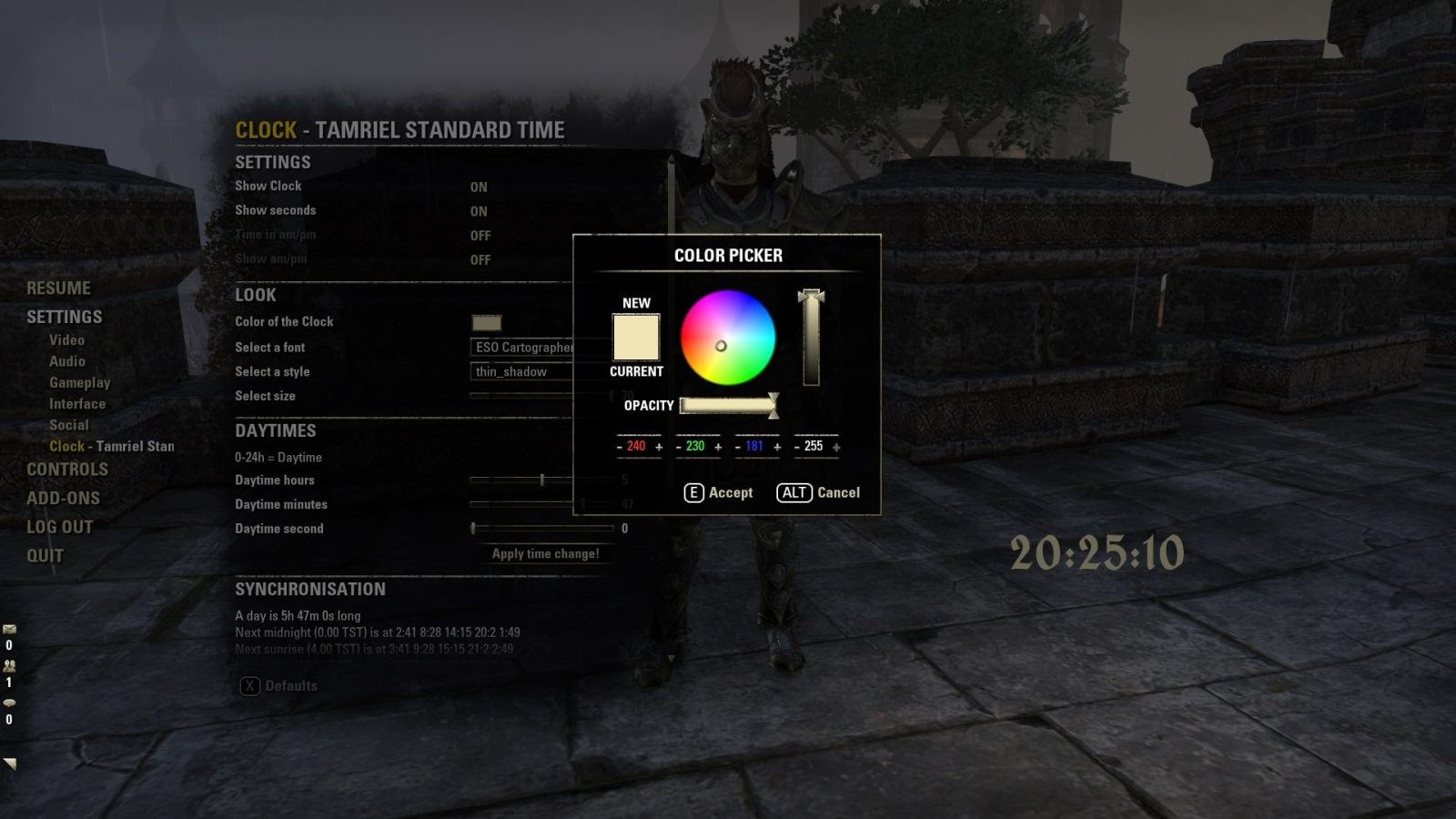
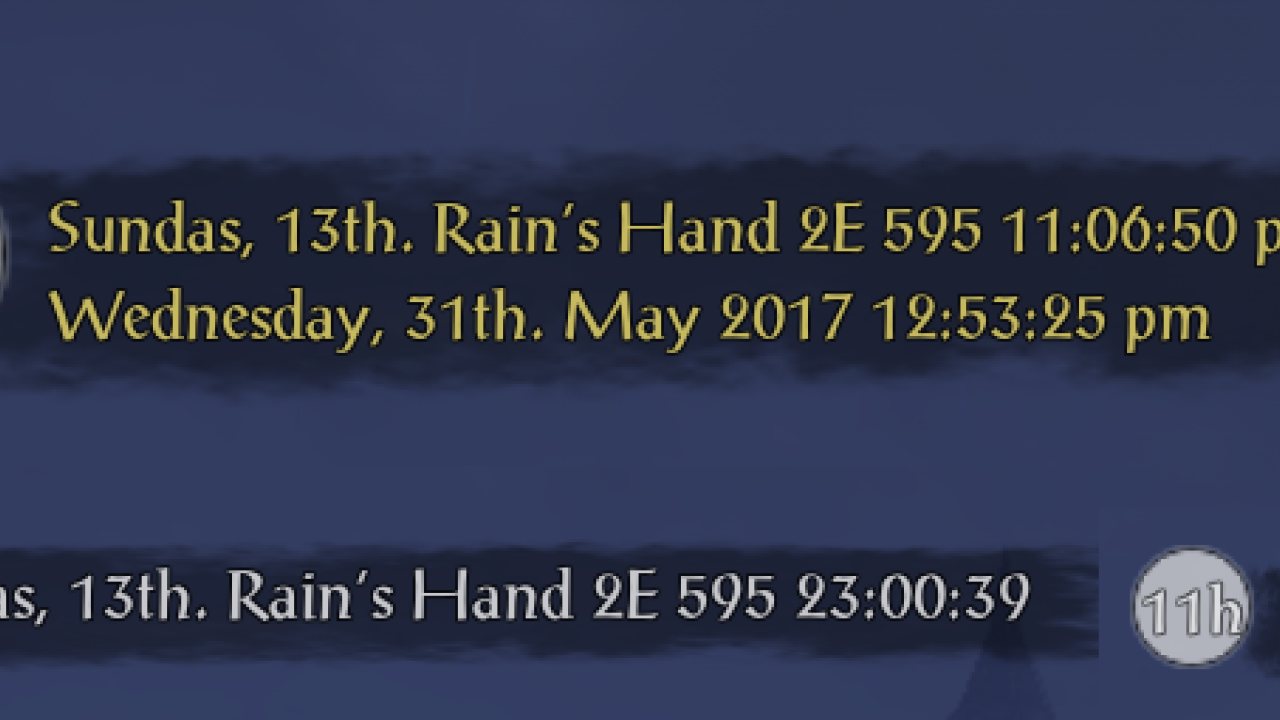
I would like to thank all the people who gave me donations. It means a lot to me.
I guess you want to stay anonymous but if you like to be named, please write me a PM.
Dependencies
- LibAddonMenu-2.0
- LibMediaProvider
- LibStub
Latest Update
I completely rewrote the Clock - Tamriel Standard Time
It has now a much better performance, a pretty code background and many more features.
Check it out!
This legacy version should still work for a long time, but will not receive any updates anymore.
Overview
This addon Clock - TST adds a completely customizable and moveable label to the game which shows you the current date and time of Tamriel and of Earth (linked to your system time, thus it is accurate where ever you are).
Additionally, it also shows the current state of the moon and the remaining time to the next phase.
Updates
The last update 1.0.0 brings you a fixed Fake Lore Date and an improved fragment handeling (no more warnings when opening the menu). The FLD will show you the current week day, day and month month in the real world with a lore name.
Update 0.7.8 added independently sizeable moon and phase labels with a customizable look of moon label independent of the clock label. It has a improved moon alignment inspired by Kenza. it also is now fully translated into French (all thanks to Fifish).
With update 0.7.6 comes a Japanese translation thanks to @BowmoreLover from the ESOUI community.
Together with the new localisation, Clock can now set to show 0 am instead of 12 am at midnight with the 12h setting.
Since 0.7.2 also with Russian localisation! (next to English and German).
With Update 7 a new background feature was added. The Clock - TST never looked that good before. Check it out.
Additional to that and a few bug fixes, you can now have your real time next to the Tamriel time instead of beneath.
You can use this addon together with Harven's Dwemer Clock to get the in-game Time as a fantastic looking, animated clock. Install both addons then right-click on the Dwemer Clock and click "Use Tamriel Standard Time Clock" option. You can change the size of the Dwemer Clock by clicking on it (left mouse button) and then scrolling with your mouse wheel over the Clock.
Check out kerb9729's Addon for Clock - TST: Midnight. It will show you the time until midnight.
Follow the Clock on GitHub to always get the latest beta/alpha Version (caution: unstable)
I will release every stable build here as soon as possible!
If you like an offline desktop application of the Clock to see the current time in Tamriel where ever a PC is, search no further and look here (still an alpha Version)
Features
This AddOn will show you the current time in Tamriel.
It is displayed on the Interface wherever you want it to be - completely movable.
You are also able to set the size, font and style of the clock to your liking.
The time in Tamriel is not a fact.
There is not function in the API which gets us the length back.
Many people right now are trying to figure out how long a day is.
Zenimax Online stated in their FAQ that the time is a bit less than 5h, but after many tests, I am sure it is 5,83h long.
If you agree with me or not is up to you.
You are able to customize the length of the day easily in the Clock - TST settings.
This can be done to a precision of seconds.
The time could be off after a maintenance or something else.
With the settings menu or commands you can choose one out of four times to synchronize the clock.
For example, you see the sun right under your South needle of the compass.
You are sure that it is noon right now.
No problem: Just write /cl noon in the chat or use the "Noon is now!" button in the settings to sync your clock.
The best way to sync your Clock is to set the clock to noon at noon and wait a day or more (in-game).
Then set your time (at noon again) so that your clock shows exactly 12:00.
When this is done you should have a perfectly synced clock
Noon is best because you can see the sun and you have a compass
So just wait until the sun is right under you South sign at your compass.
Right now, the settings and the Clock is localized in English, German and Russian.
If you are from the US or any other country which uses a 12-hour clock, you are able to change the clock to that format too. You can even hide the am/pm signs.
Of course you can use the formats: 12h or 24h wherever you are from.
You can also hide the 0 before a single number: 01:12 -> 1:12.
I personally love to see the seconds pass by. It is fun to see if they reach the zero or step over it (because of the game to real time ratio). It is like the screensaver of a DVD player... you have to watch for some reason.
If they distract you too much - like me - or you just don't want to see them, just disable them.
You can disable to show seconds in the settings menu.
You can let the Clock AddOn show you the current moon phase and the time to the next one.
This feature is like the time not based on a fact but on an adjustable algorithm.
After many months of studying it, I am sure the one cycle is 30 Tamriel days long, but you can still change the length of the different phases.
You can customize the length of a moon phase at the settings menu.
Clock does not stop there.
You can also let the Clock show you the current lore date on your screen either as a real calculated date or a fake one representing the current real date as a lore date.
The look of the time and date are fully customizable.
Write a String like this in the text field in the settings:
_DDD, _D day of _MMM _YY _hh:_mm:_ss
It will return you a date looking like this:
Fredas, 4th day of First Seed 2E 582 07:09:08
If you want the Clock will also show you the current real date and time as customizable as the lore time and date.
TL;DR
Clock - TST gives you a fully customizable lore- (and real-) date and time system with moon cycle integration.
If you want a new feature to be added too, feel free to suggest it here.
Commands
You can easily change all settings in the menu:
The panel can be called with writing the command /clsettings in the chat.
Or To open it press "esc" -> choose "settings" and look for "Clock - Tamriel Standard Time".
If it is too much of a hassle for you, there are also chat commands.
The meta command is /cl
/cl active toggle the clock on or off
/cl date toggle the date on or off
/cl ldate toggle the lore date on or off
/cl fldate toggle the fake lore date on or off
/cl help will give all available commands
/cl moon toggle the lines for the moon phase under your clock on or off
/cl rt toggle the Real Time on or off
/cl reset resets the clock to the default values (all saved values will be lost)
/cl resetUI resets the changes only to the clock look
/cl sec toggle to show seconds on or off
/cl show shows the length of a day and the upcoming times in real world time
Synchronize the Clock
/cl midnight will save the current time as midnight
/cl sunrise will save the current time as sunrise
/cl noon will save the current time as noon
/cl sunset will save the current time as sunset
/cl us Toggle am/pm format on or off
Known Bugs
Clock will "jump" around if you activate or deactivate the date functions
If you notice one please use this link to report it.
It will help me a lot.
Future Plans
#0.1 Add ingame time algorithm
#0.2 Display ingame time
#0.3 Create commands to adjust time
#0.4 Create user interface to adjust clock
# 0.41 Bugfixes
# 0.42 Add hide seconds
# 0.43 Rewrite time algorithm
# 0.44 Make clock moveable and add colorize, fonts, styles, size to settings
# 0.45 Bugfixes
#0.5 Create moon cycle database
# 0.51 Moon icon
# 0.52 Various improvements
#0.6 Various bug fixes and improvements
#0.7 Added background
#0.8 Display for moon cycle
Thanks to Harven I don't need to provide you with a custom animated Clock.
He made already a really beautiful one compatible with this addon.
#0.8 Make clock visible at the map
#0.9 Animate clock
#1.0 Add moon cycle to the clock (animated)
Thanks
I am really thankful to the Community of ESOUI which helped me a lot in the forum and the comments or per PM.
Special thanks to Seerah for helping me out and giving us the LibAddonMenu, LibMediaProvider and LibStub which I use in this Addon.
Furthermore to name some helpful users which reported bugs and/or presented features:
Munkry, Friiar, Sephiroth018, fosley, LegoManIAm94, WatersMoon110, Kraeius, Phinix, logan9a, oldbushie, MAOofDC, QuadroTony, GT-Schorsch, Philgo68, Phinix, KiriX, kerb9729, BowmoreLover,
Fifish, Kenza and of course Garkin.
I am sorry if I forgot to mention you if you helped me out too
Zenimax Disclosure
This Add-on is not created by, affiliated with or sponsored by ZeniMax Media Inc. or its affiliates.
The Elder Scrolls® and related logos are registered trademarks or trademarks of ZeniMax Media Inc. in the United States and/or other countries.
All rights reserved.
ABOUT THIS LISTING
This page describes Clock - Tamriel Standard Time - Legacy by Tyx. The description and screenshots are the author's own, imported from their listing on ESOUI on 26 October 2026: https://www.esoui.com/downloads/info241-Clock-TamrielStandardTime-Legacy.html
Mythiq.net hosts no files for it. The download button goes straight to the release file on cdn.esoui.com, so you are downloading from the author's own host, not from a copy of ours.
The download count, rating and comments on this page start at zero and count Mythiq.net only. The source's own figures are not copied here — they measure a different site, and a number that cannot be checked against our own ledger is not worth printing.
Media
Requirements
Game version
5.3.5
API VERSION
Built for ESO API version 5.3.5. After a patch the game marks add-ons built for the previous API as out of date; the "Allow out of date add-ons" checkbox in the add-on menu loads them anyway, and most work.
LIBRARIES
Many ESO add-ons depend on a shared library — LibAddonMenu-2.0 above all — which is installed separately, exactly like an add-on. A dependency that is missing shows as the add-on simply not appearing in the list.
CONSOLE
Add-ons are PC and Mac only. There is no way to load them on console.
Installation
1. Download the archive with the button on this page and unzip it.
2. Move the unzipped folder into your add-ons directory:
Windows — Documents\Elder Scrolls Online\live\AddOns
3. Start the game, and at the character select screen click Add-Ons.
4. Tick the add-on. If it is greyed out and marked out of date, tick "Allow out of date add-ons" at the top of the same panel.
5. Log in. Most add-ons need a /reloadui after they are first enabled.
UPDATING
Delete the old folder first. ESO loads everything it finds, and two copies of one add-on is the usual cause of "an add-on has produced an error" on login.
This release downloads from cdn.esoui.com, not from us, so
there is no checksum to compare against. Scan the archive before you unpack it.
Version history
v1.0.1Latest
7 Mar 2020 · 162 KB via cdn.esoui.com · 0 downloads Download
Deprecated: -> New Version
---- 1.0.1 ----
- Removed LibStub
---- 1.0.0 ----
- Update for Elder Scrolls Online: Harrowstorm (API 100030)
- Fixed the Fake Lore Date
- Fixed the LibAddonMenu warnings
- Removed libraries from code base
- Removed LibStub and LibMediaProvider dependency
---- 0.7.13 ----
- Tested with update 16 (Clockwork City)
- Updated LAM 2.0 to r25
---- 0.7.12 ----
- Tested with update 3.1 (Horns of the Reach)
- Updated LAM 2.0 to r24
---- 0.7.11 ----
- Added customizable vertical offset of the moon
- Improved performance by limiting the computation to once per second
- Fixed moon style not applying (thanks Kenza)
---- 0.7.10 ----
- Added independently sizeable moon and phase label
- Added customizable look of moon label independent of the clock label
- Improved moon alignment inspired by Kenza
- Limited label font size to maximum allowed
---- 0.7.8 ----
- Tested with update 3.0 (Morrowind)
- Updated French localization (all thanks to Fifish)
---- 0.7.7 ----
- Tested with update 2.7 (Homestead)
---- 0.7.6 ----
- Updated LibAddonMenu to the latest Version.
- Tested with update 2.6 (One Tamriel)
- 12 am can be set to 0 am with the 12h setting
- Added Japanese localization - Thank you BowmoreLover
- + Hotfix for localisations (0.7.6a)
---- 0.7.5 ----
- Updated LibAddonMenu to the latest Version.
- Tested with update 2.6 (One Tamriel)
- 12 am/pm and 0 to 12 12h-time bugfix (thanks to the ESOUI Community for telling me about it).
---- 0.7.4 ----
- Updated LibAddonMenu to the latest Version.
- Tested with update 2.5 (Shadows of the Hist).
---- 0.7.3 ----
- Updated LibAddonMenu to the latest Version.
- Tested with update 2.4 (Dark Brotherhood).
---- 0.7.2 ----
- Updated LibMediaProvider and LibAddonMenu to the latest Version.
Thank you very much Garkin and sirinsidiator (who took over for Seerah if I understood correctly) for updating these two.
- Tested with update 2.3 (Thieves Guild).
- Added Russian localisation - Thank you KiriX (sorry for adding it so late outside of GitHub)
Big thanks to kerb9729 for updating Clock when I was not around.
Check out his Addon Midnight for Clock - TST.
---- 0.7.0 ----
- Update for Elder Scrolls Online: Tamriel Unlimited (API 100011)
- Fixed End of the Year Bug - Thank you Philgo68
- Fixed Waxing/Waning moon switch - Phinix
- Added Phinix's start of moon phase as default (hope it is ok)
- Added Background feature - Thanks for the suggestion GT-Schorsch
- Added Horizontal feature
- Added base for future features
- Updated LibMediaProvider
- Updated LibAddonMenu
- Known Bugs:
-- Various label "hops" when switching toggles
-- Moveable area is much larger than Clock label and background
---- 0.6.2 ----
- Updated LibMediaProvider and LibAddonMenu to the latest Version.
Thank you very much Seerah for these two.
- Tested with game version 5.
Thanks for the bug report and testing this Version Jigen.
---- 0.6.0 ----
-Updated Moon algorithm to a 30 day period
- Changed moon starting time to 14.08.2014 3:00 am
- Changed some strings
- Removed bug from am/pm
- Various fixes
Attention: Will reset the Saved Variables
---- 0.5.9 --
- fixes a nasty date bug which came with 0.5.8
Thanks to WatersMoon110, Phinix and logan9a for reporting it and helping me fix it
- fixes a little bug where the Clock would disappear when AutoHide is off and you open the settings menu.
Thanks to WatersMoon110 for reporting it.
---- 0.5.8 --
- changes the manual language selection to a client based language
- fixed a bug with the days in the lore date
- added a picture to show how to sync the Clock at noon
Off-site on cdn.esoui.com —
no checksum, because we never held this file.
Link checked by our review team on 26 Oct 2026.
Tell us if something is wrong — a file that will not work, content taken from
someone else, or anything that looks unsafe. Reports go to our review team, not
to the author.
We use cookies to ensure that we give you the best experience on our website and improve your experience. By continuing to use this site you consent to such use of cookies.