If you like my work and want to support what I'm doing, consider supporting me on Ko-Fi or on buymeacoffee.
Should there be any bugs, feel free to report them on my ESOUI Portal.
Beta Version Available for Download:
- Github
- ESOUI
Install at your own risk.
Features
Track your heavy swings, ability cooldowns, and cast/channels all in one bar to help you perfect your rotation timing and take advantage of ability queuing with live latency information. Now includes optional Ultimate tracking.
- Heavy attack + Cast / Channel + GCD tracking = Consolidate all of your combat timing into one bar.
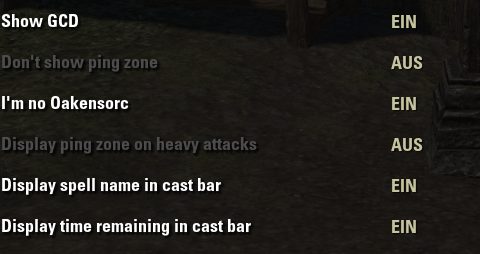
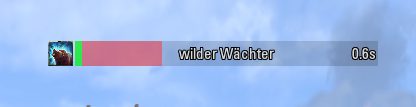
- Display remaining time, spell names, and spell icons on the cast bar for spells with cast or channel time.
- Displays your ping live on the bar to allow spell queuing with live latency information.
- Fine-tune the displayed GCD / heavy timer / cast / channel individually (or globally) for ANY ability to best suit your play.
- Change the color of the GCD bar on channeled abilities.
- Auto hides - Keeps your UI clean.
- Flashing animation on health percentage during execute.
- Keybind to force display + show absolute health.
- 'Tick Tock' sound cues for audio feedback.
- New UI customization options for a personalized experience.
- Track stacks for skilline-specific skills: Bound Armaments, Crux, Fetcher Infection, Flame Skull, Molten Whip and Grim Focus (+ its morphs).
To access the addon settings quickly, enter the command: /cm
Combat Auras - Companion Addon
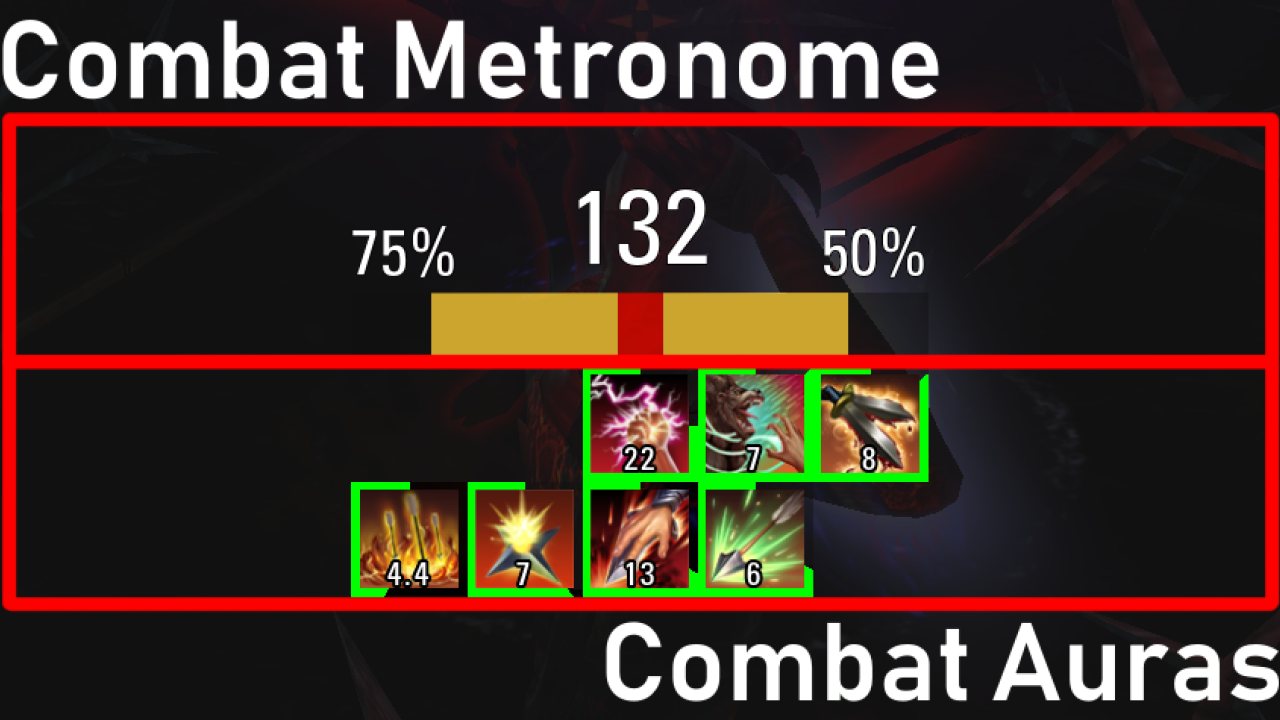
This addon's counterpart, "Combat Auras," has now been released! (You can see it in the preview)
Combat Auras - Ability Timers
IMPORTANT: This addon and "Combat Auras" SHOULD always be updated at the same time. They share a common library to improve performance, and there is a good chance on any update that changes have been made to this central library.
IMPORTANT: There have been changes to the central library. Combat Auras may not work properly after updating Combat Metronome!
Special Thanks
Thanks to Seltiix for prototyping the initial sound cue system.
- Light attack miss alert? (Audio/Visual alert to provide feedback and improve timing reflexes)
Known Issues:
- None. Let me know if you find some undesired 'features' on my ESOUI Portal.
ABOUT THIS LISTING
This page describes Combat Metronome (GCD Tracker) by Darianopolis. The description and screenshots are the author's own, imported from their listing on ESOUI on 24 October 2026: https://www.esoui.com/downloads/info2373-CombatMetronomeGCDTracker.html
Mythiq.net hosts no files for it. The download button goes straight to the release file on cdn.esoui.com, so you are downloading from the author's own host, not from a copy of ours.
The download count, rating and comments on this page start at zero and count Mythiq.net only. The source's own figures are not copied here — they measure a different site, and a number that cannot be checked against our own ledger is not worth printing.
Media
Requirements
Game version
12.1.0
API VERSION
Built for ESO API version 12.1.0. After a patch the game marks add-ons built for the previous API as out of date; the "Allow out of date add-ons" checkbox in the add-on menu loads them anyway, and most work.
LIBRARIES
Many ESO add-ons depend on a shared library — LibAddonMenu-2.0 above all — which is installed separately, exactly like an add-on. A dependency that is missing shows as the add-on simply not appearing in the list.
CONSOLE
Add-ons are PC and Mac only. There is no way to load them on console.
Installation
1. Download the archive with the button on this page and unzip it.
2. Move the unzipped folder into your add-ons directory:
Windows — Documents\Elder Scrolls Online\live\AddOns
3. Start the game, and at the character select screen click Add-Ons.
4. Tick the add-on. If it is greyed out and marked out of date, tick "Allow out of date add-ons" at the top of the same panel.
5. Log in. Most add-ons need a /reloadui after they are first enabled.
UPDATING
Delete the old folder first. ESO loads everything it finds, and two copies of one add-on is the usual cause of "an add-on has produced an error" on login.
This release downloads from cdn.esoui.com, not from us, so
there is no checksum to compare against. Scan the archive before you unpack it.
2026-09-28 v1.7.7
+ API bump
+ Moved 'Show permanently' settings option to 'Behavior' submenu
! Fixed Sound 'tock' effect now playing at correct volume if in settings menu
! Fixed 'tock' being played on heavy attacks even though turned off
! Fixed bar behavior on heavy attacks with cast time lower 1sec
! Fixed 'tick'&'tock' being played on initial load
+ Added 'tick'&'tock' queues for abilities > 1 sec if ended early
+ Moved 'tick'&'tock' outside of updater to play sounds more accurately (reverted again as that method caused more trouble rather than being more accurate)
+ Added debug option for sound timings
! Fixed LATracker not showing when reset timer > 0
! Fixed initial showing of LATracker when reset timer = 0
! Fixed event.ending calculations to not end events too early
! Fixed heavy attacks not being interrupted by bar swaps (only affects heavy attack tracking ofc)
! Fixed stacks timers being hidden correctly
2026-08-15 v1.7.6
! Fix for toggle abilities on toggle off
! UI fix for canceled abilities and make-it-fancy mode
2026-05-12 v1.7.5
! Fixed execute reminder being shown on allies/non attackable units
! Eliminated some user irrelevant code
! Changed the volume settings for tick/tock to a hopefully more user friendly implementation
! Fixed some tracking issues. Ability/GCD tracking should now be more precise than ever
! Fixed heavy one handed attacks not being tracked
! Fixed progress being slightly off when 'make it fancy' and 'dynamic expansion' was on
! Fixes for StackTracker UI in unlocked mode
+ Added option to choose execute reminder target difficulty to prevent "EXECUTE!" spamming on normal mobs
+ StackTracker can now be set to show only in combat
+ Added option to show heavy attack details such as remaining time, ability name and icon
2025-12-18 v1.7.4
+ Made code slightly more preformant
+ Added highlights for stam and mag label
+ Added timers for BA, MW, Crux buffs
+ Added sound/visual warnings for BA, MW, Crux if their buffs are about to run out
+ Spell names in progressbar now automatically abbreviate if they would exceed their given bar space (looking at you fatecarver!)
! Fixes to Ability.lua to prevent "ghost" heavy attacks
! Fixed activation stacks for relentless focus
! Fixed morph updates when respecing
! Fixed StacksUI not hiding when being disabled after it was previously enabled
! Fixes to the settings menus
! UI Fixes
2025-07-02 v1.7.3
! Finally applied correct version, so it is now correctly shown in the settings menu
! Additional failsaves for not tracking all gcd
! Fixing minor spelling errors that caused bugs
2025-06-05 v1.7.2
! Bugfix for flame skull stacks
! Bugfix for channeled/cast abilities < 1 sec not releasing channel color correctly
2025-06-03 v1.7.1
! Bugfixes
2025-03-04 v1.7.0
! Updates to string formatting
! Finally adding channeled abilities to abilities that change channel color
+ Added option to automatically show stam/mag if coral/MK/bahsei is detected (requires LibSetDetection)
+ Added option to automatically expand castbar for abilities with channel-/casttime > 1
! Fully revamped the settings to split into four different panels in preparation for U46
! Fully rewrote the StackTracker functionality in preparation for U46 and for massive performance improvements
+ Added fetcher infection to trackable abilities
+ Added cleanup functionality for saved vars
+ Added beta and new version notification
2025-02-17 v1.6.14
! Fixed cancelling of channeled abilities when target is ST and target is dead
! Fix for empty itemUsed string/icon if mount was summoned
+ Added debug messages to keybinds for clarity with toggles
+ Added donation options
+ Stam and mag label can now be attached to reticle and will be centered respectively if only one resource is shown (thanks to quantumfate)
Tell us if something is wrong — a file that will not work, content taken from
someone else, or anything that looks unsafe. Reports go to our review team, not
to the author.
We use cookies to ensure that we give you the best experience on our website and improve your experience. By continuing to use this site you consent to such use of cookies.