The main goal of this addon is to help those players who running daily and weekly tasks for more than one character. Typically, these tasks are quests against the World Bosses, Trials, Pledges and etc.
New feature
- Added auto-claim the Challenges activities rewards
- Added the "Blueprints" tab that shows a number of learned crafting blueprints
- Added the "Weapon Charge" tab to track the remaining charge of the equipped weapon enchantment
- Added an option (disabled by default) to automatically recharge weapon enchantment when a charge is below a specified threshold
- Added an option (disabled by default) to automatically summon the "Eye of the Infinite" in the Infinite Archive zones
Description
The main goal of this addon is to help those players who running daily and weekly tasks for more than one character. Typically, these tasks are quests against the World Bosses, Trials, Pledges and etc.
Addon tracks the statuses and cooldowns of such quests for each character and displays information in a convenient visual form. Any of addon's mode/window can be turned on/off separately as well as tracking any of your characters. You can show/hide any mode/window as well as post a message to the chat using the key bindings or slash commands.
The addon also provides several additional useful features: Raid Group Leader Assistant (RGLA), Calendar of Pledges, a Group's Finder for Pledges (GFP).
Main feature
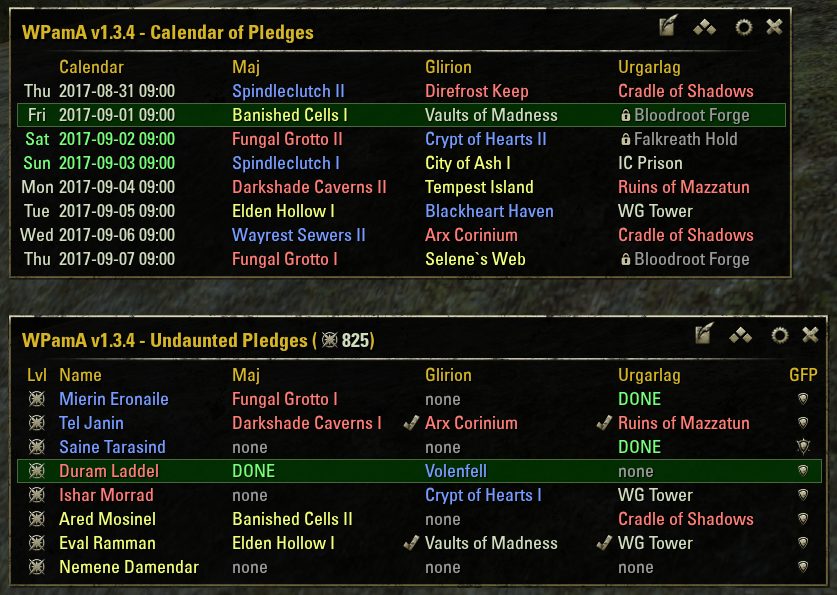
Displays a calendar of Pledges and allows post to chat message about today's pledges.
Shows information for each characters about:
- What the Undaunted Pledges taken/done;
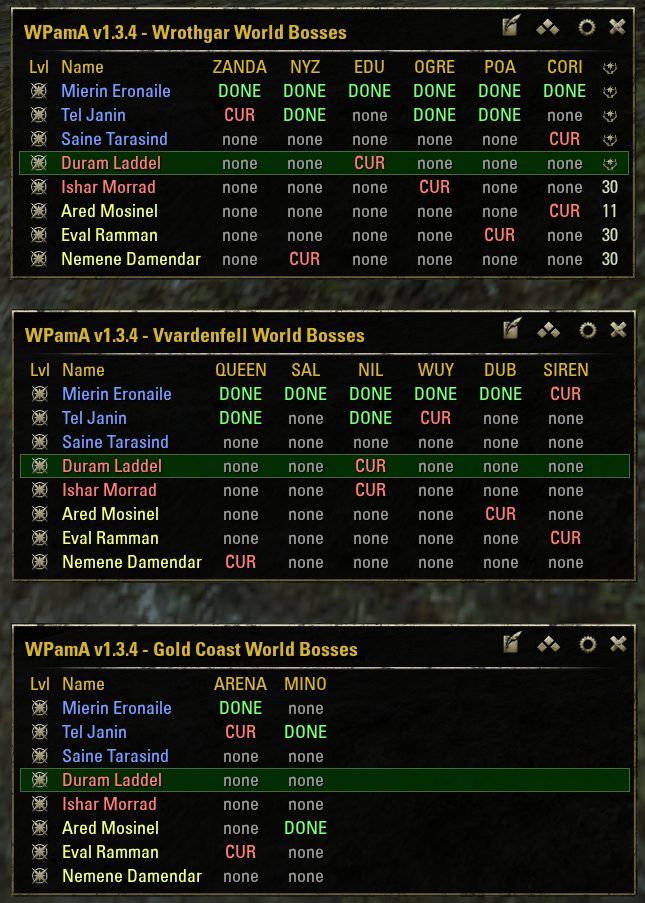
- Statuses (Done/Current/None) of World Bosses in Wrothgar, Vvardenfell and Gold Coast;
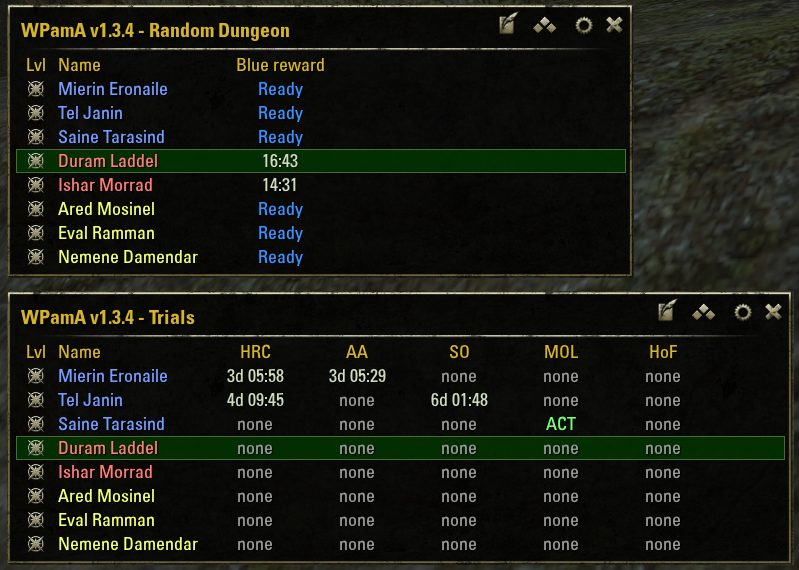
- Statuses of Trials;
- Statuses of Random Dungeons;
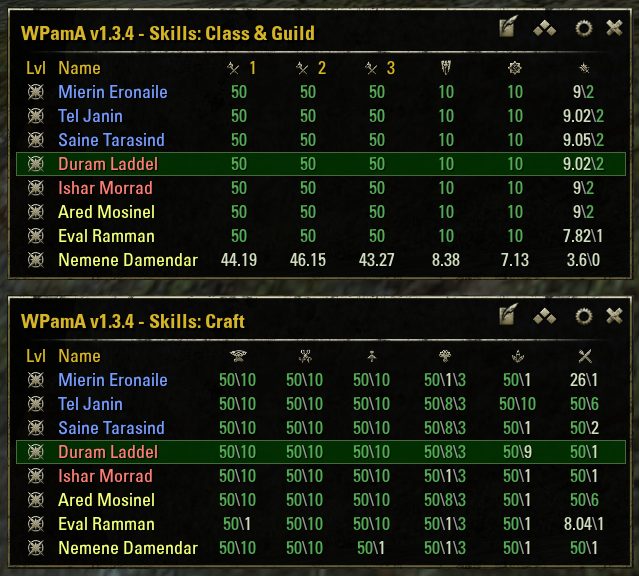
- Class, Guild and Craft Skills, useful for performing daily quests, e.g. passive skill of alchemy - Medicinal Use;
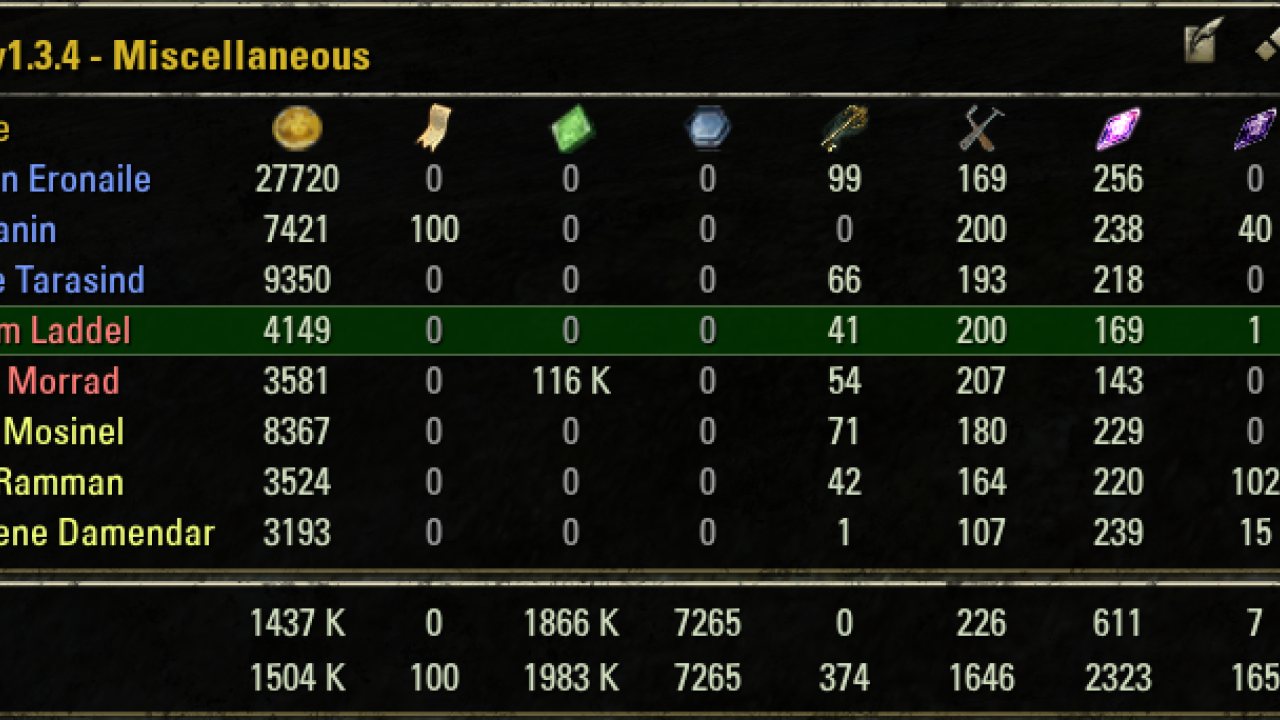
- Undaunted keys, lockpicks, full and empty grand soulgems, other items.
Battlegrounds
After the Battlegrounds results table was displayed, to start the timer, you need to close the table by pressing the "F" button (or waiting two minutes) and wait for the successful loading of the location where your character will be transferred after the Battlegrounds.
Attention! If you log off a character on the Battlegrounds, the timer will not start, and at the next time login on this character instead of time you will see "???". The same situation will occur if the game crashed when the location is loading after the Battlegrounds.
RGLA (Raid Group Leader Assistant)
Attention! To use this feature you must have the addon AutoInvite!
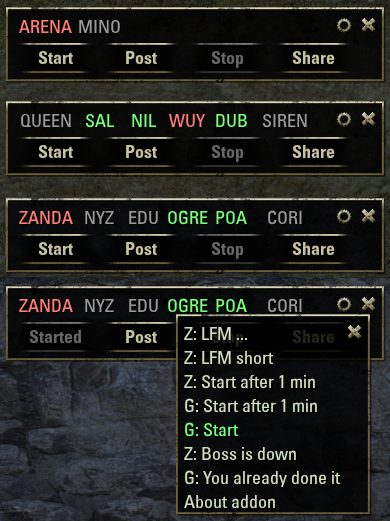
If you have daily quest for World Bosses on Wrothgar, Vvardenfell or Gold Coast, RGLA will help you gather a group.
When you click the "Start" button, the addon will set the appropriate quest settings in AutoInvite and turn it on.
You don't need to manually set the invite string. Also saves previous configuration of AutoInvite.
After a new player joins the group quest shared automatically.
Click the "Post" button for select and post predefined (LFM and others) message to chat.
When you click the "Stop" button AutoInvite will be stopped and its settings will be restored.
Trials
In order for this feature to work you need to complete the Trials and get the purple coffer while running the addon. This starts the countdown. If you have a crash the game after getting the coffer information will not be saved. I recommend after getting the coffer to save the information to perform a "/reloadui" or relogin.
Pledges and Calendar
Instead of dungeons names you can display the names of locations.
When Pledge stage is "Return to .." or "Talk to" displays checkmark.
Multiple languages support
EN fully supported;
DE fully supported;
FR fully supported;
RU fully supported;
JP fully supported for JP-ESO;
Other languages - if you dare to care with the translation. :)
Special thanks
OlegS for alpha/beta-testing and debugging as well as co-authoring of the several features
Baertram for help with German translation
igx31, Llwydd, Svan, Nita for help with French translation
Marify, Lionas for help with Japanese translation
About "Done" and "N/A" statuses
To determine the status "Done" addon remembers time stamp the taking of a pledge and time stamp closing of a pledge. If both the time stamp is between today 6:00 UTC to 6:00 UTC tomorrow then the status "None" is changed to "Done" (if current time < 6:00 then checks between yesterday 6:00 to 6:00 today). Both the time stamp stored in the saved variables.
6:00 UTC = 0:00 CST/MDT or 7:00 BST or 9:00 MSK
There are several cases when the status "Done" may not be displayed:
1. If you had a crashing game. Saved variables are not preserved in the file;
2. You used the option "reset characters" (/wpa resetchar);
3. If you took a pledge on the same computer and closed it to another. This is true if you play on multiple computers, for example you have a computer and a laptop.
The status "N/A" replaces the status of "None" in the following cases:
- Your character with a level lower than 45.
List of Slash Command
Main command
/wpa - Show/hide addon window
/wpa on - Show addon window (alias /wpa show)
/wpa off - Hide addon window (alias /wpa hide)
/wpa r - Reload quests information for curent character (alias /wpa refresh)
/wpa n - Switch to display dungeons names (alias /wpa name)
/wpa l - Switch to display locations names (alias /wpa location)
/wpa ch - Switch to character window (alias /wpa char)
/wpa cl - Switch to calendar window (alias /wpa calendar)
/wpa ava - Switch to AvA window (alias /wpa pvp)
/wpa gfp - Start/stop finding group using GFP
/wpa gfpm - Change GFP mode (normal/veteran) for the current character
Post to chat message about pledges
/wpa td - Today's pledges(alias /wpa today)
/wpa tde - Today's pledges on English(alias /wpa todayen)
/wpa yd - Yesterday's pledges(alias /wpa yesterday)
/wpa yde - Yesterday's pledges on English(alias /wpa yesterdayen)
/wpa tm - Tomorrow's pledges(alias /wpa tomorrow)
/wpa tme - Tomorrow's pledges on English(alias /wpa tomorrowen)
/wpa pl shift - Pledges for the specified day, where shift is a number indicating the offset from the current day, for example: 0 is today, -1 is yesterday, 1 is tomorrow, 2 is the day after tomorrow
/wpa ple shift - Pledges for the specified day on English
RGLA command
/rgla - Show/hide RGLA window
/rgla on - Show RGLA window (alias /rgla show)
/rgla off - Hide RGLA window (alias /rgla hide)
/rgla s - Start RGLA(alias /rgla start)
/rgla t - Stop RGLA(alias /rgla stop)
/rgla p - Post to chat "LFM .." message(alias /rgla post)
Debug command
/wpad - Enable/disable debug mode
/wpad on - Enable debug mode
/wpad off - Disable debug mode
/wpad clr - Clear debug buffer in SavedVariables
/wpad ts - Post to chat current time stamp(alias /wpad timestamp)
/wpad mzi - Post to chat current Map Zone Index
/wpad qd - Dumping all taken quests to chat and debug buffer (alias /wpad qdump)
/wpad qc - Dumping all taken quests with conditions to chat and debug buffer (alias /wpad qcond)
/wpad dlc - List of DLC ID`s
/wpad csl - List of class skill lines ID`s
/wpad gsl - List of guild skill lines ID`s
/wpad asl - List of AvA skill lines ID`s
/wpad chl - List of characters (alias /wpad charslist)
/wpad inv itemid - Dumping inventory content to chat and debug buffer, where itemid is a number indicating the Item ID (alias /wpad invlist)
/wpad invf itemid - Similar to /wpad inv command, but dumping more information (alias /wpad invlistfull)
/wpad bnk itemid - Dumping inventory content to chat and debug buffer, where itemid is a number indicating the Item ID (alias /wpad banklist)
/wpad bnkf itemid - Similar to /wpad bnk command, but dumping more information (alias /wpad banklistfull)
/wpad rch - Delete information for all characters and load for curent (alias /wpad resetchars)
Mini-guide "How to use the quick menu of the WPamA addon".
Step 1: Assign a key to call the quick menu.
Step 2: Open the WPamA options and enable those modes that you want to see in the quick menu.
Step 3: Press and hold the quick menu button, select the mode as usual in such radial menus.
Note: the quick menu button only works when the reticle is visible on the screen.
Step 4: The WPamA addon will open the window of the selected mode.
ABOUT THIS LISTING
This page describes WPamA (What Pledges at my Alts) by ForgottenLight. The description and screenshots are the author's own, imported from their listing on ESOUI on 24 October 2026: https://www.esoui.com/downloads/info1190-WPamAWhatPledgesatmyAlts.html
Mythiq.net hosts no files for it. The download button goes straight to the release file on cdn.esoui.com, so you are downloading from the author's own host, not from a copy of ours.
The download count, rating and comments on this page start at zero and count Mythiq.net only. The source's own figures are not copied here — they measure a different site, and a number that cannot be checked against our own ledger is not worth printing.
Media
Requirements
Game version
12.1.0
API VERSION
Built for ESO API version 12.1.0. After a patch the game marks add-ons built for the previous API as out of date; the "Allow out of date add-ons" checkbox in the add-on menu loads them anyway, and most work.
LIBRARIES
Many ESO add-ons depend on a shared library — LibAddonMenu-2.0 above all — which is installed separately, exactly like an add-on. A dependency that is missing shows as the add-on simply not appearing in the list.
CONSOLE
Add-ons are PC and Mac only. There is no way to load them on console.
Installation
1. Download the archive with the button on this page and unzip it.
2. Move the unzipped folder into your add-ons directory:
Windows — Documents\Elder Scrolls Online\live\AddOns
3. Start the game, and at the character select screen click Add-Ons.
4. Tick the add-on. If it is greyed out and marked out of date, tick "Allow out of date add-ons" at the top of the same panel.
5. Log in. Most add-ons need a /reloadui after they are first enabled.
UPDATING
Delete the old folder first. ESO loads everything it finds, and two copies of one add-on is the usual cause of "an add-on has produced an error" on login.
This release downloads from cdn.esoui.com, not from us, so
there is no checksum to compare against. Scan the archive before you unpack it.
Version history
v2.6.8Latest
1 Oct 2026 · 190 KB via cdn.esoui.com · 2 downloads Download
version 2.6.8 (2026-09-30) (DL: 743622/3039)
- API version changed to 101051
- Added compatibility with Update 51 (Season One)
- Added the "Hide completed challenges" option (disabled by default) that hides completed weekly and seasonal challenges
- Added the "Skills: Active Abilities" tab to track the active abilities slotted for each companion
- Added the "Unformed Planar Key" column to the "Items" tab instead of "Zenithar's Bounty" containers
- Some text and cosmetic improvements across various tabs
version 2.6.7 (2026-08-30) (DL: 740583/3157)
- Added the "Dynamic Encounters: Notifications" option (automatic by default) that notifies about the start, activity, completion and progress of dynamic encounters
- Added tracking of "Master Writ", "Unknown Writ", "Unopened Treasure Map" and "Unidentified Survey Report" items in the character's inventory
- Added columns for 3 types of "Alliance War Skill Line" scrolls to the "AP Bonus" tab
- Added the "/wpad favors" slash-command to post the number of completed favor-type tasks
- Added the "Favors" tab that tracks a progress of favor-type tasks for each character
version 2.6.6 (2026-07-28) (DL: 737426/3972)
- Added new ID for the "Rewards for the Worthy" coffers
- Fixed tracking of AvA skill lines progress
- Fixed attempts to handle Dynamic Encounters as regular World Events
- Improved chat notifications for Challenge progress: the total Challenge progress is now shown instead of a single Challenge progress
version 2.6.5 (2026-06-10) (DL: 733454/3206)
- API version changed to 101050
- Added compatibility with Update 50 (Season Zero Pt2)
- Added tracking of World Events in Night Market locations (Calamity Bosses and Skirmishes)
- Fixed the column names for the "Seasonal Festivals" tab
- Fixed location indexes for RGLA feature
- Fixed world event tracking in several locations
- Improved localization of direction and distance designations in the "World Events" tab
- Optimized auto-claim of the Challenges activity rewards
version 2.6.4 (2026-05-20) (DL: 730248/3785)
- Fixed spam to chat with debug messages about an unknown World Events in Adventure Zone (Night Market) locations
- Fixed attempts to handle Adventure Zone events as regular World Events
- Changed the LibAddonMenu required version to r43
version 2.6.3 (2026-04-25) (DL: 726463/2616)
- Added an option (disabled by default) to enable/disable auto-claim of the Challenges activity rewards
- Improved localization of option names
version 2.6.2 (2026-04-19) (DL: 723847/3944)
- Added a "Repeat" column to the "Challenges" tab
- Added auto-claim the Challenges activities rewards
- Added a chat notification about claim the Challenges activity reward
- Daily challenges will only be displayed when available
version 2.6.1 (2026-03-29) (DL: 719903/3696)
- Added seasonal activities to the "Challenges" tab
- Fixed weekly activity timers
version 2.6.0 (2026-03-12) (DL: 716207/3458)
- API version changed to 101049
- Added compatibility with Update 49 (Season Zero)
- Fixed the column names for the "Seasonal Festivals" tab
- Fixed location indexes for RGLA feature
- Fixed world event tracking in several locations
- Fixed display of daily activity timers
- Renamed the "Endeavors" tab to "Challenges"
version 2.5.9 (2026-02-24) (DL: 712749/5763)
- Fixed tracking of World Events on PTS
- Fixed display of the "Endeavors" ("Challenges") tab on PTS
- Ignored (i.e. disabled) the "Automatically charge weapons" option for the "Vengeance" AvA campaign until "Vengeance" is officially released
version 2.5.8 (2025-11-20) (DL: 706986/4219)
- Added tracking of Eastern Solstice world bosses
- Added the "AP Bonus" tab to track the current AP bonus and the number of Colovian War Torte for each character
- Fixed the "user:/AddOns/WPamA/WPamAWE.lua:389: attempt to index a nil value" lua-error
Off-site on cdn.esoui.com —
no checksum, because we never held this file.
Link checked by our review team on 26 Oct 2026.
Tell us if something is wrong — a file that will not work, content taken from
someone else, or anything that looks unsafe. Reports go to our review team, not
to the author.
We use cookies to ensure that we give you the best experience on our website and improve your experience. By continuing to use this site you consent to such use of cookies.